
1. Introduction
This document provides essential instructions for the Generic replacement remote control, designed for use with AudioVOX-Venturer CD7106VI and CD7116VI audio stereo music systems. This remote is a dedicated replacement and may not offer all functions of the original unit. Please review this manual to ensure proper setup and operation.
What's in the Box
- 1 x Generic Replacement Remote Control
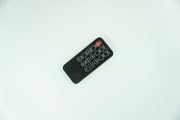
Image 1.1: Generic Replacement Remote Control. This image displays the front view of the black replacement remote control, featuring an array of circular and rectangular buttons for various functions.
2. Setup
Battery Installation
- Locate the battery compartment on the back of the remote control.
- Slide open the battery compartment cover.
- Insert two new AAA batteries (not included), ensuring the correct polarity (+ and -) as indicated inside the compartment.
- Close the battery compartment cover securely.
Initial Use
No programming or setup is required for this replacement remote control. Once batteries are installed, the remote is ready for use with compatible AudioVOX-Venturer CD7106VI and CD7116VI audio stereo music systems.
3. Operating Instructions
Point the remote control directly at the AudioVOX-Venturer audio stereo music system. Press the desired function buttons to control your device. Due to its nature as a replacement, some advanced or specific functions of the original remote may not be supported or may operate differently.
General Functions
- Power Button: Turns the device on or off.
- Volume Up/Down: Adjusts the audio output level.
- Track Skip/Seek: Navigates between tracks or radio stations.
- Play/Pause: Controls media playback.
- Mode/Source: Switches between different input sources (e.g., CD, Radio).
4. Maintenance
Cleaning
To clean the remote control, gently wipe its surface with a soft, dry cloth. Do not use liquid cleaners, abrasive materials, or chemical solvents, as these may damage the remote's finish or internal components.
Storage
Store the remote control in a cool, dry place away from direct sunlight and extreme temperatures. If the remote will not be used for an extended period, it is recommended to remove the batteries to prevent leakage.
5. Troubleshooting
Remote Not Responding
- Ensure batteries are inserted correctly with the proper polarity.
- Replace old batteries with new ones.
- Check for any obstructions between the remote and the audio system's sensor.
- Ensure the remote is pointed directly at the audio system.
Some Functions Do Not Work
As a replacement remote, it may not support all functions of the original remote control. This is not indicative of a defective product. Refer to your AudioVOX-Venturer audio system's original manual for specific functions if needed.
6. Specifications
| Brand | Generic |
| Model Compatibility | AudioVOX-Venturer CD7106VI, CD7116VI |
| Material | ABS/Plastic |
| Power Source | Batteries (AAA, not included) |
| Special Feature | Digital Display (if applicable to specific models) |
| Max Supported Devices | 1 |
| Compatible Devices | Audio/Video Players, TV, AC, Projector (specifically AudioVOX-Venturer CD7106VI, CD7116VI) |
7. Support
For any issues or questions regarding this replacement remote control, please contact the seller or retailer from whom the product was purchased. Provide your purchase details and the model numbers (CD7106VI, CD7116VI) for efficient assistance.