
1. Product Overview
The Ossuret Android 14 Car Radio Stereo is an advanced multimedia system designed to upgrade your Subaru Legacy or Outback (2015-2019 models). It features a 10.4-inch HD touchscreen, Android 14 operating system, 2GB RAM, and 64GB ROM. Key functionalities include Wireless Apple CarPlay, Android Auto, WiFi connectivity, GPS navigation, Bluetooth 5.0, FM radio, and steering wheel control support.

2. Setup and Installation
This section provides a general guide for connecting the main components of your Ossuret car stereo. For detailed vehicle-specific wiring, refer to the provided wiring tutorial video.
2.1 Component Connections
- GPS Antenna: Insert the GPS antenna into its designated port on the back of the unit and tighten the screws. Position the antenna under the front windshield for optimal signal reception.
- Camera Input Cable: Connect the camera input cable to the unit. This is essential for rearview camera functionality.
- USB Cables: Insert the 6-pin USB cable into its port. If provided, also connect the 4-pin USB harness.
- RCA Cable: Connect the RCA cable harness to the unit. This provides various audio/video inputs and outputs.
- CANBUS Box: Connect the main wiring harness to the CANBUS box, then plug the 8-pin CANBUS plug into the corresponding port on the unit.
- Radio Adapter Cable: Insert the radio adapter cable to ensure proper FM/AM radio reception.
- AUX Connection: If your original car has an AUX jack, connect the AUX L/R from your vehicle to the AUX IN L/R in the RCA harness.
- OEM Camera Adapter: If your vehicle has an OEM camera, select the appropriate adapter from the four provided options that matches your car's port. Connect the yellow video signal cable from this adapter to the "Camera Input" line.

2.2 Installation Video Guide
For a visual step-by-step guide on wiring and installation specific to Subaru Outback/Legacy 2015-2018 models, please refer to the video below.
3. Operating Instructions
This section covers the primary functions and how to operate your Ossuret car stereo.
3.1 Wireless Apple CarPlay & Android Auto
Connect your smartphone wirelessly via Bluetooth or WiFi to access Apple CarPlay or Android Auto. This allows for online navigation, hands-free calls, SMS, music, and podcasts directly on the car stereo display.

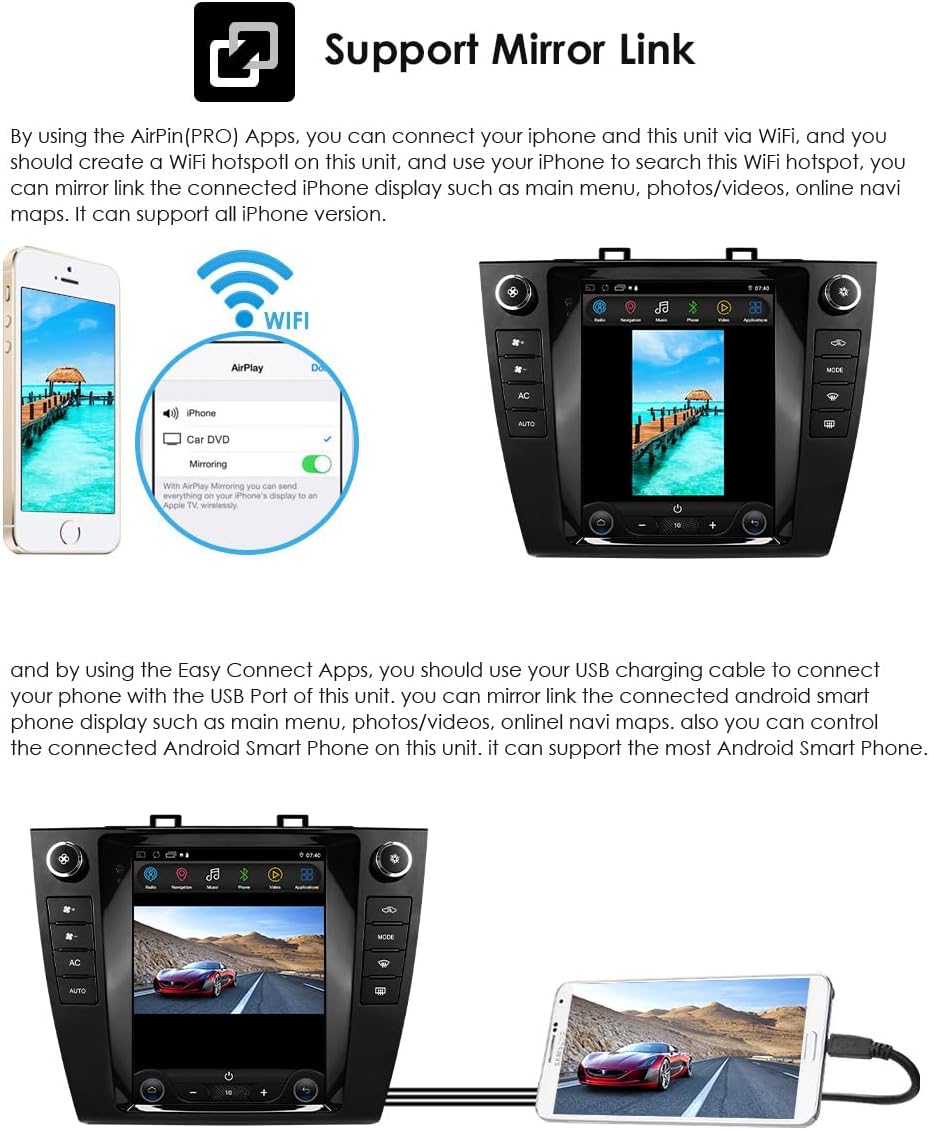
3.2 Mirror Link Function
The Mirror Link function allows you to mirror your smartphone's screen onto the car stereo display. Connect your iPhone via WiFi or your Android phone via USB cable to use this feature for navigation, photos, videos, and more.
3.3 Bluetooth Functionality
The unit supports Bluetooth 5.0 for hands-free calling and music streaming (A2DP). Pair your mobile phone to make and receive calls, access your phonebook, and play audio wirelessly. A built-in microphone ensures clear communication.

3.4 GPS Navigation
The car stereo features built-in GPS navigation with support for 2D/3D map views. It allows for online and offline navigation applications. Voice guidance is available, and you can navigate while listening to music (dual zone function).

3.5 Multimedia Playback
The unit supports various audio and video formats, including MP3, WMA, AAC, RM, FLAC, MPEG-1/2/4, H264, H263, VC1, RV, RMVB, DivX, Sorensen Spark, VP8, and AVS Stream. Enjoy your favorite music and videos directly on the 10.4-inch HD screen.

3.6 Radio Function
The car stereo includes an FM radio tuner with a tuning range of 87.5-108MHz. It supports RDS (Radio Data System) and allows you to save preset stations for quick access.

3.7 Steering Wheel Control (SWC)
The unit supports steering wheel controls, allowing you to manage music playback, volume, and calls without taking your hands off the wheel, enhancing driving safety.

3.8 WiFi Functionality
Connect to WiFi to access online content, download applications from the app store, stream music, and browse news. The unit supports both 5G and 2.4G WiFi for faster internet speeds.

3.9 Split Screen Function
Utilize the split-screen feature to run two applications simultaneously. For example, use navigation on one side and entertainment on the other.

3.10 DSP Sound Adjustment
The built-in 30-band EQ DSP allows for precise sound adjustments, enabling you to customize the audio output and reduce car noise for an optimized listening experience.

4. Maintenance
To ensure the longevity and optimal performance of your Ossuret car stereo, follow these maintenance guidelines:
- Screen Cleaning: Use a soft, lint-free cloth to gently wipe the touchscreen. For stubborn smudges, slightly dampen the cloth with water or a screen-safe cleaner. Avoid abrasive materials or harsh chemicals.
- Software Updates: Periodically check for software updates to ensure you have the latest features and bug fixes. Follow the on-screen instructions for safe updates.
- Temperature Control: Avoid exposing the unit to extreme temperatures for extended periods. While designed for automotive use, prolonged exposure to direct sunlight or freezing conditions can affect performance.
- Cable Connections: Ensure all cables are securely connected. Loose connections can lead to intermittent functionality or signal loss.
- Ventilation: Do not obstruct the ventilation openings on the unit to prevent overheating.
5. Troubleshooting
If you encounter any issues with your car stereo, refer to the following common troubleshooting steps:
- No Power:
- Check all power connections to ensure they are secure.
- Verify the vehicle's fuse related to the car stereo.
- No Sound:
- Check volume levels and mute settings.
- Ensure speaker wires are correctly connected.
- Verify the audio source (e.g., FM, Bluetooth, CarPlay).
- GPS Signal Loss:
- Ensure the GPS antenna is securely connected and has a clear view of the sky (under the windshield).
- Move the vehicle to an open area away from tall buildings or dense foliage.
- Bluetooth/CarPlay/Android Auto Connection Issues:
- Ensure Bluetooth and WiFi are enabled on both the stereo and your smartphone.
- Forget the device on your phone and re-pair.
- Restart both the car stereo and your smartphone.
- Touchscreen Unresponsive:
- Perform a soft reset of the unit (refer to the device settings for a reset option).
- Ensure the screen is clean and free of debris.
If these steps do not resolve the issue, please contact customer support.
6. Specifications
| Feature | Specification |
|---|---|
| Operating System | Android 14 |
| RAM | 2GB |
| ROM (Memory Storage Capacity) | 64 GB |
| Display Size | 10.4 Inches |
| Screen Resolution | 1024 x 718 FHD |
| Bluetooth Version | 5.0 |
| Connectivity Technology | Bluetooth, USB, Wi-Fi |
| Special Features | Wireless Apple CarPlay, Android Auto, MirrorLink, FM Radio, SWC, DSP, GPS Navigation, Backup Camera Support |
| Map Type | Worldwide (Built-in offline map of North America) |
| Item Weight | 4.4 pounds |
| Package Dimensions | 9.06 x 5.91 x 5.91 inches |
| Mounting Type | Dashboard Mount |
| Included Components | Head unit, frame, power cord, RCA cord, USB cable, etc. |
7. Warranty and Support
Your Ossuret car stereo comes with a 1-year free parts warranty, covering manufacturing defects. This warranty does not cover artificial damage.
We offer free returns and exchanges for any unsatisfied purchase within 30 days of receipt. Technical support is available both before and after sale. If you have any questions or require assistance, please contact us via the i-stereo support channel.


