
1. Introduction
Thank you for purchasing the Crrtvt 88 Key Piano Keyboard, Model 883. This digital piano is designed to provide an authentic playing experience with a wide range of features suitable for beginners and experienced musicians. Please read this manual thoroughly before use to ensure proper setup, operation, and maintenance.
2. Package Contents
Carefully unpack all items and ensure the following components are present. If any items are missing or damaged, please contact customer support.
- Crrtvt 88 Key Digital Piano
- Music Stand
- Power Adapter
- Sustain Pedal
- Adjustable Keyboard Stand
- Carrying Case
- Headphones
- User Manual

Image: All components included in the package, such as the 88-key piano, adjustable stand, music stand, power adapter, sustain pedal, headphones, and carrying case.
3. Setup
3.1 Assembling the Keyboard Stand
- Unfold the adjustable keyboard stand to its desired height. Ensure all locking mechanisms are securely fastened.
- Place the Crrtvt 88 Key Digital Piano securely on top of the stand. Verify that the piano is stable and does not wobble.
3.2 Connecting Power
- Locate the DC 5V power input port on the rear panel of the piano.
- Connect the provided power adapter to the DC 5V input port.
- Plug the power adapter into a standard electrical outlet.
- Alternatively, the piano can be powered by batteries for portable use. (Batteries not included).

Image: Detailed view of the piano's rear panel, highlighting the power input, USB, MIDI, audio input, audio output, and one-foot pedal connections.

Image: Illustration of the two power options for the piano: using batteries for portability or connecting the power adapter for continuous use.
3.3 Connecting the Sustain Pedal
- Plug the sustain pedal cable into the 'One-foot pedal' input port on the rear panel of the piano.
3.4 Attaching the Music Stand
- Insert the music stand into the designated slots on the top panel of the piano.
4. Operating Instructions
4.1 Power On/Off
- To power on, slide the 'Power switch' on the rear panel to the 'ON' position.
- To power off, slide the 'Power switch' to the 'OFF' position.
4.2 Volume Control
- Use the dedicated volume control knob or buttons on the control panel to adjust the overall sound output.
4.3 Sound Selection (Tones)
- The piano offers 128 different instrument voices (tones).
- Press the 'Tone' button and use the number pad or arrow buttons to select your desired instrument voice. The current tone number will be displayed on the LED screen.
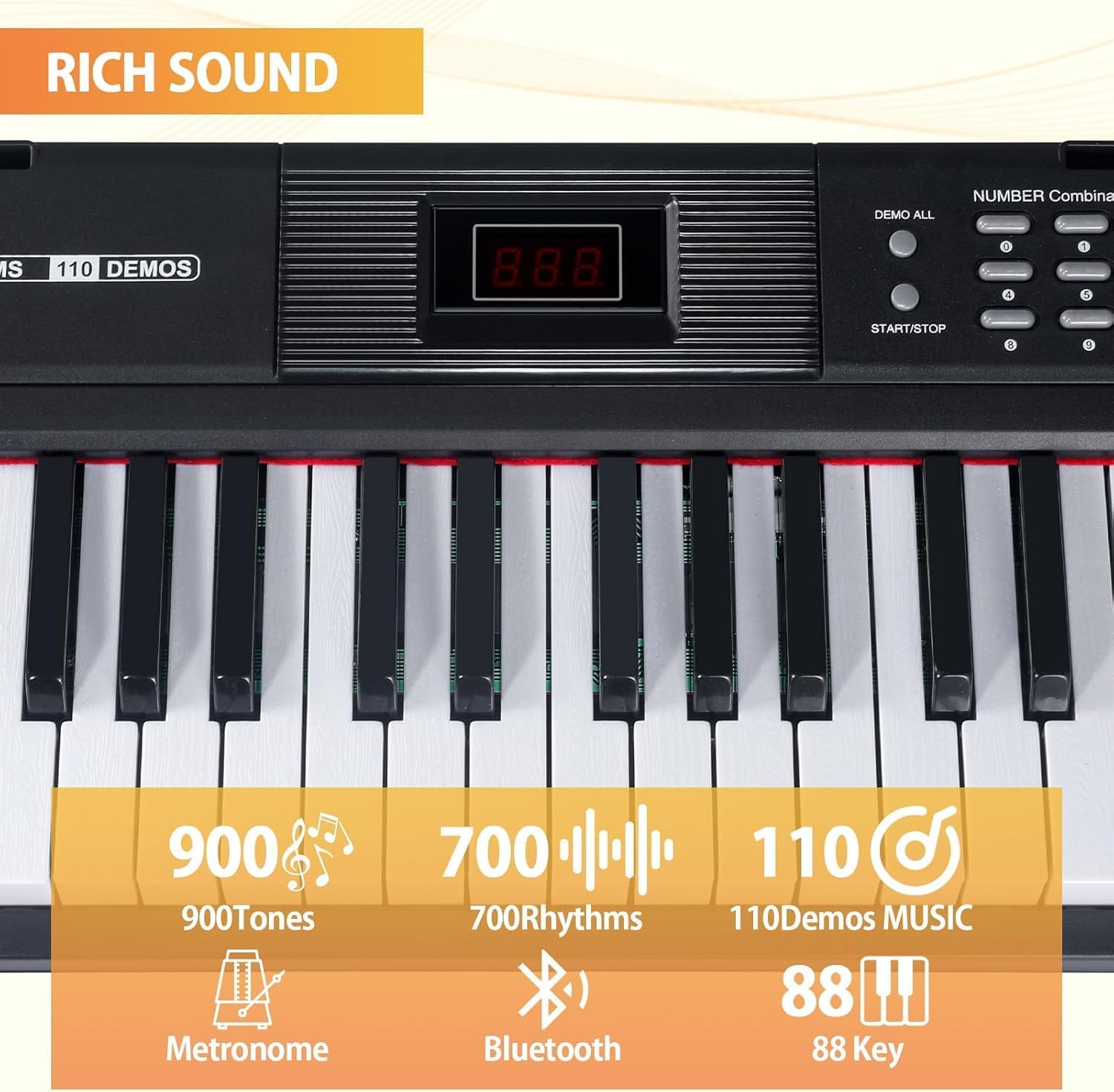
Image: The control panel of the piano, illustrating the LED display for tone/rhythm selection and the buttons for various functions.
4.4 Rhythm Selection
- The piano includes 128 rhythms.
- Press the 'Rhythm' button and use the number pad or arrow buttons to select a rhythm.
- Press 'Start/Stop' to begin or end the rhythm playback.
4.5 Demo Songs
- The piano features 80 demo songs.
- Press the 'Demo All' button to cycle through the demo songs.
- Press 'Start/Stop' to play or pause a demo song.
4.6 Bluetooth Connectivity
- Activate Bluetooth on your external device (e.g., smartphone, tablet).
- On your device, search for available Bluetooth devices and select 'Crrtvt Piano' (or similar name) to pair.
- Once paired, you can stream audio from your device to the piano's speakers or use the piano as a MIDI controller for compatible apps.
4.7 MIDI Functionality
- Connect the piano to a computer or smart device via the USB MIDI port on the rear panel.
- This allows the piano to function as a MIDI controller for music production software or educational apps.

Image: The piano connected to a tablet via MIDI, illustrating its use with educational applications for learning or music editing.
4.8 Headphone Use (Silent Practice Mode)
- Plug the included headphones into the headphone jack on the piano.
- When headphones are connected, the internal speakers will be muted, allowing for private practice.
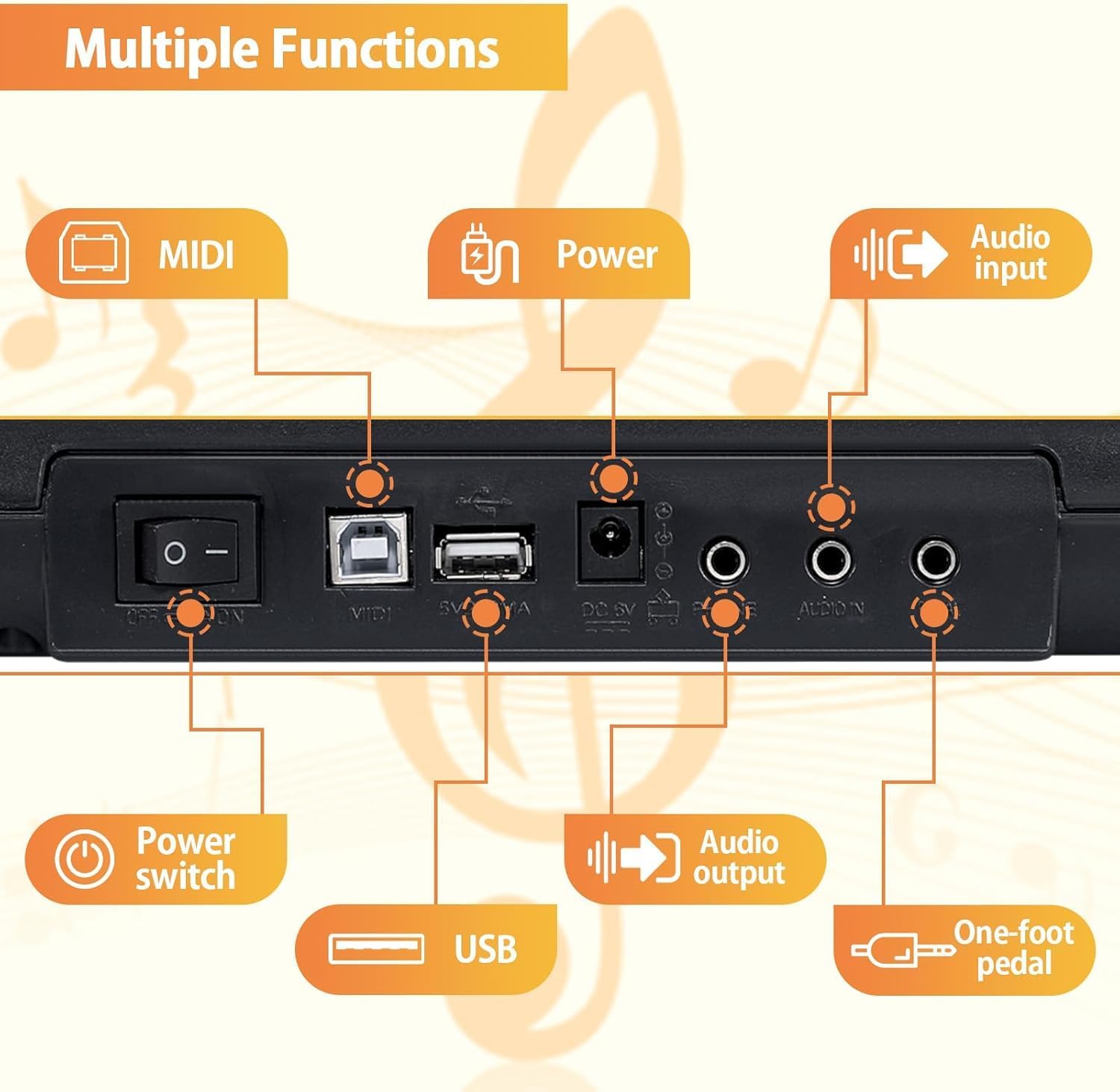
Image: A split image showing a user practicing with headphones for silent play and a diagram of the piano's dual powerful speakers.
4.9 Recording Function
- Refer to the control panel for the 'Record' button. Press it to start recording your performance.
- Press 'Play' to listen to your recorded track.
5. Maintenance
5.1 Cleaning
- Wipe the piano's surface with a soft, dry cloth.
- For stubborn dirt, use a slightly damp cloth and then dry thoroughly.
- Do not use abrasive cleaners, waxes, or solvents, as these can damage the finish.
5.2 Storage
- Store the piano in a cool, dry place away from direct sunlight and extreme temperatures.
- When transporting, use the provided carrying case to protect the instrument.
6. Troubleshooting
6.1 No Sound
- Ensure the power adapter is securely connected and the piano is turned on.
- Check the volume level; increase it if necessary.
- If headphones are plugged in, unplug them to enable speaker output.
- Verify that the correct tone is selected and not a silent patch.
6.2 Bluetooth Connection Issues
- Ensure Bluetooth is enabled on both the piano and your external device.
- Move your device closer to the piano to ensure it is within range.
- Try unpairing and re-pairing the devices.
- Restart both the piano and your external device.
6.3 Keys Not Responding
- Check if the piano is in a specific mode (e.g., demo mode) that might prevent normal key input.
- Power cycle the piano (turn off, then on again).
7. Specifications
| Feature | Specification |
|---|---|
| Model Number | 883 |
| Number of Keys | 88 |
| Key Type | Semi-Weighted, Touch-Sensitive |
| Tones/Voices | 128 |
| Rhythms | 128 |
| Demo Songs | 80 |
| Connectivity | Bluetooth, USB MIDI, Audio In, Audio Out, Sustain Pedal |
| Special Features | Built-In Speaker, Recording Function |
| Power Supply | DC 5V Power Adapter (included), Battery (not included) |
| Item Weight | 13.47 pounds (approx. 6.11 kg) |
| Package Dimensions | 46.5 x 14.45 x 4.75 inches (approx. 118.1 x 36.7 x 12.1 cm) |
8. Warranty and Support
This Crrtvt product is covered by a manufacturer's warranty. Please refer to the warranty card included in your package for specific terms and conditions. For technical support, troubleshooting assistance, or warranty claims, please contact Crrtvt customer service through the retailer where the product was purchased.