
1. Product Overview
The Pyle PLR7103MHU is a 7-inch single DIN touchscreen car stereo designed to enhance your in-car multimedia experience. It features wireless Apple CarPlay and Android Auto for seamless smartphone integration, Bluetooth 5.0 for stable connectivity, USB/USB-C ports for fast charging and media playback, and an AM/FM radio tuner. The unit also includes a backup camera for improved safety during parking maneuvers.

Image 1.1: Pyle PLR7103MHU Car Stereo main unit.
2. Safety Information
Read all instructions carefully before installation and operation. Failure to follow these instructions may result in personal injury or damage to the product or vehicle. Keep this manual for future reference.
- Always consult a professional for installation if you are unsure about any steps.
- Do not operate the unit in a manner that distracts you from driving.
- Ensure all wiring is correctly connected to prevent short circuits or damage.
- Avoid exposing the unit to extreme temperatures, direct sunlight for prolonged periods, or excessive moisture.
- Disconnect the vehicle's battery before beginning installation to prevent electrical hazards.
3. Package Contents
Verify that all items are present in the package before proceeding with installation.

Image 3.1: Contents of the Pyle PLR7103MHU package.
- Single DIN Car Stereo Unit
- Remote Control
- Power & Wiring Harness
- Backup Camera
- Mounting & Cable Accessories (screws, mounting straps, RCA cables, microphone)
4. Installation Guide
4.1 Pre-Installation Checks
- Ensure the vehicle's battery is disconnected.
- Confirm the vehicle has a single DIN dashboard opening.
- Review the wiring diagram provided with the unit.
4.2 Mounting the Unit
The PLR7103MHU is designed to fit standard single DIN slots. The screen offers tilt and height adjustments for optimal viewing.

Image 4.1: Pyle PLR7103MHU unit installed in a vehicle dashboard.
- Remove the existing car stereo from the dashboard.
- Connect the wiring harness to the vehicle's wiring and the stereo unit.
- Slide the stereo unit into the single DIN slot.
- Secure the unit using the provided mounting brackets and screws.
- Adjust the screen tilt and height as needed.
4.3 Wiring Connections
Refer to the detailed wiring diagram included with your product for specific connections. Key connections include power, ground, speaker outputs, antenna, and auxiliary inputs/outputs.

Image 4.2: Rear view of the Pyle PLR7103MHU showing various input/output ports.
- Power (Yellow): Constant 12V+
- Accessory (Red): Switched 12V+
- Ground (Black): Vehicle chassis ground
- Speaker Wires: Connect to corresponding vehicle speaker wires (e.g., Front Left +, Front Left -).
- Backup Camera Input (Yellow RCA): Connect to the video output of the backup camera.
- Reverse Trigger (Brown): Connect to the vehicle's reverse light circuit.
- Antenna (Blue): Power antenna/amplifier remote turn-on.
4.4 Backup Camera Installation
The included HD waterproof backup camera provides night vision for enhanced visibility.

Image 4.3: Included waterproof backup camera with night vision capabilities.
- Mount the backup camera at the rear of the vehicle, ensuring a clear view.
- Run the video cable from the camera to the stereo unit's "CAM IN" RCA input.
- Connect the camera's power wire to the vehicle's reverse light power source.
- Connect the stereo's reverse trigger wire (usually brown) to the same reverse light power source.
5. Operating Instructions
5.1 Basic Operation
- Power On/Off: Press the power button (usually the volume knob) to turn the unit on or off.
- Volume Control: Rotate the volume knob or use the touchscreen controls.
- Mode Selection: Press the MODE button to cycle through available sources (Radio, USB, Bluetooth, CarPlay/Android Auto, AUX, AV IN).
- Home Screen: Press the HOME button to return to the main menu.
5.2 Touchscreen Interface
The 7-inch touchscreen provides intuitive control over all functions. Navigate by tapping icons and swiping through menus.
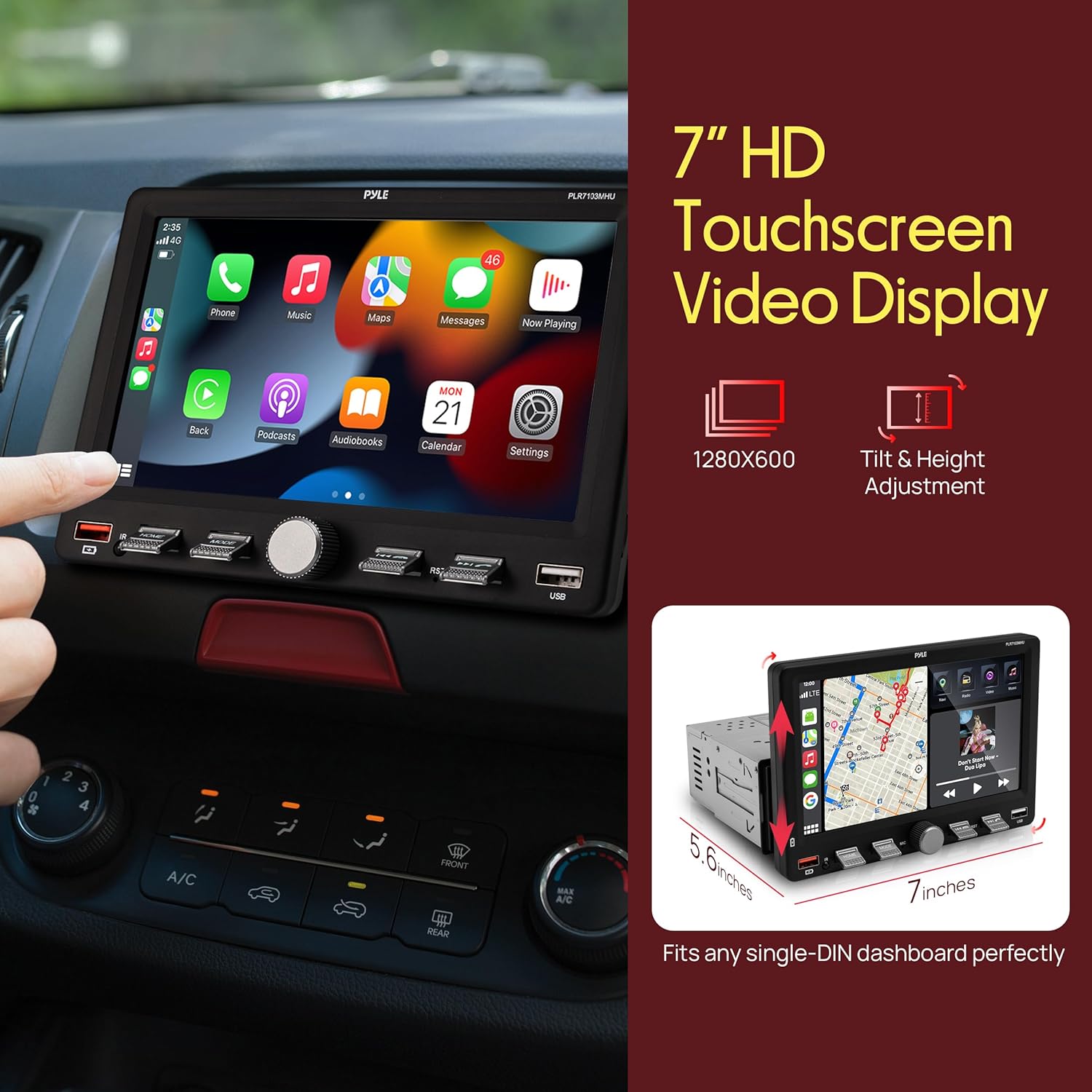
Image 5.1: Touchscreen display showing Apple CarPlay interface.
5.3 Radio Operation (AM/FM)
- Select "Radio" from the main menu.
- Use the "Scan" function to automatically search for and store strong stations.
- Manually tune by tapping the frequency up/down arrows.
- Save favorite stations to preset buttons (P1-P6).
6. Connectivity Features
6.1 Wireless Apple CarPlay & Android Auto
Connect your compatible smartphone wirelessly to access navigation, music, calls, and messages directly on the stereo's display.
- Ensure Bluetooth is enabled on your smartphone and the car stereo.
- Pair your phone with the car stereo via Bluetooth.
- Once paired, select "CarPlay" or "Android Auto" from the stereo's menu.
- Follow any on-screen prompts on your phone to grant permissions.
6.2 Bluetooth Audio & Hands-Free Calling
Bluetooth 5.0 provides a stable connection for streaming music and making hands-free calls.
- Enable Bluetooth on your phone and the stereo.
- Search for "Pyle PLR7103MHU" (or similar) on your phone's Bluetooth settings.
- Select the device to pair. A confirmation prompt may appear.
- Once connected, you can stream audio or make/receive calls using the stereo's interface.
6.3 USB/USB-C Media Playback & Charging
The unit features USB and USB-C ports for media playback from flash drives and fast charging of compatible devices.
- Insert a USB flash drive into the USB-A or USB-C port.
- Select "USB" from the main menu to browse and play media files.
- Connect your smartphone or other devices to the USB/USB-C ports for charging.
7. Audio Settings
Access the Equalizer (EQ) settings to customize your audio experience. The unit features a 10-band EQ.
- From the main menu, select "EQ" or "Sound Setup".
- Adjust frequency bands to your preference.
- Choose from preset EQ modes like Jazz, Classic, Rock, Pop, or Flat.
- Adjust Loudness settings for enhanced bass and treble at low volumes.
8. Backup Camera Operation
When properly installed, the backup camera automatically displays the rear view when the vehicle is shifted into reverse gear.
- Shift the vehicle into reverse. The screen will automatically switch to the camera view.
- Guide lines may appear on the screen to assist with parking.
- Shift out of reverse to return to the previous screen.
9. Maintenance
- Cleaning the Screen: Use a soft, lint-free cloth to gently wipe the touchscreen. Do not use abrasive cleaners or solvents.
- General Cleaning: Keep the unit free from dust and debris.
- Software Updates: Check the Pyle website periodically for any available firmware updates for your model.
10. Troubleshooting
| Problem | Possible Cause | Solution |
|---|---|---|
| Unit does not power on. | Incorrect wiring (power/ground), blown fuse, vehicle battery disconnected. | Check all power and ground connections. Inspect vehicle fuses. Ensure battery is connected. |
| No sound from speakers. | Incorrect speaker wiring, volume too low, mute activated, amplifier issues. | Verify speaker connections. Increase volume. Check if mute is active. Consult amplifier manual if external amp is used. |
| Bluetooth connection unstable or fails. | Interference, phone too far, incorrect pairing process, phone software issue. | Ensure phone is close to the unit. Re-pair the device. Restart phone and stereo. Clear Bluetooth cache on phone. |
| CarPlay/Android Auto not connecting. | Incorrect phone settings, app issues, unstable Bluetooth/Wi-Fi connection. | Ensure CarPlay/Android Auto is enabled on your phone. Check phone's Wi-Fi and Bluetooth. Restart phone and stereo. |
| Backup camera not displaying. | Incorrect camera wiring, reverse trigger not connected, faulty camera. | Check camera power and video connections. Verify reverse trigger wire connection. Test camera if possible. |
11. Specifications
| Feature | Detail |
|---|---|
| Model Number | PLR7103MHU |
| Display Size | 7 inches |
| DIN Size | Single DIN |
| Connectivity | Wireless Apple CarPlay, Android Auto, Bluetooth 5.0, USB, USB-C, Auxiliary, RCA |
| Radio Tuner | AM/FM |
| Output Power | 60 Watts (per channel, typically 4 channels) |
| Product Dimensions | 5.6"D x 7"W x 4.9"H |
| Item Weight | 2.95 pounds |
| Included Accessories | Backup Camera, Remote Control, Wiring Harness |
12. Product Video Overview
Watch this official product video for a visual overview of the Pyle PLR7103MHU 7-inch Single DIN Touchscreen Car Stereo's features and functions.
Video 12.1: Official product overview of the Pyle PLR7103MHU car stereo.
13. Warranty and Support
Pyle products are designed for reliability and performance. For specific warranty details, please refer to the warranty card included with your product or visit the official Pyle website. For technical support, troubleshooting assistance, or service inquiries, please contact Pyle customer support through their official channels.
Pyle Official Website: www.pyleusa.com


