
1. Introduction
Thank you for choosing the SJCAM C400 4K Pocket Vlog Action Camera. This manual provides essential information for setting up, operating, and maintaining your camera. Please read it carefully before use to ensure optimal performance and longevity of your device.

The SJCAM C400 is a versatile 4K pocket vlog action camera designed for capturing high-quality video and photos in various scenarios.
2. Safety Information
- Do not expose the camera to extreme temperatures or direct sunlight for extended periods.
- Keep the camera away from strong magnetic fields.
- Avoid dropping or subjecting the camera to strong impacts.
- Do not attempt to disassemble or modify the camera.
- Ensure all ports are dry before charging or connecting to other devices.
- Use only approved accessories and chargers.
3. Package Contents
Verify that all the following items are included in your package:
- SJCAM C400 Camera Unit
- Battery Handle
- Frame Mount
- Waterproof Case
- USB Cable
- Hand Strap
- Bracket
- Back Clip
- Flat Bottom Bracket
- Helmet Base
- Tripod
- Magnetic Strap

Image showing the SJCAM C400 camera and its various included accessories.
4. Camera Overview
Familiarize yourself with the main components of your SJCAM C400 camera:
- Front Touch Screen: 1.3-inch display for intuitive control and preview.
- Main Screen: 2.23-inch display for detailed viewing and settings.
- Lens: High-quality f/2.0 large aperture lens with 154° ultra-wide-angle FOV.
- Power/Mode Button: Used to power on/off and switch between modes.
- Shutter/Record Button: To start/stop recording or take photos.
- USB Type-C Port: For charging and data transfer.
- MicroSD Card Slot: For memory card insertion.

The SJCAM C400 features dual screens for versatile operation and monitoring.
5. Setup
5.1. Charging the Battery
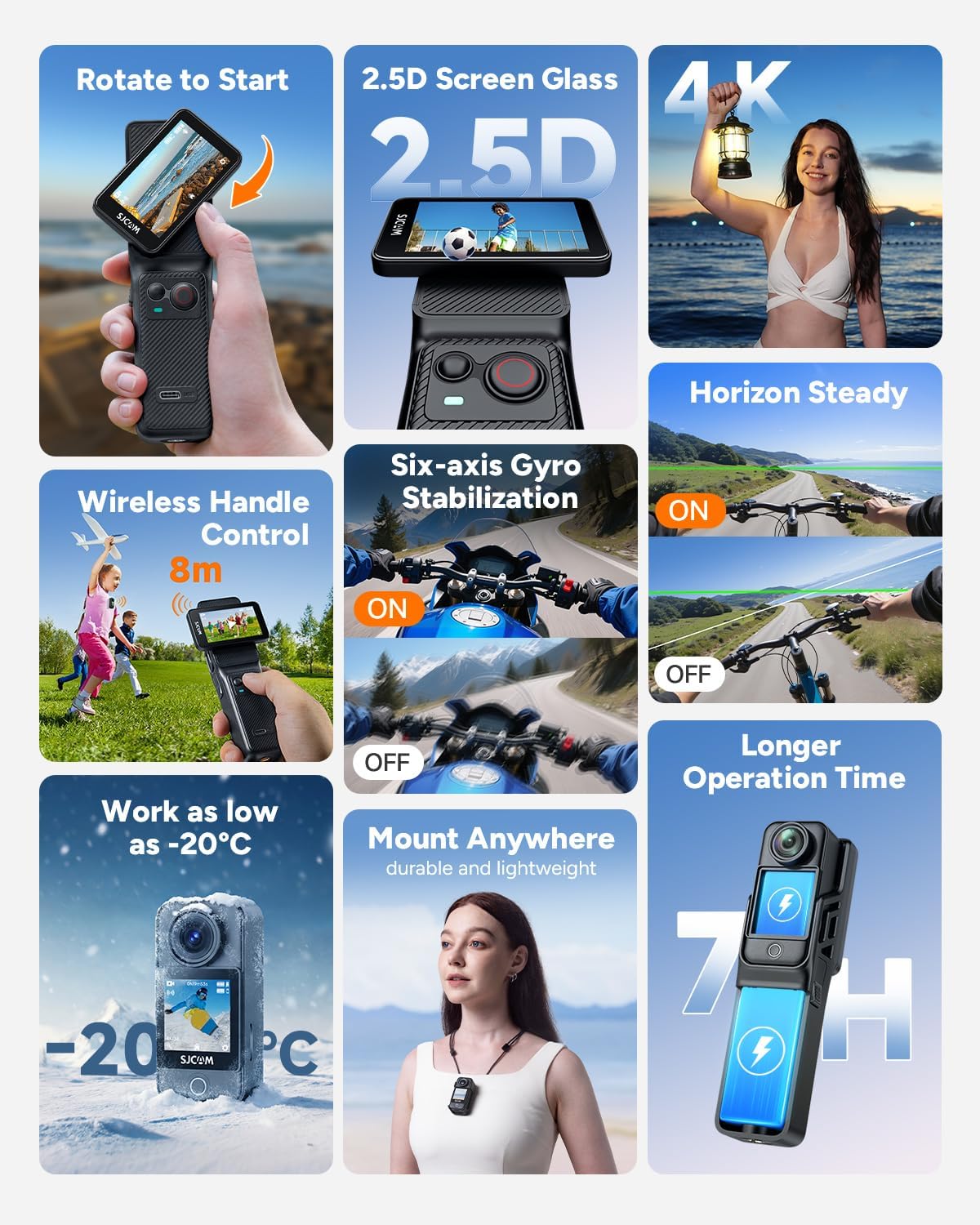
Connect the camera to a power source using the provided USB Type-C cable. The charging indicator will show the charging status. A full charge provides approximately 460 minutes (7 hours 40 minutes) of continuous 4K30fps recording when using both the camera and battery handle.
The camera and battery handle provide extended operation time.
5.2. Inserting a MicroSD Card
Locate the MicroSD card slot on the camera. Insert a compatible MicroSD card (up to 128GB, Class 10 or higher recommended) with the contacts facing down until it clicks into place.
5.3. Powering On/Off
Press and hold the Power/Mode button for a few seconds to power the camera on or off.
5.4. Initial Settings
Upon first use, you may need to set the language, date, and time. Navigate through the menu using the touch screen to configure these settings.
6. Operating the Camera
6.1. Basic Controls and Touchscreen
The SJCAM C400 features a responsive touch screen for easy navigation. Swipe and tap to access menus, change settings, and switch between shooting modes. The front 1.3-inch screen allows for intuitive composition adjustments, especially for vlogging.

The large screen offers intuitive control and a clear view of your footage.
6.2. Rotating Screen Functionality
The camera's screen can be rotated to switch between horizontal (16:9) and vertical (9:16) recording orientations, ideal for different platforms like YouTube and TikTok.

Easily switch between horizontal and vertical video formats by rotating the screen.
6.3. Video Recording and Photo Capture
The C400 supports 4K/30fps, 2.5K, and 1080P video resolutions. Press the Shutter/Record button to start or stop recording. For photos, switch to photo mode and press the Shutter/Record button.

Experience sharp, clear, and vivid images with 4K resolution.
6.4. Image Stabilization
The camera features 6-axis Electronic Image Stabilization (EIS) and Horizon Steady functions to ensure smooth and stable footage, even during dynamic activities.

6-axis gyro stabilization and Horizon Steady keep your footage smooth and level.
6.5. Wireless Control
The detachable handheld controller connects via Bluetooth, allowing you to operate the camera remotely from up to 8 meters away. The controller screen provides a real-time preview.

Control your camera wirelessly from a distance of up to 8 meters.
6.6. Shooting Modes
The C400 offers various shooting modes for creative capture:
- Normal Recording: Standard video capture.
- Interval Recording (Time-lapse): Condense long events into short videos.
- Slow Motion: Capture detailed movements (e.g., 720P/120fps).
- Motion Detection: Automatically records when motion is detected.
- Loop Recording: Continuously records, overwriting older footage.
- Burst Shooting: Capture multiple photos in quick succession.
- Timer Shooting: Set a delay before taking a photo.

Time-lapse mode captures the essence of changing scenes.
6.7. Waterproof Usage
When placed in its professional waterproof case, the C400 is waterproof up to 30 meters (98 feet), making it suitable for snorkeling, surfing, and cycling in the rain.

The waterproof case allows for underwater recording up to 30 meters.
6.8. Hands-free POV
The compact design and magnetic strap allow for easy, hands-free Point-of-View (POV) recording, perfect for vlogging and capturing daily activities.

Capture hands-free POV footage with the magnetic strap accessory.
6.9. Webcam Mode & Live Streaming
Connect the camera to your computer via USB to use it as a webcam. The C400 also supports direct live streaming to compatible platforms without additional equipment.

Utilize the camera for webcam functionality or direct live streaming.
7. Maintenance
7.1. Cleaning the Camera
Use a soft, lint-free cloth to clean the camera body and lens. For stubborn smudges on the lens, use a specialized lens cleaning solution and cloth. Do not use harsh chemicals or abrasive materials.
7.2. Battery Care
To prolong battery life, avoid fully discharging the battery frequently. Store the camera with a partially charged battery (around 50%) if not used for extended periods. Do not expose the battery to extreme heat.
7.3. Storage
Store the camera in a cool, dry place, away from dust and moisture. When storing for long periods, remove the MicroSD card and ensure the battery is partially charged.
8. Troubleshooting
| Problem | Possible Cause | Solution |
|---|---|---|
| Camera does not power on. | Low battery; faulty battery; camera malfunction. | Charge the battery fully. Try a different charging cable/adapter. If issue persists, contact support. |
| Cannot record video/take photos. | No MicroSD card; MicroSD card full; MicroSD card error; incorrect mode. | Insert a MicroSD card. Delete files or replace card. Format the card. Switch to correct mode. |
| Poor image/video quality. | Dirty lens; low light conditions; incorrect settings. | Clean the lens. Ensure adequate lighting. Adjust resolution, exposure, or other settings. |
| Wireless control not working. | Bluetooth/Wi-Fi off; out of range; pairing issue. | Ensure Bluetooth/Wi-Fi is enabled on both devices. Move closer to the camera. Re-pair the devices. |
9. Specifications
| Feature | Detail |
|---|---|
| Brand | SJCAM |
| Model Number | C400 |
| Photo Sensor Technology | CMOS (1/2.8-inch) |
| Video Capture Resolution | 4K (30fps), 2.5K, 1080P |
| Lens Aperture | f/2.0 |
| Field of View (FOV) | 154° Wide Angle |
| Optical Zoom | 8X |
| Image Stabilization | 6-axis Gyro (EIS) |
| Front Screen Size | 1.3 inches (Touchscreen) |
| Main Screen Size | 2.23 inches |
| Connectivity | Bluetooth, Wi-Fi (5G), USB Type-C |
| Storage Media | MicroSD card (up to 128GB) |
| Waterproof Depth | 30 meters (with waterproof case) |
| Battery Life | Approx. 460 minutes (4K30fps with handle + small battery) |
| Product Dimensions | 3.8 x 3.8 x 14 cm |
| Product Weight | 760 g |
10. Warranty & Support
The SJCAM C400 comes with a 1-year free warranty from the date of purchase. For any technical issues or inquiries, please contact our 24-hour online support. Refer to the official SJCAM website or your purchase documentation for specific contact details.
11. Optional Accessories
Enhance your SJCAM C400 experience with a range of optional accessories:
- Extension Adapter
- Auxiliary Light
- Magnetic Pendant
- Additional Tripods and Mounts

A selection of optional accessories to expand your camera's capabilities.


