
Important Safety Instructions
Please read and save these important safety instructions before using this fan. Failure to follow these instructions may result in electric shock, fire, or injury.
- Always unplug the fan before cleaning, servicing, or relocating.
- Do not operate any fan with a damaged cord or plug. Discard fan or return to an authorized service facility for examination and/or repair.
- Do not run cord under carpeting. Do not cover cord with throw rugs, runners, or similar coverings. Arrange cord away from traffic area and where it will not be tripped over.
- Do not insert or allow fingers or foreign objects to enter any ventilation or exhaust opening as this may cause an electric shock or fire, or damage the fan.
- Do not use outdoors. This fan is designed for indoor use only.
- Do not use in wet or moist locations such as bathrooms or laundry areas.
- Place the fan on a stable, flat surface to prevent it from tipping over.
- This appliance has a polarized plug (one blade is wider than the other). To reduce the risk of electric shock, this plug is intended to fit in a polarized outlet only one way. If the plug does not fit fully in the outlet, reverse the plug. If it still does not fit, contact a qualified electrician. Do not attempt to defeat this safety feature.
Product Overview
The shinic 20-inch Box Fan with Thermostat is designed to provide efficient air circulation and cooling with smart temperature control. Key features include a durable metal frame, three-speed settings, and an integrated thermostat for automatic operation.
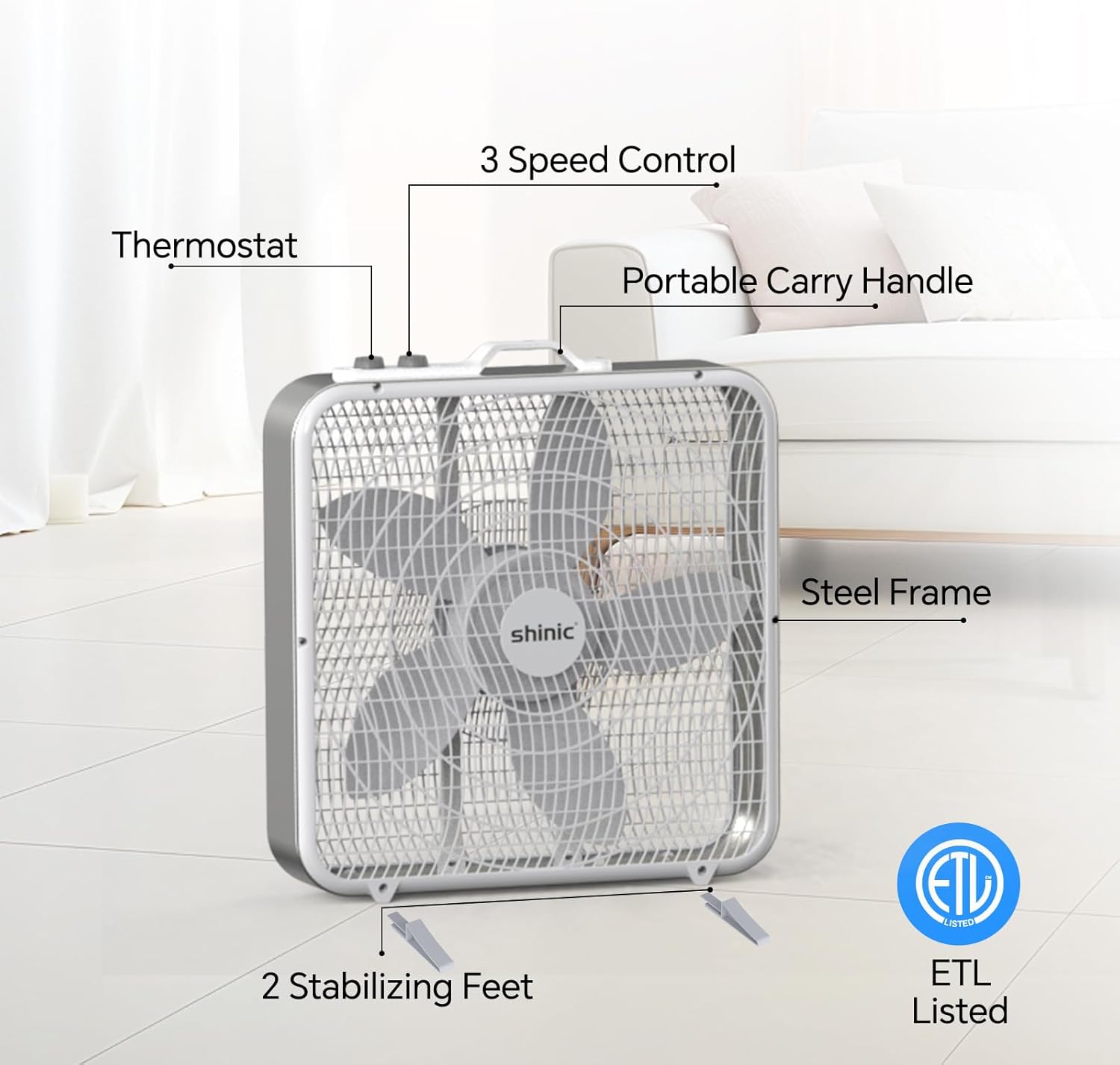
Image: Overview of the shinic 20-inch Box Fan, highlighting its main components and features such as the thermostat, speed control, carry handle, steel frame, stabilizing feet, and ETL certification.
Features:
- Smart Thermostat: Automatically turns the fan on/off based on a set temperature to maintain consistent comfort and save energy.
- 3-Speed Settings: Choose from Low, Medium, or High for customized airflow.
- Heavy-Duty Metal Frame: Provides enhanced durability and stability.
- Portable Design: Equipped with a carry handle and non-slip feet for easy relocation and secure placement.
- ETL Certified: Meets U.S. safety standards for reliable operation.
Setup
Unpacking:
- Carefully remove the fan from its packaging.
- Remove all packing materials and ensure no components are missing or damaged.
Placement:
- Place the fan on a firm, level surface. The non-slip feet will help secure its position.
- Ensure the fan is positioned away from curtains, drapes, or any objects that could obstruct the airflow or be drawn into the fan blades.
- For window use, ensure the fan is securely placed within the window frame.

Image: The shinic box fan positioned in a window, illustrating its suitability for window placement and showing its approximate dimensions.
Operating Instructions
Power Connection:
Plug the fan's power cord into a standard 120V AC electrical outlet. Ensure the outlet is in good condition and not overloaded.
Speed Control:
The fan features a 3-speed rotary control knob. Turn the knob clockwise to select your desired fan speed:
- 0: Off
- 1 (Low): Gentle breeze for quiet operation.
- 2 (Medium): Moderate airflow for daily circulation.
- 3 (High): Maximum cooling power for larger spaces or quick ventilation.

Image: Detail of the fan's control panel, illustrating the 3-speed selection knob.
Thermostat Operation:
The fan includes an adjustable thermostat for automatic temperature control. The thermostat knob allows you to set a desired room temperature.
- Turn the thermostat knob to your desired temperature setting.
- When the room temperature rises above your set temperature, the fan will automatically turn on.
- When the room temperature drops below your set temperature, the fan will automatically turn off.
- This feature helps maintain a consistent room temperature and conserves energy by operating only when cooling is needed.

Image: The fan in operation, demonstrating the adjustable thermostat feature and its automatic on/off functionality.
Maintenance
Cleaning:
- Always unplug the fan before cleaning.
- Use a soft, damp cloth to wipe the exterior surfaces of the fan. Do not use abrasive cleaners or solvents.
- To clean the fan blades and grilles, use a vacuum cleaner with a brush attachment or a soft cloth to remove dust and debris. Do not immerse the fan in water.
- Ensure all parts are completely dry before plugging the fan back in.
Storage:
When not in use, store the fan in a cool, dry place. It is recommended to keep the fan in its original packaging to protect it from dust and damage.
Troubleshooting
| Problem | Possible Cause | Solution |
|---|---|---|
| Fan does not turn on. | No power to the unit. | Ensure the fan is securely plugged into a working electrical outlet. Check the circuit breaker. |
| Fan is noisy or vibrates excessively. | Fan is not on a stable surface; obstruction in blades. | Place the fan on a flat, stable surface. Unplug the fan and check for any foreign objects obstructing the blades. |
| Thermostat function is not working as expected. | Incorrect thermostat setting; room temperature not matching setting. | Adjust the thermostat knob to a different temperature. Allow time for the fan to react to changes in room temperature. |
| Fan stops working unexpectedly. | Internal malfunction. | Unplug the fan and wait a few minutes before plugging it back in. If the issue persists, contact customer support. |
Specifications
| Feature | Detail |
|---|---|
| Brand | shinic |
| Model Number | BP-20T |
| Fan Type | Box Fan |
| Size | 20 inch |
| Dimensions (D x W x H) | 51.7D x 17.5W x 55H centimetres |
| Power Source | Corded Electric |
| Wattage | 65 watts |
| Number of Speeds | 3 |
| Special Features | Thermostat, Portable |
| Material | Plastic (with Metal Frame) |
| Indoor/Outdoor Usage | Indoor |
| Certifications | ETL Listed |
Warranty and Support
For warranty information or technical support, please refer to the warranty card included with your product or contact shinic customer service. Keep your purchase receipt for proof of purchase.