
Introduction
Thank you for choosing the AnseTo HS-ST01 Automatic Irrigation Timer. This device is designed to simplify your watering tasks, offering both solar and Type-C charging options for eco-friendly and efficient operation. It features intelligent programming, manual control, and a rain delay function, making it suitable for various environments such as gardens, lawns, patios, and orchards.
Please read this manual carefully before use to ensure proper installation, operation, and maintenance of your irrigation timer.
Product Features
- Eco-friendly and Energy-efficient: Our irrigation controller offers dual power options: solar energy and Type-C charging. This allows for free plant watering using solar power and quick recharging via the Type-C port, promoting flexible and ecological use.
- Flexible Adjustable Solar Panel: Equipped with a 120° adjustable solar panel, you can easily adjust the angle to maximize sunlight exposure. This ensures efficient energy conversion and reliable operation, even in varying weather conditions.
- Smart Irrigation Control System: The solar irrigation system features an intelligent, user-friendly control program. Simply set your desired watering time, and the system will water automatically, saving you time and effort.
- Two Operating Modes: Supports both intelligent automatic mode and manual mode. In automatic mode, the system waters after a preset time, ensuring optimal hydration for your plants. Manual mode offers direct control for maximum flexibility when immediate watering is needed.
- Versatile Application: Perfect for various environments including gardens, patios, lawns, or orchards. The integrated rain delay function prevents overwatering during rainfall, keeping your plants in optimal condition.
Product Overview

Figure 1: AnseTo HS-ST01 Solar Water Timer connected to an outdoor faucet, highlighting its solar panel and digital display.

Figure 2: Detailed view of the robust brass inlet with a metal filter screen, emphasizing tool-free installation.

Figure 3: The AnseTo HS-ST01 irrigation timer demonstrating its dual charging capabilities: solar charging with a 120° adjustable panel and convenient USB Type-C charging.
Setup Instructions
Follow these steps to set up your AnseTo HS-ST01 irrigation timer:
- Initial Charge: Before first use, ensure the product is fully charged. You can use the solar panel or the Type-C charging port.
- Install the Product: Connect the timer to your outdoor faucet. Ensure a secure, watertight connection.
- Adjust Solar Panel: Position the solar panel to receive maximum sunlight. The panel is 120° adjustable.
- Set Clock:
- Rotate the dial to align the arrow with 'Set Clock'.
- Press 'OK' when '24H' appears to confirm 24-hour format.
- Use the '+' and '-' buttons to adjust the current hour, then press 'OK'.
- Adjust the current minutes using '+' and '-' buttons, then press 'OK'.
Video 1: Step-by-step guide on setting the clock on your AnseTo HS-ST01 irrigation timer.
Operating Instructions (Automatic Mode)
To program an automatic watering schedule:
- Set Start Time:
- Rotate the dial to align the arrow with 'Start Time'.
- Use the '+' and '-' buttons to set the desired hour for watering to begin, then press 'OK'.
- Adjust the minutes using '+' and '-' buttons, then press 'OK'.
- Set Watering Duration ('How Long'):
- Rotate the dial to align the arrow with 'How Long'.
- Use the '+' and '-' buttons to set the desired watering duration in minutes, then press 'OK'.
- If you need to set hours, press 'OK' again to switch to hours, then adjust using '+' and '-' buttons. Press 'OK' to confirm.
- Set Watering Frequency ('How Often'):
- Rotate the dial to align the arrow with 'How Often'.
- Use the '+' and '-' buttons to set the frequency (e.g., every 12 hours, every 1 day). If you continue pressing '+' after 12 hours, it will switch to days (1-7 days). Press 'OK' to confirm.
- Activate Program: Rotate the dial to 'ON' to activate the programmed schedule.

Figure 4: The user interface of the AnseTo HS-ST01, featuring a large LCD display, intuitive rotary dial, and clearly labeled buttons for easy programming.
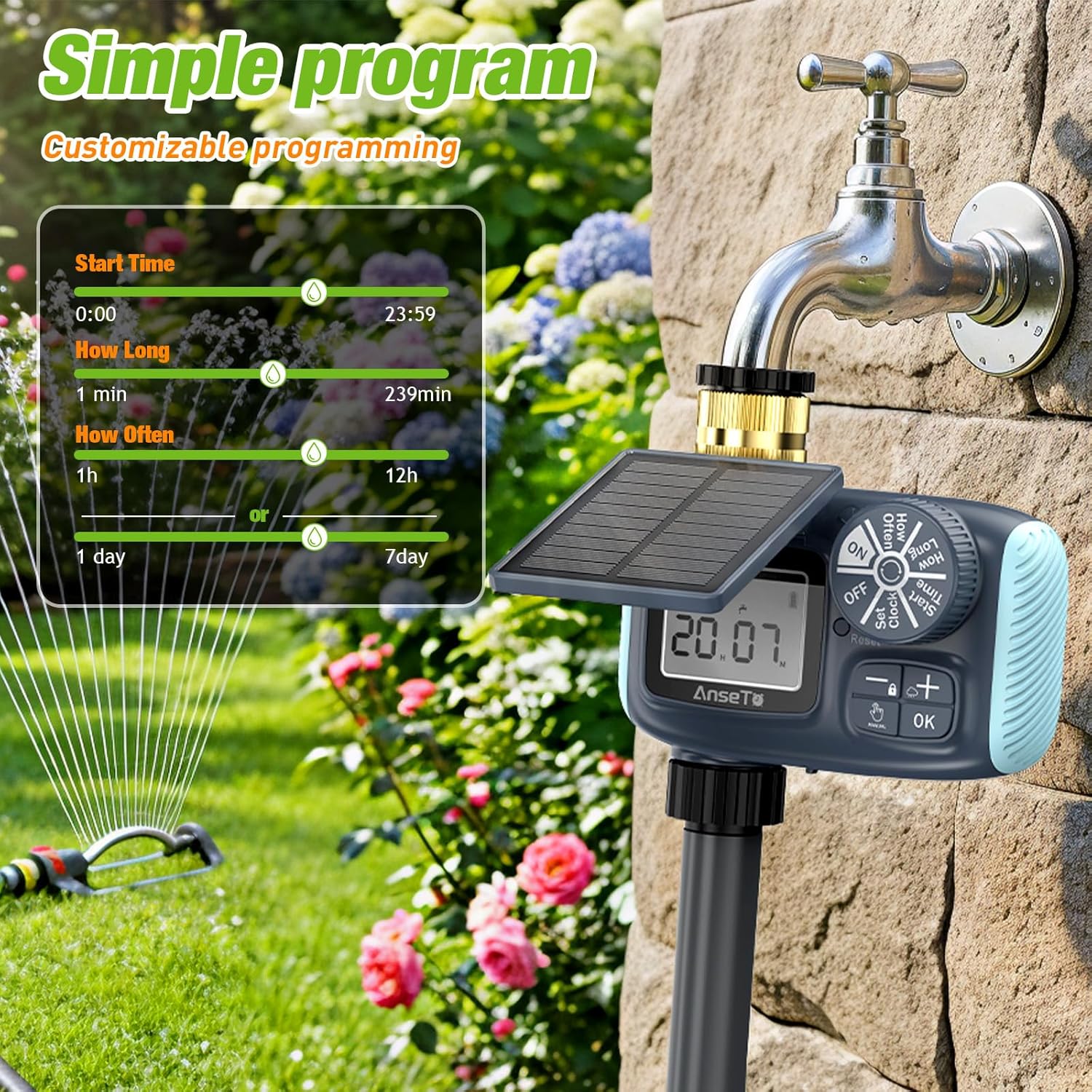
Figure 5: The programming screen of the AnseTo HS-ST01, illustrating options to customize start time, watering duration, and frequency for tailored irrigation schedules.
Manual Mode
To initiate manual watering:
- Press and hold the 'Manual' button. The default duration is 10 minutes.
- You can adjust the manual watering duration using the '+' and '-' buttons.
- Press 'OK' to start manual watering.
- To stop manual watering, press and hold the 'Manual' button again.
Note: Manual watering does not affect your automatic program.
Rain Delay Function
To activate the rain delay function:
- Press and hold the '+' button.
- Use the '+' and '-' buttons to select the desired delay duration: 24 hours, 48 hours, or 72 hours.
- Press 'OK' to confirm the rain delay.
- To cancel the rain delay, press and hold the '+' button again.
Note: The rain delay function temporarily suspends the automatic program without erasing your settings.
Specifications
| Feature | Detail |
|---|---|
| Brand | AnseTo |
| Model Number | HS-ST01 |
| Color | Yellow |
| Material | Plastic |
| Product Dimensions (D x W x H) | 15f. x 11.8an. x 5.1al. centimeters (approx. 15 x 11.8 x 5.1 cm) |
| Number of Settings | 2 (Automatic, Manual) |
| Smart Home Compatibility | Not compatible with digital home systems |
| Country of Origin | China |
Maintenance
- Cleaning: Regularly clean the exterior of the timer with a soft, damp cloth. Do not use abrasive cleaners or solvents.
- Filter Screen: Periodically check and clean the metal filter screen in the brass inlet to prevent blockages and ensure optimal water flow.
- Winter Storage: During freezing temperatures, disconnect the timer from the faucet and store it indoors to prevent damage.
- Solar Panel: Keep the solar panel clean and free of debris to ensure efficient charging.
Troubleshooting
| Problem | Possible Cause | Solution |
|---|---|---|
| Timer not watering |
|
|
| Water leakage |
|
|
| Display not working |
|
|
Warranty and Support
AnseTo products are designed for durability and performance. For warranty information or technical support, please refer to the product packaging or contact our customer service team through the retailer where you purchased the product. Please have your model number (HS-ST01) ready when contacting support.
We are committed to providing excellent customer satisfaction.


