
Introduction
This manual provides comprehensive instructions for the VIVOHOME 12-inch Shutter Exhaust Fan (Model VH1854). This fan is engineered for efficient ventilation in various environments, including attics, garages, greenhouses, chicken coops, and barns. It integrates an EC motor, variable speed control, a thermostat, humidity sensor, and a timer for automated and precise operation. Please read this manual thoroughly before installation and use to ensure safe and optimal performance.
Safety Information
Always adhere to the following safety guidelines to prevent injury or damage to the product:
- Electrical Safety: Disconnect power at the circuit breaker before performing any installation, maintenance, or cleaning. Ensure the fan is connected to a properly grounded 110V AC outlet. Do not use with extension cords unless absolutely necessary and ensure they are rated for the fan's wattage.
- Installation Safety: Wear appropriate personal protective equipment, including gloves and eye protection, during installation. Ensure the mounting surface is structurally sound and capable of supporting the fan's weight. Follow all local electrical codes and building regulations.
- Operation Safety: Keep hands, clothing, and other objects clear of the fan blades and moving parts during operation. Do not operate the fan if it is damaged or if any components are missing.
- Environmental Conditions: This fan is designed for indoor use in environments such as attics, garages, and barns. While water-resistant, avoid direct exposure to heavy rain or extreme weather conditions.
Package Contents
Verify that all items are present in the package:
- VIVOHOME 12" Shutter Exhaust Fan
- Wireless Remote Control
- Mounting Hardware (screws, adhesive for remote)
- Cutout Template (12.4" x 12.4")
Product Features
The VIVOHOME 12" Shutter Exhaust Fan offers the following key features:
- Powerful & Quiet Exhaust: Driven by a 110V/40W brushless EC motor, this fan operates below 60dB while delivering up to 1300 CFM airflow, effectively removing heat, dust, and odors from spaces up to 1400 sqft.
- 3-in-1 Smart Control: Monitors temperature (32-120°F) and humidity (30%-90%), automatically adjusting operation to maintain ideal conditions. An alarm triggers instantly if either level exceeds set thresholds.
- Variable Speeds & Smart Timing: Features 9 manual speed settings for precise airflow control. A 12-hour timer allows for automatic shut-off, conserving energy.
- Versatile Application: Suitable for various locations including garages, attics, kitchens, chicken coops, greenhouses, warehouses, and barns.
- Durable Construction & Easy Installation: Constructed with rust-resistant materials for a lifespan exceeding 20,000 hours. Auto-shutdown shutters with foam cut noise and block rain and dust. Compact 15×15×7.5 inches, includes a 12.4×12.4 inch cutout template and a 5 ft plug-in cord for straightforward wall mounting.
- One-Touch Remote Control: The remote clearly displays mode, speed, temperature, and humidity. It can be wall-mounted (adhesive and screws included) or used handheld. Requires 2 AAA batteries (not included).

Image: The VIVOHOME 12-inch Shutter Exhaust Fan, showcasing its design and components.

Image: Diagram illustrating the fan's powerful airflow, EC motor, and coverage area, highlighting its durability.
Setup and Installation
Follow these steps for proper installation of your exhaust fan:
- Choose Location: Select a suitable wall location in your attic, garage, greenhouse, chicken coop, or barn. Ensure the area is clear of obstructions and has access to a 110V AC power outlet.
- Prepare Opening: Use the provided 12.4 x 12.4 inch cutout template to mark and create the opening in the wall. Ensure the opening is precise for a secure fit.
- Install Fan: Carefully insert the fan into the prepared opening. Ensure the external shutter louvers face outwards to allow for proper exhaust and weather protection.
- Secure Fan: Secure the fan to the wall using the appropriate mounting screws and hardware provided. Ensure it is firmly attached and stable.
- Connect Power: Plug the 5 ft power cord into a standard 110V AC grounded outlet.
- Remote Control Setup: Open the battery compartment of the remote control and insert 2 AAA batteries (not included), observing correct polarity. You may mount the remote on a wall using the included adhesive or screws for convenient access.

Image: Visual guide showing the three main installation steps: preparing the opening, installing the fan, and connecting power.
Video: An overview of the VIVOHOME 1300 CFM Attic Fan with Thermostat Control, demonstrating its features and general operation.
Operating Instructions
Control your VIVOHOME exhaust fan using the wireless remote control:
- Power On/Off: Press the ON/OFF button to turn the fan on or off.
- Manual Speed Control: Press the Fan button, then use the + or - buttons to select from 9 available speed settings.
- Temperature Mode: Press the Temp button. Use + or - to set your desired temperature. The fan will automatically activate if the ambient temperature exceeds this set level.
- Humidity Mode: Press the Hum button. Use + or - to set your desired humidity level. The fan will automatically activate if the ambient humidity exceeds this set level.
- Timer Function: In manual fan mode, press the Timer button, then use + or - to set a countdown from 1 to 12 hours. The fan will automatically shut off once the timer expires.
- Alarm Mode: Long press the Alarm button for 3 seconds to activate the alarm function. An audible and visual alert will trigger if temperature or humidity levels exceed their set limits. To deactivate the alarm, long press the Alarm button again for 3 seconds.
- Mute Setting: To mute the beep sounds, refer to the remote control diagram. Typically, a combination of buttons (e.g., long press of a specific button) will toggle the mute function. Three short beeps indicate mute off, one long beep indicates mute on.
- °F/°C Switch: Use the designated button (often a combination with +/-) to switch between Fahrenheit and Celsius display for temperature.
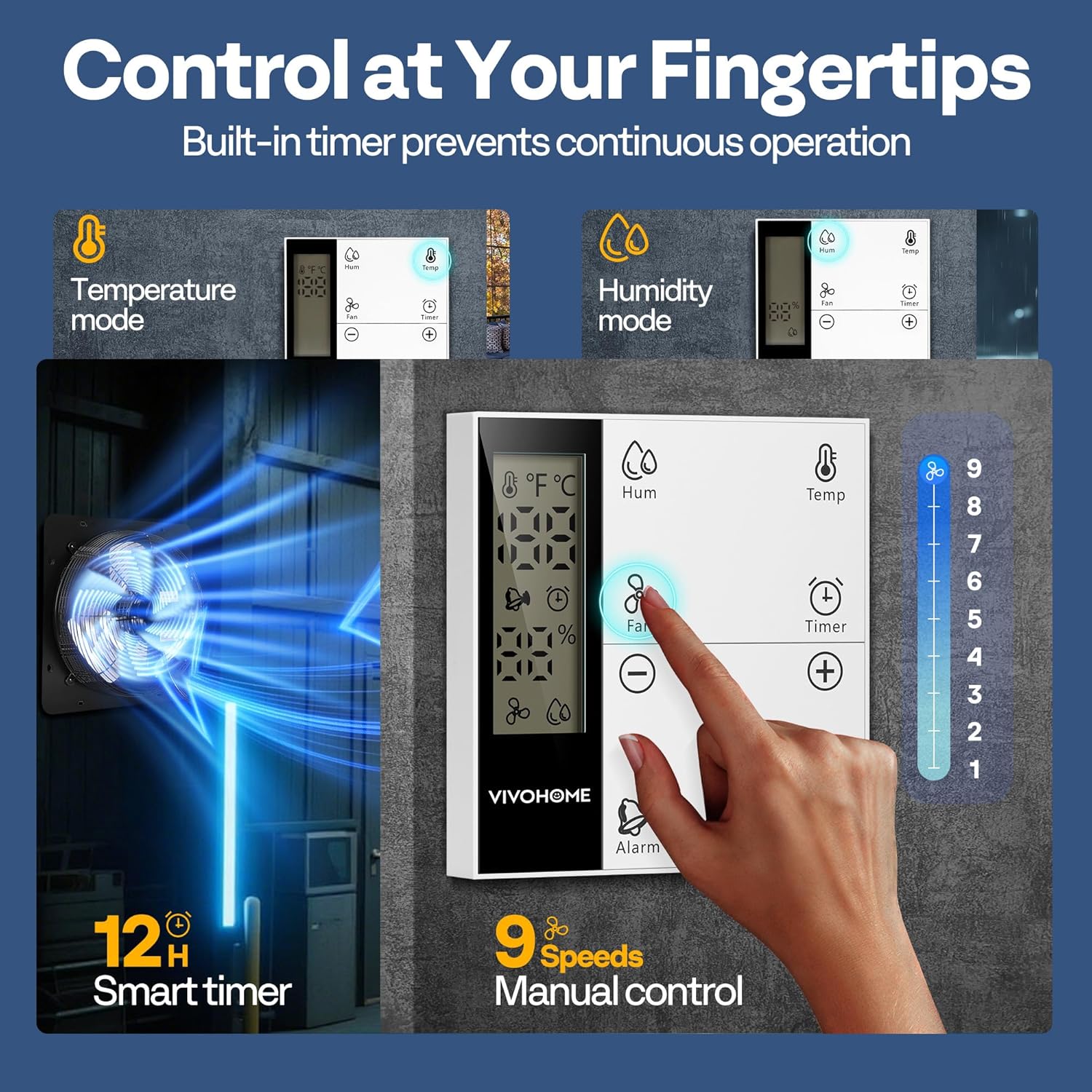
Image: Detailed view of the remote control, showing buttons for temperature, humidity, fan speed, timer, and alarm functions.

Image: Diagram of the remote control highlighting various buttons and their functions, including mute setting and temperature unit switch.
Video: A guide demonstrating the use of the remote control for the VIVOHOME Attic Fan with Thermostat, including setting temperature and fan speeds.
Video: Demonstrates the variable speed settings and automatic shutter operation of the VIVOHOME 12" & 14" Shutter Exhaust Fan.
Maintenance
Regular maintenance ensures the longevity and efficiency of your VIVOHOME exhaust fan:
- Cleaning: Disconnect the fan from power before cleaning. Regularly clean the fan blades, grille, and shutters to prevent dust and debris buildup. Use a soft, damp cloth. Avoid abrasive cleaners or solvents.
- Inspection: Periodically inspect the fan for any signs of wear, damage, or loose connections. Check the power cord for fraying or cuts.
- Shutter Operation: Ensure the automatic shutters open and close smoothly. Clear any obstructions that might hinder their movement, such as leaves or insects.
Troubleshooting
If you encounter issues with your VIVOHOME exhaust fan, refer to the following troubleshooting guide:
- Fan Not Turning On:
- Check if the power cord is securely plugged into a working 110V AC outlet.
- Ensure the remote control batteries are installed correctly and are not depleted. Replace if necessary.
- Verify that the fan is not in timer mode or set to a temperature/humidity threshold that has not yet been met.
- Fan Not Moving Air Effectively:
- Check for any obstructions around the fan blades or shutters.
- Ensure the shutters are opening fully when the fan is operating.
- Clean any accumulated dust or debris from the blades and grille.
- Remote Control Not Responding:
- Replace the AAA batteries in the remote control.
- Ensure there are no physical obstructions between the remote control and the fan's receiver.
- Alarm Constantly Triggering:
- Adjust the set temperature or humidity thresholds to appropriate levels for your specific environment.
- Ensure the fan is adequately ventilating the space to reduce temperature or humidity.
Specifications
| Brand | VIVOHOME |
| Model Name | Shutter Exhaust Fan |
| Model Number | VH1854 |
| Size | 12 inches |
| Product Dimensions (D x W x H) | 8.1" x 15" x 15" |
| Item Weight | 8.4 Pounds |
| Material | Aluminum, Metal |
| Color | Black |
| Power Source | AC |
| Voltage | 110 Volts |
| Wattage | 40 watts |
| Motor Type | EC Motor |
| Air Flow Capacity | 1300 Cubic Feet Per Minute (CFM) |
| Speed | 1700 RPM |
| Number of Speeds | 9 |
| Noise Level | 60 Decibels |
| Controller Type | Remote Control |
| Installation Type | Wall Mount |
| Recommended Uses | Attic, Chicken Coop, Greenhouse, Garage, Kitchen, Warehouse, Barn |
| Special Features | Auto Humidity Sensor, Automatic Shutters, Thermostat Control, Timer, Water Resistant |
| Lifespan | ≥20,000 Hours |

Image: Diagram showing the detailed dimensions and key specifications of the VIVOHOME 12-inch Shutter Exhaust Fan.
Warranty and Support
Warranty: This VIVOHOME product comes with a 1-year limited warranty from the date of purchase, covering manufacturing defects.
Customer Support: For technical assistance, warranty claims, or any questions regarding your VIVOHOME 12" Shutter Exhaust Fan, please contact VIVOHOME customer service. Refer to the product packaging or the official VIVOHOME website for contact information.


