
1. Safety Information
Please read and understand all instructions before assembling and using this product. Failure to follow these warnings can result in serious injury.
- Exercise caution around sharp edges during assembly.
- Assemble the bed according to instructions to ensure stability.
- Do not exceed the maximum weight capacity of 400 pounds for the bed frame.
- Keep electrical components (LED lights, charging station) dry and away from water.
- Always supervise children around the bed frame.
- Ensure all connections are securely tightened before use. Regularly check and retighten fasteners.
- Use the provided anti-tipping device to secure the bed to the wall.
- Only use a mattress with a thickness of 4-6 inches.

Figure 1: Key safety features including the anti-tilt device and stable ladder design.
2. Package Contents
Before beginning assembly, verify that all parts and hardware are present. Refer to the detailed parts and hardware lists below and the exploded view diagram.
2.1. Parts List
- Metal Bed Frame Components (Side rails, head/footboards, bed slats, support bars)
- Panel Desk
- Inclined Ladder
- 6 x Fabric Drawers
- Charging Station
- LED Light Strip
- Remote Control (for LED)
- Clothes Rail
- Wire Mesh Hanging Board
- Guardrail Hanging Storage Bag
- 5 x Hooks
- Instruction Manual
- Accessory Bags (containing various screws, washers, and tools)
2.2. Hardware List
The accessory bags contain various screws (M6x15mm, M6x30mm, M6x12mm, M6x40mm, M6x50mm, M6x60mm, M4x10mm), M6 washers, Allen wrenches, open-end wrenches, wall anchors, small screws, and anti-tipping brackets. Refer to the included instruction manual for exact quantities and identification of each hardware piece.

Figure 2: Overview of all components included in the package.
3. Assembly Instructions
Two people are recommended for assembly. Follow the steps carefully to ensure proper construction and stability.
Video 1: Official assembly guide for the Decofy Twin Metal Loft Bed with Desk.
- Assemble the Bed Frame Base: Connect the long side rails (1, 2) with the head/footboard decorative panels (7) and lower bed frame crossbars (10, 12) using the specified hardware. Ensure all screws are finger-tightened initially.
- Attach Side Rails and Head/Footboards: Secure the short side rails (3, 4) to the assembled base. Attach the upper headboard (5) and upper footboard (6) to complete the main bed frame structure. Fully tighten all screws.
- Install Bed Slats: Place the upper bed slats (9) into the designated slots on the bed frame. Secure them with the bed slat connectors (31) and appropriate screws.
- Assemble Desk and Storage Frame: Connect the desk frame long rails (19, 20), short rails (21), and crossbar (22). Similarly, assemble the storage unit frame using top bars (23) and bottom bars (24).
- Attach Desk and Storage Frame to Main Bed Frame: Carefully position and attach the assembled desk and storage frames to the main loft bed frame. Use the desk support bars (14) and lower support bar (15) to secure them.
- Install Desk and Bookshelf Panels: Place the desk panel (28) and bookshelf panel (29) onto their respective frames. Secure them using the provided screws.
- Assemble and Attach Ladder: Connect the ladder uprights (25, 26) with the ladder rungs (27). Attach the assembled ladder to the main bed frame using the specified hardware.
- Install Guardrail Accessories: Attach the clothes hanging rod (11) and the perforated metal panel (13) to the bed frame. Hang the guardrail hanging storage bag (32) and hooks (33) as desired.
- Install LED Light Strip and Charging Station: Peel off the adhesive backing from the LED light strip (O) and attach it to the underside of the bed frame as shown in the manual. Secure the charging station (N) into the cutout on the desk panel and connect its power cord. Use cable ties (from accessory bag) to manage wires.
- Secure Anti-Tipping Device: Attach the anti-tipping brackets (M) to the bed frame and the wall using the wall anchors (P) and screws (G). This step is crucial for safety.
4. Operating Instructions
4.1. LED Lighting
The integrated LED light strip provides customizable illumination. Use the included remote control to adjust colors, brightness, and various flash modes. The LED strip offers over 60,000 colors and multiple dynamic effects to create a personalized ambiance.
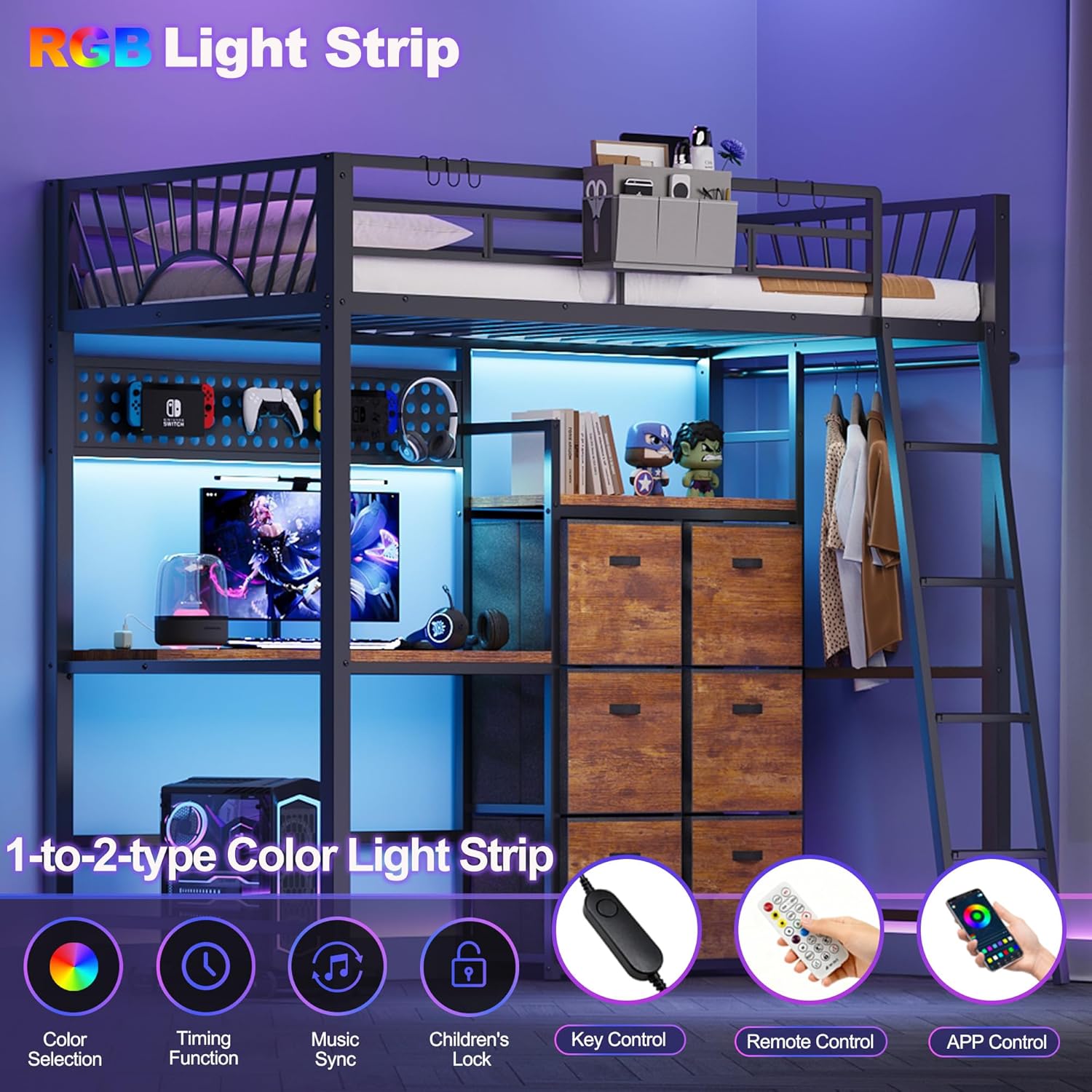
Figure 3: LED light strip providing illumination to the desk area.
4.2. Charging Station
The embedded charging station features 2 AC outlets and a USB port. Connect the power cord to a wall outlet to provide power for laptops, mobile phones, gaming devices, and other electronics. This eliminates the need for extension cords and keeps your workspace tidy.

Figure 4: Built-in charging station for convenient power access.
4.3. Storage Features
This loft bed is designed with multiple storage solutions:
- Fabric Pull-Out Cabinets: Six large-capacity fabric drawers are included for storing clothes, bedding, toys, or other personal items.
- Slab Desk & Bookshelf: The spacious desk surface accommodates computers and books, while the integrated bookshelf provides additional storage for reading materials or decorative items.
- Hooks: Five practical hooks are provided for hanging schoolbags, hats, or other accessories.
- Clothes Bar: A clothes bar, which can be interchanged left or right, is ideal for hanging clothes and scarves.
- Iron Mesh Hanging Board: Use this board for DIY displays, photo albums, or hanging small items.
- Guardrail Hanging Storage Bag: A convenient bag that hangs on the guardrail for storing small items like headphones, remote controls, or mobile phones.

Figure 5: Comprehensive storage solutions integrated into the loft bed design.
5. Maintenance
Proper maintenance ensures the longevity and safety of your loft bed.
- Cleaning: Wipe the metal frame and wooden panels with a dry cloth. Avoid using harsh chemicals or abrasive cleaners that could damage the finish.
- Regular Checks: Periodically inspect all screws, bolts, and connections to ensure they remain tight. Retighten any loose fasteners to maintain stability.
- Fabric Drawers: The fabric drawers can be spot cleaned with a damp cloth and mild detergent if necessary. Allow them to air dry completely.
- Electrical Components: Ensure the LED light strip and charging station remain dry. Do not attempt to repair electrical components yourself; contact qualified personnel if issues arise.
6. Troubleshooting
If you encounter issues with your loft bed, refer to the following common problems and solutions:
- Bed feels unstable or wobbly:
- Ensure all screws and bolts are fully tightened.
- Verify that the anti-tipping device is correctly installed and securely anchored to the wall.
- Check that all frame components are properly aligned and connected according to the assembly instructions.
- LED light strip is not working:
- Check if the power adapter is securely plugged into a working outlet.
- Ensure all connections between the LED strip, controller, and power adapter are firm.
- Replace the battery in the remote control if it's unresponsive.
- Charging station is not providing power:
- Confirm the charging station's power cord is fully plugged into a functional wall outlet.
- Check if the charging station itself is properly seated in the desk cutout and its internal connections are secure.
- Test the outlet with another device to ensure it is working.
- Parts do not align during assembly:
- Review the assembly video and diagrams carefully to ensure parts are oriented correctly.
- Do not fully tighten all screws until the entire section is assembled to allow for minor adjustments.
- If a part appears defective, contact customer support.
7. Specifications
| Feature | Detail |
|---|---|
| Model Number | DC-LB02 |
| Size | Twin Loft Bed with Desk |
| Material | Metal |
| Product Dimensions (L x W x H) | 77.9" x 41" x 71.6" |
| Item Weight | 106.92 Pounds |
| Maximum Weight Recommendation | 400 Pounds |
| Compatible Mattress Size | Twin (Recommended thickness: 4"-6") |
| Color | Black |
| Special Features | No Box Spring Needed, LED Lighting, Charging Station, Heavy Duty & Stable, Space Saving, Remote Control, USB Port, Storage Space |
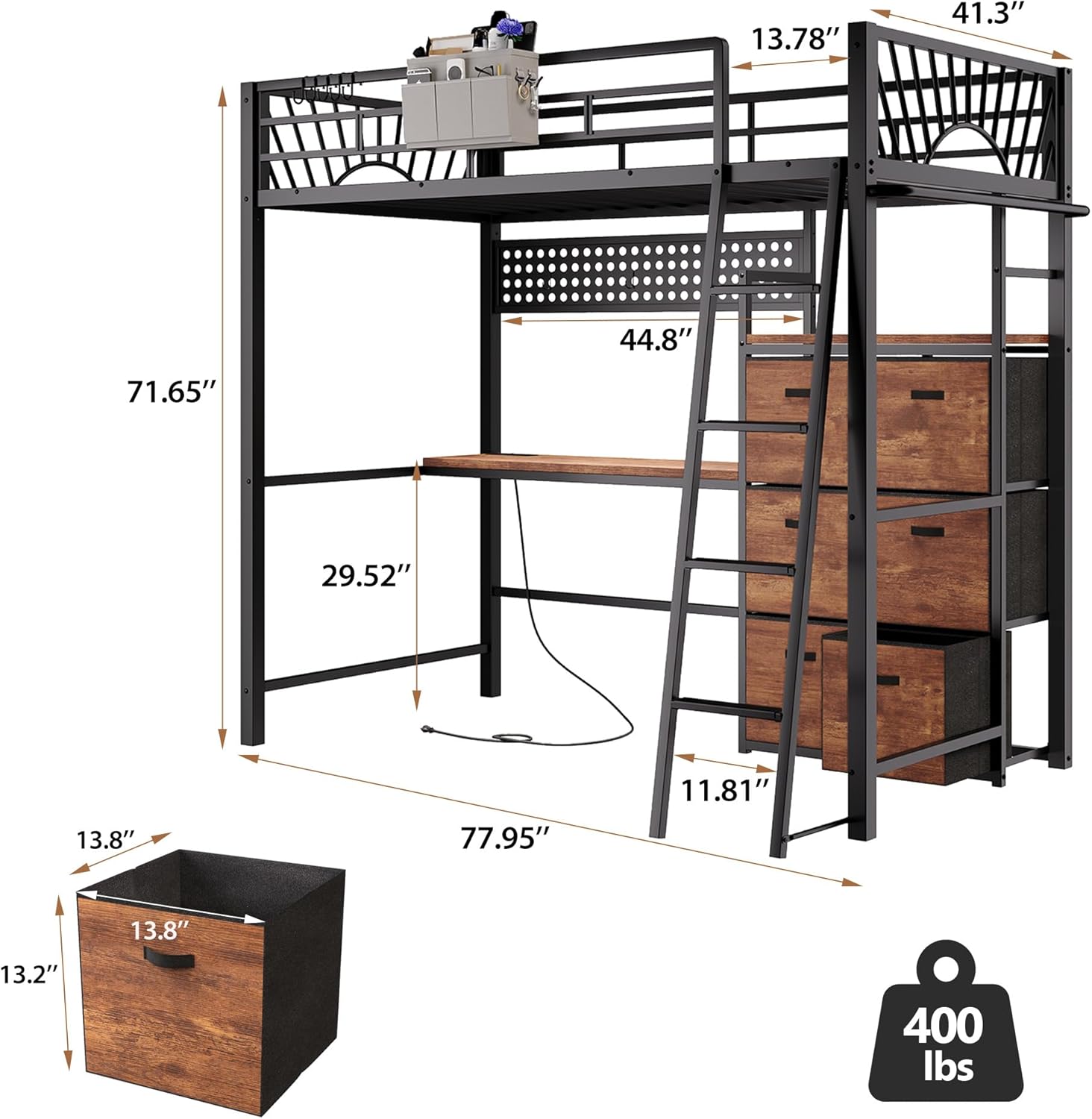
Figure 6: Product dimensions for the loft bed.

Figure 7: Mattress compatibility and weight capacity details.
8. Warranty & Support
For warranty information, product support, or to report missing/damaged parts, please contact Decofy customer service. Keep your purchase receipt and model number (DC-LB02) handy for faster service.
Contact information can typically be found on the retailer's website or on the product packaging.


