
1. Introduction
Thank you for choosing the SEESII L40 pro Multi-Functional Gardening Tool. This 8-in-1 cordless tool is designed to simplify various gardening tasks, including high and low branch cutting, pruning, hedge shaping, and lawn care. It integrates an 8-inch electric chainsaw, pole pruning shears, pole hedge trimmer, pole grass trimmer, cordless pruning shears, handheld chainsaw, cordless hedge trimmer, and electric grass trimmer into one versatile system. This manual provides essential information for safe and efficient operation, maintenance, and troubleshooting.

Image: Overview of the SEESII L40 pro 8-in-1 Multi-Functional Gardening Tool, illustrating its various attachments and applications for different gardening tasks.
2. Safety Instructions
Always prioritize safety when operating power tools. Read and understand all safety warnings and instructions before use. Failure to follow these instructions may result in electric shock, fire, and/or serious injury.
- Personal Protective Equipment: Always wear appropriate personal protective equipment (PPE) including safety glasses, gloves, hearing protection, and sturdy footwear.
- Work Area: Keep the work area clean and well-lit. Cluttered or dark areas invite accidents. Keep children and bystanders away while operating the tool.
- Electrical Safety: Do not expose power tools to rain or wet conditions. Water entering a power tool will increase the risk of electric shock.
- Tool Maintenance: Maintain tools with care. Check for misalignment or binding of moving parts, breakage of parts, and any other condition that may affect the tool’s operation.
- Battery Safety: Use only SEESII brand batteries with this product. Using other batteries may create a risk of injury and fire.
- Secure Grip: Always maintain a firm grip on the tool, especially when using the extension pole.
- Chain Saw Specific: Be aware of kickback when operating the chainsaw. Ensure proper chain tension.
- Hedge Trimmer Specific: Keep hands away from blades. Ensure blades are properly installed and secured.
3. Package Contents
Verify that all items listed below are included in your package:
- Electric Chainsaw (x1)
- Electric Pruning Shears (x1)
- Extendable Pole (x1)
- Trimmer Body (x1)
- Hedge Trimmer Blade (x1)
- Grass Trimmer Blade (x1)
- Hedge Trimmer Blade Protective Cover (x1)
- Grass Trimmer Blade Protective Cover (x1)
- Chainsaw Protective Cover (x1)
- 4000mAh Battery (x2)
- Charger (x1)
- Shoulder Strap (x1)
- User Manual (Japanese) (x1)
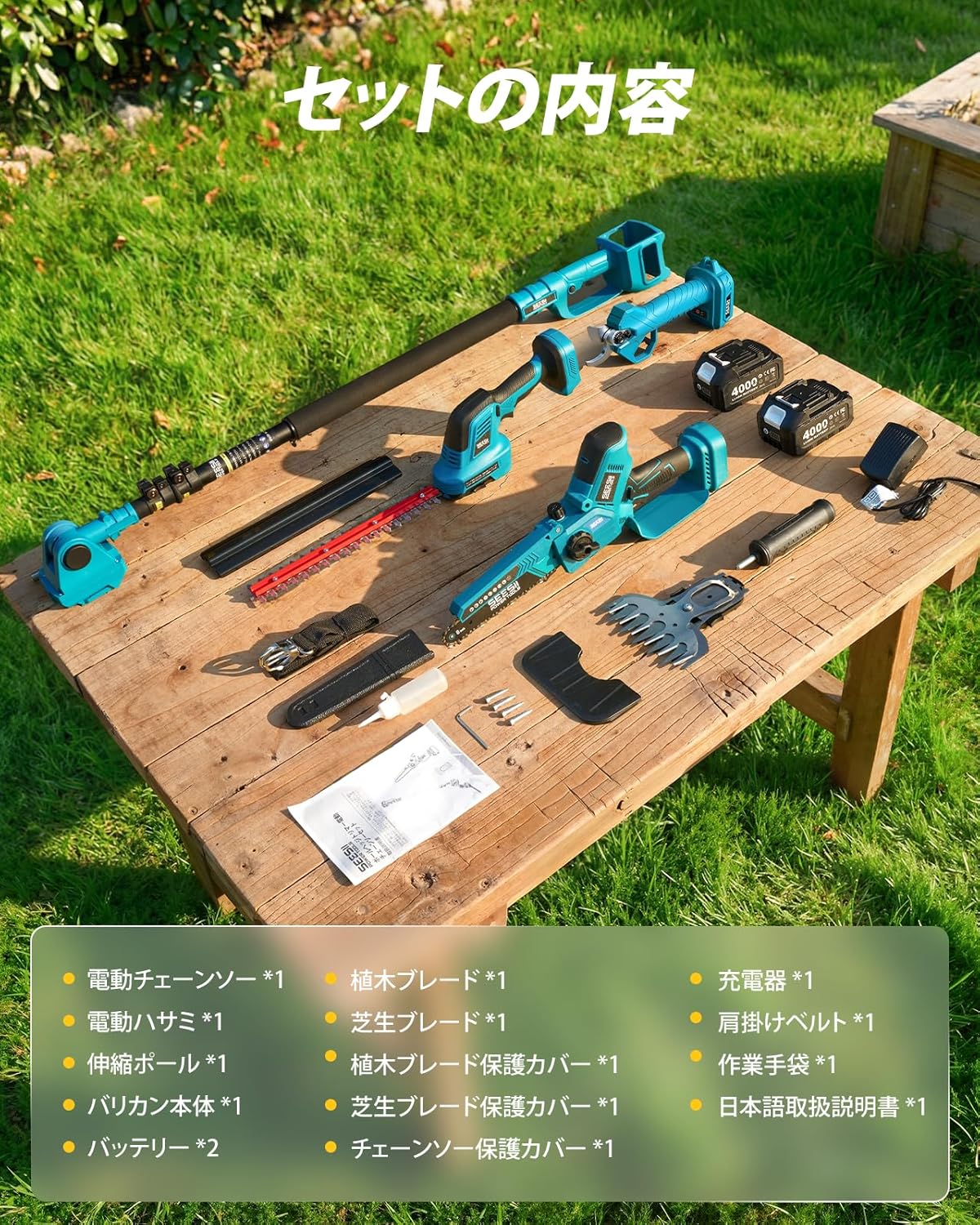
Image: All components included in the SEESII L40 pro package, neatly arranged on a wooden surface.
4. Setup
4.1. Battery Installation
Insert the 4000mAh battery into the designated slot on the tool until it clicks securely into place. Ensure the battery is fully charged before first use. The batteries feature a charge indicator for easy monitoring.

Image: Two 4000mAh batteries, highlighting their capacity and importance for extended operation.
4.2. Chainsaw Chain Installation and Tensioning
- Use the provided wrench to loosen the two fixing bolts on the chainsaw cover.
- Remove the cover and the guide bar.
- Carefully place the chain around the sprocket and guide bar, ensuring the cutting direction of the chain is correct.
- Align the guide bar with the mounting holes on the chainsaw body.
- Replace the cover and loosely tighten the bolts.
- Use a screwdriver to adjust the chain tension through the adjustment hole. The chain should have a slight give (2-3mm) when pulled lightly.
- Once the tension is correct, fully tighten the two fixing bolts with the wrench.
Video: Detailed procedure for replacing the chain on the SEESII electric chainsaw, including tension adjustment.
4.3. Hedge Trimmer Blade Installation
To install the hedge trimmer blade, ensure the power tool is off and the battery is removed. Align the blade with the gear mechanism and secure it with the cover and screws. Refer to the video for a visual guide.
Video: Step-by-step guide on how to install the blade for the SEESII hedge trimmer attachment.
5. Operating Instructions
5.1. General Operation
After attaching the desired tool head and battery, press and hold the safety switch, then quickly press the operating switch twice to start the tool. Release the safety switch once the tool is running.
5.2. Extendable Pole Usage
The extendable pole can be adjusted steplessly from 130cm to 240cm, providing a maximum working range of up to 450cm (including user height). This allows for safe and easy trimming of high branches without a ladder. The tool head can be adjusted from 0° to 180° for optimal cutting angles.
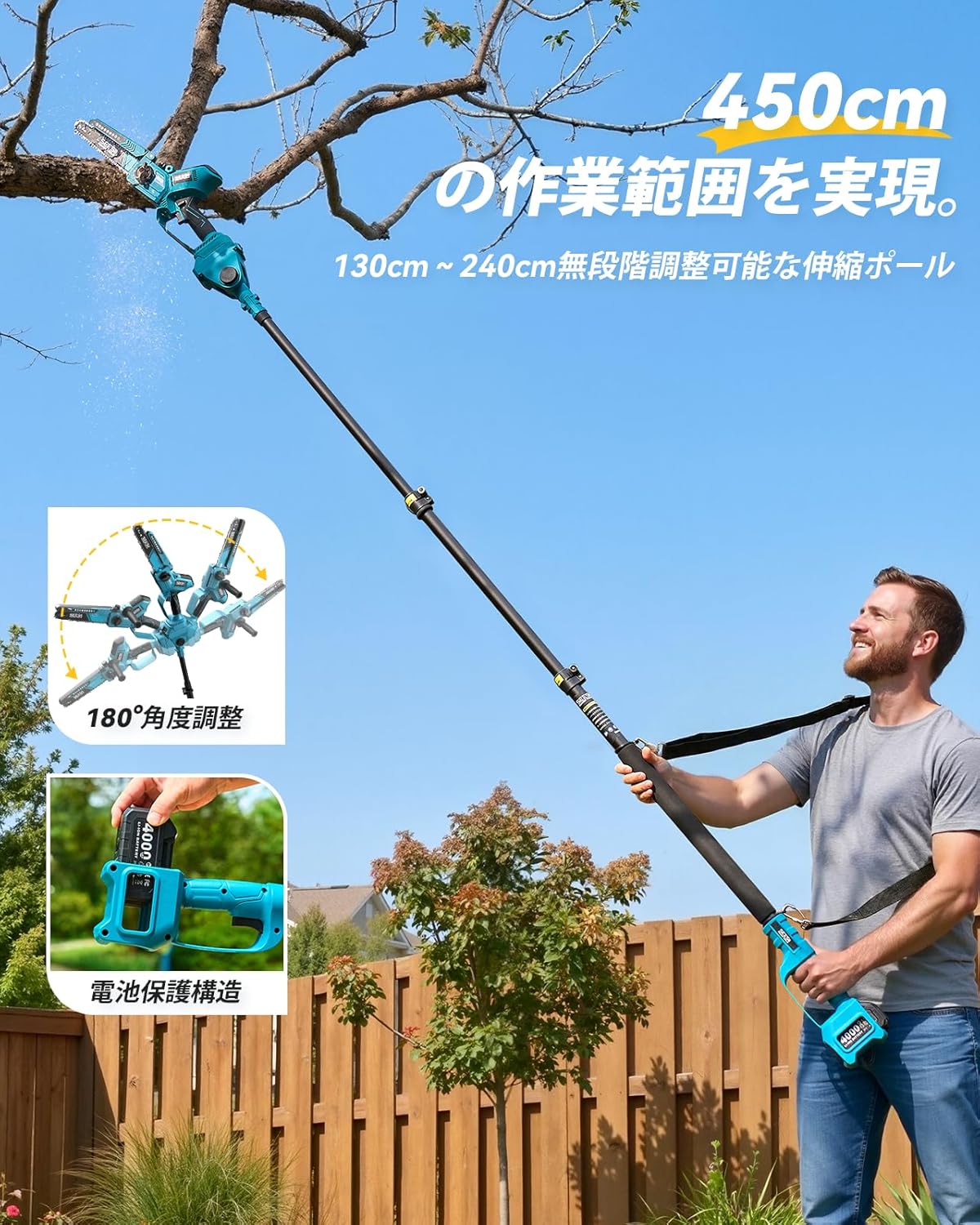
Image: Demonstrates the extendable pole in use for high branch pruning, highlighting its adjustable length and head angle.
Video: Shows the SEESII 8-inch electric chainsaw in action, both handheld and with the extendable pole, demonstrating its cutting power and automatic oiling feature.
5.3. Electric Pruning Shears Operation
The cordless pruning shears are equipped with a brushless motor, capable of smoothly cutting branches up to 30mm in diameter. The anti-slip design ensures comfortable use during long periods of work, and the cutting diameter can be easily switched between two stages.
Video: Demonstrates the operation of the high branch electric pruning shears, showing how to activate and use the tool for precise cuts.
6. Maintenance
6.1. Chainsaw Chain Lubrication
The 8-inch chainsaw features an automatic lubrication system. Ensure the oil reservoir is filled with appropriate chain oil. Check the oil level regularly and refill as needed (approximately 30ml each time). Proper lubrication extends chain life and ensures smooth operation.
6.2. Cleaning and Storage
After each use, clean all tool heads and the main body. Remove any debris, sawdust, or grass clippings. Store the tool and batteries in a dry, secure place, away from direct sunlight and extreme temperatures. Always attach protective covers to blades and chains when storing.
7. Troubleshooting
If you encounter any issues, refer to the following common troubleshooting tips:
- Tool not starting: Ensure the battery is fully charged and properly installed. Check that the safety switch is pressed before activating the operating switch.
- Chainsaw not cutting efficiently: Check chain tension and sharpness. Ensure the oil reservoir is filled for proper lubrication.
- Hedge/Grass Trimmer blades jamming: Ensure blades are clean and free of debris. Avoid cutting branches thicker than the recommended maximum diameter.
- Battery not charging: Verify the charger is properly connected to both the battery and a power outlet. Ensure the charger is functioning correctly.
For persistent issues, please contact customer support.
8. Specifications
| Feature | Specification |
|---|---|
| Brand | Seesii |
| Model Number | L40 pro |
| Power Source | Battery Powered |
| Battery Capacity | 4000mAh (x2 included) |
| Chainsaw Bar Length | 8 inches |
| Chainsaw Cutting Diameter | Up to 200mm |
| Pruning Shears Cutting Diameter | Up to 30mm |
| Hedge Trimmer Blade Length | 350mm |
| Grass Trimmer Blade Length | 150mm |
| Extendable Pole Length | 130cm - 240cm (stepless adjustment) |
| Max Working Reach (with pole) | Up to 450cm |
| Head Angle Adjustment | 0° - 180° |
| Motor Type | Brushless Motor |
| Chainsaw Motor Power | 1200W |
| Chainsaw No-load Speed | 4500 r/min |
| Fast Charger Time | 2-3 hours |
| Product Dimensions (L x W x H) | 40 x 20 x 30 cm |
| Country of Origin | China |
9. Warranty and Support
SEESII products come with a 1-year warranty. If you experience any product defects or have questions during use, please contact us. We offer free exchanges for initial defects. Our customer support team aims to respond within 24 hours.
How to Contact Support:
- Go to your order history.
- Select the relevant order.
- Click on the product to view order details.
- Click on the 'Seller Name' (Seesii-JP).
- Click 'Ask a Question'.
We are committed to providing prompt assistance.