
1. Introduction
The S.M.S.L A100 is a compact Class D stereo audio amplifier designed for home desktop speaker systems. It features an Infineon MA12070 chip, Bluetooth 5.0 connectivity, USB audio input, and RCA input, providing versatile audio playback options. This manual provides detailed instructions for the proper setup, operation, and maintenance of your A100 amplifier.
2. Safety Instructions
- Do not expose this device to rain or moisture.
- Do not disassemble the unit. Refer all servicing to qualified personnel.
- Ensure proper ventilation around the unit to prevent overheating.
- Use only the specified power supply and cables.
- Keep the unit away from heat sources, direct sunlight, and strong magnetic fields.
- Disconnect the power plug from the wall outlet if the unit is not in use for a long period.
3. Package Contents
Please check the package for the following items:
- S.M.S.L A100 Amplifier
- Power Cable
- USB Cable
- User Manual
4. Product Overview
4.1 Front Panel
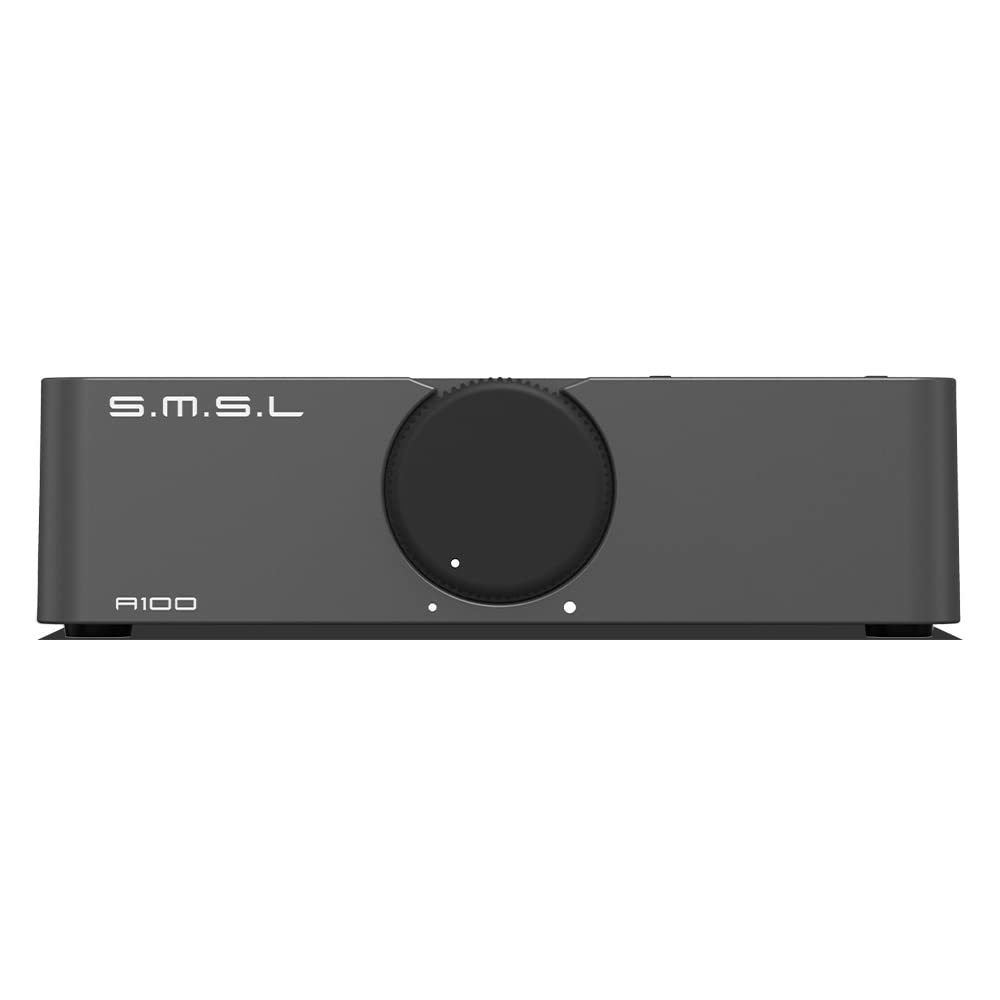
The front panel features the main volume control knob, which also functions as a mute button, and input selection indicators. The input selection button allows switching between USB, Bluetooth, and AUX (RCA) inputs.
4.2 Rear Panel

The rear panel includes the AC power input, power switch, speaker output terminals (for left and right channels), USB input port, RCA (AUX) input jacks, and two subwoofer pre-outputs.
4.3 Key Features
- Infineon MA12070 Chip: Utilizes a high-efficiency Class D power amplifier chip for enhanced sound performance.
- Bluetooth 5.0 Receiver: Provides stable and high-quality wireless audio streaming with extended transmission distance.
- Multiple Input Methods: Supports USB, Bluetooth 5.0, and Line-in (RCA) audio inputs.
- Driver-Free USB Audio: USB audio input supports driver-free operation for easy connection to computers.
- Subwoofer Pre-Output: Includes two sets of subwoofer signal pre-outputs for connecting active subwoofer systems (2.1 or 2.2 configurations).
- Integrated Power Supply: Features a low-noise, high-power audio-dedicated switching power supply.
- Protection Circuitry: Incorporates protection against overheating and overcurrent.
- Gold-Plated Terminals: High-quality gold-plated input and output terminals for optimal signal transfer.
5. Setup
5.1 Connecting Speakers
- Ensure the amplifier is powered off.
- Connect your passive speakers to the speaker output terminals on the rear panel. Match the positive (+) terminal of the amplifier to the positive (+) terminal of the speaker, and the negative (-) terminal of the amplifier to the negative (-) terminal of the speaker.
- Ensure a secure connection for both left (L) and right (R) channels.
5.2 Connecting Audio Sources
5.2.1 USB Input

Connect the provided USB cable from your computer (laptop or desktop PC) to the USB input port on the rear of the A100 amplifier. The amplifier supports driver-free operation for various music file formats.
5.2.2 RCA (AUX) Input
Connect an audio source (e.g., CD player, DAC, TV) to the RCA (AUX) input jacks on the rear panel using appropriate RCA cables. Ensure left and right channels are correctly matched.
5.2.3 Bluetooth Input
For Bluetooth connection, ensure the amplifier is powered on and select the Bluetooth input. Then, enable Bluetooth on your source device (e.g., smartphone, tablet) and select 'S.M.S.L A100' from the list of available devices to pair.
5.3 Connecting an Active Subwoofer

The A100 features two subwoofer pre-outputs. Connect your active subwoofer to either of these outputs. Your active subwoofer must have a 'Subwoofer in' or 'LFE in' port. After connection, the bass signal will be output from both the main speakers and the subwoofer simultaneously, enriching the low-frequency response.
6. Operating Instructions
6.1 Power On/Off
Flip the power switch on the rear panel to the 'ON' position to power on the amplifier. Flip it to 'OFF' to power off the amplifier.
6.2 Input Selection
Press the input switch button on the front panel to cycle through the available inputs: USB, Bluetooth (BT), and AUX (RCA). The corresponding indicator light will illuminate to show the active input.
6.3 Volume Control and Mute
Rotate the large central knob on the front panel clockwise to increase volume and counter-clockwise to decrease volume. Press the volume knob once to mute the audio. Press it again to unmute.
6.4 Bluetooth Pairing
When the Bluetooth input is selected, the Bluetooth indicator will flash, indicating it is in pairing mode. On your device, search for 'S.M.S.L A100' and connect. Once paired, the indicator will remain solid.
6.5 USB Audio Playback
After connecting your computer via USB and selecting the USB input, the A100 will be recognized as an audio output device. Select it as your default audio output in your computer's sound settings to play audio through the amplifier.
7. Maintenance
- Clean the unit with a soft, dry cloth. Do not use abrasive cleaners or solvents.
- Avoid blocking the ventilation openings to ensure proper airflow.
- Regularly check cable connections for security and integrity.
8. Troubleshooting
| Problem | Possible Cause | Solution |
|---|---|---|
| No power | Power cable not connected; Power switch off | Ensure power cable is securely connected; Turn power switch ON. |
| No sound output | Incorrect input selected; Volume too low; Speaker cables loose; Mute activated | Select correct input; Increase volume; Check speaker connections; Press volume knob to unmute. |
| Bluetooth not pairing | Not in pairing mode; Device too far; Interference | Ensure Bluetooth input is selected and flashing; Move device closer; Reduce interference from other wireless devices. |
| USB audio issues | USB cable not connected; Incorrect audio output selected on PC | Check USB cable connection; Select A100 as default audio output on your computer. |
9. Specifications
- Model: A100
- Power Amplifier Chip: Infineon MA12070
- Channels: 2
- Output Power: 80W x 2 (into 4 ohms)
- Bluetooth Version: 5.0
- Inputs: USB, Bluetooth, RCA (Line-in)
- Outputs: Speaker terminals (L/R), Subwoofer pre-out x 2
- Voltage: AC 100-240V (Internal Power Supply)
- Dimensions: Approximately 150mm x 150mm x 45mm (Width x Depth x Height)
- Weight: Approximately 2.14 Pounds (0.97 kg)
10. Warranty and Support
The S.M.S.L A100 amplifier comes with a 12-month warranty. During this period, you may return the item or request a replacement if you encounter any problems. For technical support or warranty claims, please contact your retailer or the official S.M.S.L support channels.