
1. Safety Information
Please read and understand all safety warnings and operating instructions before using this multimeter. Failure to do so may result in electric shock, fire, or serious injury.
- Always ensure the multimeter is in the correct measurement mode before connecting to a circuit.
- Do not exceed the maximum input values specified for each range.
- Exercise extreme caution when working with voltages above 60V DC or 30V AC RMS.
- Inspect the test leads for damage before each use. Do not use if insulation is compromised.
- Do not operate the multimeter if it appears damaged or is not functioning properly.
- Replace batteries immediately when the low battery indicator appears to ensure accurate readings.
- Keep hands and fingers behind the probe barriers during testing.
2. Product Overview
The MDWXDOFP ZL128B is a True RMS Smart Pen Multimeter designed for accurate and reliable electrical measurements. It features a digital display with 4000 counts and a measurement speed of 3 times per second.
2.1 Components
The multimeter consists of a main body, a digital display, function buttons, and test probe connections.
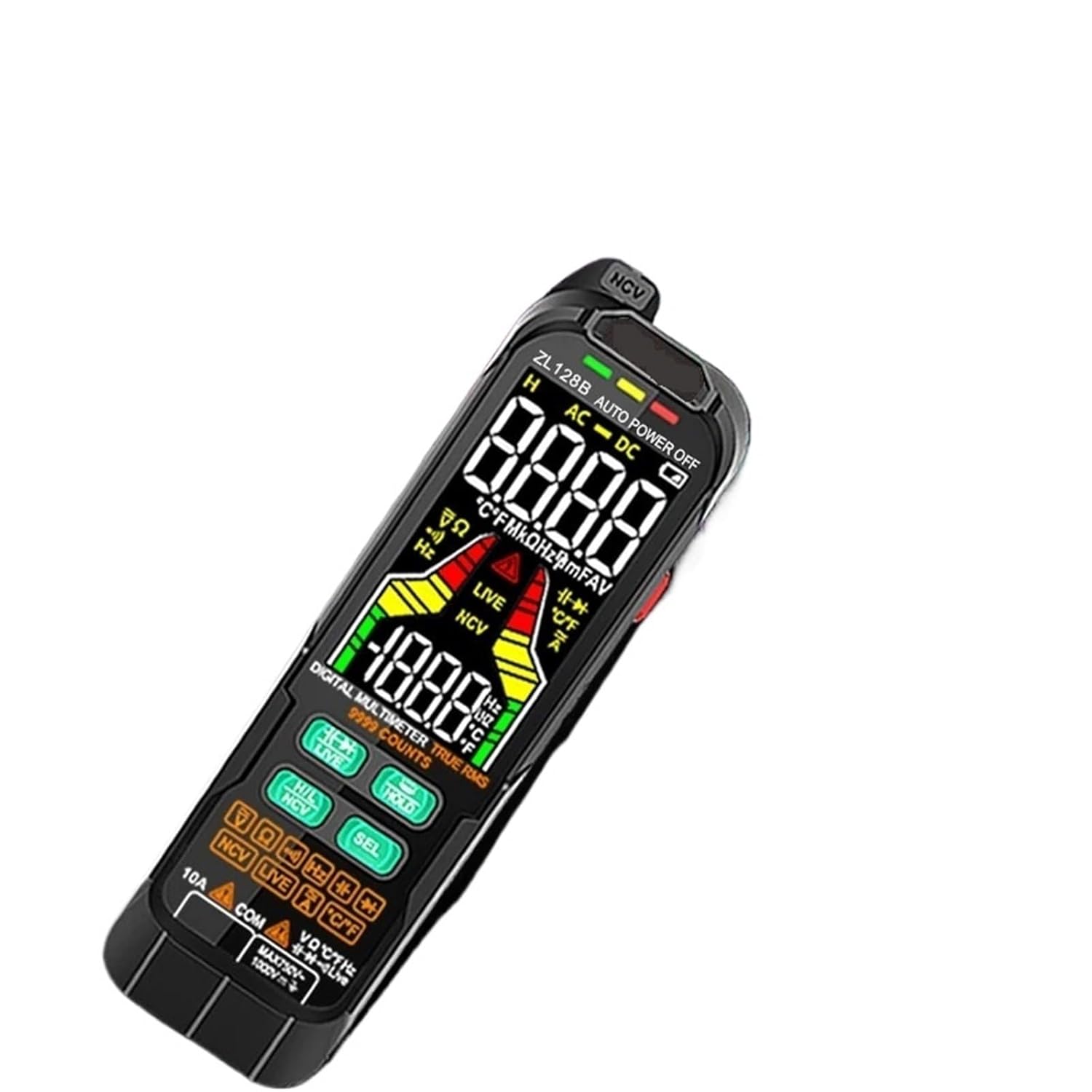
Figure 1: Front view of the ZL128B Smart Pen Multimeter, highlighting the display, function buttons, and probe tip.

Figure 2: The ZL128B Smart Pen Multimeter held in hand, demonstrating its ergonomic design for practical use.
2.2 Display Indicators
- AC/DC: Indicates Alternating Current or Direct Current measurement.
- V: Voltage measurement.
- Ω: Resistance measurement.
- F: Capacitance measurement.
- Hz: Frequency measurement.
- °C/°F: Temperature measurement.
- NCV: Non-Contact Voltage detection mode.
- LIVE: Live wire detection mode.
- HOLD: Data hold function activated.
- AUTO: Auto-ranging mode.
- Battery Icon: Indicates low battery level.
3. Setup
3.1 Battery Installation
- Locate the battery compartment cover on the back of the multimeter.
- Use a screwdriver to open the cover.
- Insert two 1.5V AAA batteries, observing the correct polarity (+/-).
- Replace the battery compartment cover and secure it with the screw.
Note: The ZL128B Charging PRO model includes rechargeable batteries and a charging port. Refer to the charging instructions for initial charge before first use.
3.2 Initial Power On
Press the power button to turn on the multimeter. The display will illuminate, and the device will enter auto-ranging mode by default.
4. Operating Instructions
The ZL128B features an intelligent auto-ranging function that automatically identifies the measurement type (AC/DC Voltage, Resistance, Continuity) and selects the appropriate range. For other functions, use the 'SEL' button.
4.1 Automatic Measurement Mode
- Turn on the multimeter. It will default to auto mode.
- Connect the test leads to the circuit or component. The multimeter will automatically detect and display Voltage (AC/DC), Resistance, or Continuity.
4.2 Manual Function Selection
Press the 'SEL' button to cycle through different measurement functions when not in auto mode or to select specific functions like Capacitance, Diode, Frequency, or Temperature.
4.2.1 DC/AC Voltage Measurement
- Select 'V' mode (if not in auto).
- Connect the red test lead to the positive terminal and the black test lead to the negative terminal of the DC source, or across the AC source.
- Read the voltage value on the display.
4.2.2 Resistance Measurement (Ω)
- Select 'Ω' mode (if not in auto).
- Ensure the circuit is de-energized before measuring resistance.
- Connect the test leads across the component to be measured.
- Read the resistance value.
4.2.3 Capacitance Measurement (F)
- Select 'F' mode using the 'SEL' button.
- Ensure the capacitor is fully discharged before measurement.
- Connect the test leads across the capacitor terminals.
- Read the capacitance value.
4.2.4 Diode Test
- Select Diode mode using the 'SEL' button.
- Connect the red test lead to the anode and the black test lead to the cathode of the diode.
- A forward voltage drop will be displayed. Reverse the leads; an open circuit (OL) should be displayed for a good diode.
4.2.5 Non-Contact Voltage (NCV) Detection
- Press the NCV button to activate NCV mode.
- Move the tip of the multimeter close to the conductor.
- The device will emit an audible beep and the NCV indicator will light up if AC voltage is detected.
4.2.6 Live Wire Detection
- Press the LIVE button to activate Live Wire mode.
- Insert the red test probe into the socket or touch the conductor.
- The display will indicate 'LIVE' and an audible alarm will sound if a live wire is detected.
4.2.7 Frequency (Hz) Measurement
- Select 'Hz' mode using the 'SEL' button.
- Connect the test leads across the circuit where frequency is to be measured.
- Read the frequency value on the display.
4.2.8 Data Hold Function
- Press the 'HOLD' button to freeze the current reading on the display.
- Press 'HOLD' again to release the reading and resume live measurement.
5. Maintenance
5.1 Cleaning
Wipe the case with a damp cloth and mild detergent. Do not use abrasives or solvents. Ensure the device is off and disconnected from any power source before cleaning.
5.2 Storage
When not in use for extended periods, remove the batteries to prevent leakage. Store the multimeter in a cool, dry place away from direct sunlight and extreme temperatures.
5.3 Battery Replacement
When the low battery indicator appears on the display, replace the batteries as described in the 'Battery Installation' section (3.1). For the ZL128B Charging PRO, ensure regular charging to maintain optimal performance.
6. Troubleshooting
- No Display: Check battery installation and charge level. Replace or recharge batteries if necessary.
- Inaccurate Readings: Ensure correct measurement mode is selected. Check test lead connections. Verify batteries are not low.
- 'OL' on Display: Indicates an open circuit or that the measured value exceeds the selected range. Adjust range or check connections.
- No NCV/LIVE Detection: Ensure the function is activated. The signal might be too weak or the conductor too far.
7. Specifications
| Parameter | Specification |
|---|---|
| Model Number | ZL128B |
| Display Type | Digital Display, 4000 Counts |
| Measurement Speed | 3 times per second |
| DC Voltage Range | 4V/40V/400V/600V ±(0.5%reading+3) |
| AC Voltage Range | 4V/40V/400V/600V ±(0.8%reading+3) |
| Resistance Range | 400Ω/40kΩ/400kΩ/4MΩ/40MΩ ±(1.5%reading+10) |
| Capacitance Range | 40nF/400nF/4µF/40µF/400µF/4mF ±(3.0%reading+5) |
| Frequency Range | 40Hz/400Hz/4kHz/40kHz/400kHz/4MHz |
| Maximum Voltage | DC/AC 600V |
| Operating Temperature | 0 - 50°C |
| Power Source | 2 x 1.5V AAA Batteries (included) |
| Product Dimensions | 1.1 x 0.9 x 2.8 inches |
| Item Weight | 1.76 ounces (0.078 kg) |
| Certification | UL |
8. Warranty and Support
This product is covered by a standard manufacturer's warranty against defects in materials and workmanship. For specific warranty terms, duration, and to obtain technical support or service, please contact the retailer or manufacturer directly.
Please retain your proof of purchase for warranty claims.