
Introduction
Thank you for choosing the Zenport ZL615 Long Reach Telescopic Pruner. This manual provides essential information for the safe and effective use, setup, operation, and maintenance of your new tool. Please read these instructions carefully before use and retain them for future reference.
The Zenport ZL615 is designed for precise pruning of branches in hard-to-reach areas, extending from 33.5 to 73 inches. Its lightweight aluminum pole and bypass cutting head ensure clean cuts with minimal effort.
Safety Information
WARNING: Always exercise caution when using pruning tools. Blades are sharp and can cause serious injury.
- Always wear appropriate personal protective equipment (PPE), including safety glasses, gloves, and sturdy footwear.
- Keep hands and body parts clear of the cutting blades.
- Ensure the area around you is clear of bystanders, especially children and pets, before operating the pruner.
- Do not use the pruner near electrical wires or power lines.
- Inspect the tool before each use for any damage or loose parts. Do not use if damaged.
- Use the pruner only for its intended purpose: pruning branches. Do not attempt to cut materials beyond its capacity.
- Maintain a stable footing and balance, especially when extending the pole to its maximum length.
- Store the pruner in a safe, dry place, out of reach of children.
Product Components
The Zenport ZL615 Long Reach Telescopic Pruner consists of the following main components:
- Telescopic Pole: Lightweight aluminum pole that extends for long reach.
- Adjustable Handle/Grip: Ergonomic handle for comfortable operation and control.
- Bypass Cutting Head: Sharp carbon steel blades designed for clean cuts on green wood.
- Locking Mechanism: Secures the pole at desired lengths.

Image: The Zenport ZL615 Long Reach Telescopic Pruner, showing the full length of the tool.
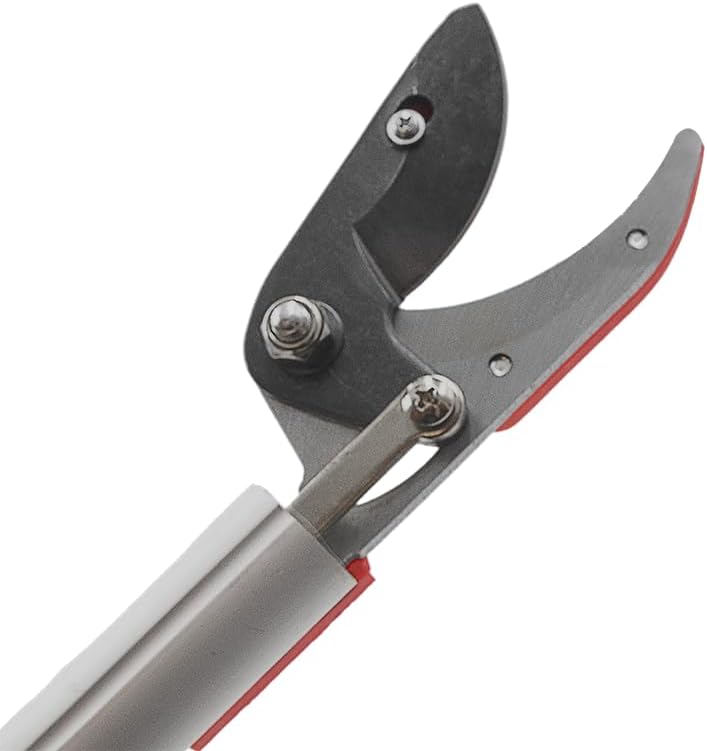
Image: A detailed view of the bypass cutting head, highlighting the sharp blades.
Setup and Adjustment
- Unpacking: Carefully remove the pruner from its packaging. Inspect for any shipping damage.
- Extending the Pole:
- Locate the locking mechanism on the telescopic pole.
- Twist or release the lock to allow the pole to extend.
- Gently pull the pole to the desired length. The ZL615 extends from 33.5 inches (85 cm) to 73 inches (185 cm).
- Once the desired length is reached, secure the locking mechanism firmly to prevent accidental retraction during use.
- Adjusting the Handle: The handle may feature a rotation mechanism for optimal grip and angle.
- If applicable, adjust the handle's angle for comfortable operation. The handle can rotate up to 180 degrees for versatile use.
- Ensure the handle is securely locked in position before use.

Image: The adjustable handle of the ZL615, illustrating its 180-degree rotation capability for ergonomic use.

Image: Diagram showing the dimensions of the ZL615 pruner, including its extended length and handle/head measurements.
Operating Instructions
Follow these steps for effective and safe pruning:
- Assess the Branch: Identify the branch to be cut. Ensure it is within the pruner's cutting capacity (typically for green wood). Avoid attempting to cut excessively thick or dry branches, which can damage the blades or mechanism.
- Position the Pruner: Extend the pole to the appropriate length. Position the cutting head around the branch. For best results, place the branch as deep as possible into the jaws of the bypass cutting head.
- Make the Cut: Firmly squeeze the handle grip. The bypass blades will close, making a clean cut. Apply steady pressure. Do not twist or wrench the pole during cutting.
- Retract and Store: After use, retract the pole to its shortest length and secure the locking mechanism. Clean the blades before storage.

Image: The Zenport ZL615 Long Reach Telescopic Pruner being used to cut a branch, demonstrating its extended reach.
Maintenance
Regular maintenance will prolong the life and performance of your Zenport ZL615 pruner:
- Cleaning: After each use, clean the blades and cutting head to remove sap, dirt, and debris. Use a damp cloth and, if necessary, a mild detergent. Dry thoroughly to prevent rust.
- Lubrication: Periodically apply a light machine oil to the pivot points of the cutting head and the telescopic pole mechanism to ensure smooth operation.
- Sharpening: The carbon steel blades may require sharpening over time. Use a sharpening stone or file designed for pruning tools. Always sharpen the beveled edge of the blade, maintaining the original angle. Refer to professional sharpening services if unsure.
- Storage: Store the pruner in a dry, protected area. Retract the pole to its shortest length for compact storage.
- Inspection: Regularly check all screws, bolts, and the locking mechanism for tightness. Tighten any loose fasteners.
Troubleshooting
| Problem | Possible Cause | Solution |
|---|---|---|
| Difficulty extending/retracting pole | Dirt/debris in mechanism, dry mechanism, locking mechanism engaged. | Clean the pole sections. Apply lubricant to the telescopic mechanism. Ensure the locking mechanism is fully disengaged. |
| Blades not cutting cleanly | Dull blades, sap/resin buildup, attempting to cut too thick a branch. | Clean blades thoroughly. Sharpen blades. Ensure branch size is within tool capacity. |
| Handle feels loose or wobbly | Loose fasteners on the handle or cutting head. | Inspect and tighten all screws and bolts on the handle and cutting head. |
Specifications
| Feature | Detail |
|---|---|
| Model Number | ZL615 |
| Brand | Zenport |
| Extension Length | 33.5 to 73 inches (85 cm to 185 cm) |
| Blade Material | Carbon Steel |
| Blade Type | Bypass, Curved |
| Pole Material | Lightweight Aluminum |
| Color | Silver (with red/black accents) |
| UPC | 643459339378 |
Contact and Support
For further assistance, questions, or to inquire about replacement parts, please contact Zenport customer support. Refer to the Zenport website or your purchase documentation for contact details.
Note: Warranty information may vary by retailer and region. Please retain your proof of purchase for warranty claims.