
Introduction
This manual provides essential instructions for the safe and efficient operation, setup, and maintenance of your WEN 10,500-Watt Tri-Fuel Inverter Generator, Model TF1050iX. Please read this manual thoroughly before operating the generator to ensure proper use and to prevent injury or damage.
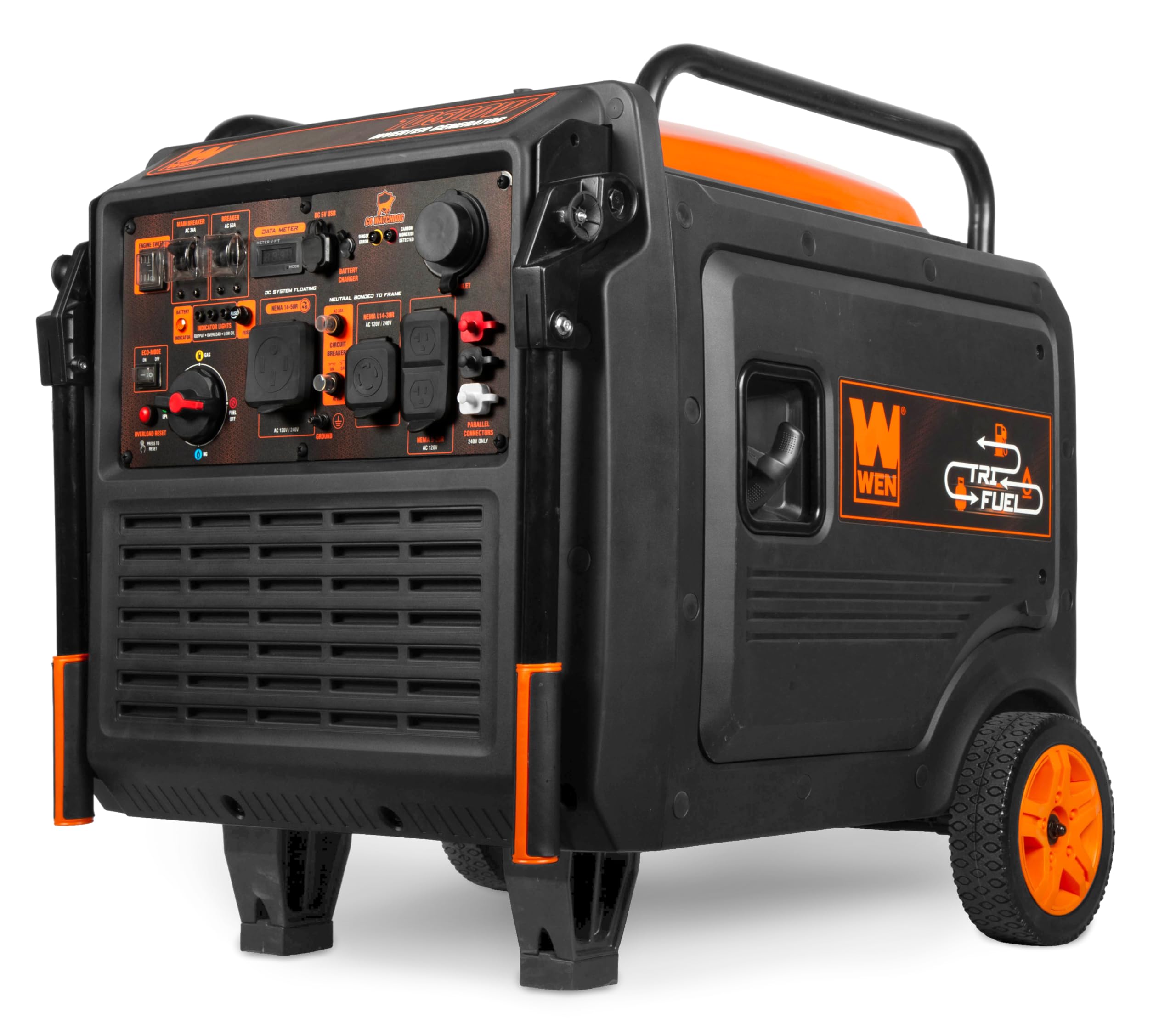
Figure 1: WEN 10,500-Watt Tri-Fuel Inverter Generator (TF1050iX) - Overall View
This image shows the complete WEN 10,500-Watt Tri-Fuel Inverter Generator, Model TF1050iX, from a three-quarter front view, highlighting its compact design, control panel, and integrated wheels.
Safety Information
Always operate the generator outdoors in a well-ventilated area, far from windows, doors, and vents, to prevent carbon monoxide poisoning. Ensure the generator is on a level surface. Keep children and pets away from the operating unit. Do not operate in rain or wet conditions. Always refer to local codes and regulations for generator usage.
Carbon Monoxide (CO) Watchdog Sensor
Your generator is equipped with a WEN Watchdog CO Shutdown Sensor. This sensor automatically turns off the generator if dangerous levels of carbon monoxide are detected. Do not disable or tamper with this safety feature. If the generator shuts down due to CO detection, move it to an area with fresh air and allow it to cool before attempting to restart.
Setup
1. Unpacking and Assembly
Carefully remove the generator from its packaging. Inspect for any shipping damage. The generator comes with a wheel kit and folding handles for portability. Attach the wheels and handles according to the included assembly instructions.

Figure 2: Generator Wheel Assembly
This image provides a close-up view of one of the generator's wheels, demonstrating the robust design for easy transport.

Figure 3: Generator Folding Handle Mechanism
This image shows the folding handle mechanism, illustrating how the handles can be extended or retracted for transport or storage.
2. Adding Engine Oil
Before first use, add the recommended engine oil to the crankcase. Refer to the oil fill cap or engine specifications for the correct type and amount of oil. Do not overfill.
3. Connecting the Battery
Connect the battery for the electric start feature. Ensure positive (+) and negative (-) terminals are connected correctly to avoid damage.
4. Fuel Connection
This tri-fuel generator operates on gasoline, propane (LPG), or natural gas (NG). Choose your desired fuel source and connect it appropriately.
- Gasoline: Fill the fuel tank with unleaded gasoline. Do not overfill.
- Propane (LPG): Connect the included 6-foot LPG connection hose to a propane tank and the generator's LPG inlet.
- Natural Gas (NG): Connect a natural gas hose (sold separately, part no. TF1450X-1431) to a natural gas supply and the generator's NG inlet using the quick-connect adapter.
Ensure all fuel connections are secure and free of leaks before starting the generator.
Operating Instructions
1. Control Panel Overview

Figure 4: Generator Control Panel
This image displays a detailed view of the generator's control panel, showing the engine switch, data meter, indicator lights, various outlets (120V 5-20R, 120V/240V 14-50R, 120V/240V L14-30R), USB ports, battery charger port, and the fuel selector switch.
The control panel features an engine switch, data meter (runtime, voltage, frequency), indicator lights (battery, output, overload, low oil, fuse), a fuel selector switch, various AC outlets, a battery charger port, and two 5V USB ports.
2. Starting the Generator
- Ensure the generator is on a level surface and all electrical loads are disconnected.
- Select the desired fuel type (Gas, LPG, or NG) using the fuel selector switch on the control panel.
- Turn the engine switch to the "ON" position.
- Electric Start: Press and hold the electric start button until the engine starts.
- Recoil Start (Backup): If the electric start fails, pull the recoil starter handle firmly and smoothly until the engine starts.
- Allow the generator to warm up for a few minutes before connecting electrical loads.
3. Eco-Mode Operation
Engage the eco-mode switch to maximize fuel economy. In eco-mode, the engine automatically adjusts its speed to match the electrical load, reducing fuel consumption and noise when less power is required.
4. Connecting Electrical Loads
Connect your appliances or transfer switch to the appropriate outlets on the control panel. The generator provides:
- Two 120V NEMA 5-20R receptacles
- One 120V/240V NEMA L14-30R receptacle (transfer-switch-ready)
- One 120V/240V NEMA 14-50R receptacle (transfer-switch- or EV-ready)
- Two 5V USB ports
Do not exceed the generator's rated wattage. Overload protection is built-in and will shut down the generator if overloaded.
5. Parallel Connection (Optional)
For increased power, two 240V WEN inverter generators can be linked using a WEN 240V Parallel Connection Kit (sold separately). Refer to the parallel connection kit's instructions for proper setup.
6. Shutting Down the Generator
- Disconnect all electrical loads from the generator.
- Turn the engine switch to the "OFF" position.
- For gasoline operation, engage the fuel shutoff feature to allow the carburetor to run dry. This helps prevent fuel-related issues during storage.
Maintenance
Regular maintenance ensures the longevity and reliable operation of your generator.
- Oil Changes: Check engine oil level before each use and change oil at recommended intervals.
- Air Filter: Inspect and clean or replace the air filter regularly, especially in dusty conditions.
- Spark Plug: Inspect and clean or replace the spark plug as needed for optimal engine performance.
- Fuel System: Utilize the fuel shutoff feature when storing the generator to prevent carburetor blockages from stagnant fuel.
- Battery Charging: Use the on-panel battery charger port and the included charger to keep the electric start battery topped off.
Refer to the detailed maintenance schedule in the full product manual for specific intervals and procedures.
Troubleshooting
This section addresses common issues you might encounter with your generator.
| Problem | Possible Cause | Solution |
|---|---|---|
| Generator will not start. | No fuel, incorrect fuel selection, low oil, battery discharged (for electric start). | Ensure adequate fuel, select correct fuel type, check oil level and add if low, charge battery or use recoil start. |
| Generator shuts down unexpectedly. | Low oil, low fuel, overload, CO Watchdog activation. | Check oil and fuel levels, reduce electrical load, ensure proper ventilation if CO sensor activated. |
| No power output. | Circuit breaker tripped, overload. | Check and reset circuit breakers on the control panel. Reduce load. |
If issues persist after following these steps, contact WEN customer support.
Specifications
| Feature | Detail |
|---|---|
| Brand | WEN |
| Model Number | TF1050iX |
| Wattage (Gasoline) | 10500 surge / 8550 running watts |
| Wattage (Propane) | 9450 surge / 8550 running watts |
| Wattage (Natural Gas) | 8500 surge / 7700 running watts |
| Fuel Type | Gasoline, Propane, Natural Gas |
| Engine Type | 4 Stroke |
| Engine Displacement | 457 Cubic Centimeters |
| Ignition System | Electric Start |
| Fuel Tank Volume | 7.1 Gallons |
| Runtime (Half-load, Gasoline) | Up to 10.5 hours |
| Runtime (Half-load, 20lb Propane) | Up to 5.8 hours |
| Special Features | CO Sensor, Electric Start, Tri-Fuel, Eco-Mode, Fuel Shutoff |
| Outlets | (2) 120V 5-20R, (1) 120V/240V L14-30R, (1) 120V/240V 14-50R, (2) 5V USB |
| Product Dimensions (L x W x H) | 30.1"L x 26.3"W x 28.8"H |
| Item Weight | 209.4 Pounds |
Warranty
The WEN 10,500-Watt Tri-Fuel Inverter Generator (TF1050iX) comes backed by a three-year limited warranty. Please retain your proof of purchase for warranty claims.
Support
For technical assistance, replacement parts, or warranty inquiries, please contact WEN customer support. A nationwide network of skilled service technicians is available to assist you.
Visit the official WEN website for the most up-to-date contact information and additional resources.
Additional Resources
Product Video: Hands-On WEN 11,000-Watt Dual Fuel Generator
Video 1: Hands-On WEN 11,000-Watt Dual Fuel Generator
This video provides a hands-on overview of a similar WEN dual-fuel generator, demonstrating general operation and features that are largely applicable to the tri-fuel model. It covers aspects like starting, fuel types, and control panel functions.