
1. Introduction
The KRACESS KRS-S1 Smart Bike Helmet is designed to enhance cycling safety and convenience. It integrates advanced features such as a high-definition sports camera, Bluetooth connectivity for audio and calls, and intelligent lighting systems. This manual provides essential information for proper setup, operation, and maintenance of your smart helmet.
2. Safety Information
Always wear your helmet correctly adjusted and fastened. Ensure the helmet fits snugly and comfortably. While the helmet offers advanced features, it is primarily a safety device designed to protect your head during impact. Always adhere to local traffic laws and regulations. Do not rely solely on electronic features for safety; maintain situational awareness at all times.
3. Package Contents
Verify that all items are present in your package:
- KRACESS KRS-S1 Smart Helmet
- Magnetic Replaceable Goggles
- USB Type-C Charging Cable
- Wireless Remote Control
- 64GB TF Memory Card (pre-installed or included separately)
- Removable Windproof Ear Protection (Earmuffs)
4. Product Overview
The KRS-S1 helmet features an integrated design with various components for enhanced functionality.

Figure 1: Front view of the KRACESS KRS-S1 Smart Bike Helmet with visor.
- Front Camera: 1080P 60 fps high-speed motion camera for recording.
- Control Buttons: Located on the side for camera, Bluetooth, and lighting functions.
- Rear LED Light: Integrated for visibility, turn signals, and brake warnings.
- Visor: Magnetic, replaceable goggles for eye protection.
- Bluetooth Speakers & Microphone: Built-in for audio playback and hands-free communication.
- Adjustment Dial: Located at the rear for head circumference adjustment.
5. Setup
5.1. Charging the Helmet
Before first use, fully charge the helmet. Connect the provided USB Type-C cable to the charging port located under a protective flap inside the helmet (refer to Figure 2 for location). Connect the other end to a USB power source.

Figure 2: USB Type-C port for charging and data transfer.
5.2. Memory Card Installation
The helmet supports up to a 128GB TF card. A 64GB TF card is included. Ensure the card is properly inserted into the designated slot, usually located near the charging port, under a protective cover.
5.3. App Connection
To utilize the camera and advanced settings, download the companion app to your smartphone. Turn on the helmet's Wi-Fi/Bluetooth by pressing the corresponding button (refer to Product Overview for button location). Open the app and follow the on-screen instructions to connect to your helmet.
6. Operating Instructions
6.1. Power On/Off
Press and hold the power button (typically one of the side control buttons) for a few seconds until you hear an audible prompt indicating the helmet is powered on or off.
6.2. Camera Operation
The integrated 1080P 60 fps camera records your rides. Video and photos can be managed via the smartphone app or by connecting the helmet directly to a computer using the USB Type-C cable.

Figure 3: Illustration of the 1080p 60-frame motion camera.
- Recording: Start/stop recording via the helmet's control buttons or the connected app.
- Loop Recording: The camera supports loop recording, overwriting older footage when the memory card is full.
- Emergency Incident: In case of a sudden impact or fall, the helmet's acceleration sensor can automatically trigger and lock the current footage to prevent it from being overwritten.
- Data Transfer: Connect the helmet to a computer using the USB Type-C cable to transfer video and photo files.
6.3. Bluetooth Audio & Voice Control
The helmet features dual antenna 5.0 Bluetooth for stable connection to your smartphone.

Figure 4: Bluetooth connectivity for music and voice commands.
- Music Playback: Stream music from your phone to the helmet's built-in speakers.
- Hands-Free Calls: Answer calls with the windproof microphone and speakers.
- Voice Assistant: Activate your smartphone's intelligent voice assistant for navigation or other commands.
6.4. Smart Lighting System
The helmet's rear LED light enhances visibility and communication with other road users.
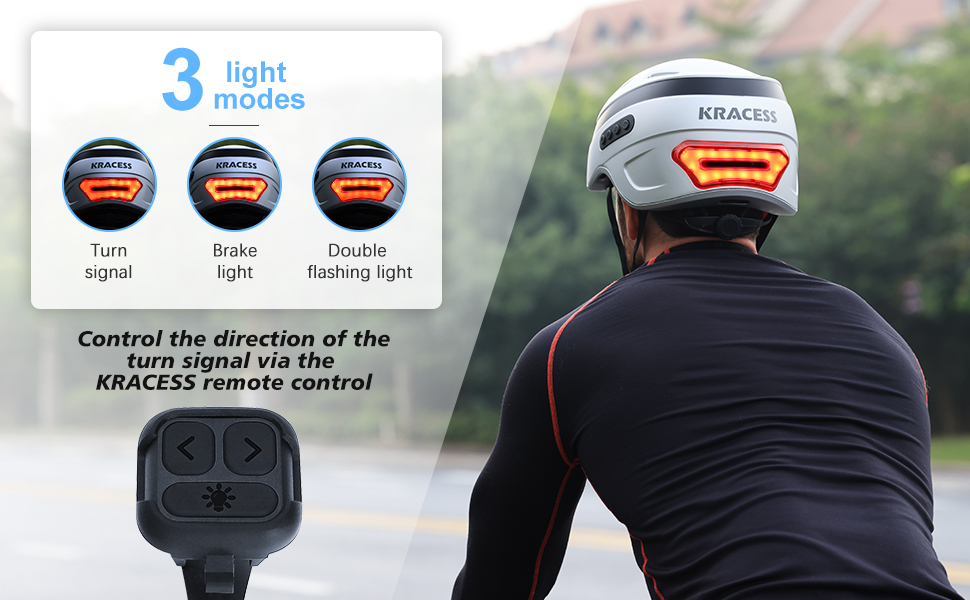
Figure 5: Remote control for turn signals and brake light functionality.
- Auto-Sensing: The helmet automatically detects braking and activates a highlighting reminder.
- Turn Signals: Use the wireless remote control (attachable to handlebars) to activate left, right, or double flashing turn signals.
- Warning Lights: Automatic flashing high-beam lights activate upon detecting a fall.
6.5. Visor Usage
The magnetic visor provides eye protection from wind, dust, and sun. It can be easily attached or removed. Additional transparent or yellow goggles for night use may be purchased separately.
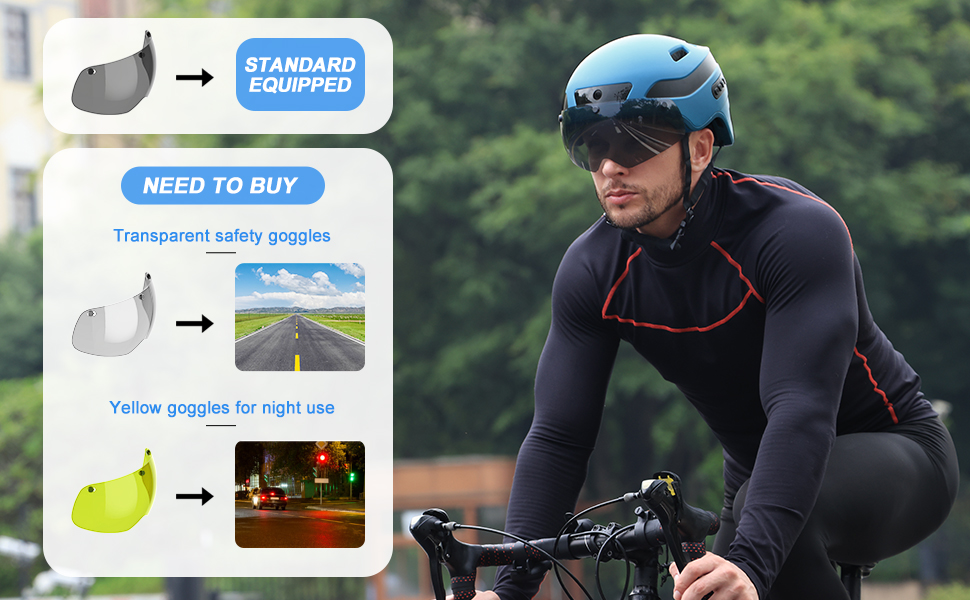
Figure 6: Standard visor and optional goggles.
7. Fitting and Adjustment
The helmet is designed for a comfortable and secure fit. It comes in two sizes: M (21.56-22.84 inches / 54-58 CM) and L (22-24.4 inches / 58-62 CM). Use the adjustment dial at the rear of the helmet to tighten or loosen the fit around your head. Ensure the chin straps are securely fastened but not uncomfortably tight.
7.1. Removable Earmuffs
The helmet includes removable windproof earmuffs for comfort in colder weather. Attach or remove them as needed based on environmental conditions.

Figure 7: Earmuffs can be removed for summer and installed for winter.
8. Maintenance
- Cleaning: Use a soft, damp cloth to clean the helmet's exterior. Avoid harsh chemicals.
- Visor Care: Clean the visor with a microfiber cloth and mild soap solution to prevent scratches.
- Storage: Store the helmet in a cool, dry place away from direct sunlight when not in use.
9. Troubleshooting
- Helmet not powering on: Ensure the helmet is fully charged.
- Camera not recording: Check if the memory card is correctly inserted and has sufficient space. Verify settings in the app.
- Bluetooth connectivity issues: Ensure Bluetooth is enabled on both the helmet and your smartphone. Try re-pairing the devices.
- Audio quality: Ensure speakers are not obstructed and microphone is clear.
10. Specifications
| Feature | Detail |
|---|---|
| Model Name | KRS-S1 |
| Brand | KRACESS |
| Material | PC+EPS (Polycarbonate + Expanded Polystyrene) |
| Item Weight | 2.27 Pounds |
| Camera Resolution | 1080P 60 fps |
| Bluetooth Version | 5.0 (Dual Antenna) |
| Memory Card Support | Up to 128GB TF card (64GB included) |
| Waterproof Level | IPX5 (Daily waterproof) |
| Sizes Available | M (21.56-22.84"), L (22-24.4") |
| Included Components | Helmet, Goggles, Charging Cable, Remote Control |
11. Official Product Video
Watch this official product video from KRACESS for a visual guide on the KRS-S1 intelligent helmet's features and usage.
Video Description: An overview of the KRACESS KRS-S1 intelligent helmet, demonstrating its various smart features and user experience.
12. Warranty and Support
KRACESS provides a 1-year after-sales quality assurance service for the KRS-S1 Smart Bike Helmet. For any issues encountered during use, please contact KRACESS customer support for assistance.