
1. Introduction
Thank you for purchasing the KEECOON 18L Hybrid Humidifier. This advanced humidifier combines ultrasonic and heated mist technologies to provide optimal humidity levels in your environment. With its large capacity, smart features, and user-friendly design, it is suitable for various settings including homes, offices, schools, and clinics. Please read this manual thoroughly before use to ensure safe and efficient operation.

Image 1.1: KEECOON 18L Hybrid Humidifier in a modern living space, highlighting its large capacity and wide coverage.
2. Safety Precautions
To reduce the risk of fire, electric shock, or injury, always follow these basic safety precautions:
- Always place the humidifier on a firm, flat, water-resistant surface.
- Do not place the humidifier near heat sources or in direct sunlight.
- Keep the humidifier out of reach of children and pets.
- Do not immerse the humidifier in water or other liquids.
- Unplug the humidifier before filling, cleaning, or moving it.
- Do not add water to the mist outlet.
- Use only clean, cool tap water. Distilled water is recommended to prevent mineral buildup.
- Do not use essential oils directly in the water tank; use the designated aroma tray.
- Ensure the power cord is not damaged or pinched.
- Do not attempt to repair or modify the humidifier yourself. Contact customer support for assistance.
3. Product Components
Familiarize yourself with the main parts of your KEECOON Humidifier:
- Main Unit (Water Tank, Base)
- Top Cover / Water Inlet
- Mist Outlet Nozzles (360° Rotatable)
- Extension Pipe (Optional)
- Control Panel / Display Screen
- Aroma Tray
- Remote Control
- Power Cord
- Cleaning Brush
- Casters (pre-installed)
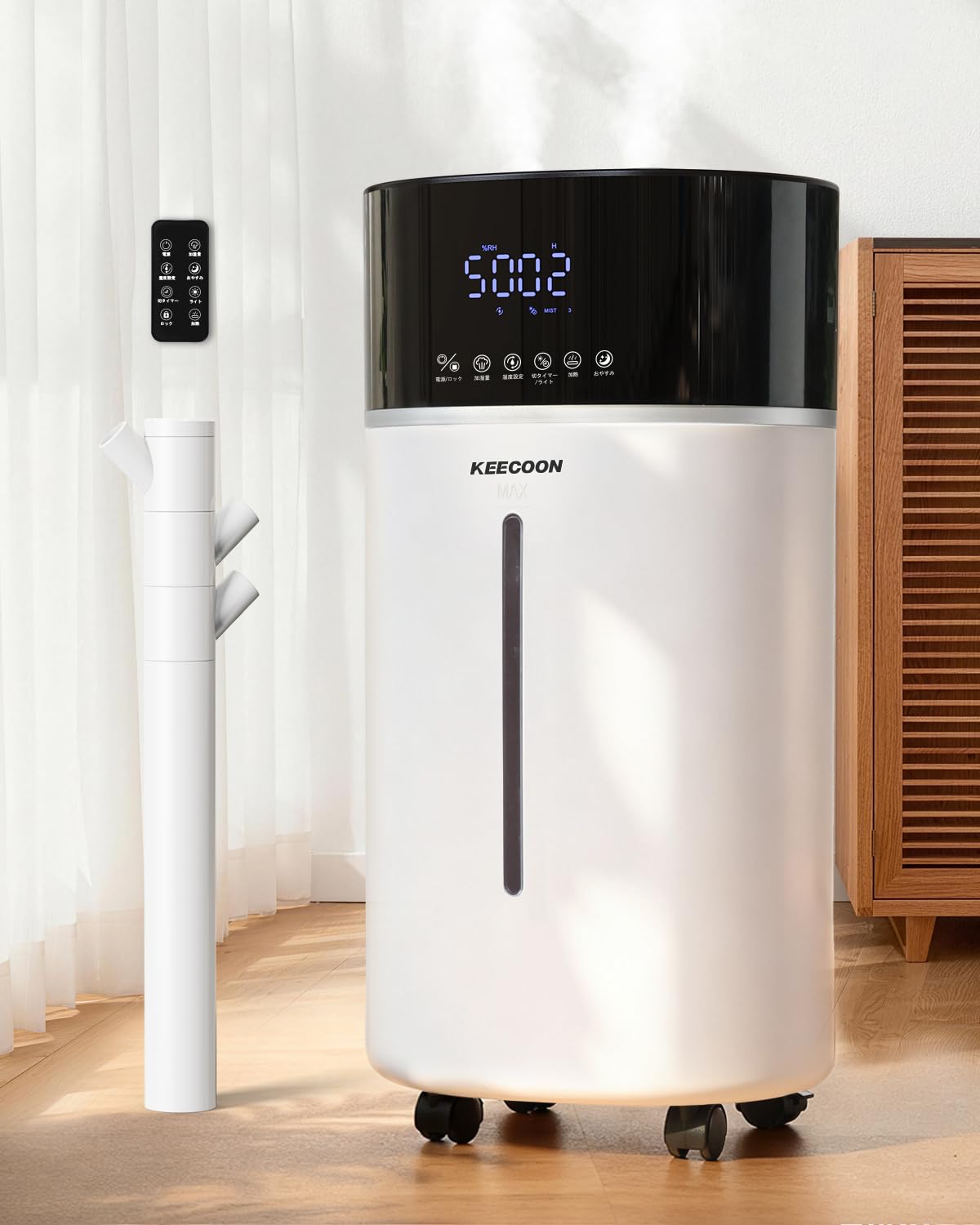
Image 3.1: Overview of the KEECOON 18L Hybrid Humidifier.
4. Setup
4.1 Initial Placement
- Place the humidifier on a flat, stable surface at least 15 cm (6 inches) away from walls and furniture.
- Ensure the power cord is easily accessible and not obstructed.
4.2 Installing the Extension Pipe (Optional)
For higher mist output and wider coverage, you can install the included extension pipe:
- Remove the small cap from the mist outlet on the top cover.
- Insert the base of the extension pipe into the opening until it clicks into place.
- Attach the multi-directional mist nozzles to the top of the extension pipe.

Image 4.1: Visual guide for installing the optional extension pipe.
4.3 Filling the Water Tank
The KEECOON Humidifier features a convenient top-fill design:
- Open the top cover of the humidifier.
- Pour clean, cool tap water directly into the water tank. Do not exceed the 'MAX' line.
- Caution: Do not pour water into the mist outlet.
- Close the top cover securely.

Image 4.2: Demonstrates the top-fill method and the 360-degree rotating mist nozzles.
4.4 Automatic Water Supply (Optional Float Valve Kit)
This humidifier supports an optional 1/4-inch tube float valve kit for automatic water replenishment. This kit is not included and must be purchased separately. Refer to the kit's instructions for installation.

Image 4.3: Illustrates the concept of automatic water supply using an external connection (float valve kit not included).
5. Operating Instructions
Plug in the humidifier. The display will light up, and the unit will be in standby mode.
5.1 Power On/Off
- Press the Power button on the control panel or remote control to turn the humidifier on or off.
5.2 Mist Level Adjustment
Adjust the mist output to your preference:
- Press the 'Mist' button repeatedly to cycle through Weak (800ml/h), Medium (900ml/h), and Strong (1000ml/h) mist levels.

Image 5.1: Demonstrates the three adjustable mist output levels.
5.3 Humidity Setting
Set your desired humidity level:
- Press the 'Humidity' button to set the target humidity from 40% to 90% in 5% increments. The smart sensor will automatically maintain this level.

Image 5.2: Shows the humidifier's display with humidity settings and smart sensor feature.
5.4 Warm/Cool Mist Selection
Choose between cool mist for general humidification or warm mist for enhanced comfort and sterilization:
- Press the 'Warm' button to activate the heated mist function. The humidifier will heat water up to 100°C for sterilization and a comfortable warm mist.
- Press again to switch back to cool mist (ultrasonic only).

Image 5.3: Illustrates the dual cool mist and 40°C warm mist functions for year-round use.

Image 5.4: Diagram showing the 100°C high-temperature sterilization process, beneficial for infants, pregnant women, the elderly, and sensitive individuals.
5.5 Timer Function
- Press the 'Timer' button to set the operating time from 1 to 12 hours in 1-hour increments. The humidifier will automatically turn off after the set time.
5.6 Sleep Mode & Night Light
- Press the 'Sleep' button to activate sleep mode. The display lights will turn off, and the humidifier will operate at a low noise level (approx. 35dB) for undisturbed sleep.
- The night light function provides gentle ambient lighting.

Image 5.5: Humidifier in a bedroom, illustrating quiet operation (35dB) and night light feature for comfortable sleep.
5.7 Aroma Function
- Open the aroma tray located on the side of the humidifier.
- Add a few drops of your preferred essential oil onto the aroma pad.
- Close the tray. The aroma will diffuse with the mist.

Image 5.6: Demonstrates how to use the aroma function by adding essential oil to the dedicated tray.
5.8 Additional Features
- Auto-Restart after Power Failure: The humidifier will automatically resume its previous settings once power is restored, ensuring seamless operation.
- Dry-Burn Protection: The unit will automatically shut off when the water level is too low to prevent damage.
- Child Lock: Activates to prevent accidental changes to settings.

Image 5.7: Highlights the auto-restart, dry-burn protection, and child lock safety features.
6. Maintenance and Cleaning
Regular cleaning is essential for optimal performance and hygiene.
6.1 Daily Maintenance
- Empty and rinse the water tank daily.
- Wipe the mist outlet and top cover with a clean, damp cloth.
6.2 Weekly Cleaning
- Unplug the humidifier.
- Remove the top cover and any extension pipes.
- Drain any remaining water from the tank.
- Clean the inside of the water tank with a soft brush (provided) and a mild detergent. Rinse thoroughly.
- For mineral buildup, fill the tank with a mixture of white vinegar and water (1:1 ratio) and let it soak for 30 minutes. Scrub gently and rinse well.
- Clean the transducer (the small disc that produces mist) with a soft brush or cotton swab. Do not use abrasive materials.
- Clean the aroma tray and replace the aroma pad if necessary.
- Ensure all parts are dry before reassembling.
7. Troubleshooting
If you encounter issues, please refer to the following common problems and solutions:
| Problem | Possible Cause | Solution |
|---|---|---|
| No mist output | No water in tank; Power not connected; Transducer dirty; Air vent blocked | Fill water tank; Plug in unit; Clean transducer; Clear air vent |
| Unpleasant odor | Stagnant water; Dirty tank | Empty and clean tank thoroughly; Use fresh water daily |
| White dust around humidifier | Hard water minerals | Use distilled or demineralized water; Clean unit regularly |
| Unit leaks water | Overfilled tank; Improperly seated components | Do not overfill; Ensure top cover and extension pipe are correctly installed |
| Remote control not working | Dead batteries; Obstruction between remote and unit | Replace batteries; Ensure clear line of sight |
If the problem persists after trying these solutions, please contact KEECOON customer support.
8. Specifications
| Feature | Detail |
|---|---|
| Model Number | KC-MH-303 |
| Brand | KEECOON |
| Capacity | 18 Liters (approx. 4.75 Gallons) |
| Dimensions | 55 x 33 x 27 cm (approx. 21.7 x 13 x 10.6 inches) |
| Material | Plastic |
| Color | White |
| Power Consumption | 270 W |
| Voltage | 110 Volts |
| Coverage Area | Up to 40 tatami mats (approx. 66 square meters) |
| Continuous Operation | Up to 48 hours |
| Mist Output | Max 1000 ml/h |
| Noise Level | Approx. 35 dB (Sleep Mode) |
| Special Features | Timer, Removable Tank (for cleaning), Constant Humidity, Adjustable Humidity Control, Ultrasonic Technology, 100°C High-Temperature Sterilization, Aroma Function, Remote Control, Auto-Restart, Dry-Burn Protection, Child Lock |
9. Warranty and Support
The KEECOON 18L Hybrid Humidifier comes with a one-year warranty from the date of purchase. This warranty covers initial defects and malfunctions under normal use. During the warranty period, free exchanges or repairs will be provided for eligible issues.
For any questions, concerns, or warranty claims, please contact KEECOON customer support. Our team is dedicated to ensuring your satisfaction with our products and services.
Please have your purchase receipt and model number (KC-MH-303) ready when contacting support.