
Introduction
The AEGTEST 8103 Gauss Meter is a precision instrument designed for measuring DC magnetic field strength and identifying magnetic pole direction. This device is equipped with a Hall probe for accurate readings and features data logging, alarm functions, and a rechargeable battery for extended use. It is suitable for various applications including quality control, equipment maintenance, and educational experiments.
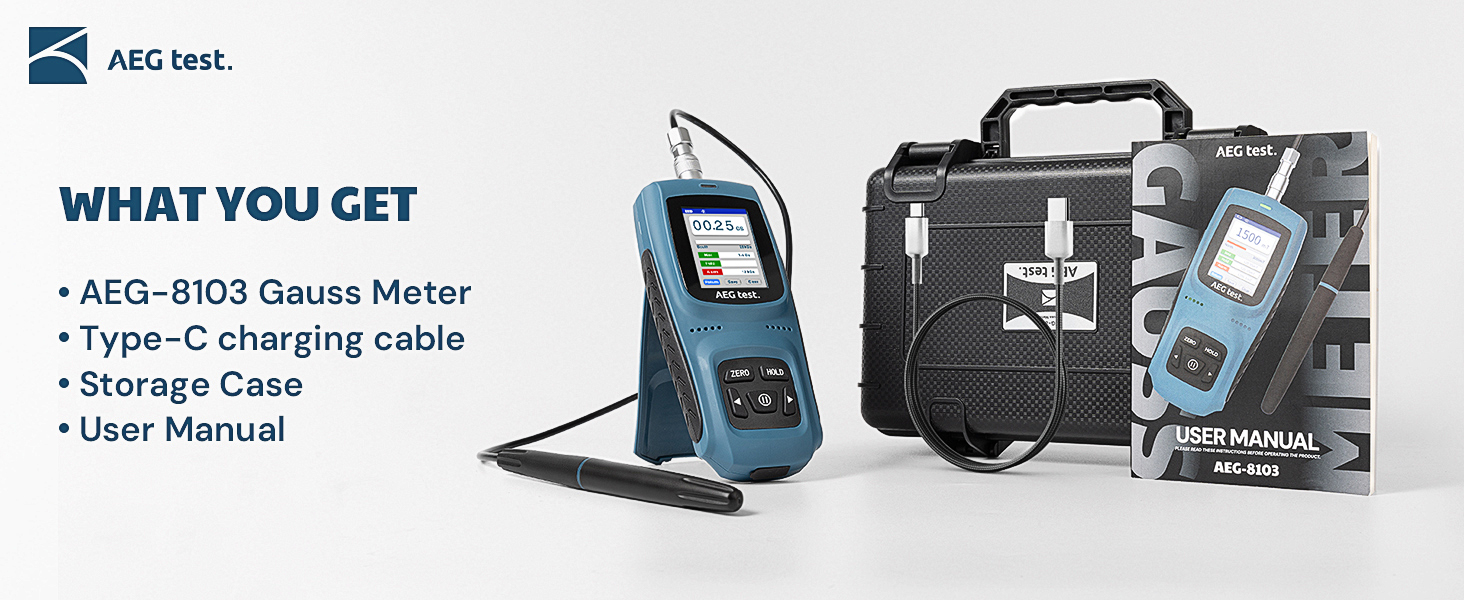
What's in the Box
- AEG-8103 DC Gauss Meter
- Hall Probe
- Storage Case
- Type-C Charging Cable
- User Manual

This image displays the complete package contents: the 8103 Gauss Meter, its Hall probe, a Type-C charging cable, a protective storage case, and the user manual.
Key Features
- 5% Basic Precision Measurement: Detects magnetic field strength (Gs/mT) and identifies magnetic pole direction (N/S) for DC magnetic fields. Measurement range up to 0–2500 mT.
- Alarm, Data Storage & Calibration: Features audible and visual alarms, data hold, and storage functions for up to 50 readings. Supports manual and automatic zero calibration.
- User-Friendly Design: Built-in 750mAh rechargeable battery provides up to 16 hours of continuous use. TFT color display for clear readings and a stand for hands-free operation.
- Dual Modes for Industrial Efficiency: Includes QC test mode for quick magnetic field strength checks and a counting/speed measurement mode for dynamic applications.
Setup
Charging the Device
Before initial use, ensure the Gauss Meter is fully charged. Connect the provided Type-C charging cable to the device's charging port and a suitable USB power source. The built-in 750mAh rechargeable battery provides up to 16 hours of continuous operation on a full charge.

This image shows the AEGTEST 8103 Gauss Meter being charged via its Type-C port, highlighting its 16-hour battery life.
Connecting the Hall Probe
Carefully connect the Hall probe to the designated port on the top of the Gauss Meter. Ensure a secure connection for accurate measurements. The Hall probe is essential for detecting magnetic fields.

This image illustrates the AEGTEST 8103 Gauss Meter with its Hall probe attached, demonstrating its user-friendly design and powerful functionality for various measurements.
Operating Instructions
Basic Magnetic Field Measurement
- Power on the device by pressing the power button.
- Ensure the Hall probe is connected.
- Perform a zero calibration if necessary. The device supports both manual and automatic zero calibration.
- Position the Hall probe perpendicular to the magnetic field source for optimal accuracy. The device will display the magnetic field strength in Gauss (Gs) or milliTesla (mT) and indicate the magnetic pole (N/S).

This image demonstrates the correct positioning of the Hall probe, perpendicular to the magnetic field, for accurate measurement with 5% accuracy and a range up to 25,000 Gs.
Alarm Function
The 8103 Gauss Meter features audible and visual alarms. These alarms activate when the measured magnetic field strength exceeds predefined thresholds. The alarm threshold is adjustable through the device's menu.

This image shows the Gauss Meter's alarm function in action, with visual and auditory alerts indicating a threshold exceedance. The alarm settings can be customized.
Data Hold and Storage
Press the "HOLD" button to freeze the current measurement on the screen. The device can store up to 50 readings, allowing for easy tracking and review of key measurement values. Access stored data through the device's menu.
This image illustrates the data storage capability of the Gauss Meter, showing a list of recorded magnetic field measurements and polarity.
QC Test Mode
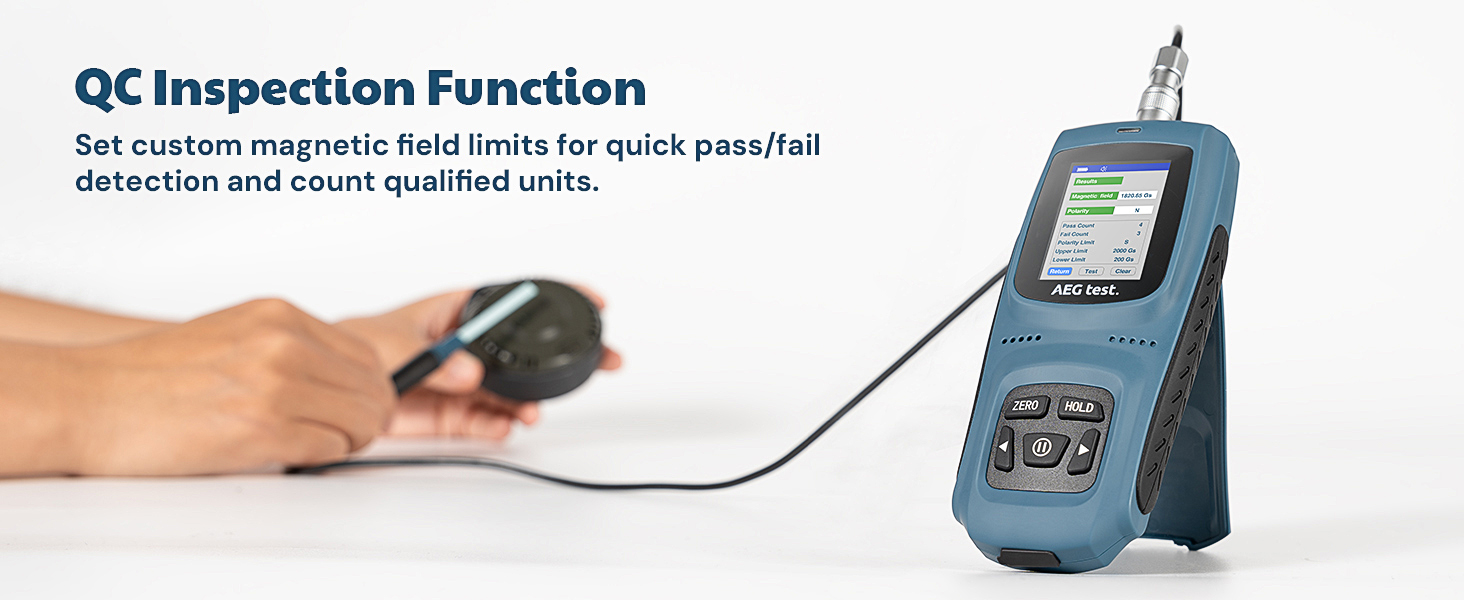
The QC test mode allows for quick quality control checks by setting custom magnetic field limits. The device will indicate "Pass" or "Fail" based on whether the measured value falls within the defined range, and can count qualified units.

This image displays the QC test mode interface, showing magnetic field readings, polarity, and pass/fail counts against set limits, useful for industrial applications.

This image demonstrates the QC inspection function in use, where the meter quickly determines if a magnetic field meets predefined standards.
Counting and Speed Measurement Mode
This mode detects magnetic field changes in magnets, enabling dynamic counting and speed measurement. It is ideal for applications such as motor testing and equipment maintenance, providing RPM, count, speed, and distance readings.

This image shows the counting and speed measurement mode interface, displaying parameters like speed, count, and rotation rate, useful for dynamic magnetic field analysis.
This image visually explains the counting and speed measurement mode, showing the Hall probe interacting with a rotating gear to accurately measure RPM and count.
Calibration
The device supports both manual and automatic zero calibration to maintain measurement accuracy. Refer to the on-screen menu for calibration options. The device is factory-calibrated and complies with international standards.
Maintenance
- Keep the device and Hall probe clean and free from dust and debris. Use a soft, dry cloth for cleaning.
- Store the Gauss Meter in its protective storage case when not in use to prevent damage.
- Avoid exposing the device to extreme temperatures, humidity, or strong magnetic fields that are not being measured.
- Recharge the battery regularly to ensure optimal performance and longevity.
Troubleshooting
Device Not Powering On
- Ensure the battery is charged. Connect the device to the Type-C charging cable and allow it to charge for at least 30 minutes before attempting to power on again.
- Verify the power button is pressed firmly.
Inaccurate Readings
- Check if the Hall probe is securely connected to the main unit.
- Ensure the Hall probe is positioned correctly (perpendicular to the magnetic field source).
- Perform a zero calibration.
- Verify that the measurement is within the device's specified range (0-2500 mT for DC magnetic fields).
Alarm Not Functioning
- Check the alarm settings in the device's menu to ensure thresholds are correctly set and the alarm is enabled.
- Verify that the measured magnetic field strength actually exceeds the set alarm threshold.
Specifications
| Feature | Detail |
|---|---|
| Product Dimensions | 1.06 x 5.51 x 2.48 inches |
| Item Weight | 5.4 ounces |
| Item Model Number | AEG-8103-5%-T1 |
| Batteries | 1 Lithium Ion battery (included) |
| Measurement Range | 0-2500 mT (DC magnetic field) |
| Accuracy | ±5% |
| Battery Life | Up to 16 hours continuous use |
| Hall Sensor Connection | 21.26 inches |
| Probe Dimensions | 1.97 x 0.20 x 0.04 inches |
Warranty and Support
The AEGTEST 8103 Gauss Meter is factory-calibrated and has passed calibration tests by internationally recognized institutions, ensuring compliance with industry standards.
For technical support, warranty claims, or service inquiries, please contact AEGTEST customer service through the contact information provided in the packaging or on the official AEGTEST website. Please retain your purchase receipt for warranty validation.

This image highlights the product's certification and calibration, compliant with international standards for precision and reliability.