
1. Introduction
This manual provides essential information for the safe and efficient operation of your Generic 5000W Hybrid Solar Inverter. This device converts DC power from batteries (72V) into stable AC power (110V), suitable for various household and outdoor appliances. Designed for home energy storage and off-grid applications, it features a pure sine wave output, high efficiency, and multiple protection functions. Please read this manual thoroughly before installation and use to ensure proper functionality and safety.
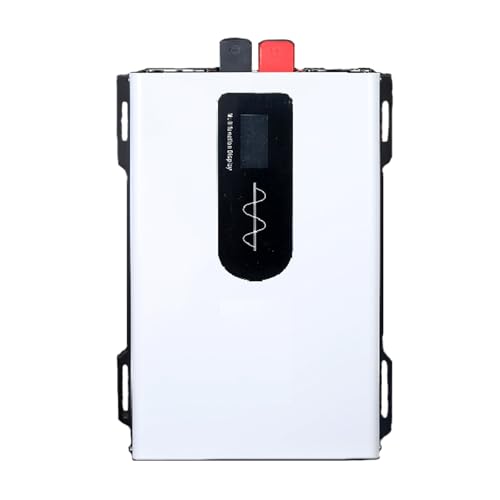
Figure 1: Generic 5000W Hybrid Solar Inverter, front view.
2. Safety Instructions
Always observe the following safety precautions to prevent injury and damage to the inverter or connected devices:
- Read all instructions: Before operating the inverter, read all instructions and cautionary markings on the inverter, the batteries, and all appropriate sections of this manual.
- Electrical Hazard: This inverter produces AC power, which can be lethal. All electrical work should be performed by qualified personnel.
- Proper Voltage Selection: Ensure the inverter's DC input voltage (72V for this model) matches your battery bank voltage. Incorrect voltage can cause severe damage.
- Disconnect Power: Always ensure the inverter switch is OFF before connecting or disconnecting any cables.
- Secure Connections: Secure the positive (+) and negative (-) terminals tightly to prevent loose connections, which can cause overheating and sparks.
- Ventilation: Install the inverter in a well-ventilated area. Do not block ventilation openings.
- Environmental Conditions: Avoid direct sunlight exposure, moisture, and extreme temperatures. Do not operate in areas with flammable fumes or gases.
- Grounding: Ensure the inverter is properly grounded according to local electrical codes.
- Children and Pets: Keep the inverter out of reach of children and pets.
3. Product Overview
The 5000W Hybrid Solar Inverter is designed for robust performance and reliability. Key features include:
- Pure Sine Wave Output: Provides stable and clean power, suitable for sensitive electronics.
- High Efficiency: Up to 95% conversion efficiency, minimizing energy waste.
- Durable Construction: Crafted from a durable aluminum-magnesium alloy cooling shell for longevity and optimal heat dissipation.
- Intelligent LCD Display: For real-time monitoring of battery input voltage, AC output voltage, output power, and various alerts.
- Multiple Protection Functions: Includes low/high input voltage, short circuit, overload, and high-temperature protection.
- Dual Output Sockets: For versatile connectivity of AC appliances.
- Smart Control Fans: Integrated dual fans for efficient cooling and energy savings.
3.1 Component Identification

Figure 2: Front and Rear Panel Details of the Inverter.
- Front Panel:
- 1. Switch: Power ON/OFF control.
- 2. AC Output Terminals: For connecting AC loads.
- 3. Socket: Universal AC output socket.
- Rear Panel:
- 4. Positive Terminal (+): Connects to the positive terminal of the battery.
- 5. Negative Terminal (-): Connects to the negative terminal of the battery.
- 6. Smart Control Fan: Automatically activates for cooling.
4. Setup and Installation
Follow these steps for safe and correct installation of your inverter:
- Choose a Location: Select a dry, well-ventilated area away from direct sunlight, heat sources, and flammable materials. Ensure sufficient clearance around the inverter for airflow.
- Mounting: The inverter can be mounted using the integrated flap guards on both sides. Ensure it is securely fastened to a stable surface.
- Battery Connection:
- Ensure the inverter switch is in the OFF position.
- Connect the supplied pure copper cables to the inverter's positive (+) and negative (-) terminals.
- Connect the other ends of the cables to the corresponding positive (+) and negative (-) terminals of your 72V battery bank.
- Important: Secure all connections tightly to prevent loose contacts, which can cause voltage drops or overheating.
- Grounding: Connect the inverter's grounding terminal to an appropriate earth ground.
- AC Load Connection: Once the DC connections are secure, you can connect your AC appliances to the inverter's output sockets or terminals. Ensure the total power consumption of your appliances does not exceed the inverter's rated power (5000W peak, 2500W rated).

Figure 3: Typical Solar System Diagram showing inverter integration.
This diagram illustrates how the inverter integrates into a solar power system, connecting solar panels, a battery bank, and providing AC output for household use.
5. Operating Instructions
To operate your 5000W Hybrid Solar Inverter:
- Power On: After all connections are made and secured, switch the inverter to the ON position. The intelligent LCD display will illuminate.
- Monitor Display: The LCD display provides real-time information:
- Battery Power
- Battery Input Voltage (DC)
- AC Output Voltage
- Output Power (Watts)
- Frequency and Temperature (rotating display)
- Connect Appliances: Plug your AC appliances into the inverter's output sockets. Ensure the appliance is within the inverter's power capacity.
- Power Off: To turn off the inverter, first disconnect all AC loads, then switch the inverter to the OFF position.

Figure 4: Intelligent Digital Display showing various parameters.
The display provides critical operational data, including input voltage, output power, and output voltage, along with status indicators.
6. Maintenance
Regular maintenance ensures the longevity and optimal performance of your inverter:
- Keep Clean: Periodically clean the exterior of the inverter with a dry, soft cloth. Do not use liquid cleaners or solvents.
- Check Connections: Regularly inspect all DC and AC connections to ensure they are tight and free from corrosion. Loose connections can lead to overheating.
- Ventilation: Ensure the ventilation openings and cooling fans are free from dust and obstructions. Clean them gently if necessary.
- Environmental Check: Verify that the installation environment remains dry, well-ventilated, and within the recommended temperature range.
7. Troubleshooting
The inverter is equipped with intelligent protection features. If an issue occurs, the LCD display may show an alert. Here are common issues and solutions:
| Problem | Possible Cause | Solution |
|---|---|---|
| No output power / Inverter not turning on |
|
|
| Low output power / Appliances not working correctly |
|
|
| Inverter shuts down automatically |
|
|
| Fans running constantly or loudly |
|
|
8. Specifications
Technical specifications for the Generic 5000W Hybrid Solar Inverter (72V DC to 110V AC):
| Parameter | Value |
|---|---|
| Model Name | LS |
| Brand | Generic |
| Rated Power | 2500W (Continuous) |
| Peak Power | 5000W |
| DC Input Voltage | 72V |
| AC Output Voltage | 110V |
| Output Waveform | Pure Sine Wave |
| Conversion Efficiency | Up to 95% |
| Material | Aluminum-magnesium alloy cooling shell |
| Protection Functions | Over Voltage, Under Voltage, Overload, Over Current, Over Temperature, Short Circuit |
| Product Size | 28 x 18.5 x 10.5 cm (approximate, based on image) |
| Product Net Weight | 2.5 kg (approximate, based on image) |

Figure 5: Product specifications and dimensions.
9. Warranty and Support
Specific warranty details are not provided in the product description. Please refer to your purchase documentation or contact the seller for warranty information.
For any questions, technical assistance, or support, please reach out to the seller via email. You can expect a response within 24 hours. When contacting support, please provide your product model and a detailed description of the issue.