
1. Introduction
This manual provides detailed instructions for the assembly, operation, and maintenance of your PAKASEPT 55.12" Large Makeup Vanity. Please read all instructions carefully before assembly and use to ensure safe and optimal performance of your product.
Safety Warnings
- Handle with care due to sharp edges and fragile components. Avoid injury by being cautious during assembly and use.
- Ensure all screws and fasteners are securely tightened before use.
- Do not overload drawers or shelves to prevent tipping or damage.
- Keep electrical components (LED lights, power outlets) away from water.
- Adult assembly is recommended.
2. Package Contents
Verify that all components listed below are present before beginning assembly. If any parts are missing or damaged, please contact customer support.
- Vanity Desk Frame (Engineered Wood)
- Large Rectangular Mirror with Built-in LED Light Strip
- 5 Storage Drawers
- 4 Storage Shelves
- Small Storage Compartments (integrated)
- Built-in Power Supply with 2 USB Ports and 2 AC Outlets
- Hardware Pack (screws, cam bolts, etc.)
- Assembly Instructions Manual
3. Setup and Assembly
Assembly of the PAKASEPT Makeup Vanity requires careful attention to detail. It is recommended to have at least two people for certain steps. Follow the detailed installation instructions provided in the included manual, as each part has a label number.
Assembly Overview
- Unpack and Identify Parts: Lay out all components and hardware. Match them against the parts list in your manual.
- Assemble Drawers: Construct the 5 drawers first. This is often the most time-consuming part.
- Assemble Main Desk Frame: Connect the side panels, bottom, and top sections of the vanity desk.
- Install Mirror and Shelves: Secure the large mirror with LED lights and attach the storage shelves.
- Integrate Power Outlet: Ensure the power outlet and USB ports are correctly installed and connected.
- Final Adjustments: Place the drawers into their respective slots. Check all connections and stability.
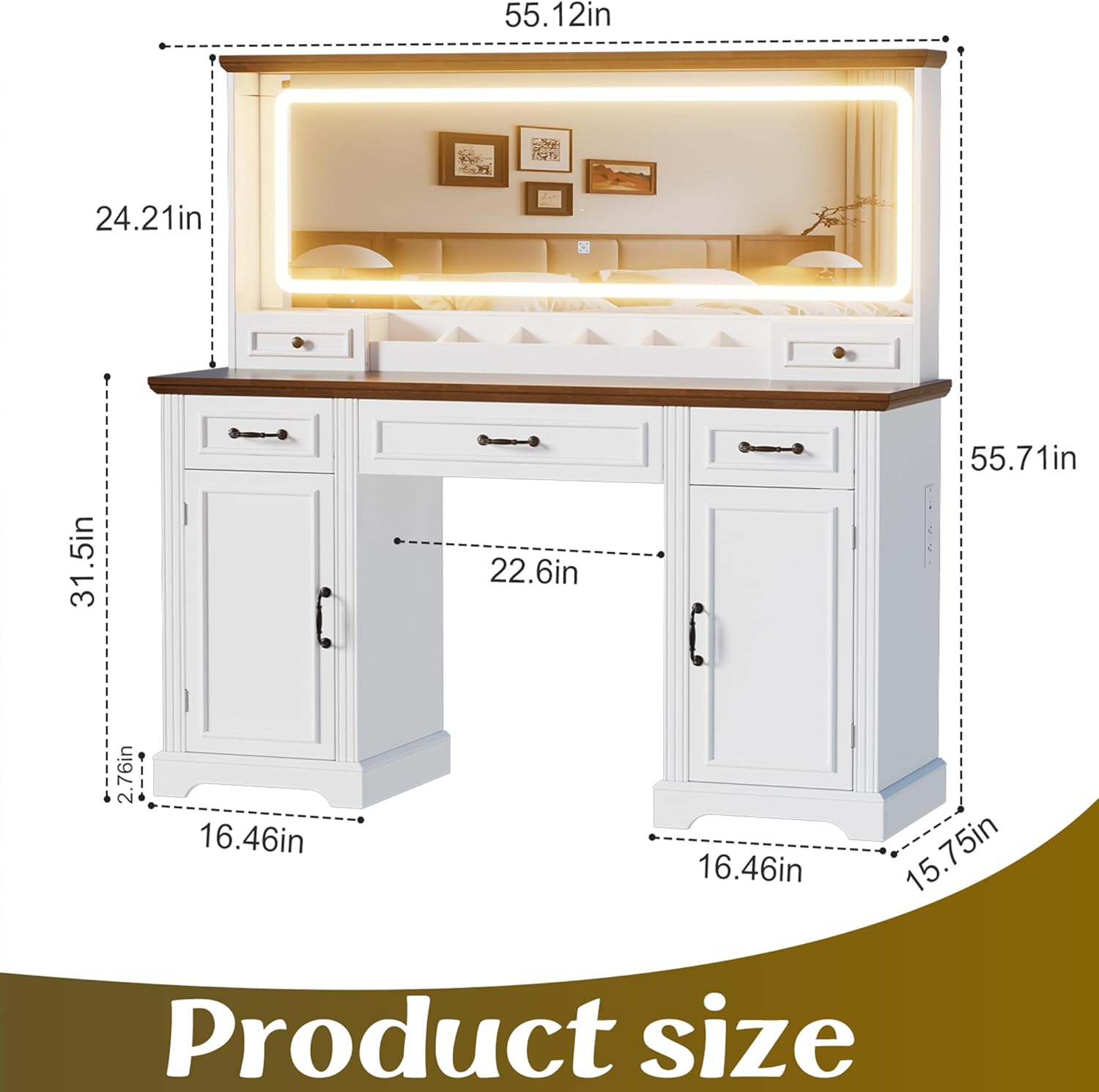
Figure 3.1: Product Dimensions. The vanity measures 55.12 inches in length, 15.75 inches in width, and 55.71 inches in height.
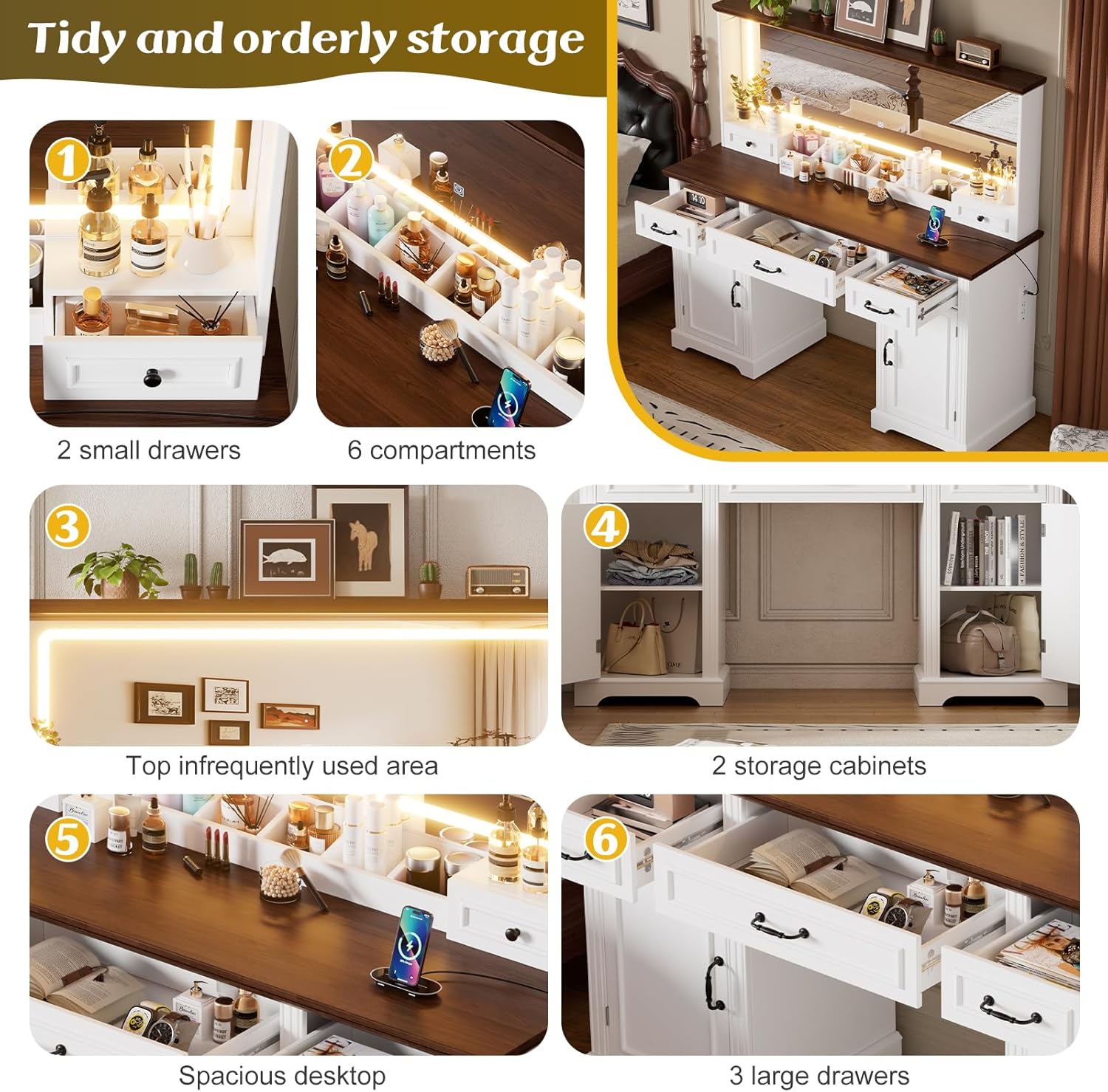
Figure 3.2: Multi-functional design elements, highlighting adjustable partitions within cabinets, ergonomic drawer grips, and smooth-gliding drawers.
Assembly Video Guide
Video 3.1: Assembly process for a similar vanity. This video demonstrates the general steps involved in putting together the vanity, including drawer construction and mirror installation. Note that specific parts may vary slightly from your model.
4. Operating Instructions
LED Mirror Lights
The large rectangular mirror features a built-in LED light strip with three color modes and adjustable brightness.
- Power On/Off: Locate the touch sensor on the mirror surface. Tap once to turn the lights on or off.
- Change Light Color: With the lights on, short press the touch sensor to cycle through the three color modes: warm yellow, warm white, and cool white.
- Adjust Brightness: With the lights on, long press the touch sensor to adjust the brightness level. Release when the desired brightness is achieved.

Figure 4.1: Multiple light settings available on the LED mirror, demonstrating white, cold, and intense light options.
Integrated Power Outlet and USB Ports
The vanity is equipped with a built-in power supply for convenience.
- AC Outlets: Two 125V/12A AC outlets are provided for powering hair dryers, curling irons, or other small appliances.
- USB Ports: Two 5V/2A USB ports are available for charging mobile phones, tablets, or other USB-powered devices.
- Usage: Simply plug your device into the appropriate port. Ensure the vanity is connected to a power source.

Figure 4.2: Charging station with 2 AC outlets and 2 USB ports, conveniently located on the side of the vanity.
Storage Features
The vanity offers extensive storage solutions to keep your items organized.
- Drawers: Utilize the 5 drawers for storing makeup, jewelry, and other accessories.
- Shelves & Compartments: The 4 storage shelves and small integrated compartments are ideal for displaying frequently used items or decorative pieces.
- Top Storage: The top surface of the vanity provides additional space for dolls, books, or makeup boxes.

Figure 4.3: Tidy and orderly storage options, illustrating two small drawers, six compartments, a top infrequently used area, two storage cabinets, a spacious desktop, and three large drawers.
Product in Use Video
Video 4.1: A user demonstrating the PAKASEPT vanity in a bedroom setting, showcasing its size, storage, and lighting features. This video provides a real-world perspective on the product's functionality.
5. Maintenance
Regular maintenance will help prolong the life and appearance of your vanity.
- Cleaning Surfaces: Wipe down engineered wood surfaces with a soft, damp cloth. Avoid harsh chemicals or abrasive cleaners.
- Mirror Care: Clean the mirror with a glass cleaner and a lint-free cloth. Do not spray cleaner directly onto the LED light strip.
- Drawer Slides: Periodically check drawer slides for smooth operation. If needed, apply a small amount of silicone lubricant.
- Electrical Components: Ensure all plugs and cords are free from damage. Do not attempt to repair electrical components yourself.
6. Troubleshooting
Here are solutions to common issues you might encounter:
| Problem | Possible Cause | Solution |
|---|---|---|
| LED lights not turning on. | Not plugged in; loose connection; power outage; faulty sensor. | Check power cord connection; ensure outlet has power; re-plug connections; contact support if sensor is unresponsive. |
| Drawers are sticking or not sliding smoothly. | Misaligned slides; debris in tracks; overloaded drawer. | Empty drawer and check alignment; clean tracks; redistribute weight. |
| Power outlets/USB ports not working. | Vanity not plugged in; circuit breaker tripped; faulty unit. | Ensure vanity is plugged into a live outlet; check household circuit breaker; test with another device; contact support. |
| Vanity feels unstable. | Loose fasteners; uneven floor. | Tighten all assembly screws; adjust levelers on the bottom of the vanity (if applicable) or place shims under legs. |
7. Specifications
| Feature | Detail |
|---|---|
| Product Dimensions | 55.12"L x 15.75"W x 55.71"H |
| Material | Engineered Wood |
| Color | White (Large) |
| Item Weight | 120 Pounds |
| Number of Drawers | 5 |
| LED Light Modes | 3 (Warm Yellow, Warm White, Cool White) with adjustable brightness |
| Power Outlet | 2 AC Outlets (125V/12A) |
| USB Ports | 2 USB Ports (5V/2A) |
| Assembly Required | Yes |
| Style | Contemporary |
8. Warranty & Support
Warranty Information
This product comes with a standard manufacturer's warranty. Please refer to the warranty card included in your package for specific terms, conditions, and duration. Keep your proof of purchase for warranty claims.
Customer Support
For any questions, missing parts, or assistance with assembly or operation, please contact PAKASEPT customer support. Contact information can typically be found on the product packaging or the brand's official website.
You may also visit the PAKASEPT Store on Amazon for additional product information and support resources.