
1. Safety Information
Always unplug the vanity before assembly or disassembly. Be cautious of sharp edges and pinch points during assembly. This vanity is heavy; ensure it is properly supported and not placed on unstable surfaces. Do not exceed the weight limit of the vanity top. Keep electrical components dry and away from heat sources. Always follow the manufacturer's instructions for assembly, usage, and maintenance.
2. Product Overview
The CollaredEagle Vanity Desk HY011-WH is a versatile makeup vanity featuring a mirror with adjustable lighting, ample storage, and a built-in charging station. It includes a comfortable stool for enhanced user experience.

Figure 2.1: CollaredEagle Vanity Desk with key dimensions. This image illustrates the overall structure and size of the vanity desk.
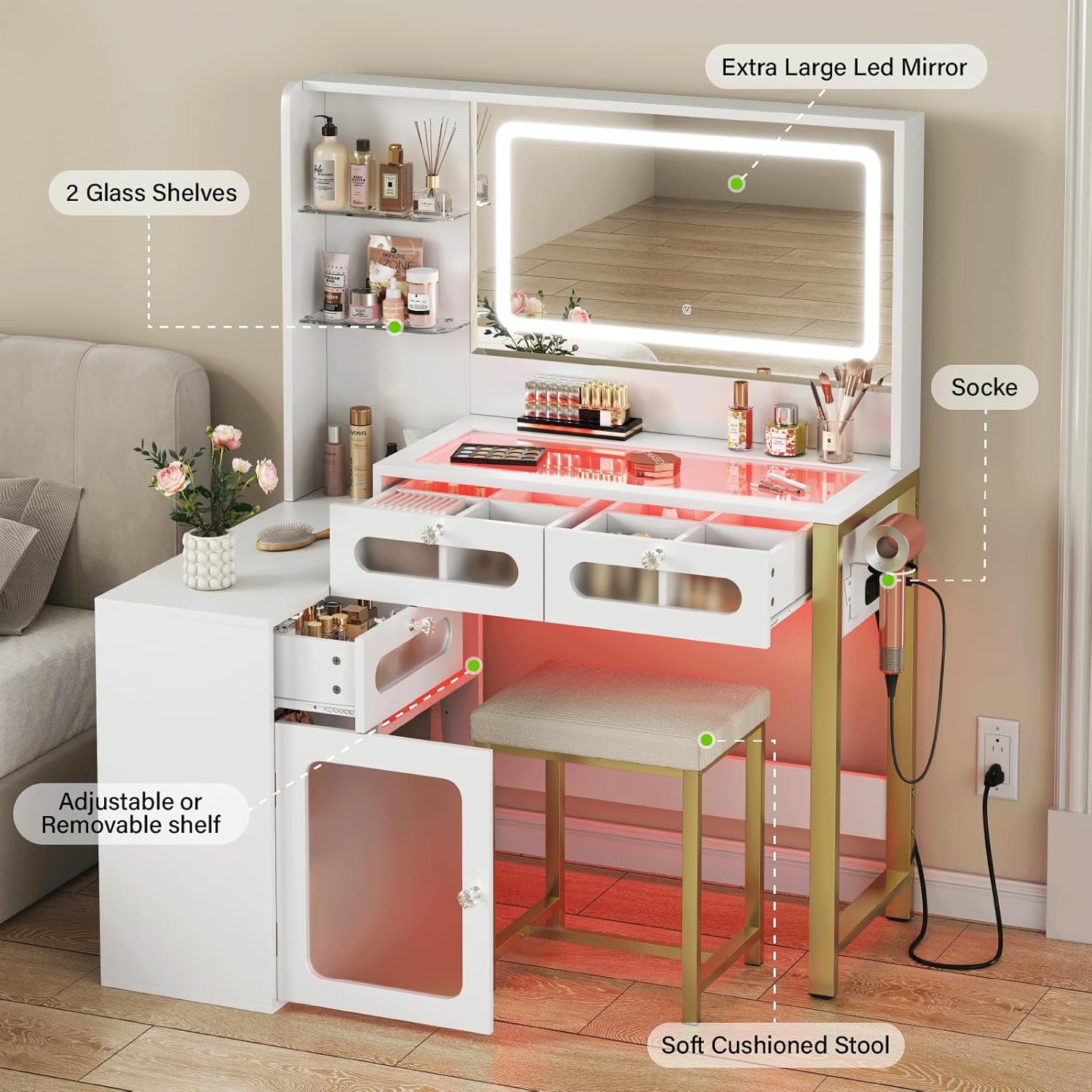
Figure 2.2: Exploded view highlighting storage, mirror, and stool features. This image details the various components and their functions.
3. Setup and Assembly
The CollaredEagle Vanity Desk requires assembly. Detailed instructions and all necessary tools are included in the package. Follow the numbered steps provided in the assembly manual for a smooth setup process.
3.1. Pre-Assembly Checklist
- Verify all parts are present and undamaged according to the parts list.
- Ensure you have adequate space for assembly.
- Gather any additional tools if required (e.g., screwdriver, hammer).
3.2. Assembly Steps
- Unpack all components and lay them out on a clean, soft surface to prevent scratches.
- Follow the step-by-step instructions provided in the included manual, matching parts by their labels.
- Secure all fasteners tightly, but do not overtighten to avoid damaging the material.
- Once assembled, ensure the vanity is stable and all connections are secure before use.
4. Operating Instructions
4.1. Mirror Lighting
The vanity mirror features built-in lighting with three adjustable color temperature modes (Cool White, Natural White, Warm White) and adjustable brightness. A touch-sensitive switch on the mirror allows for easy control.
- Power On/Off: Touch the power icon on the mirror to turn the lights on or off.
- Change Color Temperature: Briefly touch the mode icon to cycle through Cool White, Natural White, and Warm White.
- Adjust Brightness: Press and hold the power icon to increase or decrease the brightness.

Figure 4.1: Mirror lights demonstrating Cool White, Natural White, and Warm White settings. This image shows the different lighting options available for the mirror.

Figure 4.2: User interacting with the touch-sensitive mirror light control. This image demonstrates how to operate the mirror's lighting.
4.2. RGB Drawer Lighting
The transparent top drawers feature RGB LED lighting, which can be controlled via an included remote or a dedicated mobile application. This allows for multiple colors, dynamic modes, music mode, mic mode, and timing functions.
- Remote Control: Use the provided remote to power on/off, change colors, adjust brightness, and select various lighting modes.
- Mobile App Control: Download the specified mobile application (refer to the included quick start guide for app details) to access advanced features like custom RGB colors, speed modes, music synchronization, and timing functions.

Figure 4.3: RGB drawer lighting with mobile application control interface. This image illustrates the various control options for the RGB lights.

Figure 4.4: Vanity desk showcasing blue RGB lighting in the transparent drawers.

Figure 4.5: Vanity desk showcasing red RGB lighting in the transparent drawers.
4.3. Built-in Charging Station
The vanity desk includes a built-in charging station with 2 standard AC plug sockets, 1 USB port, and 1 Type-C port. This allows for convenient charging of electronic devices such as phones, tablets, and hair styling tools.
- Plug your device's power adapter or USB cable into the appropriate port on the charging station.
- Ensure the vanity is connected to a power source for the charging station to function.
Video 4.1: Demonstration of a corner vanity desk with 3 color lights and charging station. This video provides a general overview of similar vanity features, including lighting and charging capabilities.
5. Storage Features
The CollaredEagle Vanity Desk is designed with ample storage to keep your cosmetics, skincare products, and accessories organized and easily accessible.
- Transparent Top Drawers: Two drawers with tempered glass tops allow for clear visibility and quick access to stored items.
- Side Cabinet: A large tempered cabinet provides additional enclosed storage space.
- Open Shelves: Two open shelves offer convenient display and storage for frequently used items.
- Vanity Stool: The included stool (14.6 x 11.7 x 15.7 inches) provides comfortable seating.

Figure 5.1: Close-up of the transparent glass tabletop, providing a clear view of organized cosmetics and accessories.
6. Maintenance
- Cleaning: Wipe surfaces with a soft, damp cloth. Avoid abrasive cleaners or harsh chemicals that may damage the finish.
- Glass Surfaces: Use a glass cleaner for the mirror and tempered glass tops.
- Electrical Components: Ensure all electrical components remain dry. Unplug the unit before cleaning or performing any maintenance.
- Fasteners: Periodically check and tighten all fasteners to maintain stability.
7. Troubleshooting
| Problem | Possible Cause | Solution |
|---|---|---|
| Mirror lights not turning on. | Power cable disconnected; touch switch malfunction. | Ensure power cable is securely plugged in. Gently press the touch switch. If issue persists, contact customer support. |
| RGB drawer lights not responding. | Remote control battery low; app not connected; power issue. | Replace remote battery. Check mobile app connection. Ensure vanity is powered. |
| Charging station not working. | Vanity not plugged in; device cable faulty. | Verify the vanity's main power cord is plugged into a working outlet. Try a different device cable. |
| Vanity feels unstable. | Loose fasteners; uneven floor. | Tighten all assembly fasteners. Adjust leveling feet if available, or place shims under the base. |
8. Specifications
- Model Number: HY011-WH
- Brand: CollaredEagle
- Material: Engineered Wood
- Color: White
- Product Dimensions: 31.49"D x 31.49"W x 53.1"H
- Item Weight: 107 pounds
- Assembly Required: Yes
- Mirror Lighting: 3 adjustable color temperatures, dimmable
- Drawer Lighting: RGB LED with remote/app control
- Charging Station: 2 AC outlets, 1 USB port, 1 Type-C port
9. Warranty and Support
For warranty information, please refer to the documentation included with your purchase or contact CollaredEagle customer support directly. If you encounter any issues or require assistance, please reach out to our customer service team through the contact information provided in your product packaging or on the official CollaredEagle website.