1. Product Overview
This document provides instructions for the Generic replacement remote control, compatible with Kaisai RG10A/BGEF and RG10A1/BGEF air conditioner models. This remote is designed to provide essential control functions for your air conditioning unit. Please note that as a replacement unit, some advanced functions of your original remote may not be supported.
The remote control is constructed from durable ABS/Plastic material, ensuring comfortable handling and longevity.
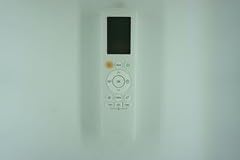
Image 1: Generic replacement remote control. This image displays the white remote control unit with a digital display and various control buttons.
2. Setup and Battery Installation
This replacement remote control requires no programming or complex setup procedures. Simply install the batteries, and it will be ready for use with compatible Kaisai air conditioner models.
- Open the Battery Compartment: Locate the battery compartment cover on the back of the remote control. Slide or press the latch to open it.
- Insert Batteries: Insert two new batteries (typically AAA, not included) into the compartment, ensuring the positive (+) and negative (-) terminals align correctly with the markings inside the compartment.
- Close the Compartment: Replace the battery compartment cover, ensuring it clicks securely into place.
- Test Functionality: Point the remote control towards your air conditioner and press a button (e.g., Power) to confirm it is working.
Note: Ensure batteries are inserted correctly. Incorrect battery placement can prevent the remote from functioning.
3. Operating Instructions
The remote control provides standard functions for your air conditioner. Point the remote directly at the air conditioner's receiver when operating.
- Power On/Off: Press the Power button to turn the air conditioner on or off.
- Temperature Adjustment: Use the Temperature Up (▲) and Temperature Down (▼) buttons to adjust the desired temperature.
- Mode Selection: The Mode button cycles through various operating modes such as Cool, Heat, Fan, Dry, and Auto.
- Fan Speed: The Fan Speed button adjusts the fan's intensity (e.g., Low, Medium, High, Auto).
- Swing Function: If available on your AC unit, the Swing button controls the louver movement.
Important: This is a replacement remote. Some specific or advanced functions present on your original air conditioner remote may not be available or fully functional with this unit. Refer to your air conditioner's original manual for detailed information on all features.
4. Maintenance
Proper maintenance ensures the longevity and reliable operation of your remote control.
- Cleaning: Wipe the remote control regularly with a soft, dry cloth. Do not use liquid cleaners, abrasive pads, or chemical solvents, as these can damage the surface or internal components.
- Battery Replacement: Replace batteries when the remote's response becomes sluggish or stops working. Always replace both batteries at the same time with new ones of the same type.
- Storage: If the remote control will not be used for an extended period, remove the batteries to prevent leakage and potential damage to the unit. Store it in a cool, dry place away from direct sunlight and extreme temperatures.
- Avoid Drops and Impacts: Protect the remote from physical shocks, as internal components can be damaged.
5. Troubleshooting
If you encounter issues with your remote control, refer to the following common troubleshooting steps:
- Remote Not Responding:
- Check if the batteries are inserted correctly with the correct polarity (+/-).
- Replace old batteries with new ones.
- Ensure there are no obstructions between the remote control and the air conditioner's receiver.
- Verify that you are within the effective operating range of the air conditioner.
- Limited Functionality:
- As a replacement remote, some advanced or specific functions of your original air conditioner remote may not be supported. This is not a defect of the product.
- Confirm that your air conditioner model is listed as compatible (Kaisai RG10A/BGEF, RG10A1/BGEF).
- Intermittent Operation:
- This could indicate low battery power. Replace the batteries.
- Ensure the remote's infrared emitter is clean and unobstructed.
If problems persist after following these steps, consult the air conditioner's original manual or contact the air conditioner manufacturer for further assistance.
6. Specifications
| Model | RG10A1/BGEF (Compatible with RG10A/BGEF, RG10AB2S/BGEFU1) |
| Brand | Generic |
| Material | ABS/Plastic |
| Special Feature | Digital Display |
| Max Number of Supported Devices | 1 |
| Compatible Devices | Kaisai Air Conditioners (RG10A/BGEF, RG10A1/BGEF, RG10AB2S/BGEFU1) |
| Power Source | Batteries (not included) |
7. Warranty and Support
This product is a generic replacement remote control. Specific warranty information is not provided with this manual. For any issues not covered in the troubleshooting section, please refer to the retailer where the product was purchased or the manufacturer of your air conditioning unit for support related to the air conditioner's functions.
Always retain your purchase receipt for any potential warranty claims with the retailer.


