
1. Introduction
Thank you for choosing the HEXEUM 4K Night Vision Binoculars, Model CZ086. These advanced infrared binoculars are designed to provide crystal-clear visibility and high-resolution recording capabilities in complete darkness. Ideal for wildlife observation, security patrols, hunting, and outdoor exploration, this manual will guide you through the setup, operation, and maintenance of your device to ensure optimal performance.
2. What's in the Box
- HEXEUM 4K Night Vision Binoculars (Model CZ086)
- 64GB TF Card
- Neck Strap
- USB Type-C Cable
- Cleaning Cloth
- User Manual
- Exquisite Gift Box (for storage)
3. Product Overview
Familiarize yourself with the components and controls of your night vision binoculars.
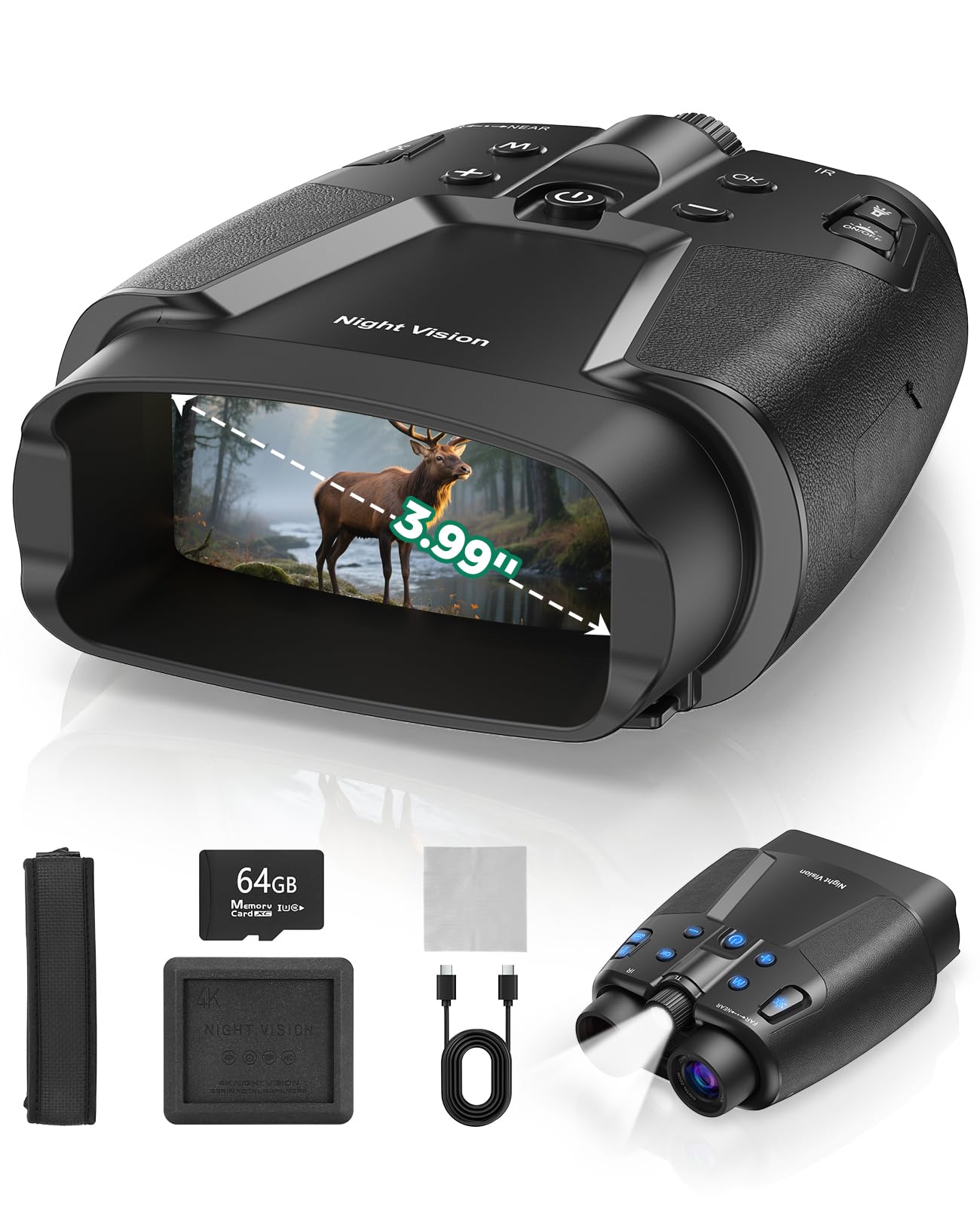
Image 1: Front view of the HEXEUM 4K Night Vision Binoculars, highlighting the main body, lenses, and control panel.
Key Components:
- Objective Lenses: Capture light for image processing.
- IR Illuminator: Emits infrared light for night vision.
- Focus Wheel: Adjusts focus for clear viewing (labeled "FAR" and "NEAR").
- 3.99" HD Display: Large screen for real-time viewing and playback.
- Control Buttons: Power, Mode, Menu, IR adjustment, Zoom, Photo/Video capture.
- USB Type-C Port: For charging and data transfer.
- TF Card Slot: For inserting the 64GB memory card (expandable up to 128GB).
- Tripod Mount: 1/4" threaded hole for tripod attachment (tripod not included).
- Built-in Microphone: Records synchronized audio with video.
- Tactical Illumination Light: Built-in flashlight for close-range visibility and emergency signaling.
4. Setup
4.1 Charging the Device
The binoculars are equipped with a 10000mAh rechargeable battery. Before first use, fully charge the device.
- Locate the USB Type-C port on the side of the binoculars.
- Connect the provided USB Type-C cable to the binoculars and to a compatible USB power source (e.g., computer, wall adapter).
- The charging indicator will illuminate. Allow sufficient time for a full charge (up to 22 hours of continuous recording).

Image 2: Binoculars connected via USB-C for charging, illustrating the high-capacity battery.
4.2 Inserting the TF Card
A 64GB TF card is included for storing photos and videos. The device supports cards up to 128GB.
- Locate the TF card slot cover on the side of the binoculars.
- Gently open the cover.
- Insert the TF card into the slot with the gold contacts facing down until it clicks into place.
- Close the cover securely.
5. Operating Instructions
5.1 Power On/Off
- To Power On: Press and hold the Power button (usually marked with a circle and a vertical line) until the screen illuminates.
- To Power Off: Press and hold the Power button again until the screen turns off.
5.2 Focus Adjustment
To achieve a clear image, adjust the focus wheel located between the objective lenses.
- Rotate the Focus Wheel clockwise or counter-clockwise until the image on the display is sharp.
- The wheel is marked "FAR" and "NEAR" to guide your adjustment.

Image 3: Demonstrating the focus adjustment wheel for clear image acquisition.
5.3 Day and Night Vision Modes
The binoculars automatically switch between day (color) and night (black and white) modes. In night mode, you can adjust the infrared illumination.
- Daylight Use: The device will display images in full color.
- Night Vision Use: The device will automatically switch to black and white mode. Use the IR+ and IR- buttons to adjust the infrared illumination level (Level 1 to Level 3) for optimal clarity in varying darkness conditions.

Image 4: Illustrating the effect of different IR illumination levels on night vision clarity.
5.4 Photo/Video Recording
- Press the Mode button to switch between Photo and Video modes.
- In Photo mode, press the Capture button (camera icon) to take a picture.
- In Video mode, press the Capture button to start recording. Press again to stop recording.
- Videos are recorded in 4K resolution with synchronized audio.
5.5 Digital Zoom
The binoculars feature an 8x digital zoom to magnify distant objects.
- Use the Zoom + and Zoom - buttons to adjust the magnification level.
- The current zoom level will be displayed on the screen.

Image 5: Digital zoom feature in action, magnifying a distant subject.
5.6 Tactical Illumination Light
A built-in tactical light provides additional illumination for close-range tasks or emergency signaling.
- Press the Light button (sun icon) to turn the tactical light on/off.
- Some models may offer different light modes (e.g., steady, SOS flash). Refer to the on-screen indicators.

Image 6: Backlit buttons for night operation and the tactical flashlight in action.
5.7 Menu Settings
Access the menu to configure various settings such as resolution, date/time, language, and more.
- Press the Menu button to enter the settings menu.
- Use the navigation buttons (usually Zoom +/- or IR +/-) to scroll through options.
- Press the OK button to select an option or confirm a setting.
- Press the Menu button again to exit the menu.
6. Maintenance
- Cleaning Lenses: Use the provided cleaning cloth to gently wipe the objective lenses and display screen. Avoid abrasive materials or harsh chemicals.
- Storage: Store the binoculars in a cool, dry place, preferably in the provided gift box, when not in use.
- Battery Care: Fully charge the battery before long-term storage and recharge every 3-6 months to maintain battery health.
- Water Resistance: The device features a rugged, water-resistant design. However, avoid submerging it in water.
7. Troubleshooting
| Problem | Possible Solution |
|---|---|
| Device does not power on. | Ensure the battery is fully charged. Press and hold the Power button for several seconds. |
| Image is blurry. | Adjust the Focus Wheel until the image is clear. |
| Poor night vision clarity. | Increase the IR illumination level using the IR+ button. Ensure there are no obstructions to the IR illuminator. |
| Cannot record photos/videos. | Ensure a TF card is properly inserted and has sufficient free space. Check the device is in the correct Photo or Video mode. |
| Screen is too bright/dim. | Adjust screen brightness settings via the Menu. |
8. Specifications
| Feature | Detail |
|---|---|
| Model Number | CZ086 |
| Video Resolution | 4K |
| Display Screen | 3.99" HD Display |
| Battery Capacity | 10000mAh (up to 22 hours recording) |
| Storage | 64GB TF Card Included (supports up to 128GB) |
| IR Illuminator | 3W 850nm IR with 3 levels of adjustment |
| Digital Zoom | 8x |
| Objective Lens Diameter | 28 Millimeters |
| Special Features | Built-In Flash, Built-in Microphone, High Magnification, Long-lasting Capacity, Tripod Mountable |
| Item Weight | 2.53 pounds |
| Dimensions | 10.2 x 9.06 x 4.57 inches |
9. Warranty and Support
For warranty information and customer support, please refer to the documentation included in your product packaging or visit the official HEXEUM website. Keep your purchase receipt for warranty claims.
10. Official Product Videos
Watch these product videos for visual guidance and demonstrations.
Video: My thoughts on the Hexeum Night Vision Binoculars!
Video: BestGuarder Night Vision Binoculars Review.
Video: Nvg goggles seeing in the dark.
Video: Daylight and Nighttime Test of Vtiisamao Night Vision Binoculars.
Video: We saw an OWL the first night we checked these out!
Video: Outdoorsy stuff you need.
Video: I Had My Doubts About These... The Results Shocked Me.
Video: Super rad and fun night vision that works!!
Video: These are really good and clear!
Video: Watch Before You Buy! Night Vision Binocular Review.