
1. Introduction
This manual provides detailed instructions for the assembly, operation, maintenance, and troubleshooting of your YDN Electric L-Shaped Standing Desk. Please read this manual thoroughly before assembly and use to ensure proper function and safety. This desk features a height-adjustable electric lifting system, a reversible L-shaped design, and a spacious desktop suitable for various home office or gaming setups.
2. Safety Information
- Ensure all components are present and undamaged before assembly. Do not use if any parts are missing or faulty.
- Keep children and pets away from the desk during operation to prevent injury.
- Do not overload the desk. Refer to the specifications for maximum weight capacity.
- Ensure the power cord is not pinched or damaged. Connect to a grounded power outlet.
- Avoid placing liquids directly on the control panel or near electrical components.
- Do not attempt to disassemble or repair the motor or control system yourself. Contact qualified service personnel.
- Always ensure there are no obstructions above or below the desk when adjusting its height.
3. Package Contents
Verify that all the following components are included in your package. If any parts are missing, please contact customer support.
- Desktop Panels (L-shaped)
- Desk Legs with Dual Motors
- Control Box
- Multi-Function Keypad
- Power Adapter and Cable
- Headphone Hooks (x2)
- Cable Clip Management System
- Adjustable Feet (x6)
- Lockable Swivel Casters (x6) (Optional installation)
- Assembly Hardware (screws, Allen wrenches, etc.)
- Instruction Manual

Figure 3.1: Included accessories such as headphone hooks, cable clips, adjustable feet, and optional casters.
4. Assembly Instructions
Follow these steps carefully to assemble your YDN Electric L-Shaped Standing Desk. It is recommended to have two people for assembly.
- Unpack and Organize: Lay out all components on a clean, soft surface to prevent scratches. Identify all parts against the package contents list.
- Assemble Desk Legs: Attach the feet to the bottom of the desk legs. You can choose to install the adjustable feet for stability or the lockable swivel casters for mobility.
- Attach Lifting Columns: Secure the lifting columns to the main frame components using the provided hardware.
- Connect Desktop Panels: The L-shaped desktop can be configured with the longer side on either the left or right, depending on your preference and room layout. Carefully align and attach the desktop panels to the assembled frame using the designated screw holes.
- Install Control Box and Keypad: Mount the control box and keypad to the underside of the desktop in an easily accessible location. Connect the motor cables and keypad cable to the control box.
- Install Accessories: Attach the headphone hooks to the desired locations on the desk frame. Utilize the cable clip management system to organize and secure power and peripheral cables.
- Power Connection: Connect the power adapter to the control box and then plug it into a grounded wall outlet.

Figure 4.1: The reversible L-shaped design allows for left or right configuration to suit your workspace.

Figure 4.2: Desk dimensions and maximum load capacity for assembly planning.
5. Operating Instructions
Your YDN Electric L-Shaped Standing Desk is equipped with an intuitive multi-function keypad for easy height adjustment and memory presets.
5.1. Initial Setup / Reset
After initial assembly or if the desk is not responding, perform a reset:
- Press and hold the "Down" arrow button until the desk reaches its lowest position and then slightly rises. Release the button.
- If the desk does not respond, unplug the power cord for 10 seconds, then plug it back in and repeat step 1.
5.2. Adjusting Height
- Press the "Up" arrow button to raise the desk.
- Press the "Down" arrow button to lower the desk.
- Release the button at your desired height. The LED display will show the current height.

Figure 5.1: The multi-function keypad for height adjustment and memory presets.
5.3. Setting Memory Presets
The keypad allows you to save up to 4 preferred height settings:
- Adjust the desk to your desired height using the Up/Down arrows.
- Press one of the numbered preset buttons (1, 2, 3, or 4) and hold it until the LED display flashes or beeps, indicating the height has been saved.
- To recall a saved height, simply press the corresponding numbered preset button. The desk will automatically move to that position.
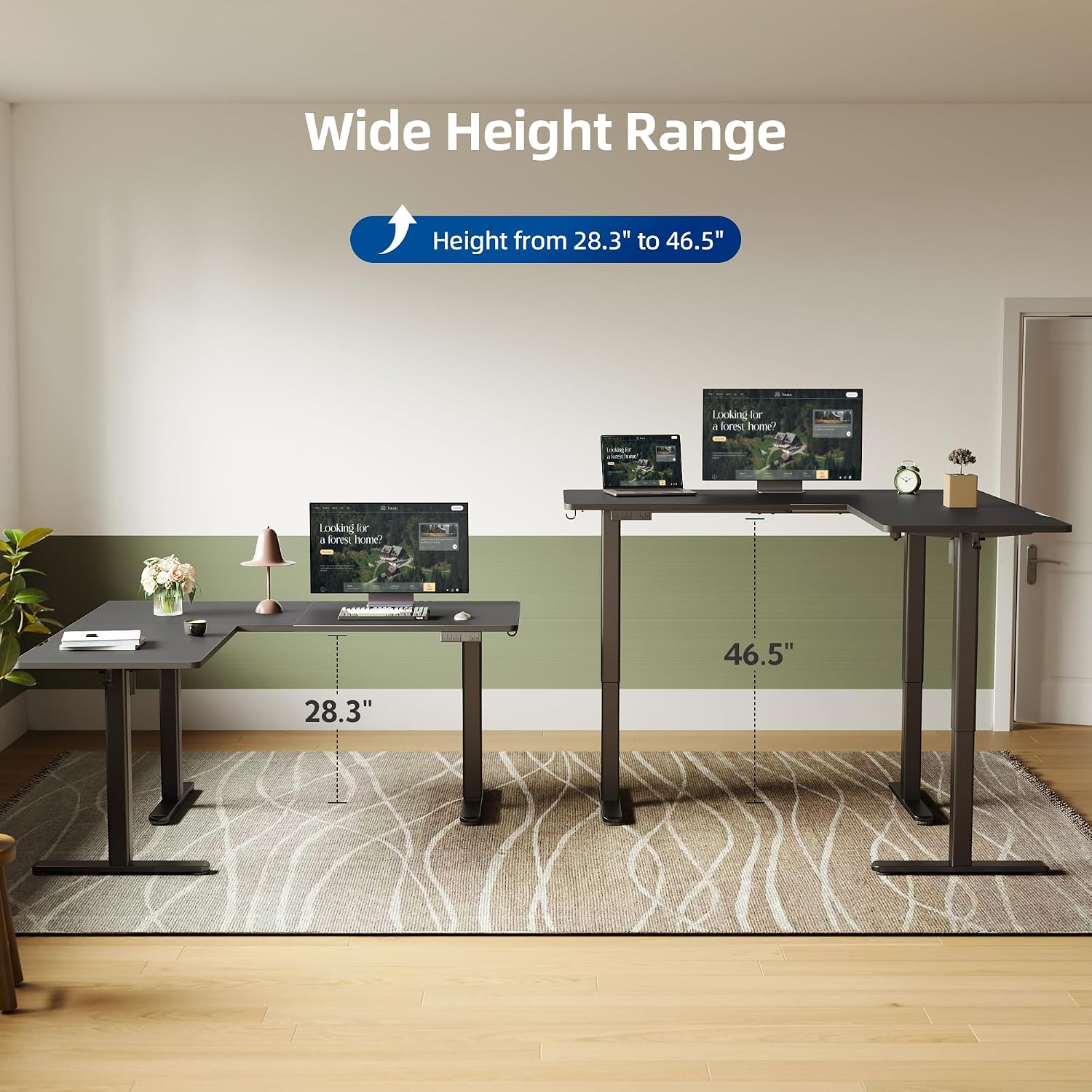
Figure 5.2: The desk offers a wide height range from 28.3 inches to 46.5 inches.
5.4. Quiet Operation
The desk's advanced motorized lift system operates with ultra-low noise, ensuring minimal disturbance during height adjustments.

Figure 5.3: The desk operates at approximately 45dB, ensuring quiet height adjustments.
6. Maintenance
- Cleaning: Wipe the desk surfaces with a damp cloth. Avoid harsh chemicals or abrasive cleaners that could damage the finish.
- Cable Management: Periodically check and reorganize cables using the provided clips to prevent tangles and damage.
- Fasteners: Occasionally check all screws and fasteners to ensure they are tight. Retighten if necessary.
- Motor Care: The electric motors are designed for maintenance-free operation. Do not lubricate or attempt to open the motor housing.
7. Troubleshooting
If you encounter issues with your YDN Electric L-Shaped Standing Desk, refer to the following common problems and solutions:
| Problem | Possible Cause | Solution |
|---|---|---|
| Desk does not move or respond to keypad. | Power cord disconnected, control box connection loose, overload, or system error. |
|
| Desk moves unevenly or makes unusual noises. | Uneven load, loose fasteners, or obstruction. |
|
| Height presets are not saving or recalling correctly. | Incorrect saving procedure or temporary system glitch. |
|
If the problem persists after attempting these solutions, please contact YDN customer support.
8. Specifications
| Feature | Detail |
|---|---|
| Model Number | P1.01.020.0001 |
| Dimensions (D x W x H) | 55"D x 63"W x 28.3"H (at lowest height) |
| Height Adjustment Range | 28.3 inches to 46.5 inches |
| Maximum Weight Capacity | 220 Pounds |
| Motor Type | Dual Motors |
| Noise Level | Approximately 45dB |
| Desktop Material | Engineered Wood |
| Frame Material | Alloy Steel |
| Color | Black |
| Control Panel | Multi-function keypad with LED display and 4 memory presets |
| Assembly Required | Yes |
9. Warranty and Support
9.1. Warranty Information
This YDN Electric L-Shaped Standing Desk comes with a limited warranty. Please refer to the warranty card included in your package for specific terms, conditions, and duration of coverage. The warranty typically covers manufacturing defects and malfunctions under normal use.
9.2. Customer Support
For any questions, assistance with assembly, troubleshooting, or warranty claims, please contact YDN customer support. You can typically find contact information on the YDN Store website or through your purchase platform.
For online purchases, you may visit the YDN Store on Amazon for further assistance.