
Introduction
The iFi Zen DAC 3 is a high-performance desktop Digital Analog Converter (DAC) and headphone amplifier designed to enhance your audio experience. It supports a wide range of high-resolution audio formats, including PCM 32-bit/768kHz, DSD512, and full MQA decoding. Featuring a Burr-Brown True Native chipset and balanced output, the Zen DAC 3 delivers pure, noise-free sound. This manual provides instructions for setting up, operating, and maintaining your device.
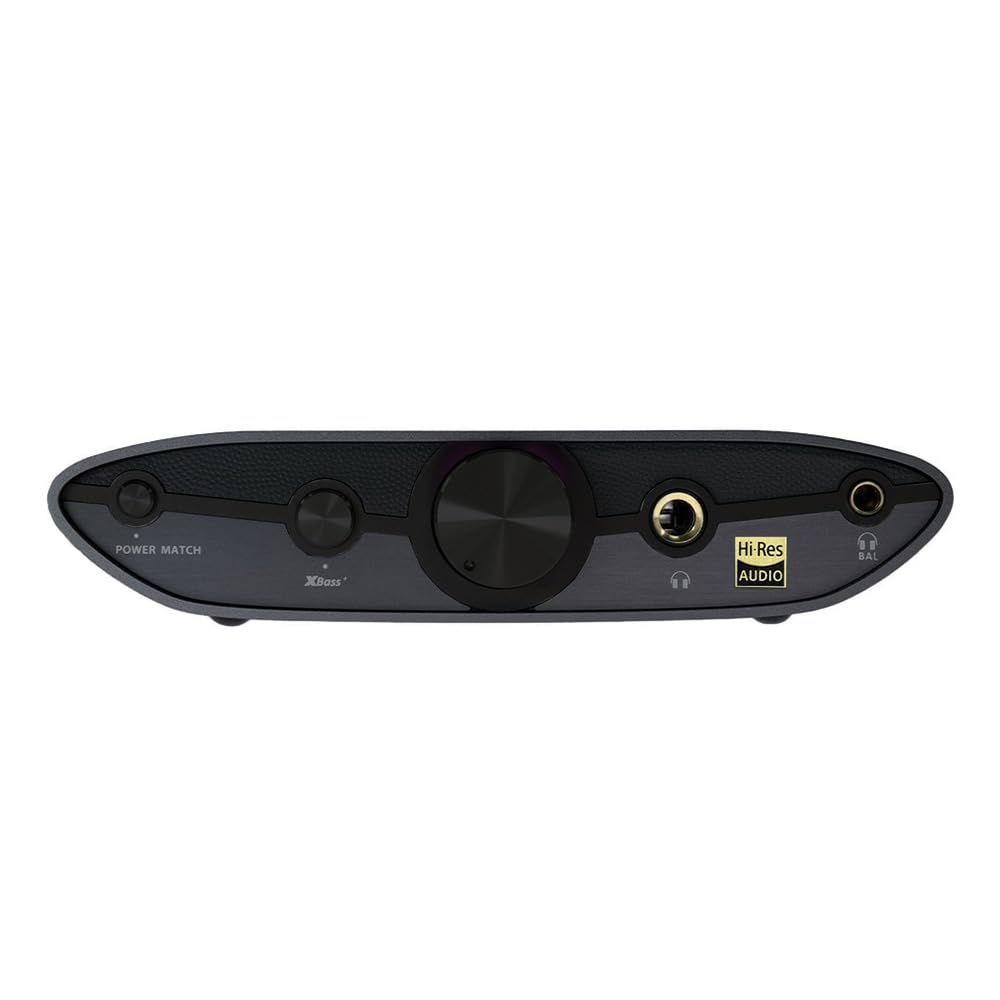
Image: The iFi Zen DAC 3 Desktop Digital Analog Converter.
Product Overview
Key Features
- High-Resolution Audio Support: Supports PCM 32-bit/768kHz, DSD512, and full MQA decoding.
- Advanced Chipset: Utilizes a Burr-Brown True Native chipset for optimal audio fidelity.
- Versatile Outputs: Equipped with dual headphone outputs (4.4mm balanced, 6.3mm single-ended) and RCA line outputs.
- USB-C Connectivity: Modern and convenient USB-C input for digital audio and power.
- Audio Enhancement Features: Includes PowerMatch and TrueBass (XBass) to optimize performance for various headphones and listening preferences.
- Durable Design: Features an exclusive matte black aluminum design.
Setup Guide
Package Contents
- iFi Zen DAC 3 Unit
- USB-C Cable
- Documentation
Front Panel Controls and Connections

Image: Front panel of the iFi Zen DAC 3.
- PowerMatch Button: Adjusts gain for different headphone sensitivities.
- X-Bass Button: Enhances bass response.
- Volume Knob: Controls the output volume. The LED ring around the knob indicates the audio format.
- 6.3mm Single-Ended Headphone Output: Standard headphone jack.
- 4.4mm Balanced Headphone Output: For balanced headphones, offering improved sound separation and power.

Image: Close-up of the front panel controls.
Rear Panel Connections

Image: Rear panel of the iFi Zen DAC 3.
- Balanced Output (4.4mm): Connects to balanced amplifiers or active speakers.
- Variable/Fixed Switch: Selects between variable volume output (controlled by the volume knob) or fixed line level output.
- RCA Line Outputs (L/R): Connects to amplifiers or active speakers.
- Digital Input (USB-C): Connects to your computer or digital audio source. This also provides power.
- DC 5V External Power Input: Optional input for an external 5V power supply (sold separately) for enhanced performance, especially when using line outputs with sensitive equipment.
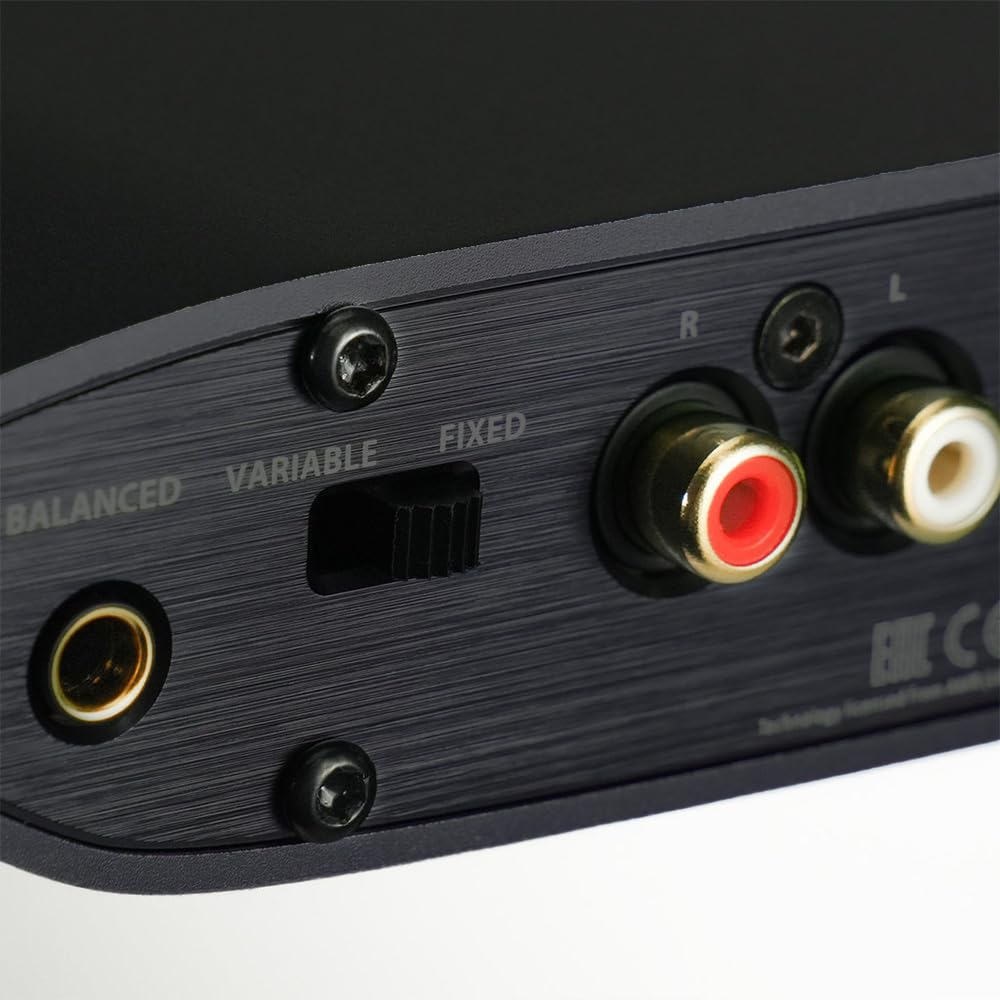
Image: Close-up of the rear panel connections.
Initial Connection
- Connect to Source: Use the provided USB-C cable to connect the Zen DAC 3 to your computer or digital audio source. The device will typically draw power from this connection.
- Connect Headphones or Speakers:
- For headphones, plug them into either the 6.3mm or 4.4mm headphone output on the front panel.
- For active speakers or an amplifier, connect the RCA outputs or the 4.4mm balanced output on the rear panel.
- Power On: The device will power on automatically when connected via USB. The LED around the volume knob will illuminate.
- Driver Installation: For Windows users, it is recommended to download and install the official iFi USB drivers from the iFi website for optimal performance and full MQA/DSD support. macOS and Linux typically do not require additional drivers.
- Audio Output Selection: Select "iFi (by AMR) HD USB Audio" or similar in your computer's sound settings as the default audio output device.
Operating Instructions
Volume Control
The large knob on the front panel controls the output volume for both headphone and line outputs (when the rear switch is set to VARIABLE). Rotate clockwise to increase volume and counter-clockwise to decrease. Always start with a low volume setting to prevent damage to your hearing or equipment.
LED Indicator for Audio Format
The LED ring around the volume knob changes color to indicate the audio format being played:
- Green: PCM 44.1/48/88.2/96kHz
- Yellow: PCM 176.4/192/352.8/384kHz
- Cyan: DSD 64/128
- Blue: DSD 256/512
- Magenta: MQA
- White: MQA Studio
If the LED does not display the expected color for high-resolution formats, ensure that the correct drivers are installed (for Windows) and your audio playback software is configured for exclusive mode or bit-perfect output.
PowerMatch (Gain Control)
Press the PowerMatch button on the front panel to adjust the gain. This feature optimizes the output power for different types of headphones:
- Off (LED off): Low gain, suitable for sensitive headphones and IEMs.
- On (LED on): High gain, suitable for less sensitive or high-impedance headphones.
X-Bass (TrueBass)
Press the X-Bass button on the front panel to activate or deactivate the TrueBass feature. This analog bass enhancement circuit provides a deeper, more defined bass response without muddying the midrange. It is particularly useful for headphones that may lack low-end presence.
Variable/Fixed Output Switch
On the rear panel, the VARIABLE/FIXED switch controls the behavior of the RCA and 4.4mm balanced line outputs:
- VARIABLE: The volume of the line outputs is controlled by the front volume knob. This is ideal when connecting directly to active speakers or a power amplifier without its own volume control.
- FIXED: The line outputs provide a fixed, full-level audio signal, bypassing the volume control. This is suitable when connecting to a pre-amplifier or integrated amplifier with its own volume control. Ensure your amplifier's volume is set low before switching to FIXED mode to avoid sudden loud audio.
Maintenance
To ensure the longevity and optimal performance of your iFi Zen DAC 3, follow these maintenance guidelines:
- Cleaning: Use a soft, dry cloth to wipe the exterior of the device. Avoid using abrasive cleaners, solvents, or chemical sprays, as these can damage the finish.
- Placement: Place the device on a stable, flat surface away from direct sunlight, heat sources, and excessive moisture. Ensure adequate ventilation.
- Connections: Periodically check all cable connections to ensure they are secure. Avoid pulling cables by the wire; always grasp the connector.
- Storage: If storing the device for an extended period, disconnect all cables and store it in a cool, dry place.
Troubleshooting
If you encounter issues with your iFi Zen DAC 3, refer to the following common solutions:
| Problem | Possible Cause | Solution |
|---|---|---|
| No sound output. |
|
|
| LED color does not match expected audio format (e.g., MQA not showing Magenta). |
|
|
| Distorted or noisy audio. |
|
|
| Cannot switch between headphone and line outputs. | The Zen DAC 3 outputs to all connected devices simultaneously. There is no switch to mute one output while using another. | Unplug the output you do not wish to use, or manage volume levels on connected devices. |
Specifications
| Feature | Detail |
|---|---|
| Model | Zen DAC 3 |
| Digital Input | USB-C |
| Supported Formats | PCM 32-bit/768kHz, DSD512, MQA Full Decoder |
| DAC Chipset | Burr-Brown True Native |
| Headphone Outputs | 4.4mm Balanced, 6.3mm Single-Ended |
| Line Outputs | 4.4mm Balanced, RCA (L/R) |
| Power Input | USB-C (bus power), DC 5V (external optional) |
| Material | Aluminum |
| Number of Channels | 2 |
Warranty and Support
Warranty Information
The iFi Zen DAC 3 comes with a 1-year manufacturer's warranty. This warranty covers defects in materials and workmanship under normal use. Please retain your proof of purchase for warranty claims.
For detailed warranty terms and conditions, please refer to the official iFi website or contact iFi customer support.
Customer Support
For technical assistance, troubleshooting beyond this manual, or warranty inquiries, please visit the official iFi support website or contact their customer service department. You can often find FAQs, driver downloads, and firmware updates on their website.
iFi Official Website: ifi-audio.com


