
1. Introduction
The Reflexion HIF2082DAB is a versatile retro-style music system designed to combine nostalgic aesthetics with modern audio technology. This unit integrates a turntable, CD player, DAB+/FM radio, USB playback and recording capabilities, and Bluetooth 5.3 connectivity. It is equipped with external speakers to deliver clear and powerful sound, making it a comprehensive audio solution for various environments.
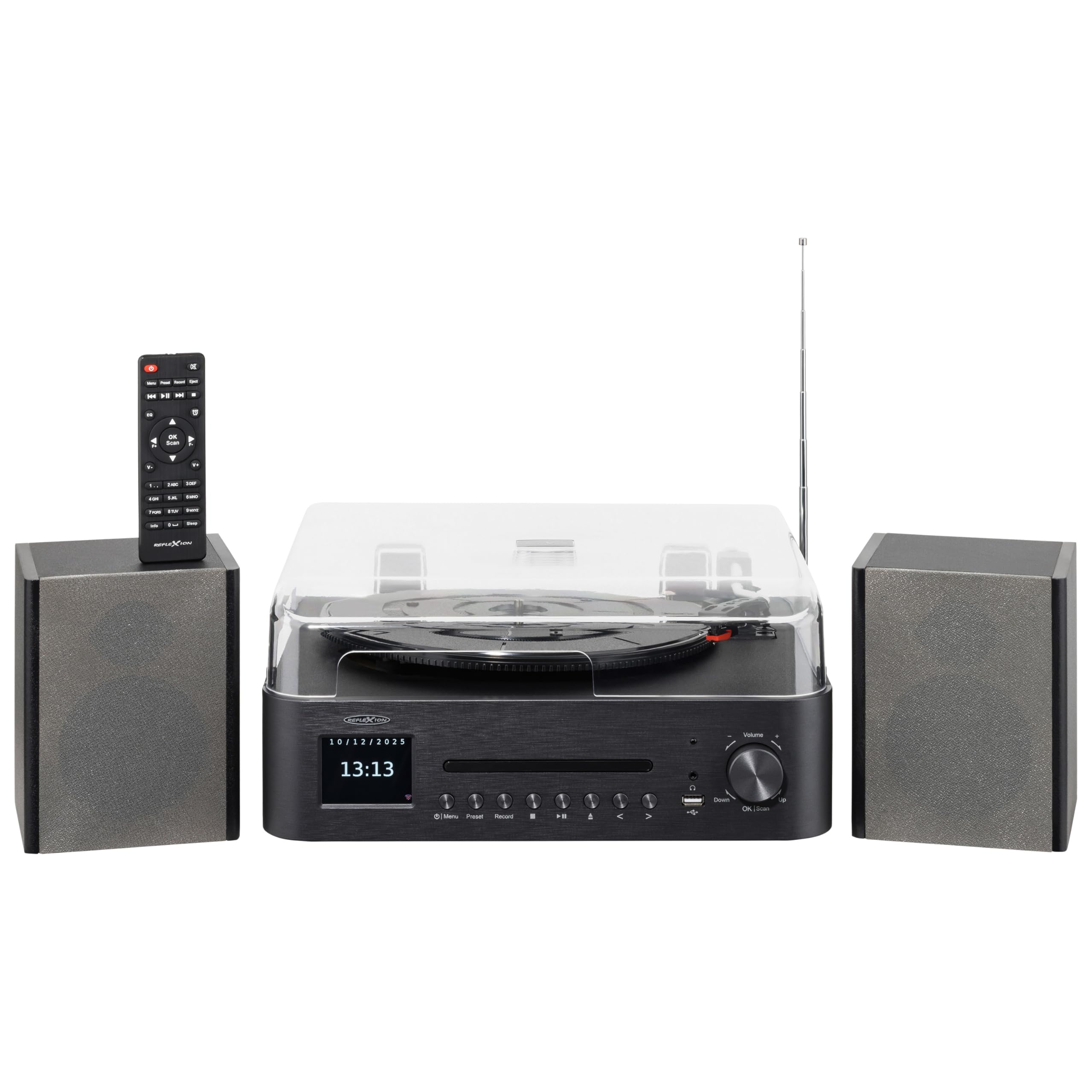
Image 1.1: The Reflexion HIF2082DAB Retro Turntable with included external speakers.
2. Safety Instructions
- Read all instructions carefully before operating the device.
- Keep the manual for future reference.
- Do not expose the unit to rain or moisture to prevent fire or electric shock.
- Ensure proper ventilation; do not block any ventilation openings.
- Place the unit on a stable, flat surface.
- Only use attachments/accessories specified by the manufacturer.
- Unplug the unit during lightning storms or when unused for long periods.
- Refer all servicing to qualified service personnel.
3. Package Contents
Please check that all items listed below are included in your package:
- 1 x Reflexion HIF2082DAB Main Unit
- 2 x Stereo Speakers
- 1 x Power Cable
- 1 x Remote Control (2 AAA batteries not included)
- 1 x Instruction Manual

Image 3.1: Included remote control and power cable.
4. Product Overview
4.1 Front Panel and Controls
The front panel features the main display, control buttons for various functions, and the CD tray. The volume knob and USB port are also located here for easy access.
4.2 Top Panel (Turntable)
The top panel houses the semi-automatic turntable, including the platter, tonearm, and stylus. A protective dust cover is also provided.

Image 4.1: Close-up view of the turntable with auto-stop and tonearm return features highlighted.
4.3 Rear Panel Connections
The rear panel includes connections for the external speakers, Line Out for connecting to an external amplifier, and Aux In for connecting external audio sources.

Image 4.2: Rear panel showing speaker terminals, Line Out, Aux In, and power input.
5. Setup
5.1 Unpacking and Placement
- Carefully remove all components from the packaging.
- Place the main unit and speakers on a stable, level surface, ensuring adequate ventilation around the unit.
- Keep the unit away from direct sunlight, heat sources, and moisture.
5.2 Connecting the Speakers
- Connect the included stereo speakers to the speaker terminals on the rear of the main unit. Ensure correct polarity (red to red, black to black).
5.3 Power Connection
- Insert the power cable into the AC input on the rear of the unit.
- Plug the other end of the power cable into a suitable wall outlet (AC 100-240V).
5.4 Initial Setup
- Upon first power-on, the unit may prompt you to select a language and set the time/date. Follow the on-screen instructions using the navigation buttons and OK/Scan button.
6. Operating Instructions
6.1 Turntable Operation
- Selecting Speed: Choose the appropriate speed (33, 45, or 78 RPM) using the speed selector switch.
- Playing a Record: Place a record on the platter. Remove the stylus protector. Gently lift the tonearm using the cueing lever and position it over the desired track. Lower the tonearm slowly onto the record.
- Auto-Stop Function: The turntable features an auto-stop function that automatically stops the platter when a record finishes playing. The tonearm will also return to its rest position.
6.2 CD Player
- Press the CD mode button.
- Press the Eject button to open the CD tray. Place a CD (audio CD or MP3 CD) with the label side up.
- Press Eject again to close the tray. Playback will begin automatically.
- Use the Skip/Search buttons to navigate tracks and Play/Pause for playback control.
6.3 DAB+/FM Radio
- Press the DAB+ or FM mode button.
- Auto Scan: For DAB+, the unit will automatically scan for available stations. For FM, press and hold the OK/Scan button to perform an auto scan.
- Manual Tuning: Use the navigation buttons to manually tune to a frequency.
- Presets: Save your favorite stations by pressing and holding the Preset button, then selecting a preset number. Recall saved stations by pressing the Preset button and selecting the desired number.
6.4 Bluetooth Connectivity
- Press the Bluetooth mode button. The display will show "Pairing" or similar.
- Enable Bluetooth on your mobile device (smartphone, tablet, etc.).
- Search for "Reflexion HIF2082DAB" in your device's Bluetooth list and select it to pair.
- Once paired, you can stream audio from your device to the HIF2082DAB.
6.5 USB Playback and Recording
- USB Playback: Insert a USB flash drive (up to 32GB, FAT format) containing MP3 files into the USB port. Press the USB mode button. The unit will automatically detect and play MP3 files.
- USB Recording (from Vinyl): While playing a vinyl record, press the Record button. The unit will begin recording the audio directly to the connected USB drive as an MP3 file. Press Record again to stop.
6.6 Alarm and Sleep Timer
- Alarm: The unit features two adjustable alarms. Access the alarm settings through the menu to set wake-up times and desired audio sources (e.g., radio, CD).
- Sleep Timer: Set the sleep timer (up to 90 minutes) to automatically turn off the unit after a specified duration. This is useful for falling asleep to music.
7. Maintenance
7.1 Cleaning the Unit
- Wipe the unit with a soft, dry cloth. Do not use abrasive cleaners or solvents.
- For the dust cover, use a soft, slightly damp cloth, then dry thoroughly.
7.2 Stylus Care
- Regularly clean the stylus using a soft brush, brushing gently from back to front.
- Replace the stylus when sound quality deteriorates or after approximately 300-500 hours of use to prevent damage to your records.
8. Troubleshooting
| Problem | Possible Cause | Solution |
|---|---|---|
| No power | Power cable not connected; Power outlet faulty | Ensure power cable is securely connected; Try a different outlet |
| No sound | Volume too low; Speakers not connected; Incorrect input mode | Increase volume; Check speaker connections; Select correct source mode |
| Turntable not spinning | Speed selector incorrect; Auto-stop engaged | Check speed setting; Ensure tonearm is over the record |
| Poor radio reception | Antenna not extended; Weak signal | Fully extend the telescopic antenna; Reposition the unit for better reception |
| Bluetooth pairing fails | Device too far; Bluetooth not enabled on device; Unit not in pairing mode | Move device closer; Enable Bluetooth; Ensure unit is in pairing mode |
9. Specifications
- Brand: Reflexion
- Model: HIF2082DAB
- Color: Black
- Dimensions (L x W x H): 32.9 x 37.1 x 16 cm (12.95 x 14.61 x 6.3 inches)
- Product Weight: 6.5 Kilograms (14.33 lbs)
- Bluetooth Technology: Yes
- Number of Speakers: 2 (External Stereo Speakers)
- Max Speaker Power: 2 x 160 W (Peak Power)
- Turntable Speeds: 33, 45, 78 RPM
- Display: 2.8" Color TFT Display
- USB Compatibility: Up to 32GB, FAT format (for MP3 playback and recording)
- Radio: DAB+, FM
- Additional Features: CD Player (MP3/Audiobook compatible), USB Recording, Remote Control, Dual Alarms, Sleep Timer, Auto-Stop with Tonearm Return, Line Out, Aux In.
10. Warranty and Support
For warranty information and customer support, please refer to the warranty card included in your package or contact your local Reflexion dealer or service center. Keep your proof of purchase for any warranty claims.
For further assistance, you may also visit the official Reflexion website or consult the contact information provided in the original product documentation.