Introduction
Thank you for choosing the BMJX US ZJ-X1 Incline Treadmill. This versatile fitness machine is designed for home use, offering a compact solution for walking, jogging, and running. It features a removable desk for multitasking, an LED display for tracking your progress, and a manual incline for varied workouts. Please read this manual thoroughly before operation to ensure safe and effective use of your treadmill.
Safety Information
Your safety is paramount. Please adhere to the following guidelines:
- Always remove the safety key when the treadmill is not in use to prevent accidental activation.
- Read the entire owner's manual carefully before initial use and subsequent operations.
- Before starting the treadmill, always stand on the side rails to ensure stability.
- Keep children and pets away from the treadmill during operation to prevent injury.
- Ensure the treadmill is placed on a stable, level surface.
- Do not use the treadmill if it is damaged or malfunctioning.
- The maximum user weight for this treadmill is 350 pounds.
What's in the Box
Your BMJX US ZJ-X1 Incline Treadmill package includes the following components:
- User Manual
- Safety Key
- Tool Kit
- Lubricating Oil
- Head Screws Set
- Convenient Storage Rack (Removable Desk)

Figure 1: Package Contents
Setup
The BMJX US ZJ-X1 Incline Treadmill arrives 95% pre-assembled for your convenience. Follow these steps for final assembly:
- Carefully remove all components from the packaging.
- Attach the handle bar to the main unit using the provided screws from the tool kit.
- Secure the removable desk onto the handle bar. Ensure it is firmly in place.
- Place the treadmill on a flat, stable surface.
- Plug the power cord into a grounded electrical outlet.
For a visual guide, please refer to the installation videos below:
Video: Treadmill Unboxing and Installation Guide
Video: Detailed Treadmill Installation Steps
Operating Instructions
Console Overview

Figure 2: Multifunctional Console
The LED display provides real-time feedback on your workout, including speed, time, distance, and calories burned. The console features intuitive buttons for easy control:
- P/M Button: Toggles between pre-programmed workouts (P1-P12) and manual mode.
- PAU (Pause) Button: Pauses your current workout without losing your progress.
- Start/Stop Button: Initiates and ends your workout.
- Speed +/- Buttons: Adjusts the treadmill speed incrementally.
- Quick Speed Buttons (e.g., 3/6, 4, 8): Instantly sets the treadmill to a specific speed (e.g., 3 MPH, 6 MPH, 4 MPH, 8 MPH).
Starting a Workout
- Ensure the safety key is securely placed in its slot on the console.
- Stand on the side rails of the treadmill.
- Press the Start button. The treadmill will begin with a 3-second countdown before the belt starts moving at a low speed.
- Carefully step onto the moving belt and adjust the speed using the Speed +/- buttons or quick speed buttons.
Workout Modes

Figure 3: Three-in-One Workout Modes
- Working Mode (0.6-2.5 MPH): Ideal for light activity while using the removable desk.
- Jogging Mode (2.5-4.0 MPH): Suitable for a moderate pace without the desk.
- Running Mode (4.0-8.0 MPH): For more intense cardio workouts without the desk.
Adjusting Incline
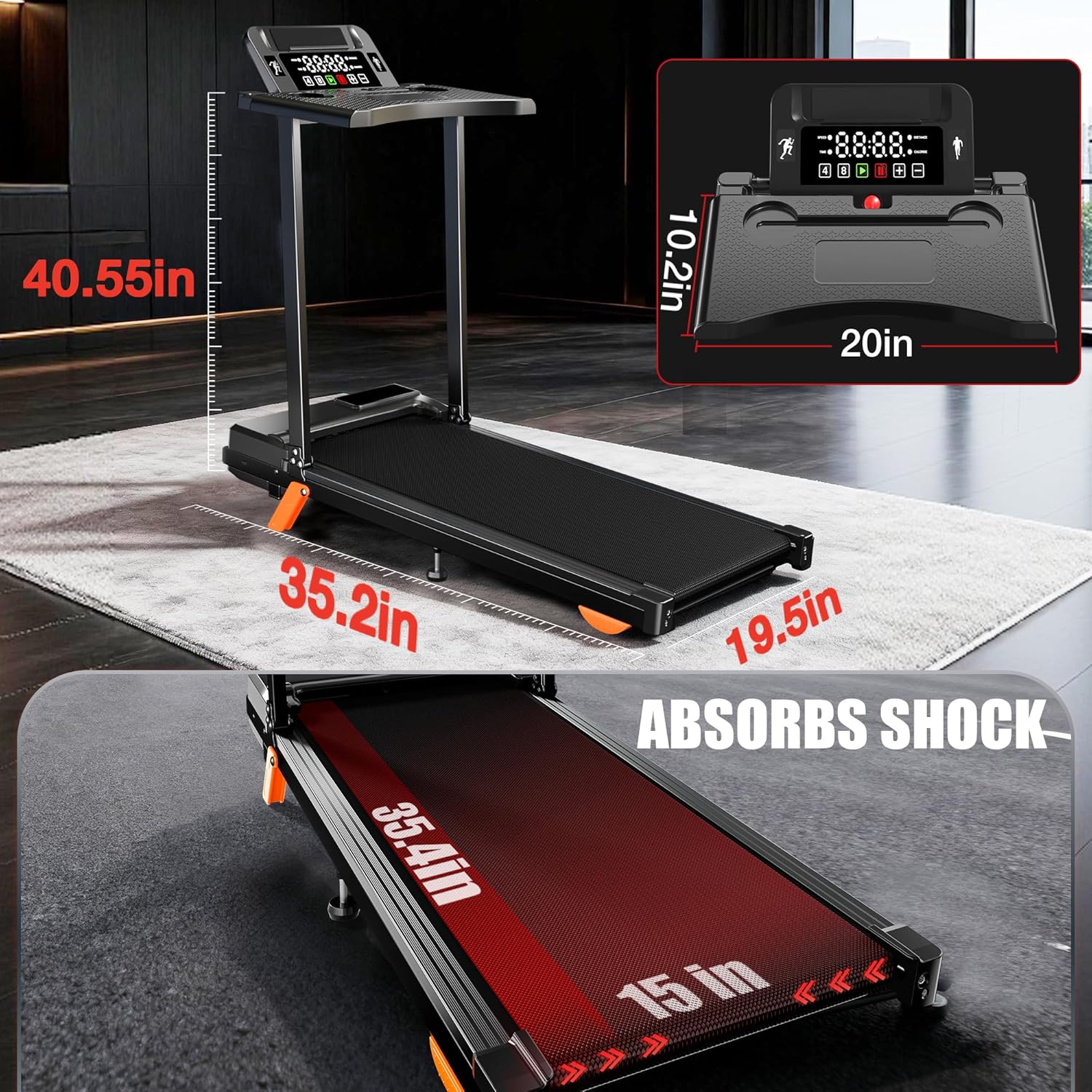
Figure 4: 12% Manual Incline Feature
The treadmill features a 12% manual incline setting. To adjust the incline, lift the rear of the treadmill and position the orange support feet to the desired incline level. Ensure both feet are securely in place before use.
Safety Key
The red safety key is a crucial safety feature. Attach the clip to your clothing while exercising. If you accidentally step off or fall, the magnetic key will detach from the console, immediately stopping the treadmill and preventing injury.
For a comprehensive demonstration of the treadmill's functions, please watch the videos below:
Video: Treadmill Demonstration and Usage
Video: Treadmill Functional Introduction
Video: Treadmill Function Display
Features
Removable Desk

Figure 5: Removable Desk for Multitasking
The treadmill includes a detachable desk tray that securely accommodates your laptop, tablet, phone, or even a water bottle. This feature allows you to seamlessly integrate work or entertainment with your exercise routine. The desk can be easily removed when not needed, providing more space for jogging or running.
Powerful and Quiet Motor

Figure 6: 3.5 HP Brushless DC Motor
Equipped with a 3.5 HP brushless DC motor, this treadmill runs smoother, quieter (below 45dB), and lasts longer than traditional motors. Brushless motors are more energy-efficient, contributing to lower electricity bills, and their enhanced durability means fewer repairs and a longer lifespan for your treadmill. It supports a maximum user weight of 350 pounds.
Advanced Shock Absorption System

Figure 7: Shock Absorption System
The treadmill features a sophisticated shock absorption system, including 4 shock absorbers and a 5-layer running belt. This design provides superior cushioning, reducing impact on your joints and offering better protection for your knees during workouts.
Compact and Portable Design
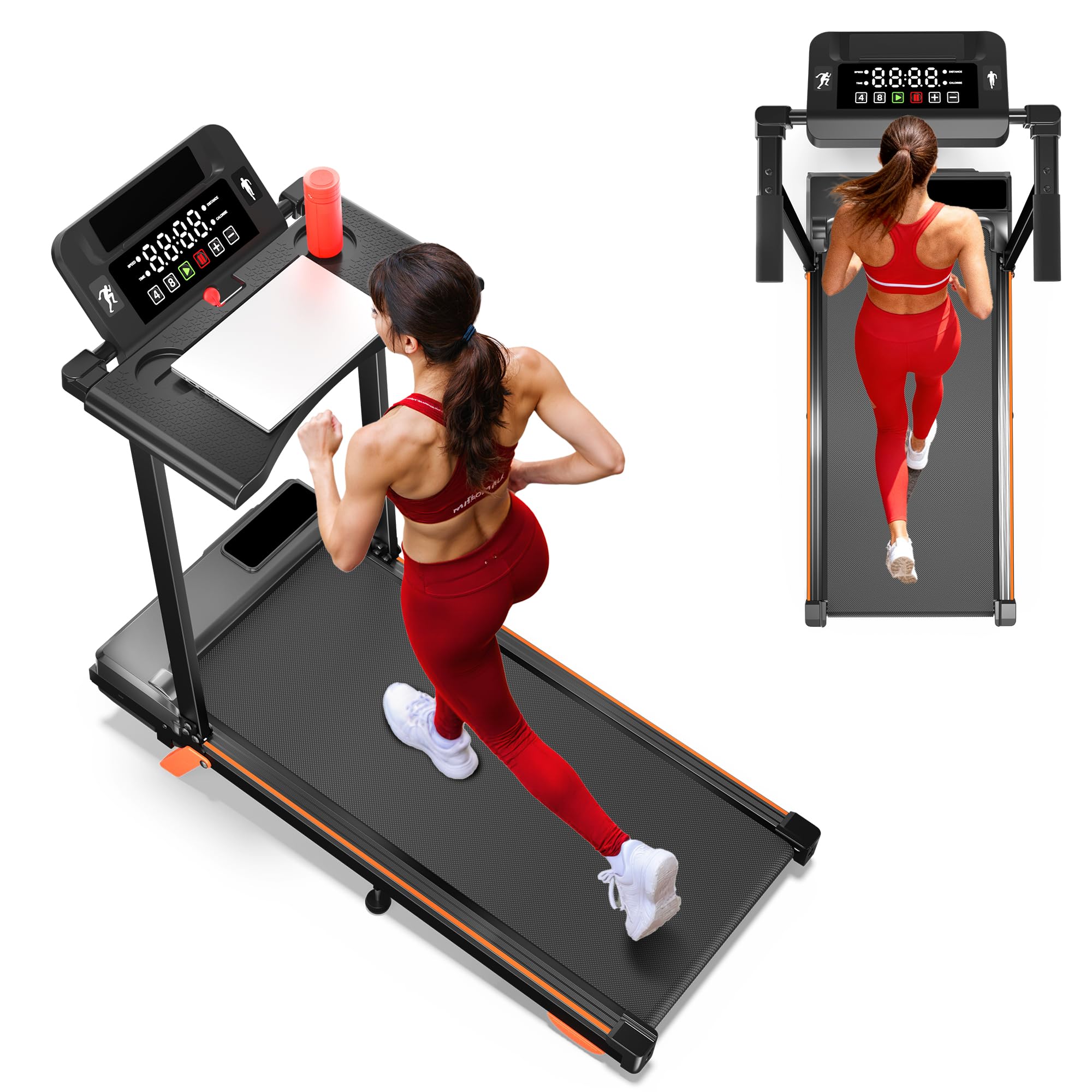
Figure 8: Compact Design
Designed for home use, this treadmill is compact and can be easily moved and stored. It features wheels on the front for effortless relocation and can be folded flat to slide under a sofa or bed, or stored upright against a wall, minimizing its footprint in your living space.
Maintenance
Regular maintenance ensures the longevity and optimal performance of your treadmill:
- Cleaning: Regularly wipe down the treadmill with a damp cloth to remove dust and sweat. Avoid using abrasive cleaners.
- Lubrication: Apply lubricating oil to the running belt as instructed in the user manual to ensure smooth operation and prevent wear. (Lubricating oil is included in the package).
- Belt Adjustment: Periodically check the tension and alignment of the running belt. Refer to the maintenance section for instructions.
- Storage: When not in use, store the treadmill in a dry, clean area away from direct sunlight and extreme temperatures.
Troubleshooting
If you encounter any issues with your treadmill, please refer to the following common solutions:
- Treadmill not starting: Ensure the power cord is securely plugged into a grounded outlet and the safety key is correctly placed in the console slot. Check the power switch on the unit.
- Belt slipping: The running belt may need adjustment or lubrication. Refer to the maintenance section for instructions.
- Unusual noises: Check for any loose parts or foreign objects under the belt. If the noise persists, contact customer support.
- Error codes on display: Consult the user manual for specific error code meanings and troubleshooting steps.
Specifications
| Brand | BMJX US |
| Model Name | ZJ-X1 |
| Color | Black |
| Product Dimensions | 40.55"D x 19.5"W x 35.2"H |
| Item Weight | 46.3 Pounds |
| Material | Alloy Steel, Acrylonitrile Butadiene Styrene (ABS) |
| Maximum Speed | 8 Miles per Hour |
| Minimum Speed | 0.6 Miles per Hour |
| Maximum Horsepower | 3.5 Horsepower |
| Maximum Incline Percentage | 12% (Manual) |
| Maximum Weight Recommendation | 350 Pounds |
| Display Type | LED |
| Connectivity Technology | Bluetooth |
| Special Feature | Foldable, Removable Desk |
Warranty
The BMJX US ZJ-X1 Incline Treadmill comes with a 365-day warranty from the date of purchase. This warranty covers manufacturing defects and ensures the product meets quality standards. Please retain your proof of purchase for any warranty claims.
Support
For any questions, technical assistance, or warranty claims, please contact BMJX US customer support. Refer to the contact information provided on the product packaging or the official BMJX US website. Our professional R&D team and factory are committed to providing you with perfect support service.