
Introduction
This user manual provides detailed instructions for the CALOETHNEY HX911 Bluetooth Retractable Neckband Headphones. Please read this manual carefully before using the product to ensure proper operation and to maximize your listening experience. Keep this manual for future reference.
What's in the Box
- CALOETHNEY HX911 Bluetooth Retractable Neckband Headphones
- USB-C Charging Cable
- Eartips (various sizes)
- User Manual
Product Overview
Familiarize yourself with the components and controls of your CALOETHNEY HX911 headphones.
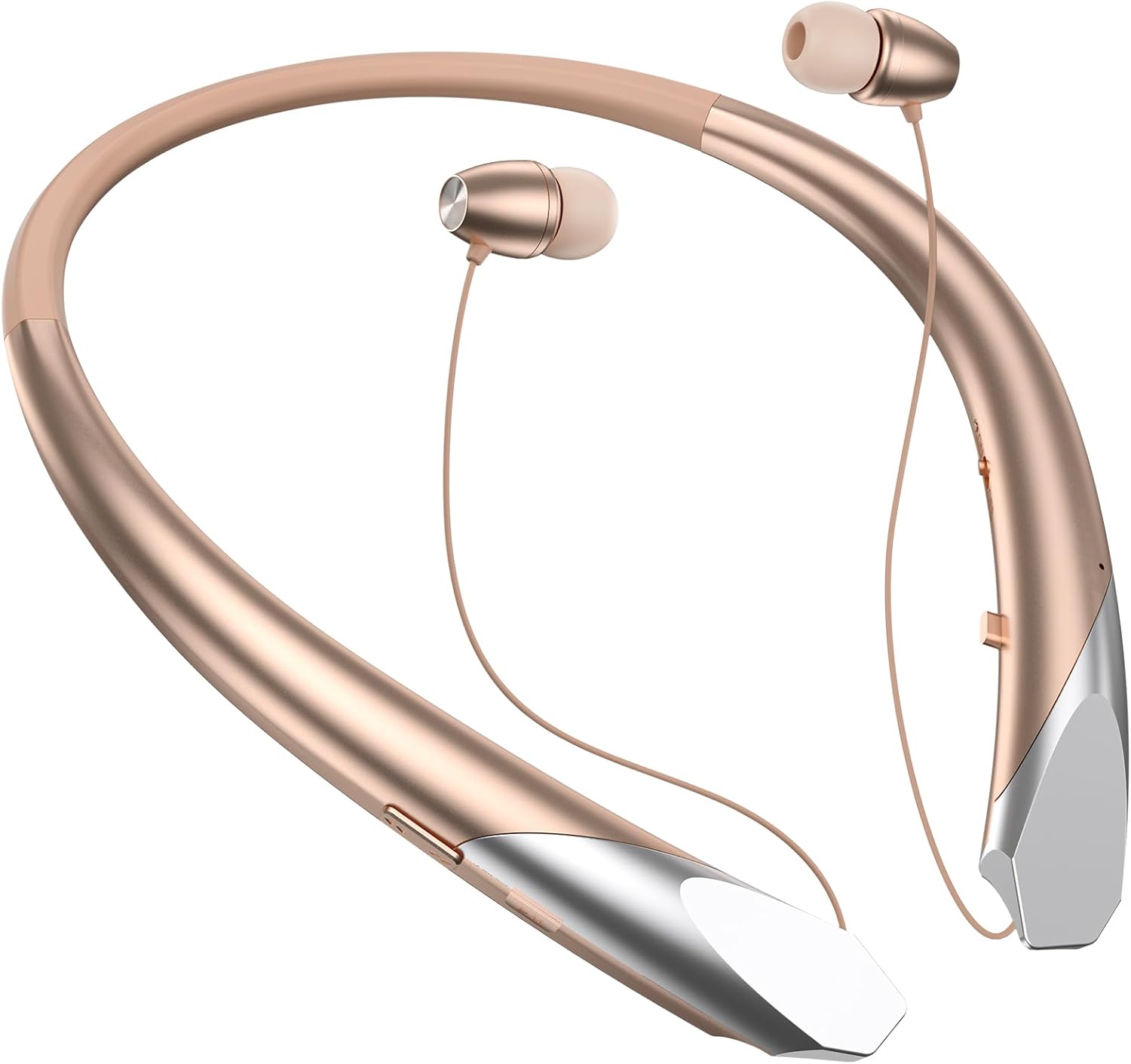
Figure 1: Main view of the CALOETHNEY HX911 Bluetooth Retractable Neckband Headphones in Rose Gold.

Figure 2: Detailed view of the control buttons and charging port located on the neckband. These include power, volume, and multi-function buttons.

Figure 3: The retractable earbud design allows for easy storage. Pull the earbud wire to extend, and press the retract button to store.
Setup
1. Charging the Headphones
Before first use, fully charge your headphones. A full charge takes approximately 2 hours.
- Connect the provided USB-C charging cable to the charging port on the neckband.
- Connect the other end of the cable to a USB power adapter (not included) or a computer's USB port.
- The LED indicator will show charging status (e.g., red for charging, blue for fully charged).

Figure 4: The headphones offer extended battery life, providing up to 22 hours of music playback on a single charge.
2. Pairing with a Bluetooth Device
The headphones use Bluetooth 5.1 for a stable and fast connection.
- Ensure the headphones are turned off.
- Press and hold the multi-function button (usually the power button) until the LED indicator flashes red and blue alternately, indicating pairing mode.
- On your device (smartphone, tablet, laptop), enable Bluetooth and search for available devices.
- Select "HX911" from the list of found devices.
- Once connected, the LED indicator will flash blue slowly, and you may hear a confirmation tone.

Figure 5: The headphones utilize Bluetooth 5.1 technology for faster and more stable connections.
Multi-device Connection: The HX911 supports connecting to two devices simultaneously. After pairing with the first device, disable Bluetooth on that device, then pair with the second device. Re-enable Bluetooth on the first device, and the headphones should connect to both. You can then switch between audio sources as needed.

Figure 6: The headphones can connect to two Bluetooth-enabled devices concurrently, allowing seamless switching.
Operating Instructions
Power On/Off
- Power On: Press and hold the multi-function button for approximately 3 seconds until the LED indicator flashes blue and you hear a power-on prompt.
- Power Off: Press and hold the multi-function button for approximately 3 seconds until the LED indicator flashes red and you hear a power-off prompt.
Music Control
- Play/Pause: Press the multi-function button once.
- Next Track: Press and hold the Volume + button.
- Previous Track: Press and hold the Volume - button.
- Volume Up: Press the Volume + button briefly.
- Volume Down: Press the Volume - button briefly.
Call Control
The built-in microphone with CVC6.8 noise-canceling technology ensures clear calls.
- Answer/End Call: Press the multi-function button once.
- Reject Call: Press and hold the multi-function button for approximately 2 seconds.
- Redial Last Number: Double-press the multi-function button.
- Incoming Call Vibration: The neckband will vibrate to alert you of incoming calls.
Retractable Earbuds
To extend the earbuds, gently pull them out from the neckband. To retract, press the dedicated retract button on the side of the neckband, and the wires will automatically retract.
Maintenance
- Cleaning: Use a soft, dry cloth to clean the headphones. Do not use abrasive cleaners or solvents.
- Storage: When not in use, store the headphones in a cool, dry place, away from direct sunlight and extreme temperatures. Ensure earbuds are retracted to prevent cable damage.
- Water Resistance: The headphones are sweatproof, making them suitable for sports. However, avoid submerging them in water or exposing them to heavy rain.
- Battery Care: To prolong battery life, avoid fully discharging the battery frequently. Charge the headphones regularly, even if not in constant use.
Troubleshooting
| Problem | Possible Cause | Solution |
|---|---|---|
| Headphones do not power on. | Low battery. | Charge the headphones for at least 2 hours. |
| Cannot pair with device. | Headphones not in pairing mode; Bluetooth disabled on device; device too far. | Ensure headphones are in pairing mode (flashing red/blue). Enable Bluetooth on your device. Move device closer to headphones (within 10 meters). |
| Sound is intermittent or cuts out. | Device too far; interference; low battery. | Move closer to your device. Avoid environments with strong Wi-Fi or other Bluetooth signals. Charge the headphones. |
| Poor call quality (muffled sound). | Microphone obstructed; environmental noise; weak Bluetooth connection. | Ensure microphone is clear. Move to a quieter environment. Check Bluetooth connection strength. |
| Voice prompts are not in English. | Incorrect language setting. | Refer to the full user manual (if available) or contact customer support for instructions on changing the voice prompt language. This is typically done by pressing a specific button combination in pairing mode. |
Specifications
| Feature | Detail |
|---|---|
| Brand | CALOETHNEY |
| Model Number | HX911 |
| Connectivity Technology | Wireless (Bluetooth) |
| Bluetooth Version | 5.1 |
| Bluetooth Range | Up to 10 meters (33 feet) |
| Ear Placement | In Ear |
| Form Factor | Neckband, In Ear |
| Headphones Jack | USB-C (for charging) |
| Noise Cancellation | CVC6.8 (for calls) |
| Battery Average Life | Up to 22 hours (music playback) |
| Battery Charge Time | Approximately 2 hours |
| Water Resistance Level | Sweatproof |
| Control Type | Volume Control, Multi-function button |
| Compatible Devices | Cellphones, Desktops, Laptops, Tablets, Telephones |
Warranty and Support
The CALOETHNEY HX911 Bluetooth Retractable Neckband Headphones come with a 1-year warranty from the date of purchase.
For warranty claims, technical support, or any questions regarding your product, please contact CALOETHNEY customer service through the retailer where you purchased the product or refer to the contact information provided on the product packaging or official CALOETHNEY website.
Please retain your proof of purchase for warranty service.