
Introduction
Thank you for choosing the PPBP Q65 AI Real-Time Translation Earbuds. These earbuds are designed to facilitate seamless cross-language communication, offering advanced translation capabilities alongside standard audio functions. This manual provides essential information for setting up, operating, and maintaining your device.
Key Features
- High-Accuracy Translation: Supports real-time two-way translation for 182 languages and accents with up to 99.3% accuracy.
- Multiple Translation Modes: Includes real-time recording, simultaneous interpretation, face-to-face, video call, and voice call modes.
- 5-in-1 Functionality: Combines translation, music playback, call handling, AI meeting recording, and spatial noise cancellation.
- Ultra-Fast Translation: Powered by a next-generation AI chip, enabling near-zero-latency translation in approximately 0.2 seconds.
- Extended Battery Life: Offers up to 10 hours of continuous use, extendable to 60 hours with the charging case.
- Advanced Connectivity: Features Bluetooth 5.4 for stable, rapid connections and lower power consumption.
- Ergonomic Design: Open-ear design with 360° adjustable ear hooks for comfortable wear.
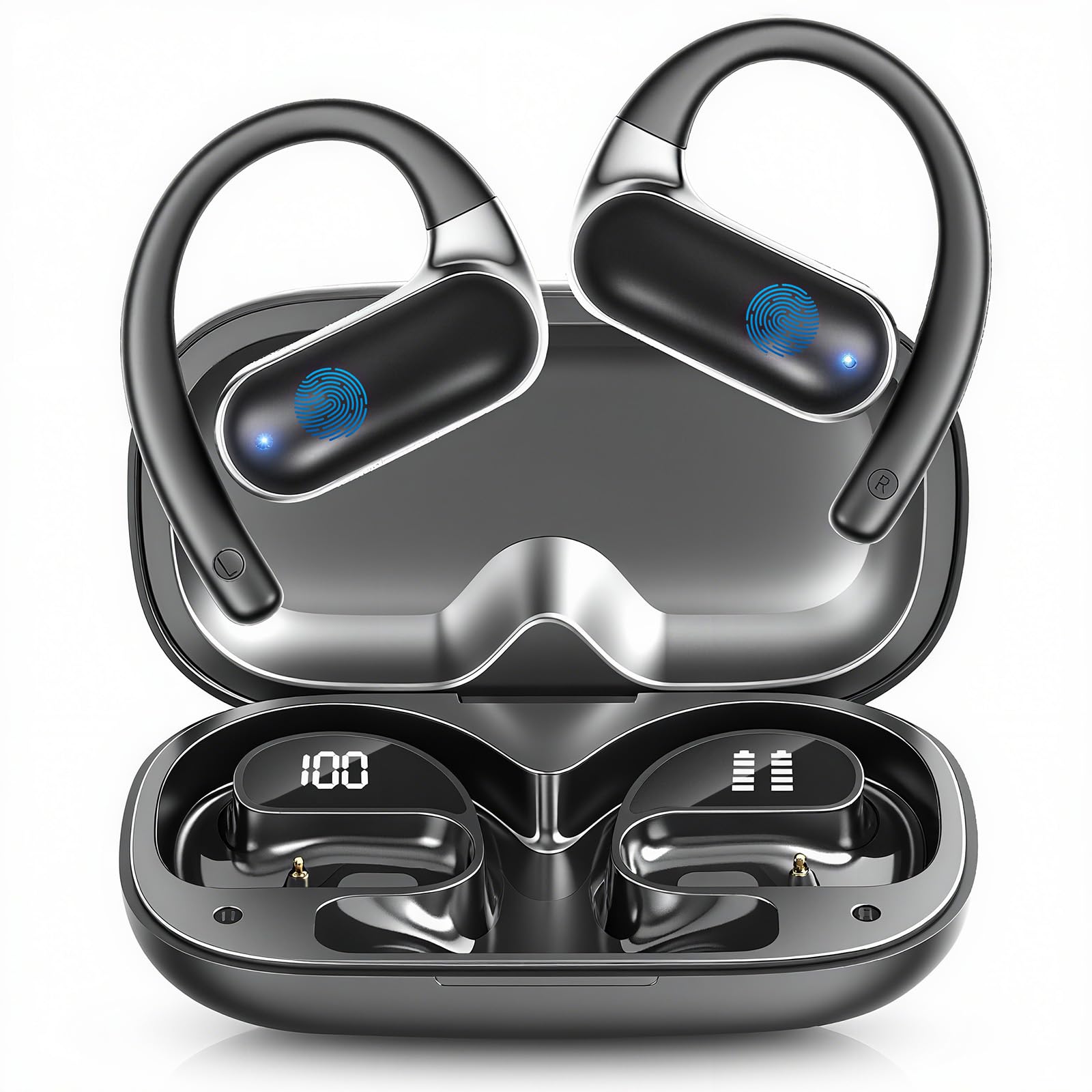
Package Contents
Ensure all items are present in the package:
- Q65 Wireless Earbuds (2 units)
- Wireless Charging Case
- Type-C Charging Cable (1 unit)
- User Manual (1 unit)

Setup
1. Charging the Earbuds and Case
Before first use, fully charge the earbuds and the charging case.
- Place the earbuds into the charging case.
- Connect the Type-C charging cable to the charging port on the case and to a USB power source.
- The LED indicators on the case and earbuds will show charging status. A full charge provides up to 10 hours of earbud use, with the case extending total usage to 60 hours. A 5-minute quick charge provides 1 hour of audio.

2. Bluetooth Pairing
The earbuds utilize Bluetooth 5.4 for a stable and fast connection.
- Open the charging case. The earbuds will automatically power on and enter pairing mode.
- On your smartphone (iOS or Android), navigate to the Bluetooth settings.
- Select "Q65" from the list of available devices to connect.
- Once connected, a confirmation sound will play, and the LED indicator on the earbuds will change.

3. App Installation
To utilize the full translation capabilities, download the dedicated translation app on your iOS or Android device. The app is required for translation functions and does not require a subscription.
4. Wearing Instructions
For optimal comfort and sound quality, ensure the earbuds are worn correctly.
- Take the earbuds out of the charging case.
- Hang the end of the earbud on your ear bone.
- Turn the earbud and slide it behind your ear.
- Adjust the ear hook for a secure and comfortable fit.

Operating Instructions
Basic Controls
The earbuds feature touch controls for various functions:
- Play/Pause: Single tap on either earbud.
- Next Track: Double tap on the right earbud.
- Previous Track: Double tap on the left earbud.
- Answer/End Call: Single tap on either earbud.
- Reject Call: Press and hold on either earbud.
- Activate Voice Assistant: Triple tap on either earbud.
- Switch Translation/Music/Call Modes: Use touch operations as specified in the app.
Translation Modes
The Q65 earbuds offer five distinct translation modes to suit various communication scenarios, managed through the dedicated app:

- Real-Time Recording Mode: Ideal for transcribing and translating spoken content in real-time during lectures, meetings, or interviews.
- Simultaneous Interpretation Mode: Enables continuous, fluid translation for conversations, allowing both parties to speak and hear translations almost instantly.
- Face-to-Face Mode (Free Talk Mode): Designed for direct conversations. When traveling, both individuals can wear an earbud for natural, translated dialogue.
- Video Call Mode: Integrates translation into video calls, allowing participants to communicate across language barriers during virtual meetings.
- Voice Call Mode (Headphone + Phone Mode): Facilitates translated communication during standard phone calls. One person uses the earbuds, while the other speaks into the phone for real-time translated conversations.
- Translation Machine Mode: Allows free communication through the app's translation function when the headset is connected.


AI Features
The Q65 earbuds integrate several AI-powered features:
- AI Assistant: Provides intelligent assistance for various tasks.
- AI Chat Mode: Supports 10 languages, allowing you to ask questions and receive quick answers, powered by advanced AI.
- AI Meeting Recording: Records and processes meeting audio, potentially offering transcription and summary features.

Maintenance
Proper care ensures the longevity and performance of your PPBP Q65 earbuds.
- Cleaning: Regularly wipe the earbuds and charging case with a soft, dry cloth. Avoid using abrasive materials or harsh chemicals.
- Water Resistance: The earbuds are waterproof. However, avoid prolonged submersion in water. Ensure they are dry before placing them back in the charging case or connecting to power.
- Storage: Store the earbuds in their charging case when not in use to protect them from dust and damage. Store in a cool, dry place away from extreme temperatures.
- Battery Care: To preserve battery health, avoid fully discharging the earbuds frequently. Charge them regularly, even if not in constant use.
Troubleshooting
If you encounter issues with your Q65 earbuds, refer to the following common solutions:
| Problem | Possible Cause | Solution |
|---|---|---|
| Earbuds do not power on. | Low battery. | Place earbuds in the charging case and charge fully. |
| Cannot pair with device. | Bluetooth is off on your device; earbuds not in pairing mode; interference. | Ensure Bluetooth is enabled on your phone. Open the charging case to activate pairing mode. Move closer to your device and away from other wireless devices. Try restarting your phone and the earbuds. |
| No sound or poor sound quality. | Earbuds not properly seated; low battery; connection issues. | Adjust earbuds for a secure fit. Check battery levels. Reconnect Bluetooth. Clean any debris from earbud speakers. |
| Translation function not working. | App not installed or configured; internet connection issue; microphone blocked. | Ensure the dedicated translation app is installed and updated. Verify your phone has an active internet connection. Check that the earbud microphones are not obstructed. Confirm correct language settings in the app. |
| Charging case not charging. | Cable or power adapter issue; charging port dirty. | Try a different Type-C cable and power adapter. Ensure the charging port is clean and free of debris. |
Specifications
Detailed technical specifications for the PPBP Q65 AI Real-Time Translation Earbuds:
| Feature | Detail |
|---|---|
| Model Name | Q65 |
| Connectivity Technology | Bluetooth 5.4 |
| Wireless Communication Technology | Bluetooth |
| Compatible Devices | Smartphones (iOS, Android) |
| Control Method | Touch |
| Ear Placement | Open Ear |
| Form Factor | Open Ear |
| Material | Plastic, Silicone |
| Color | Black |
| Water Resistance Level | Waterproof |
| Battery Average Life (Earbuds) | 10 Hours |
| Total Battery Life (with Charging Case) | Up to 60 Hours |
| Charging Time (Quick Charge) | 5 minutes for 1 hour of audio |
| Special Features | Real-time Language Translation, AI Assistant, AI Chat, AI Meeting Recording, Noise Cancellation, Spatial Noise Cancellation, Open Ear Design |
| Parcel Dimensions | 12.3 x 8.9 x 3.2 cm; 100 g |
Warranty and Support
For warranty information and customer support, please refer to the documentation included with your purchase or contact PPBP customer service through the retailer where the product was purchased. Keep your proof of purchase for any warranty claims.