
1. Introduction
The D9 SATV Android TV Box is a smart streaming media player designed to transform your television into an entertainment hub. It supports 4K Ultra HD resolution for high-quality visuals and features a Bluetooth voice remote control for convenient navigation. This manual provides essential information for setting up, operating, maintaining, and troubleshooting your device.
What's in the Box
Carefully unpack your D9 SATV Android TV Box and ensure all items are present:
- D9 SATV Android TV Box
- Bluetooth Voice Remote Control
- Power Adapter
- HDMI Cable
- User Manual

Image: The package contents, showing the D9 SATV TV Box, remote control, HDMI cable, power adapter, and a printed user manual.
2. Setup Guide
Follow these steps to set up your D9 SATV Android TV Box:
2.1 Connecting the Device
- Connect Power: Plug the power adapter into the DCIN port on the TV Box, then plug the other end into a power outlet.
- Connect to TV: Connect one end of the HDMI cable to the HDMI port on the TV Box and the other end to an available HDMI input on your television. Note the HDMI input number (e.g., HDMI 1, HDMI 2).
- Connect to Network (Optional):
- Ethernet: For a wired connection, connect an Ethernet cable from your router to the Network port on the TV Box.
- Wi-Fi: For a wireless connection, you will configure Wi-Fi during the initial setup process.
- Connect USB Devices (Optional): You can connect external storage or other USB peripherals to the USB ports.

Image: Interface ports on the D9 SATV Android TV Box, including DCIN (Power), AV, HDMI, Network (Ethernet), and two USB ports.
2.2 Initial Power On and Configuration
- Power On: Turn on your television and select the correct HDMI input source using your TV remote. The D9 SATV Android TV Box should power on automatically or by pressing the power button on the remote.
- Language Selection: Follow the on-screen prompts to select your preferred language.
- Network Setup: If you are using Wi-Fi, select your Wi-Fi network from the list and enter the password. If using Ethernet, the connection should be established automatically.
- Google Account Sign-in: Sign in with your Google account to access the Google Play Store and other Google services. If you don't have one, you can create one.
- Complete Setup: Follow any remaining on-screen instructions to complete the initial setup.
3. Operating Instructions
3.1 Remote Control Overview
The D9 SATV Android TV Box comes with a Bluetooth voice remote control for easy navigation and interaction. Ensure the remote has batteries installed and is paired with the TV Box (usually done automatically during initial setup).
- Power Button: Turns the TV Box on or off.
- Navigation Pad (Up/Down/Left/Right/OK): Used to move through menus and select items.
- Back Button: Returns to the previous screen.
- Home Button: Returns to the main Android TV home screen.
- Voice Control Button: Press and hold to activate voice commands for searching content or controlling the device.
- Volume Buttons: Adjusts the audio volume.
- Menu/Settings Button: Accesses additional options or system settings.

Image: The D9 SATV Android TV Box alongside its remote control, highlighting key features like Android 12, Wi-Fi, 4K HD, and USB 2.0.
3.2 Navigating the Android TV Interface
The Android TV home screen provides access to your installed apps, recommended content, and system settings. Use the navigation pad on your remote to browse and select options.
- Apps: Select the 'Apps' icon or scroll down to view all installed applications.
- Search: Use the voice control button or the on-screen search icon to find content.
- Settings: Access system settings to configure network, display, sound, and other device options.
4. Maintenance
Proper care ensures the longevity and optimal performance of your D9 SATV Android TV Box.
- Cleaning: Use a soft, dry cloth to clean the exterior of the device. Do not use liquid cleaners or abrasive materials.
- Ventilation: Ensure the TV Box is placed in a well-ventilated area to prevent overheating. Do not cover ventilation openings.
- Environment: Avoid exposing the device to extreme temperatures, humidity, dust, or direct sunlight.
- Power Off: If the device will not be used for an extended period, disconnect it from the power supply.
5. Troubleshooting
If you encounter issues with your D9 SATV Android TV Box, refer to the following common problems and solutions:
| Problem | Possible Solution |
|---|---|
| No power / Device not turning on | Check if the power adapter is securely connected to the TV Box and the power outlet. Ensure the power outlet is functional. |
| No picture on TV | Verify the HDMI cable is securely connected to both the TV Box and the TV. Ensure your TV is set to the correct HDMI input source. Try a different HDMI port or cable. |
| No sound | Check the volume level on both the TV Box and your television. Ensure audio settings on the TV Box are correctly configured (e.g., HDMI audio output). |
| Remote control not responding | Replace the batteries in the remote control. Ensure there are no obstructions between the remote and the TV Box. Re-pair the Bluetooth remote if necessary (refer to device settings). |
| Wi-Fi connection issues | Check if your Wi-Fi router is on and functioning. Re-enter the Wi-Fi password in the TV Box settings. Move the TV Box closer to the router or try an Ethernet connection. |
| Apps crashing or freezing | Close and restart the app. Clear the app's cache in the device settings. Ensure the device's software is up to date. Restart the TV Box. |
6. Specifications
Key technical specifications for the D9 SATV Android TV Box:
| Feature | Detail |
|---|---|
| Model | 4K Ultra HD Set-Top Box |
| Operating System | Android TV (Version may vary, typically Android 12 as indicated in product images) |
| Resolution Support | 4K Ultra HD |
| Processor | HiSilicon/Amlogic Quad Core (H618 CPU indicated in product images) |
| RAM | 1024 MB (1GB) |
| Storage Capacity | 7629 MB (approx. 8GB) |
| Connectivity | HDMI, Wi-Fi (2.4G/5G), Ethernet (100M), USB 2.0 |
| Compatible Devices | Smart TV |
| Controller Type | Bluetooth Voice Remote Control |
| Item Weight | 350 g |
| Color | Black |
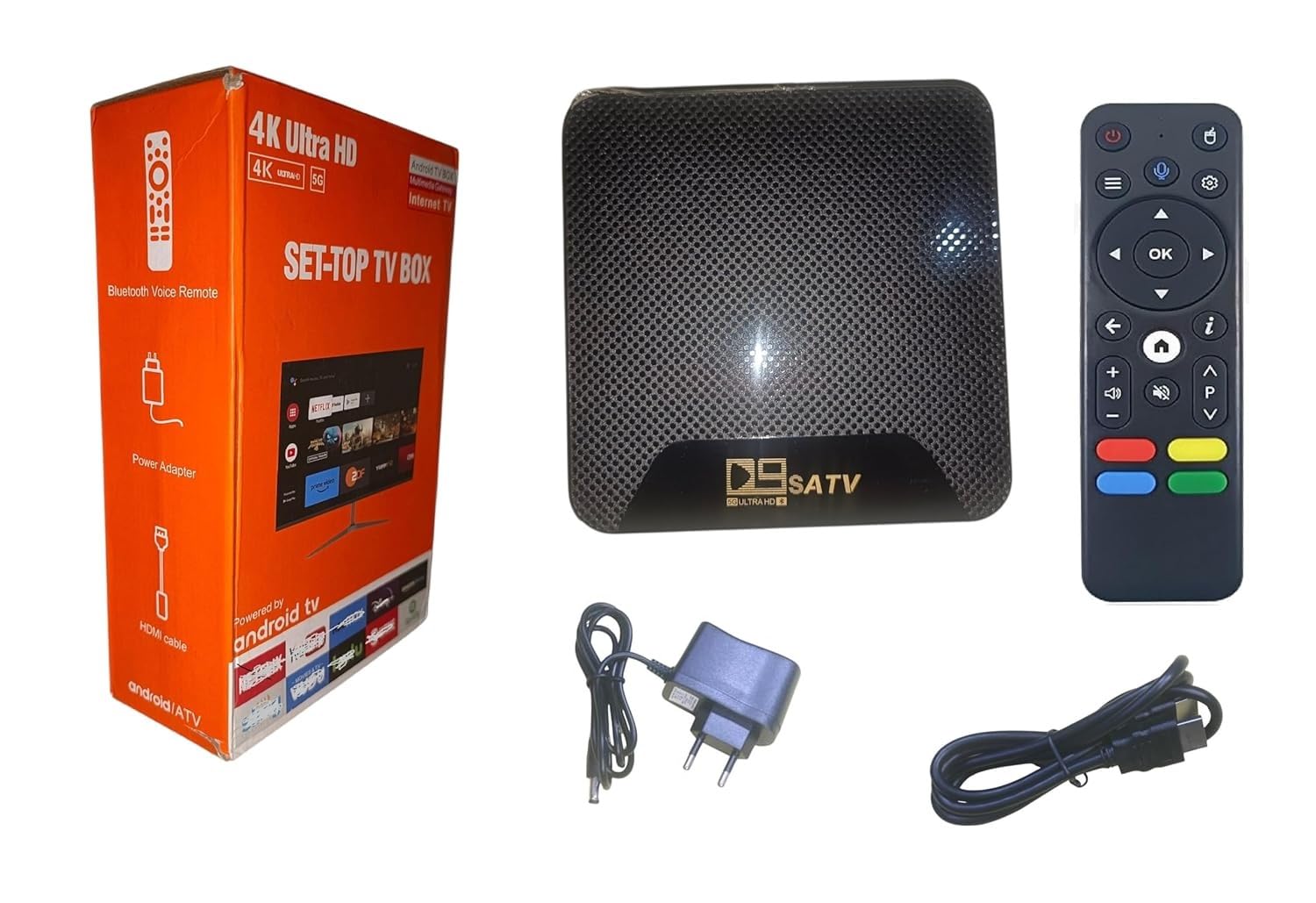
Image: Illustration of the internal quad-core processor, indicating HiSilicon/Amlogic architecture for enhanced performance.
7. Warranty Information
The D9 SATV Android TV Box comes with a 6-month warranty against manufacturing defects from the date of purchase. This warranty covers defects in materials and workmanship under normal use. It does not cover damage caused by misuse, accidents, unauthorized modifications, or external factors.
Please retain your proof of purchase for warranty claims.
8. Support
For technical assistance or customer support regarding your D9 SATV Android TV Box, please contact:
Customer Care Number: 9818249877
When contacting support, please have your product model number and a description of the issue ready.


