
1. Introduction
Thank you for choosing the HOOBRO Small TV Stand with Wheels and Mount. This versatile entertainment center is designed to accommodate 23-50 inch televisions, offering both mobility and stable placement. With its multi-tier storage and durable construction, it provides a functional and aesthetic solution for your living room, bedroom, or study. Please read this manual carefully before assembly and use to ensure proper installation and safe operation.
2. Safety Information
- Always follow the assembly instructions precisely. Incorrect assembly can lead to instability and potential injury.
- Do not exceed the maximum weight capacity for the TV mount or shelves. Refer to the specifications section for details.
- Ensure all screws and fasteners are securely tightened before use. Periodically check for loose connections.
- Keep small parts and packaging materials away from children and pets to prevent choking hazards.
- Place the TV stand on a level surface to prevent tipping.
- When moving the stand with a TV mounted, ensure the casters are unlocked and move slowly and carefully. Lock casters once in desired position.
- Avoid placing hot items directly on the wood-style panels to prevent damage.
3. Package Contents
Before beginning assembly, verify that all components listed below are present and undamaged. If any parts are missing or damaged, please contact customer support.
- 1 x HOOBRO TV Stand Frame and Shelves
- 1 x TV Mounting Bracket Kit
- 1 x Accessory Kit (screws, bolts, tools, casters, adjustable feet)
- 1 x Illustrated Instruction Manual
4. Setup and Assembly
Assembly of the HOOBRO TV Stand is designed to be straightforward and can typically be completed by one person. Follow the step-by-step instructions provided in the included manual. Ensure you have ample space and the necessary tools (usually included in the accessory kit).
- Unpack and Identify Parts: Carefully remove all components from the packaging. Lay them out and compare them against the parts list in your included manual to ensure everything is present.
- Assemble the Base: Attach the chosen base components (either casters for mobility or adjustable feet for stationary use) to the bottom frame of the TV stand.
- Construct the Shelving Unit: Assemble the metal frame and engineered wood shelves according to the diagrams in your manual. Ensure all connections are secure.
- Install the TV Mount: Attach the vertical TV mounting brackets to the back of your television using the appropriate screws from the accessory kit. Then, secure the TV mount assembly to the main stand frame.
- Mount the TV: Carefully lift your TV and hook the mounted brackets onto the stand's TV mount. Ensure it is securely seated and locked into place.
- Final Checks: Double-check all screws and connections for tightness. Ensure the stand is stable before placing any additional items or operating the TV.

5. Operating Instructions
The HOOBRO TV Stand offers flexible features for an optimized entertainment experience.
5.1. Mobile or Stationary Use
This TV stand provides the flexibility of both mobile and stationary use. You can choose to install either the four casters (two of which are lockable) for easy movement or the four adjustable feet for a fixed setup.
- Using Casters: For mobility, ensure the two lockable casters are unlocked before moving the stand. Once in the desired position, press down on the locks to secure the stand in place.
- Using Adjustable Feet: For stationary use, the adjustable feet allow you to level the stand on uneven floors, providing enhanced stability.

5.2. Adjustable TV Mount
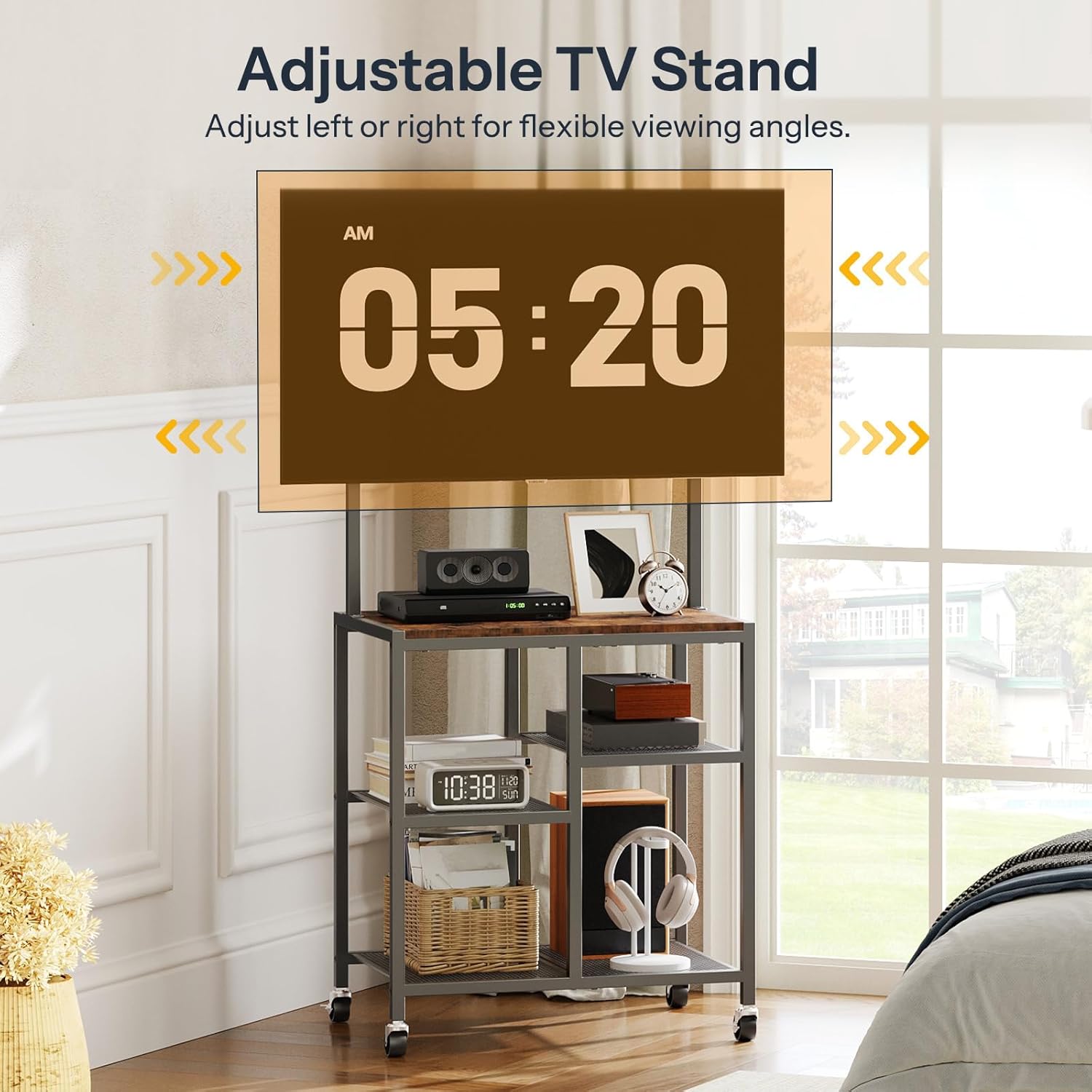
The integrated TV mount is designed for televisions ranging from 23 to 50 inches. It allows for left or right adjustment to achieve optimal viewing angles from various positions in your room.
- Gently pivot the mounted TV to the left or right to adjust the viewing angle. Avoid excessive force.
- Ensure the TV is securely attached to the mount before making adjustments.
5.3. Utilizing Storage Shelves
The stand features spacious, open multi-tier shelving to organize your media devices, accessories, and decorative items.
- Use the top surface for soundbars, remote controls, or small decor.
- The lower shelves are ideal for game consoles, routers, books, and other entertainment essentials.
- Distribute weight evenly across the shelves to maintain stability.


6. Maintenance
- Cleaning: Wipe surfaces with a soft, damp cloth. Avoid harsh chemicals or abrasive cleaners that could damage the finish.
- Dusting: Regularly dust the stand to prevent buildup.
- Inspections: Periodically check all screws and connections to ensure they remain tight. Re-tighten if necessary.
- Avoid Moisture: Keep the stand away from excessive moisture and direct sunlight to prolong its lifespan.
7. Troubleshooting
- Stand is Wobbly:
- Ensure all screws are tightened.
- If using adjustable feet, ensure they are properly adjusted to level the stand on uneven surfaces.
- If using casters, ensure the lockable casters are engaged when stationary.
- TV Not Level on Mount:
- Verify that the TV mounting brackets are installed correctly and evenly on the back of your TV.
- Check that the TV is properly seated on the stand's mount.
- Missing Parts:
- Carefully re-check all packaging materials. If parts are still missing, contact HOOBRO customer support with your purchase details.
8. Specifications
| Feature | Detail |
|---|---|
| Brand | HOOBRO |
| Model Number | BF37DS01 |
| Color | Rustic Brown + Black |
| Material | Engineered Wood, Metal |
| Overall Dimensions (L x W x H) | 21.7" x 14.6" x 46.7" (55cm x 37cm x 118.5cm) |
| Item Weight | 6.14 Kilograms |
| TV Size Compatibility | 23-50 inches |
| Mount Type | Adjustable Swivel Mount |
| Mobility | 4 Casters (2 lockable) or 4 Adjustable Feet |
| Storage | Multi-tier open shelving |
| Assembly Required | Yes |
9. Warranty and Support
For warranty information, please refer to the documentation provided with your purchase or contact your retailer. If you encounter any issues or have questions regarding your HOOBRO Small TV Stand, please reach out to HOOBRO customer support through the retailer's platform or the official HOOBRO website. Please have your model number (BF37DS01) and purchase details ready when contacting support.