
1. Product Overview
The HOOBRO Mobile Corner TV Stand BB37DS01 is designed to accommodate 23-50 inch televisions, offering both mobility and stable placement. It features multiple storage shelves and an adjustable TV mount, making it suitable for various room configurations and entertainment setups.

Image 1.1: Overview of the HOOBRO Mobile Corner TV Stand with a TV and various items displayed.
2. Safety Information
- Anti-Tip Kit: Always fix the TV stand against the wall using the supplied anti-tip kit to prevent accidental tipping, especially in households with children or pets.
- Weight Capacity: Do not exceed the maximum weight capacities for the surface and shelves. Refer to the 'Specifications' section for detailed limits. Overloading can cause instability and damage.
- Caster Installation: When using swivel casters, ensure wheels with brakes are installed diagonally opposite each other for optimal stability when locked.
- Assembly: Follow all assembly instructions carefully. Incorrect assembly can lead to structural instability.
- Placement: Place the TV stand on a level, stable surface. Avoid placing it in areas with high humidity or direct sunlight.
3. Package Contents
Before assembly, verify that all components listed below are present and undamaged:
- 1 x TV Stand with Mount components
- 1 x Anti-Tip Kit
- 1 x Accessory Kit (includes screws, bolts, and tools)
- 1 x Instruction Manual
4. Specifications
| Attribute | Detail |
|---|---|
| Model Number | BB37DS01 |
| Color | Black |
| Material | Particleboard, Metal |
| Product Size (L x W x H) | 21.7" x 14.6" x 47.6" (55.1 x 37.1 x 118.6 cm) |
| Product Weight | 6.14 kg (13.5 lb) |
| Max. Static Load Capacity (Surface) | 66.1 lb (30 kg) |
| Max. Static Load Capacity (Middle Shelf) | 22 lb (10 kg) |
| Max. Static Load Capacity (Bottom Shelf) | 22 lb (10 kg) |
| TV Size Compatibility | 23-50 inches |

Image 4.1: Detailed dimensions and TV size compatibility for the stand.
5. Setup and Assembly
Assembly of the HOOBRO Mobile Corner TV Stand is designed to be straightforward and can typically be completed by one person. Please follow the step-by-step instructions provided in the included manual. Ensure all parts are identified before beginning assembly.
- Unpack Components: Carefully remove all parts from the packaging and lay them out on a clean, soft surface to prevent scratches.
- Identify Hardware: Match all screws, bolts, and other hardware with the illustrations in the instruction manual.
- Assemble Frame: Begin by assembling the main metal frame structure according to the diagrams.
- Attach Shelves: Securely attach the particleboard shelves to the frame.
- Install TV Mount: Attach the TV mount to the stand, ensuring it is firmly secured.
- Choose Base Option: Decide whether to install the smooth casters for mobility or the adjustable feet for stationary use. If using casters, ensure the two lockable casters are installed diagonally opposite each other.
- Attach Anti-Tip Kit: Secure the anti-tip kit to the back of the TV stand and to a wall stud as per the instructions to prevent tipping.
- Mount TV: Carefully mount your television to the installed TV mount, ensuring all connections are secure.

Image 5.1: Assembled HOOBRO Mobile Corner TV Stand, ready for use.
6. Operating Instructions
6.1. Adjustable TV Mount
The integrated TV mount allows for flexible viewing angles. Once your TV is mounted, you can gently adjust its position left or right to achieve your desired viewing angle. Ensure the TV is securely fastened to the mount before making adjustments.
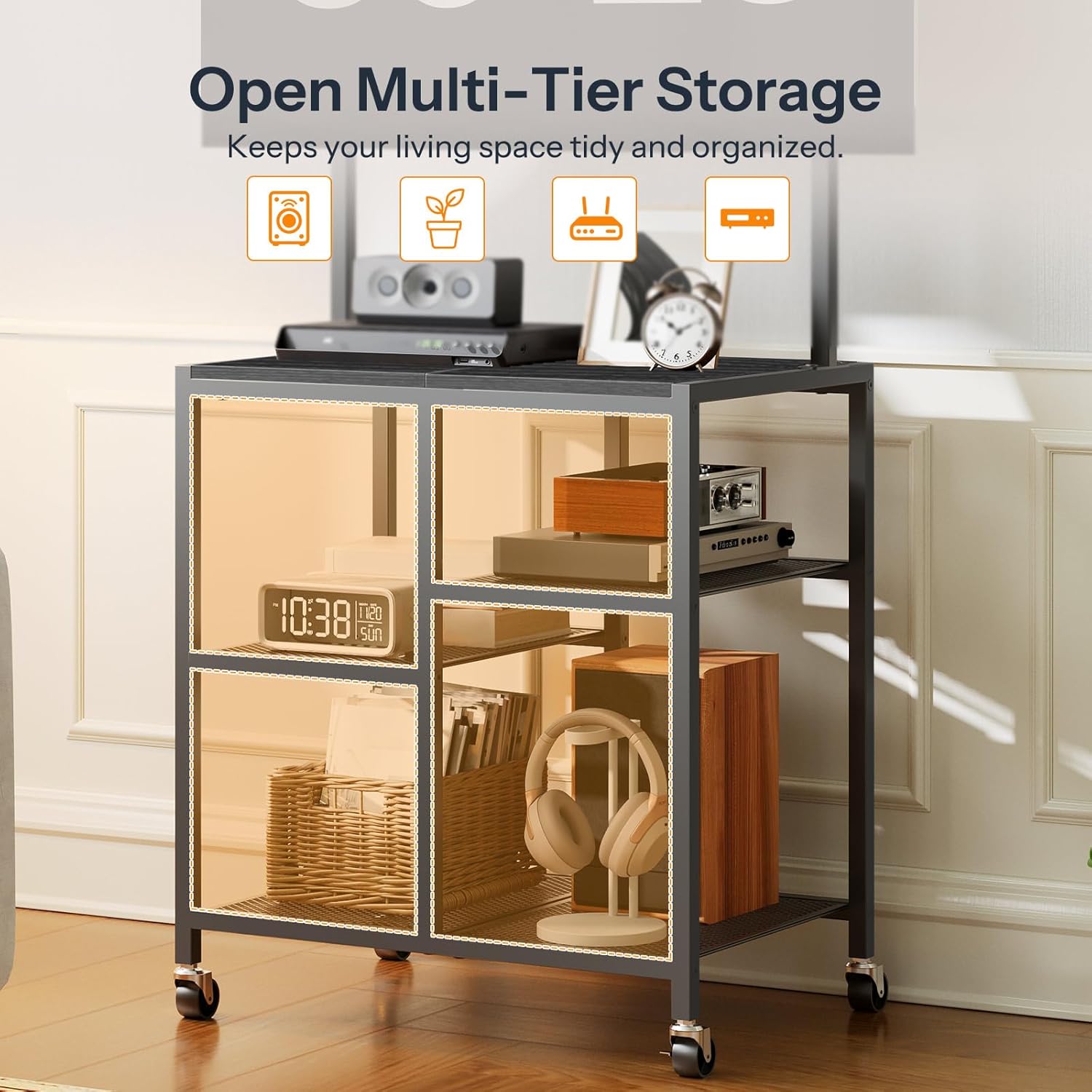
Image 6.1.1: The adjustable TV mount designed for 23-50 inch televisions.
6.2. Mobility and Stationary Use
The TV stand offers versatility with its base options:
- Mobile Mode: If the casters are installed, the stand can be easily rolled to different locations. Unlock the two lockable casters before moving.
- Stationary Mode: If the adjustable feet are installed, or if the casters are locked, the stand will remain firmly in place. Adjust the feet to level the stand on uneven surfaces.
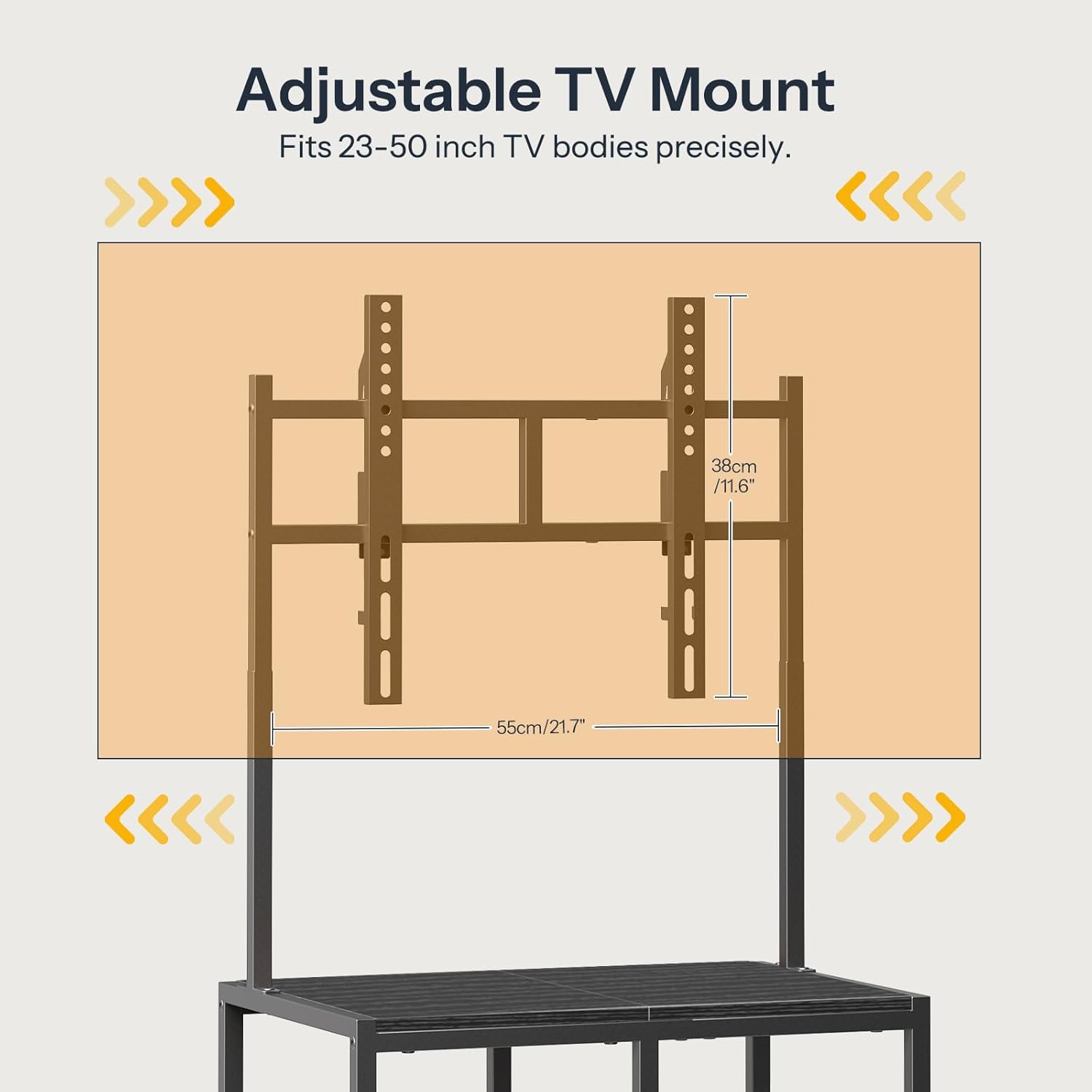
Image 6.2.1: Comparison of smooth casters for mobility and adjustable feet for stationary use.
6.3. Storage Shelves
Utilize the open multi-tier storage shelves for organizing your soundbar, game console, router, books, and decorative items. Ensure items are placed within the specified weight limits for each shelf.

Image 6.3.1: The open multi-tier storage design for organizing various items.
7. Maintenance
- Cleaning: Wipe the surfaces with a soft, damp cloth. Avoid using harsh chemicals or abrasive cleaners, which can damage the finish.
- Hardware Check: Periodically check all screws and bolts to ensure they remain tight. Retighten if necessary to maintain stability.
- Caster Care: If using casters, keep them free of dust and debris to ensure smooth movement.
8. Troubleshooting
- Stand is Wobbly:
- Ensure all screws and bolts are tightened.
- If using adjustable feet, ensure they are properly leveled on the floor.
- Verify the stand is placed on a flat, even surface.
- Casters Not Rolling Smoothly:
- Check for debris (hair, dust) caught in the wheels and clean them.
- Ensure the caster locks are disengaged.
- TV Mount Not Holding Position:
- Ensure all mounting hardware connecting the TV to the bracket, and the bracket to the stand, is securely tightened.
- Verify the TV's weight does not exceed the mount's capacity.
9. Warranty and Support
For warranty information, product support, or to order replacement parts, please contact HOOBRO customer service directly. Refer to the contact information provided with your purchase or visit the official HOOBRO website.