
1. Important Safety Instructions
Please read all instructions carefully before using the appliance. Retain this manual for future reference.
- Electrical Safety: Ensure the voltage rating of the appliance matches your local power supply. Do not immerse the cooktop in water or any other liquid. Avoid using the appliance with a damaged power cord or plug.
- Usage Safety: Do not touch the hot surface immediately after use. Always use heat-resistant cookware. Keep children and pets away from the appliance during operation. Do not place metallic objects like knives, forks, spoons, or lids on the cooktop surface as they can become hot.
- Placement: Place the cooktop on a stable, flat, and heat-resistant surface. Ensure adequate ventilation around the appliance. Do not block the air vents.
- Maintenance: Unplug the appliance before cleaning. Allow it to cool completely before cleaning or storing.
2. Product Overview
The Surya Roshni Infrared Gold Electric Cooktop is designed for efficient and versatile cooking. It features a durable glass top and intuitive feather-touch controls.
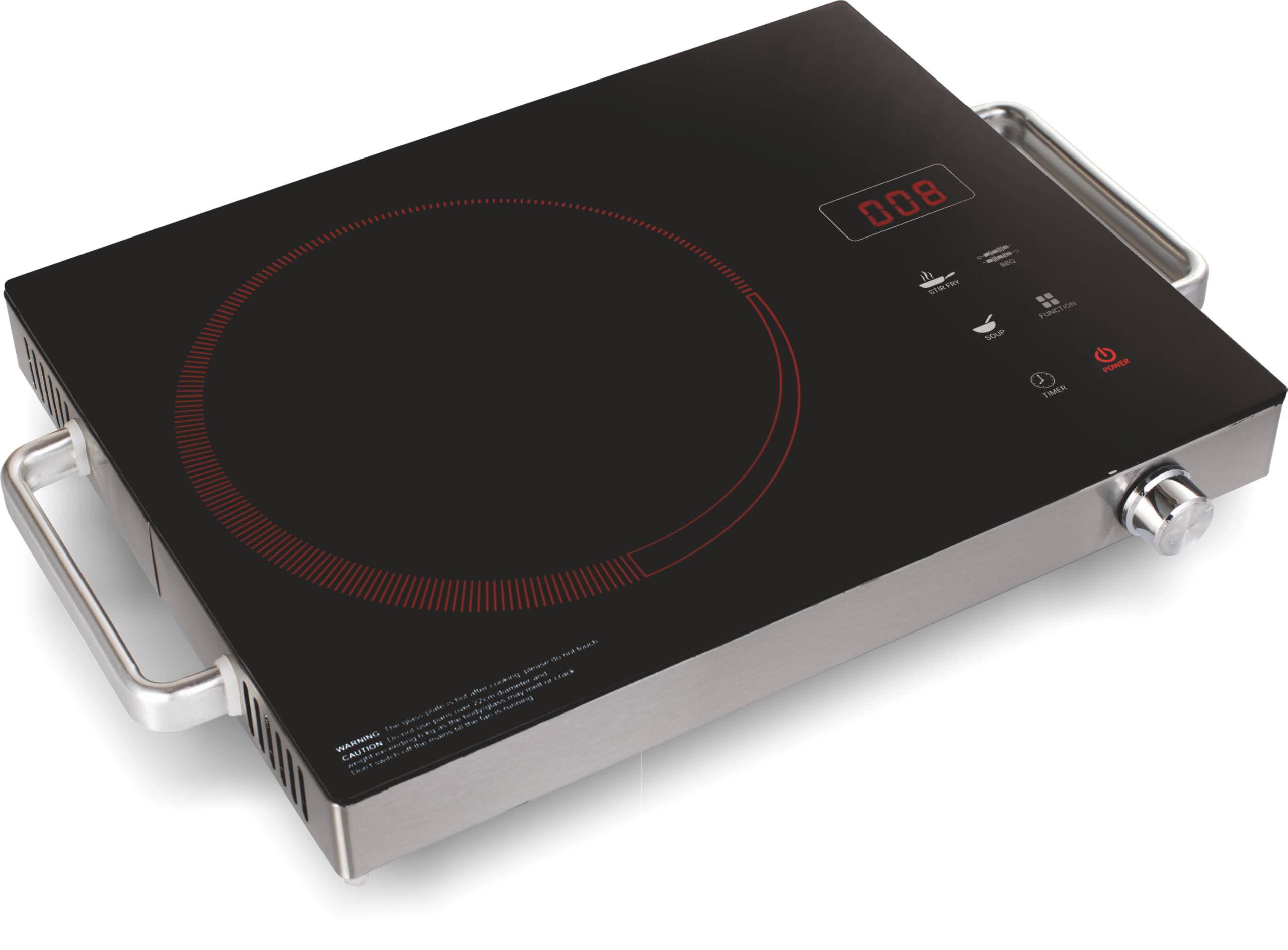
Figure 1: Front view of the Surya Roshni Infrared Gold 2200W Electric Cooktop, showcasing its sleek black glass surface and feather-touch control panel.
Key Features:
- Powerful Heating: 2200-watt infrared heating technology for efficient cooking.
- Feather Touch Controls: Precise temperature and power adjustments.
- Preset Menus: 3 convenient preset options for common dishes.
- Versatile Cookware Compatibility: Works with all types of utensils.
- Durable Design: High-quality glass construction.
- Included Accessories: Stainless steel BBQ accessories for grilling.
3. Setup
3.1 Unpacking
- Carefully remove the cooktop and all accessories from the packaging.
- Check for any damage during transit. If damaged, do not use and contact customer support.
- Ensure all components listed in the "What's in the Box" section are present.
3.2 Placement
- Place the cooktop on a dry, stable, and heat-resistant surface.
- Ensure there is at least 10-15 cm of clear space around the cooktop for proper ventilation.
- Do not place the cooktop near water sources or flammable materials.
3.3 Power Connection
- Plug the power cord into a grounded electrical outlet.
- Ensure the outlet voltage is 230 Volts (AC).
- Do not use extension cords unless absolutely necessary, and ensure they are rated for the appliance's wattage.
4. Operating Instructions
4.1 Basic Operation
- Place suitable cookware on the center of the glass top.
- Plug in the appliance. The display will show "OFF".
- Touch the "ON/OFF" button to turn on the cooktop. The display will light up.
- Select your desired cooking mode or adjust power manually using the feather-touch controls.
- After cooking, touch the "ON/OFF" button again to turn off the appliance. Unplug from the power outlet.
4.2 Preset Menus
The cooktop features 3 preset menu options for convenient cooking. To use a preset:
- Turn on the cooktop.
- Touch the "Menu" button repeatedly to cycle through the available preset options.
- The cooktop will automatically adjust power and time settings for the selected preset.
4.3 Power Adjustment
In manual mode, you can adjust the heating power using the "+" and "-" buttons on the control panel. The power level will be displayed on the screen.
4.4 Compatible Cookware
This infrared cooktop is compatible with all types of utensils, including stainless steel, cast iron, ceramic, glass, and aluminum cookware. Ensure the base of the cookware is flat and covers the heating zone adequately for optimal performance.
5. Maintenance and Cleaning
Regular cleaning and maintenance will ensure the longevity and optimal performance of your cooktop.
5.1 Daily Cleaning
- Always unplug the cooktop and allow it to cool completely before cleaning.
- Wipe the glass surface with a soft, damp cloth and mild detergent.
- For stubborn stains, use a non-abrasive cleaner specifically designed for glass cooktops.
- Dry the surface thoroughly with a clean, soft cloth.
5.2 Control Panel Cleaning
- Wipe the feather-touch control panel with a soft, slightly damp cloth.
- Do not use excessive water or abrasive cleaners on the control panel.
5.3 Storage
- Ensure the cooktop is clean and completely dry before storing.
- Store the appliance in a cool, dry place, away from direct sunlight and moisture.
- Avoid placing heavy objects on top of the cooktop during storage.
6. Troubleshooting
If you encounter any issues, please refer to the following troubleshooting guide before contacting customer support.
| Problem | Possible Cause | Solution |
|---|---|---|
| Cooktop does not turn on. | No power supply; Power cord not properly plugged in. | Check if the power cord is securely plugged into a working outlet. Check the circuit breaker. |
| Cooktop not heating. | Incorrect power setting; Cookware not suitable or improperly placed. | Increase the power setting. Ensure cookware is flat-bottomed and centered on the heating zone. |
| Display shows an error code. | Internal malfunction or overheating. | Turn off the cooktop, unplug it, and let it cool down for 10-15 minutes. Plug it back in and try again. If the error persists, contact customer support. |
| Uneven heating. | Cookware base is warped or too small/large for the heating zone. | Use cookware with a flat base that matches the size of the heating zone. |
7. Specifications
- Model Number: INFRARED GOLD
- Wattage: 2200 Watts
- Voltage: 230 Volts (AC)
- Controls Type: Feather Touch
- Heating Element: Infrared Heating Coil
- Number of Heating Elements: 1
- Material: Glass, Plastic
- Color: Black
- Item Dimensions (D x W x H): 34D x 27W x 6.5H Centimeters
- Special Features: 3 Preset Menu, Adjustable Power Mode, Stainless Steel BBQ Accessories
- Included Components: 1 x Infrared Cooktop
8. Warranty Information
The Surya Roshni Infrared Gold Electric Cooktop comes with a 1-year warranty from the date of purchase. This warranty includes free home service across India, ensuring peace of mind for our customers.
Please retain your purchase receipt as proof of purchase for warranty claims. The warranty covers manufacturing defects and malfunctions under normal use conditions. It does not cover damage caused by misuse, accidents, unauthorized repairs, or normal wear and tear.
9. Customer Support
For product-related support, service requests, or any queries, please contact our customer care team:
- Toll-Free Number: 1800 102 5657
- Email: consumercare@surya.in
Our support team is available to assist you with any technical issues or operational guidance.
