
1. Introduction
The LKAHYUIBC MS309Pro OBD2 Scanner is a versatile diagnostic tool designed for vehicle fault detection and real-time battery health analysis. This device allows users to read and clear diagnostic trouble codes (DTCs), view live engine data, and perform battery tests, making it an essential tool for maintaining vehicle health.
2. Safety Information
- Always perform automotive testing in a safe environment.
- Wear eye protection that meets ANSI standards.
- Keep clothing, hair, hands, tools, test equipment, etc., away from all moving or hot engine parts.
- Operate the vehicle in a well-ventilated work area; exhaust gases are poisonous.
- Put the transmission in PARK (for automatic transmission) or NEUTRAL (for manual transmission) and make sure the parking brake is engaged.
- Keep a fire extinguisher suitable for gasoline/chemical/electrical fires nearby.
3. Product Overview
The MS309Pro features a compact design with an LCD screen for displaying information and intuitive buttons for navigation. It connects directly to your vehicle's OBD2 port.
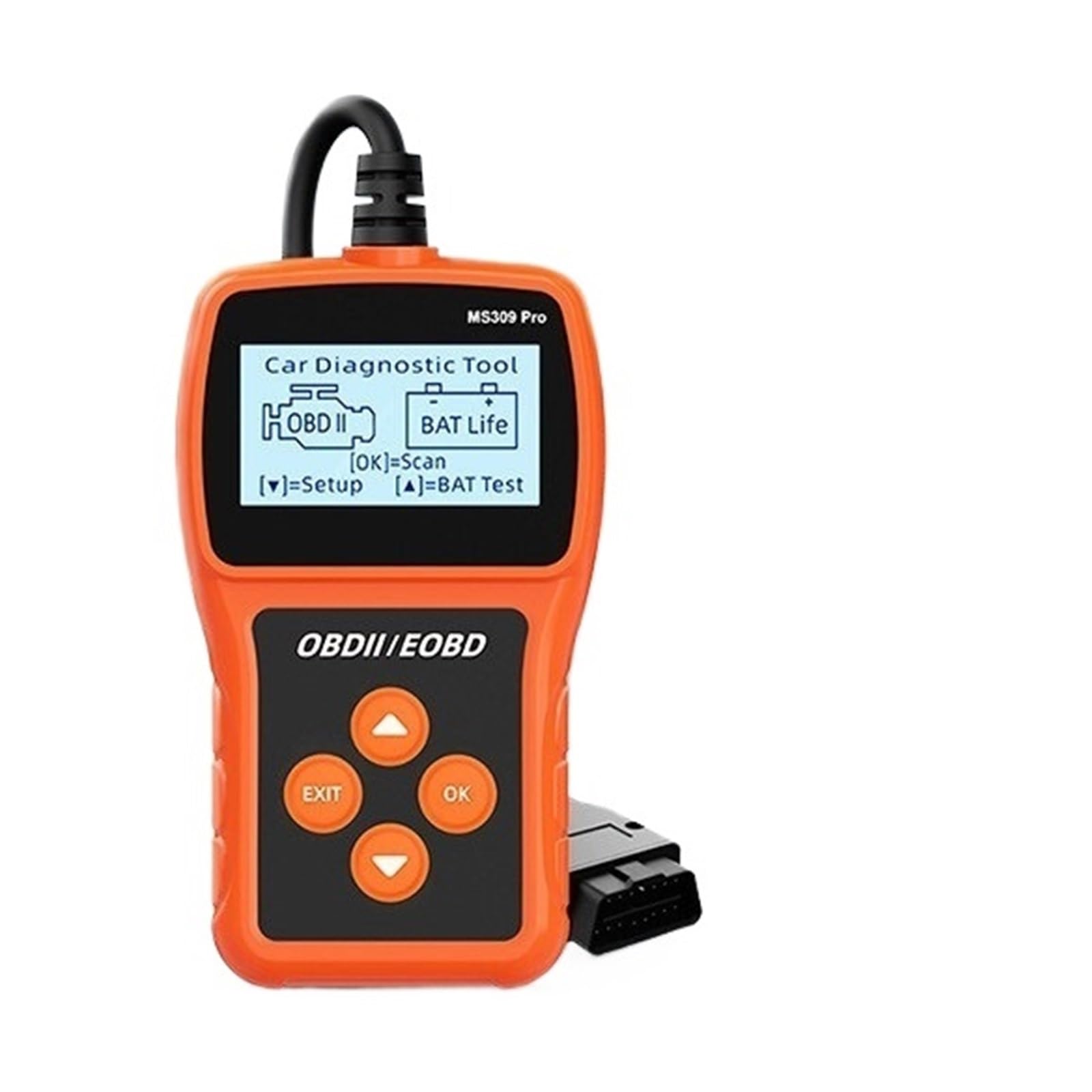
Figure 3.1: Front view of the MS309Pro OBD2 Scanner, displaying its screen and control buttons.

Figure 3.2: Angled view showing the device's ergonomic design and button layout.
Device Components:
- LCD Display: Shows diagnostic information and menu options.
- OK Button: Confirms selections or enters menus.
- EXIT Button: Returns to the previous screen or exits a function.
- Up/Down Arrow Buttons: Navigates through menu options.
- OBDII Connector Cable: Connects the scanner to the vehicle's OBD2 port.
4. Setup
Follow these steps to prepare your MS309Pro for use:
- Locate the OBD2 Port: The 16-pin Data Link Connector (DLC) is usually located under the dashboard on the driver's side of the vehicle. Refer to your vehicle's service manual for the exact location if needed.
- Connect the Scanner: With the vehicle's ignition off, firmly plug the MS309Pro's OBDII connector cable into the vehicle's DLC.
- Power On: Turn the vehicle's ignition to the 'ON' position (engine off). The scanner will automatically power on and display the main menu.
5. Operating Instructions
The MS309Pro offers several diagnostic functions. Use the Up/Down arrow buttons to navigate and the OK button to select.
5.1. Reading and Clearing Trouble Codes
- From the main menu, select 'OBDII/EOBD' and press OK.
- The scanner will establish communication with the vehicle. Once connected, select 'Read Codes' to view current, pending, or permanent Diagnostic Trouble Codes (DTCs).
- To clear codes, select 'Erase Codes' from the OBDII/EOBD menu and press OK. Confirm the action when prompted. Clearing codes will turn off the Check Engine Light (MIL) but will not fix the underlying problem.
5.2. Live Data and Freeze Frame
- Live Data: Select 'Live Data' from the OBDII/EOBD menu to view real-time sensor data such as engine RPM, vehicle speed, coolant temperature, and more.
- Freeze Frame: When an emission-related fault occurs, the OBDII system records certain vehicle operating conditions. Select 'Freeze Frame' to view this snapshot of data at the time of the fault.
5.3. Battery Test
The MS309Pro can also perform a basic battery health analysis.
- From the main menu, select 'BAT Life' (or similar battery test option) and press OK.
- Follow the on-screen prompts to perform the battery test. The scanner will display the current battery voltage and an assessment of its health.
6. Maintenance
Proper maintenance ensures the longevity and reliability of your MS309Pro scanner.
- Cleaning: Use a soft, damp cloth with mild detergent to clean the exterior of the scanner. Do not use abrasive cleaners or solvents.
- Storage: Store the device in a dry, clean environment away from extreme temperatures, direct sunlight, and corrosive materials.
- Cable Care: Avoid bending or twisting the OBDII cable excessively. Inspect the cable and connectors regularly for damage.
7. Troubleshooting
If you encounter issues with your MS309Pro, refer to the following common problems and solutions:
- Scanner does not power on:
- Ensure the OBDII cable is securely connected to the vehicle's DLC.
- Verify the vehicle's ignition is in the 'ON' position.
- Check the vehicle's fuse for the OBDII port (consult your vehicle's manual).
- Communication error with vehicle:
- Confirm the vehicle is OBDII compliant (most vehicles from 1996 and newer).
- Ensure the ignition is 'ON' and the engine is off.
- Check for any damage to the OBDII cable or connector.
- Try connecting to a different OBDII compliant vehicle to rule out scanner malfunction.
- Screen is blank or frozen:
- Disconnect the scanner from the vehicle, wait a few seconds, and reconnect.
- Ensure the vehicle's battery has sufficient charge.
8. Specifications
| Feature | Specification |
|---|---|
| Brand | LKAHYUIBC |
| Model | MS309Pro |
| Power Source | Vehicle OBDII Port (5-18V) |
| Operating Temperature | 0 to 60 ℃ (32 to 140 ℉) |
| Storage Temperature | -20 to 70 ℃ (-4 to 158 ℉) |
| Dimensions | 123 x 72 x 21 mm |
| Automotive Fit Type | Universal Fit (OBDII compliant vehicles) |
9. Warranty and Support
For warranty information or technical support, please refer to the documentation included with your purchase or contact the manufacturer directly through their official channels. Keep your purchase receipt for warranty claims.