
Introduction
Thank you for choosing the Niderson P114 Smartwatch. This manual provides essential information for setting up, operating, and maintaining your device. Please read it carefully to ensure optimal performance and longevity of your smartwatch.
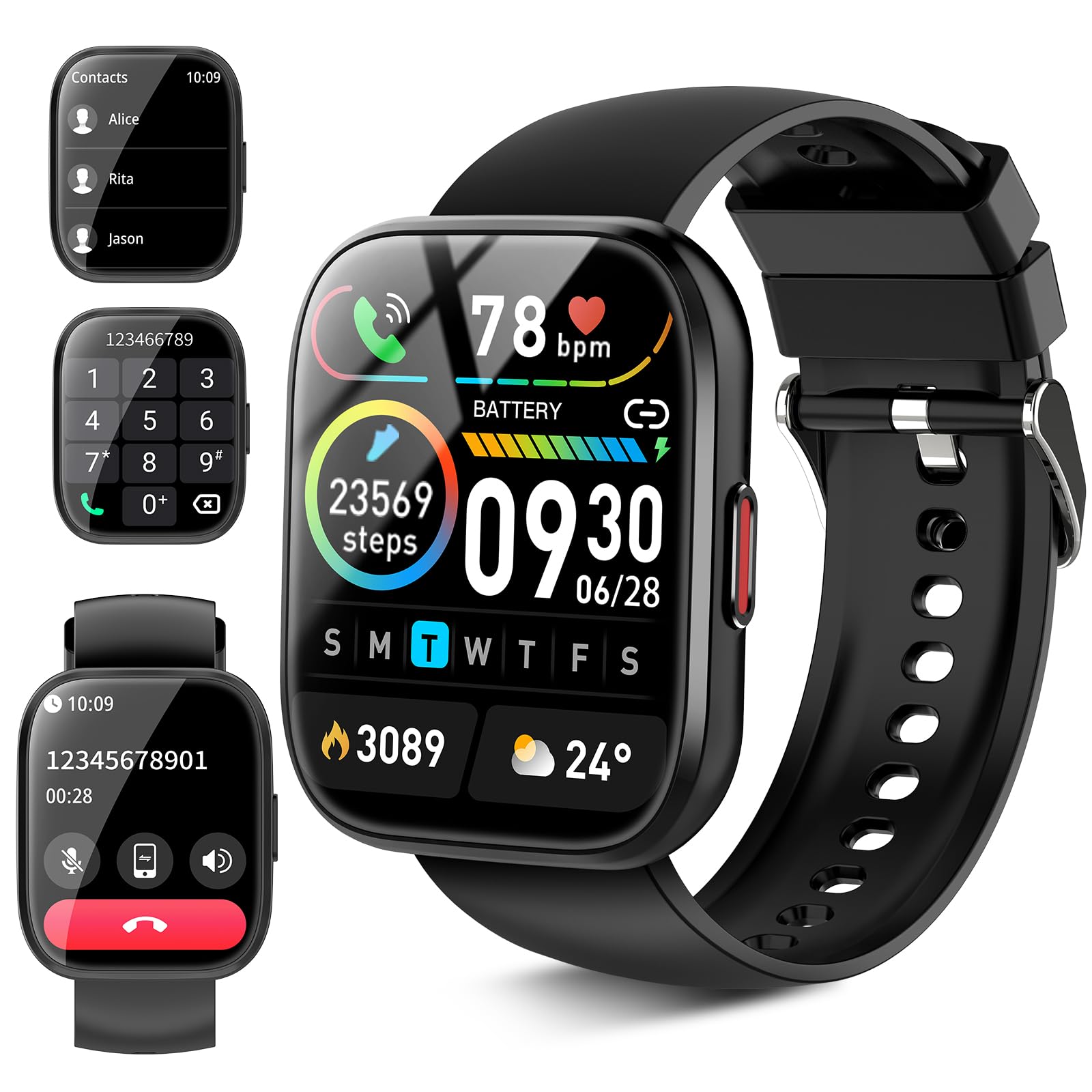
Figure 1: Niderson P114 Smartwatch, featuring a 1.85-inch HD touchscreen and a comfortable black silicone strap.
What's in the Box
- P114 Smartwatch x 1
- Magnetic charging wire x 1
- User manual x 1
Setup
1. Initial Charging
Before first use, fully charge your Niderson P114 Smartwatch. Connect the magnetic charging cable to the charging points on the back of the watch. Plug the USB end into a compatible power adapter (not included) or a computer's USB port. A full charge typically takes 1.5-2 hours.
Video: Demonstration of connecting the magnetic charging cable to the smartwatch. Ensure the cable is correctly aligned with the charging pins.
2. App Installation and Pairing
To unlock all features, download the "Dafit" app from the Google Play Store (for Android) or the Apple App Store (for iOS). Follow these steps to pair your smartwatch:
- Ensure Bluetooth is enabled on your smartphone.
- Open the "Dafit" app and create an account or log in.
- Follow the in-app instructions to search for and connect to your P114 Smartwatch.
- Grant necessary permissions for notifications, location, and health data tracking.
3. Customizing Watch Faces
After pairing, you can customize your watch face through the "Dafit" app. Choose from over 100 watch faces or upload your own photo to personalize your device.
Operating Your Smartwatch
1. Basic Navigation
The P114 Smartwatch features a 1.85-inch HD touchscreen for intuitive navigation. Swipe left, right, up, or down to access different functions and menus. The side button can be used to wake the screen or return to the home screen.
2. Bluetooth Calling & Smart Reminders
Equipped with a built-in HD speaker and microphone, the smartwatch allows you to make and receive calls directly from your wrist via Bluetooth. It also receives messages from various platforms (Facebook, WhatsApp, Twitter), keeping you updated. Note: Message replies are not currently supported.
3. Health Tracking
The smartwatch provides comprehensive health monitoring:
- Heart Rate Monitoring: 24-hour accurate heart rate tracking.
- Sleep Monitoring: Records deep, light, and awake sleep data to help improve sleep quality.
- Blood Oxygen Monitoring: Monitors blood oxygen levels.
- Stress Monitoring: Tracks stress levels.
- Menstrual Cycle Tracking: Provides tracking for women's health.
4. Sports Modes
With over 110 professional-grade sport algorithms, the P114 Smartwatch monitors various activities including hiking, cycling, yoga, basketball, soccer, and Pilates. It tracks heart rate, distance, speed, and calorie burn in real-time.
5. Other Features
The smartwatch includes additional convenient functions:
- Timer and Stopwatch
- Phone Searcher
- Sedentary Reminder
- Music Control
- Weather Display
- Photo Control
Maintenance
1. Waterproof Rating
The Niderson P114 Smartwatch has an IP68 waterproof rating, making it resistant to sweat and rain. It is suitable for activities like swimming (shallow water) but not recommended for diving or high-pressure water activities.
2. Charging
Use only the provided magnetic charging cable. Ensure the charging points on the watch and cable are clean and dry before charging to prevent corrosion.
3. Cleaning
Regularly clean your smartwatch and strap with a soft, dry cloth. If necessary, use a slightly damp cloth with mild soap, then rinse and dry thoroughly. Avoid harsh chemicals or abrasive materials.
Troubleshooting
- Watch not turning on: Ensure the watch is fully charged. Long press the side button to power on.
- Unable to pair with app: Ensure Bluetooth is on, the app has necessary permissions, and the watch is within range. Try restarting both the watch and your phone.
- Inaccurate health data: Ensure the watch is worn snugly on your wrist, not too tight or too loose. Keep the sensor clean.
- Notifications not received: Check app permissions on your phone and ensure notifications are enabled within the "Dafit" app settings.
Specifications
| Feature | Detail |
|---|---|
| Model Name | P114 |
| Brand | Niderson |
| Screen Size | 1.85 Inches |
| Operating System | Android/iOS |
| Connectivity Technology | Bluetooth |
| Waterproof Rating | IP68 |
| Battery Life | 5-7 days (usage), up to 30 days (standby) |
| Charging Time | 1.5-2 hours |
| Special Features | 110+ Sport Modes, 24/7 Health Tracking, Bluetooth Calling, Custom Watch Faces, Menstrual Tracking |
Warranty and Support
Warranty Information
The Niderson P114 Smartwatch comes with a 5-year warranty. Please retain your proof of purchase for any warranty claims. For detailed terms and conditions, refer to the warranty card included in your product packaging or contact Niderson customer support.
Customer Support
If you encounter any issues or have questions regarding your Niderson P114 Smartwatch, please refer to the troubleshooting section in this manual or contact Niderson customer support through the "Dafit" app or the official Niderson website.