
1. Introduction
The Rosonway RSH-H7C4 is a 7-port powered USB hub designed to expand connectivity for your devices. It features 4 USB-C 3.2 ports and 3 USB-A 3.2 ports, offering data transfer speeds of up to 10Gbps. This hub is equipped with a 36W (12V/3A) power adapter to ensure stable power delivery to all connected devices. Its plug-and-play design requires no additional drivers for operation.
2. Product Overview
2.1 Package Contents
- Rosonway RSH-H7C4 7-Port Powered USB 3.2/USB C Hub
- 3.3ft (1m) Detachable USB-C Host Cable
- 36W (12V/3A) DC Power Adapter
2.2 Key Features
- Hybrid USB Port Expander: 4 USB-C 3.2 ports and 3 USB-A 3.2 ports.
- High-Speed Data Transfer: Up to 10Gbps on every port.
- Stable Power Delivery: Includes a 36W (12V/3A) DC power adapter.
- Individual Port Switches: Each port has an independent electronic on/off switch with a blue LED indicator.
- Durable Construction: Crafted from aluminum for effective heat dissipation.
- Detachable Host Cable: 3.3ft USB-C cable for portability and easy storage.
- Built-in Protections: Over-voltage and over-current protection for safe operation.
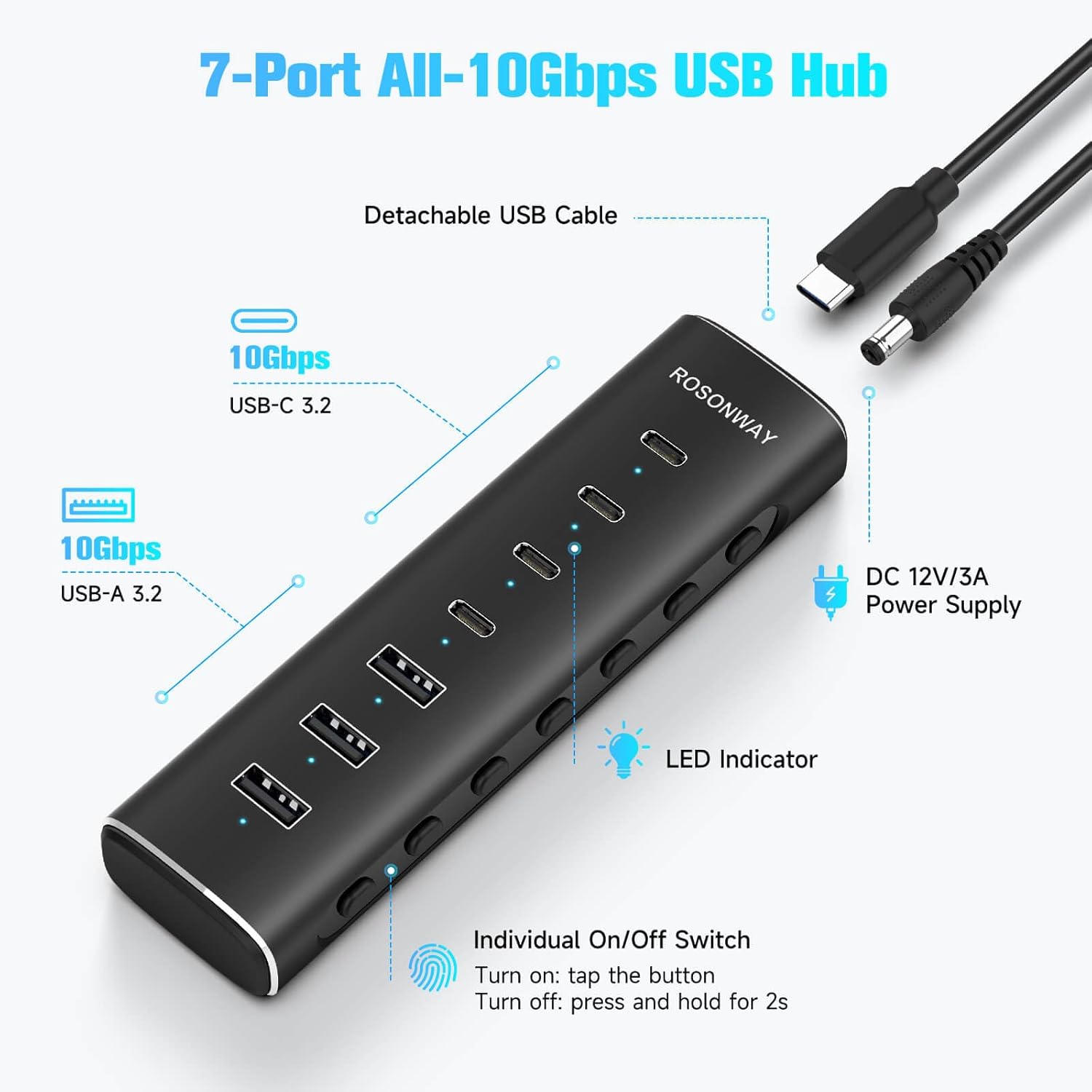
Figure 1: Diagram of Rosonway RSH-H7C4 7-Port USB Hub showing USB-C 3.2, USB-A 3.2 ports, detachable USB cable, DC 12V/3A power supply, and individual on/off switches with LED indicators.
3. Setup Instructions
- Connect the Power Adapter: Plug the included 36W (12V/3A) DC power adapter into the power input port on the hub and then into a wall outlet. This ensures stable power for all connected devices, especially high-power peripherals.
- Connect to Your Computer: Use the detachable 3.3ft USB-C host cable to connect the hub to an available USB-C port on your laptop, desktop, or other host device. The hub is plug-and-play and does not require driver installation.
- Connect Peripheral Devices: Plug your USB-A and USB-C devices (e.g., external hard drives, flash drives, keyboards, mice, cameras) into the corresponding ports on the hub.

Figure 2: The 36W power supply connected to the hub, ensuring robust and stable power to peripheral devices.

Figure 3: Rosonway RSH-H7C4 USB Hub on a desk with a monitor, showing the detachable 3.3ft USB-C host cable connected to a laptop. USB drives are plugged into the hub.
4. Operating Instructions
4.1 Individual Port Control
- Each USB port on the hub features an independent electronic switch.
- To turn a port ON: Tap the corresponding button. A blue LED indicator will illuminate.
- To turn a port OFF: Press and hold the corresponding button for 2 seconds. The blue LED indicator will turn off.
- This allows for efficient power management and precise control over individual connected devices.
4.2 Data Transfer
The Rosonway RSH-H7C4 supports data transfer speeds of up to 10Gbps on all its USB 3.2 ports. This enables fast file transfers and seamless connectivity for high-bandwidth devices.
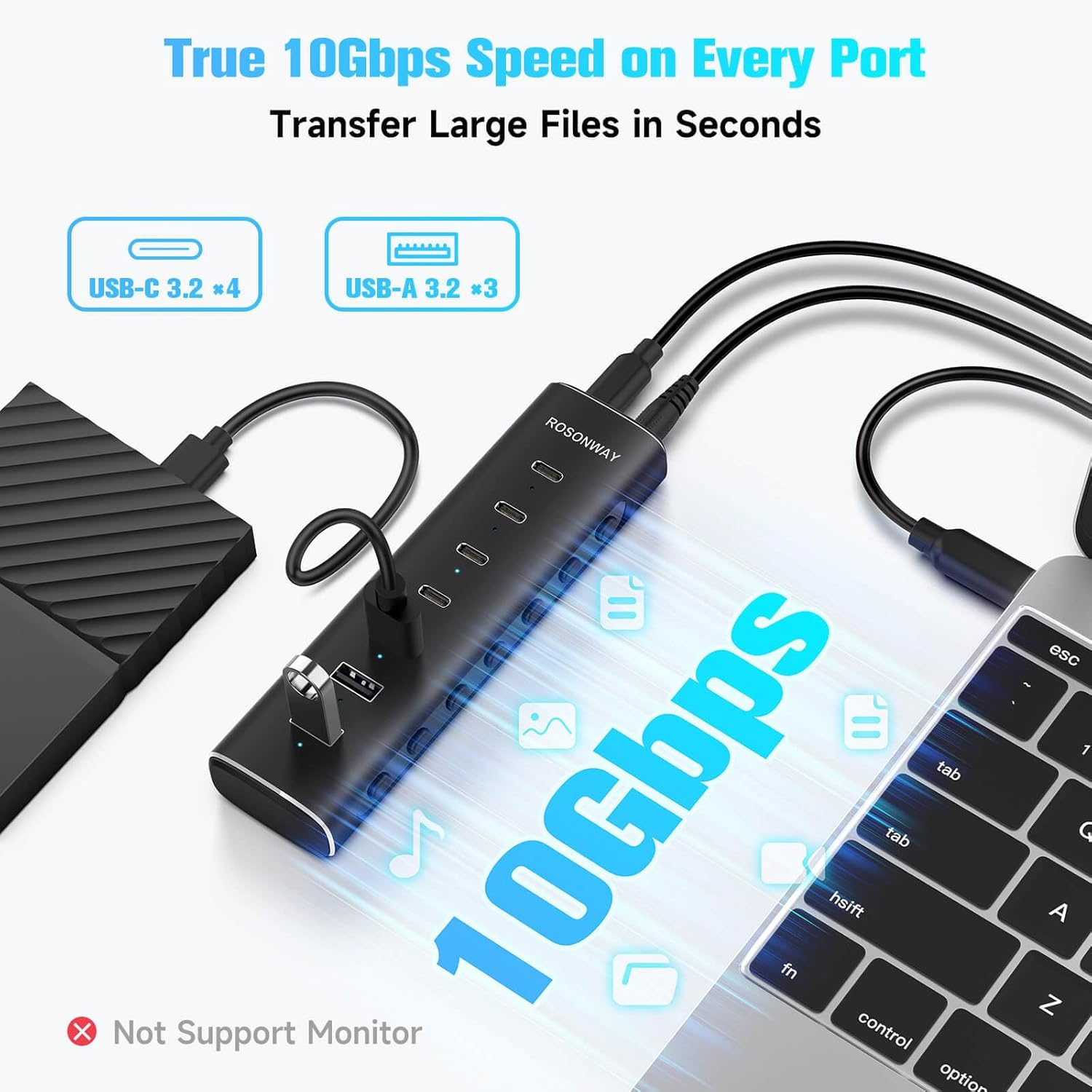
Figure 4: Rosonway RSH-H7C4 USB Hub connected to a laptop, illustrating 10Gbps data transfer speed across its ports. Note: USB-C ports only support data transfer and standard 1.5A charging, not PD charging or video output.
4.3 Charging Capabilities
- The USB-C ports on this hub support data transfer and standard 1.5A charging.
- Important Note: The USB-C ports do NOT support Power Delivery (PD) charging or video output (DisplayPort Alt Mode).
4.4 Compatibility
The hub is broadly compatible with most USB-C laptops, PCs, and various host devices running operating systems such as Windows, Mac OS, Linux, and Android. It supports a wide range of devices including card readers, desktops, gaming consoles, hard disk drives, and laptops.

Figure 5: Rosonway RSH-H7C4 USB Hub displaying compatibility with various operating systems (Windows, Mac OS, Linux, Android) and devices.
5. Troubleshooting
- Device Not Recognized: Ensure the hub is properly connected to both the power adapter and your computer. Try connecting the device directly to your computer to verify its functionality. Ensure the individual port switch for the connected device is turned on (blue LED illuminated).
- Slow Data Transfer: Verify that both the hub and your connected device support USB 3.2 (10Gbps) for optimal speeds. Ensure the power adapter is connected to provide sufficient power, especially for multiple or high-power devices.
- Charging Issues: Remember that the USB-C ports only support standard 1.5A data charging and do not support Power Delivery (PD) for fast charging laptops or video output.
- Intermittent Connection: Check all cable connections for secure fit. Ensure the hub is placed on a stable surface and not subjected to excessive movement. The built-in surge protector helps maintain stable operation.
6. Specifications
| Model Number | RSH-H7C4 |
| Product Dimensions | 5.7 x 1.77 x 0.9 inches |
| Item Weight | 14 ounces |
| Ports | 4 x USB-C 3.2, 3 x USB-A 3.2 |
| Data Transfer Speed | Up to 10Gbps |
| Power Adapter | 36W (12V/3A) DC |
| Host Cable Length | 3.3ft (1m) |
| Material | Aluminum |
| Special Features | 10Gbps Fast Data Transfer, Indicator Light, Plug and Play, Powered, Individual Switches |
7. Warranty and Support
For warranty information and technical support, please refer to the documentation included with your product packaging or visit the official Rosonway website. Keep your purchase receipt for warranty claims.