
1. Product Overview
The YOMILUVE 98.4" Two-Person Computer Desk is designed for versatile use in home offices or gaming setups. This multi-functional desk integrates several features to enhance productivity and comfort for two users.
- Spacious Workstation: An extra-long 98.4" (L) x 18.9" (W) x 35.6" (H) desktop accommodates two users comfortably.
- Integrated Storage: Features 9 fabric drawers, including 2 large file drawers suitable for Letter/Legal/A4 documents, and a dedicated printer shelf.
- Built-in Power: A monitor stand with a power strip includes 3 AC outlets, 1 USB port, and 1 Type-C port for convenient device charging.
- Dynamic LED Lighting: RGB LED light strips offer customizable lighting with APP control, timing mode, and music synchronization for an enhanced ambiance.
- Ergonomic Monitor Stand: Elevates monitors to improve viewing angles and reduce neck and back strain.

Figure 1: YOMILUVE Two-Person Computer Desk in a typical setup.
2. Setup and Assembly
This desk requires assembly. Detailed installation instructions are included in the product packaging. All parts are clearly marked to facilitate a step-by-step assembly process.
2.1 Before You Begin
- Verify all components are present by comparing them with the parts list in the instruction manual.
- Ensure you have the necessary tools (typically a screwdriver and Allen wrench, often included).
- Assemble the desk on a soft, clean surface to prevent scratches.
2.2 Assembly Steps
Follow the provided graphical and textual instructions carefully. Pay close attention to the orientation of parts and the type of fasteners used for each step.

Figure 2: Product dimensions and drawer sizes for assembly reference.
3. Operating Instructions
3.1 Power Outlets
The integrated power strip on the monitor stand provides convenient access to power for your devices.
- AC Outlets: 3 x 125V/12A AC outlets for standard electronics.
- USB Port: 1 x 5V/2A USB-A port for charging compatible devices.
- Type-C Port: 1 x 5V/2A USB-C port for charging compatible devices.
To use, connect the desk's main power cord to a wall outlet. Ensure the total power draw of connected devices does not exceed the strip's maximum capacity.
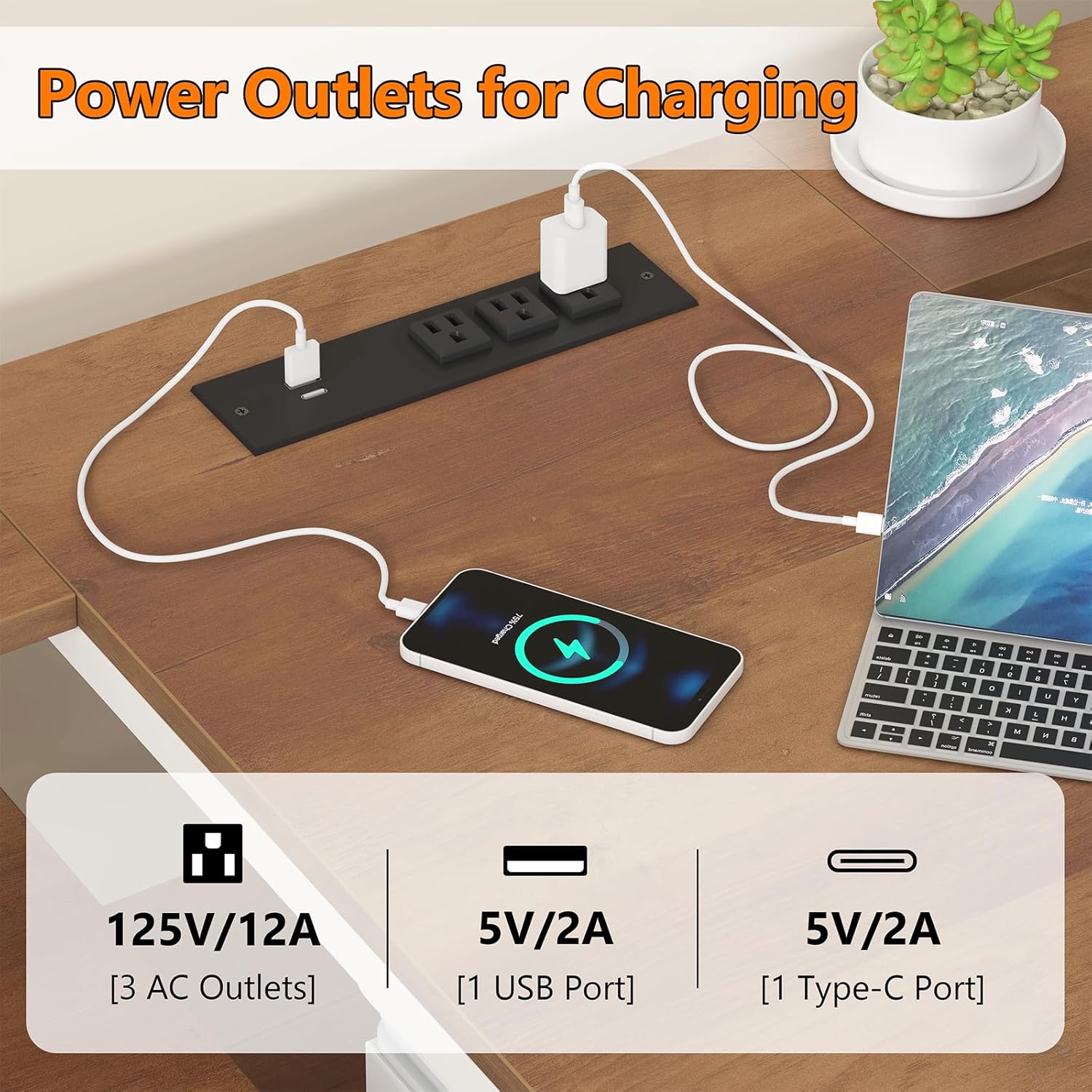
Figure 3: Detail of the integrated power outlets.
3.2 LED Light Strips
The RGB LED light strips can be controlled via a dedicated APP or a physical key control.
- APP Control: Download the specified application (details in the separate LED light manual) to access over 60,000 colors, DIY modes, music synchronization, and timing functions.
- Key Control: Use the inline controller to cycle through basic colors and modes.
- Music Mode: Synchronize the lights with music or microphone input for dynamic lighting effects.

Figure 4: RGB LED lights in operation with control options.
3.3 Storage Drawers
The desk includes 9 fabric drawers for organized storage. The two larger drawers are designed to accommodate Letter, Legal, or A4 size documents.
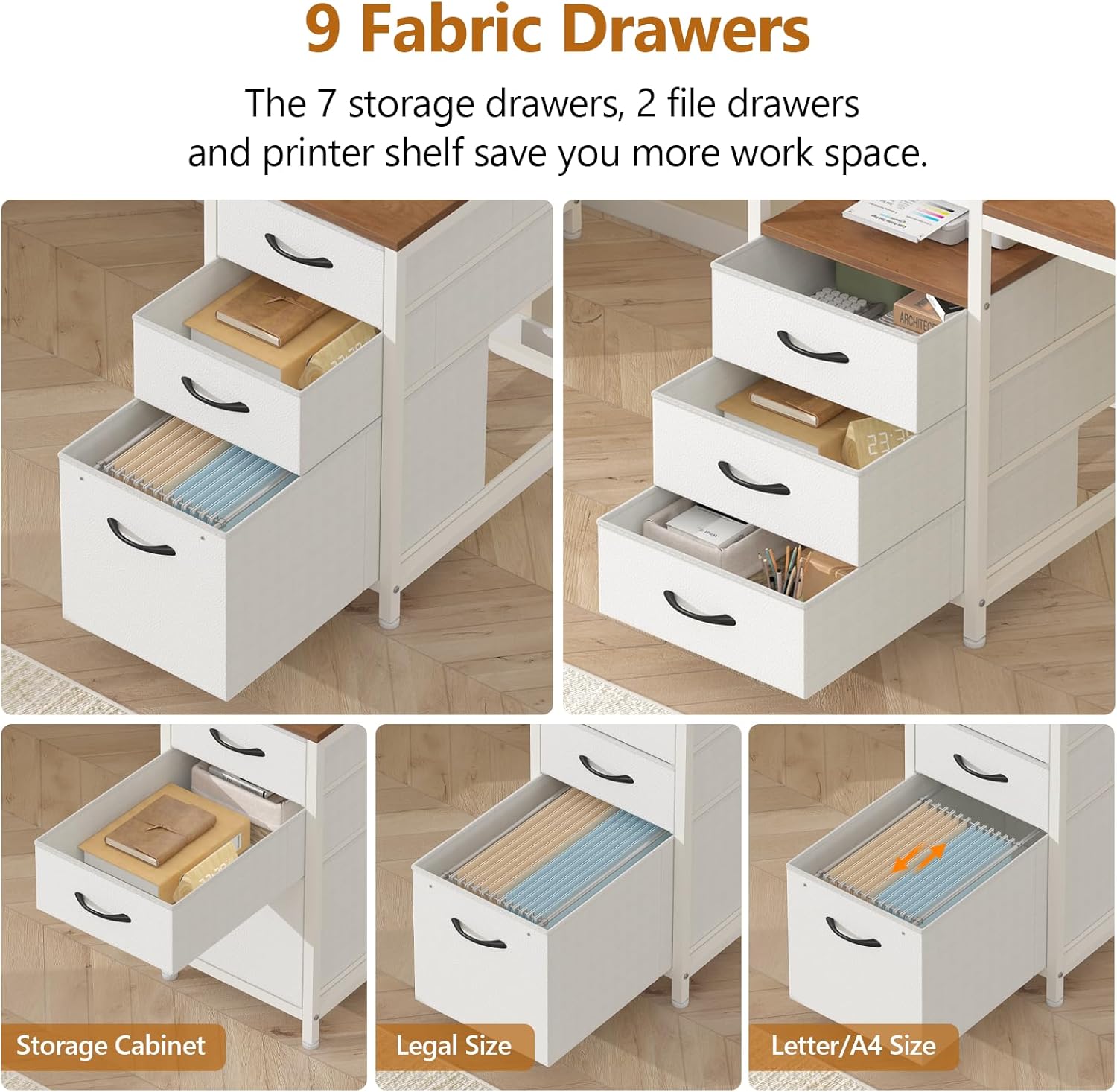
Figure 5: Fabric drawers for various storage needs.
4. Maintenance
Regular maintenance will help preserve the appearance and functionality of your YOMILUVE desk.
- Cleaning: Wipe surfaces with a soft, damp cloth. Avoid harsh chemicals or abrasive cleaners that may damage the finish.
- Dusting: Regularly dust all surfaces, including the LED light strips and power outlets, to prevent accumulation.
- Fasteners: Periodically check and tighten all screws and fasteners to ensure stability.
- Drawer Care: Ensure fabric drawers are not overloaded to maintain their shape and functionality.
5. Troubleshooting
If you encounter any issues with your desk, refer to the following common troubleshooting tips:
- Desk Wobbles: Check that all screws and bolts are securely tightened. Ensure the desk is on a level surface. Adjust any leveling feet if present.
- LED Lights Not Working: Verify the power cord for the LED lights is properly connected to the power strip and the wall outlet. Check the inline controller or APP settings.
- Power Outlets Not Functioning: Ensure the desk's main power cord is securely plugged into a working wall outlet. Test the outlet with another device. Check for any tripped circuit breakers.
- Drawers Stick or Don't Slide Smoothly: Ensure drawers are not overloaded. Check for any obstructions in the drawer slides.
If problems persist after attempting these solutions, please contact customer support.
6. Specifications
| Feature | Detail |
|---|---|
| Brand | YOMILUVE |
| Color | Brown and White |
| Overall Dimensions (L x W x H) | 98.4" x 18.9" x 35.6" |
| Item Weight | 75.4 Pounds |
| Style | Modern |
| Additional Features | Built-In Monitor Stand, Built-In USB Outlet, LED Lights, 9 Fabric Drawers, Printer Shelf |
| Power Outlet Specifications | 3 x 125V/12A AC Outlets, 1 x 5V/2A USB Port, 1 x 5V/2A Type-C Port |
| Assembly Required | Yes |

Figure 6: Monitor stand for improved ergonomics.
7. Customer Support
For any questions regarding assembly, operation, or product issues, please do not hesitate to contact YOMILUVE customer support. We are committed to responding to your inquiries within 24 hours.
Contact information can typically be found on the product packaging or through the retailer's website where the product was purchased.