
1. Introduction
Thank you for choosing the Kaoudt Cordless Red Light Therapy Shoulder Massager. This device combines red light therapy, near-infrared light therapy, heat, and vibration massage to provide targeted relief for shoulder discomfort. This manual provides essential information for safe and effective use, setup, operation, and maintenance of your device. Please read it thoroughly before first use and retain it for future reference.
2. Safety Information
Please observe the following safety precautions to prevent injury or damage to the device:
- Consult a physician before using this device if you have any pre-existing medical conditions, are pregnant, have a pacemaker, or are sensitive to light.
- Do not use on open wounds, swollen areas, or areas with skin infections.
- Avoid direct eye exposure to the red light.
- Keep out of reach of children.
- Do not immerse the device in water or use it in excessively humid environments.
- Use only the provided charging cable and adapter.
- Discontinue use if you experience any discomfort, pain, or adverse reactions.
- The device has a 30-minute auto shut-off timer to prevent overuse. Do not override this safety feature.
3. Package Contents
Verify that all items are present in the package:
- Kaoudt Cordless Red Light Therapy Shoulder Massager
- USB Charging Cable
- User Manual
- Two Elastic Straps (pre-attached or separate for adjustment)
4. Product Features
The Kaoudt Cordless Red Light Therapy Shoulder Massager offers the following key features:
- Advanced Therapy Combination: Integrates 660nm red light and 850nm near-infrared light therapy with heat and vibration massage for comprehensive shoulder relief.
- Cordless & Portable: Equipped with a built-in 5000mAh rechargeable battery, providing 1-2 hours of cordless operation for use anywhere.
- Customizable Settings: Features an intelligent touchscreen control for 5 light power levels, 3 heating levels, and 3 vibration modes.
- Automatic Safety Timer: Includes a 30-minute auto shut-off function to ensure safety and prevent prolonged use.
- Flexible & Comfortable Fit: Designed with two elastic straps to accommodate chest sizes from 32 to 48 inches and upper arms from 10 to 15 inches, ensuring a secure and comfortable fit for most body types.
- Premium Material: Constructed from breathable material that conforms comfortably to the shoulder.
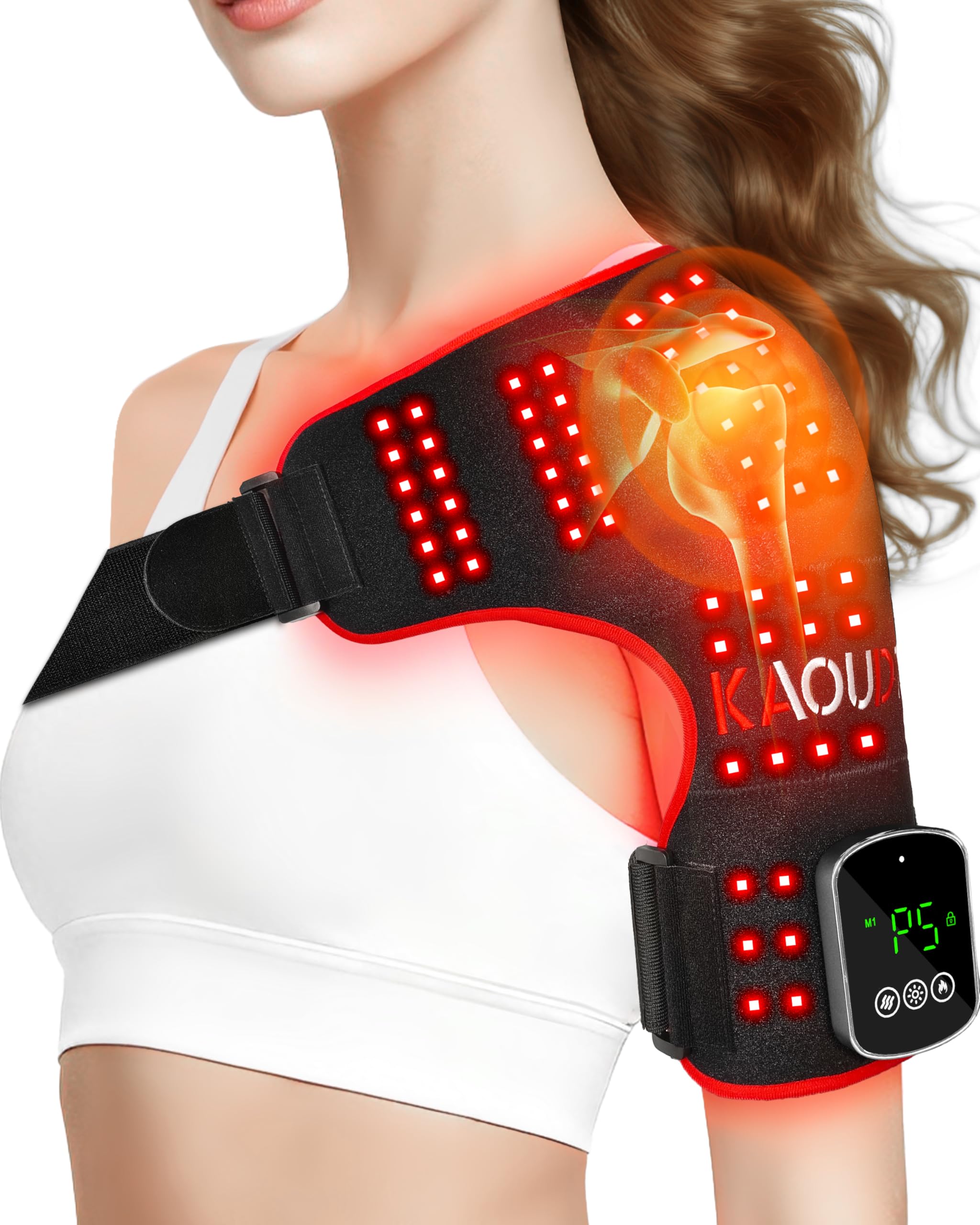
Image 1: The Kaoudt Cordless Red Light Therapy Shoulder Massager. This image displays the device wrapped around a shoulder, highlighting its ergonomic design and the integrated control panel.
5. Setup
5.1 Charging the Device
- Before first use, fully charge the device.
- Connect the USB charging cable to the charging port on the device.
- Plug the other end of the USB cable into a compatible USB power adapter (not included) or a computer USB port.
- The charging indicator light will illuminate, typically red, and turn green when fully charged.
- A full charge provides approximately 1-2 hours of cordless use, depending on the selected settings.
5.2 Fitting the Shoulder Massager
- Unfold the shoulder massager and identify the main pad and the elastic straps.
- Position the main pad over your shoulder, ensuring the light and massage elements are directly on the desired area.
- Secure the two elastic straps around your chest and upper arm. Adjust the straps to achieve a snug, comfortable fit without being too tight. The device is designed to fit chest sizes from 32 to 48 inches and upper arms from 10 to 15 inches.
- Ensure the control panel is easily accessible for operation.
6. Operating Instructions
The device features an intelligent touchscreen control panel.
6.1 Power On/Off
- Press and hold the Power button on the touchscreen for 2-3 seconds to turn the device ON.
- Press and hold the Power button again for 2-3 seconds to turn the device OFF.
- The device will automatically shut off after 30 minutes of continuous operation.
6.2 Adjusting Light Therapy
- After powering on, press the Light button to cycle through 5 different light power levels.
- Each press will increase the intensity or change the light pattern. Select the level that feels most comfortable.
6.3 Adjusting Heat Therapy
- Press the Heat button to select from 3 heating levels (Low, Medium, High).
- The indicator on the screen will show the current heat level.
- Allow a few minutes for the device to reach the desired temperature.
6.4 Adjusting Vibration Massage
- Press the Vibration button to cycle through 3 different vibration modes.
- Each mode offers a distinct massage pattern. Choose the mode that best suits your preference.
6.5 Recommended Usage
- It is recommended to use the device for one 30-minute session per day.
- Do not exceed 30 minutes per session. The device will automatically power off.
- For best results, use consistently as directed.
7. Maintenance
7.1 Cleaning
- Ensure the device is turned OFF and unplugged before cleaning.
- Wipe the surface of the device with a soft, slightly damp cloth.
- Do not use abrasive cleaners, solvents, or harsh chemicals.
- Do not immerse the device in water.
- Allow the device to air dry completely before storing or next use.
7.2 Storage
- Store the device in a cool, dry place, away from direct sunlight and extreme temperatures.
- Keep the device in its original packaging or a protective case to prevent damage.
8. Troubleshooting
| Problem | Possible Cause | Solution |
|---|---|---|
| Device does not turn on. | Battery is depleted. | Charge the device fully. |
| Device does not turn on. | Power button not pressed correctly. | Press and hold the Power button for 2-3 seconds. |
| No heat or vibration. | Heat/Vibration mode not activated or set to lowest level. | Press the respective Heat/Vibration button to select a higher level. |
| Device turns off unexpectedly. | 30-minute auto shut-off timer activated. | This is a normal safety feature. Restart the device if another session is desired, but avoid overuse. |
| Charging indicator not working. | Charging cable or adapter issue. | Ensure the cable is securely connected. Try a different USB port or adapter. |
9. Specifications
| Model Number | B0FZTHXQVH |
| Brand | Kaoudt |
| Battery Capacity | 5000mAh Lithium Ion (included) |
| Light Wavelengths | 660nm (Red Light), 850nm (Near-Infrared Light) |
| Heat Levels | 3 levels |
| Vibration Modes | 3 modes |
| Light Power Levels | 5 levels |
| Auto Shut-off Timer | 30 minutes |
| Product Dimensions | Approximately 12.2 x 7.28 x 1.97 inches |
| Product Weight | Approximately 1.32 Pounds |
| UPC | 793123198296 |
10. Warranty and Support
Kaoudt products are manufactured with high-quality standards. For warranty information, technical support, or customer service inquiries, please refer to the contact information provided on the product packaging or visit the official Kaoudt website. Please have your model number (B0FZTHXQVH) and purchase date available when contacting support.
Statements regarding dietary supplements have not been evaluated by the FDA and are not intended to diagnose, treat, cure, or prevent any disease or health condition.