
Introduction
This manual provides instructions for the assembly, operation, and maintenance of your roomfitters 4-Piece Entertainment Center. This unit is designed to serve as a comprehensive media storage and display solution, featuring a modern design with grooved side cabinet doors, tempered glass doors, and golden handles. It integrates a TV stand, bookshelf, display cabinet, and practical storage, suitable for televisions up to 80 inches. A built-in cable management system is included to help organize wires.
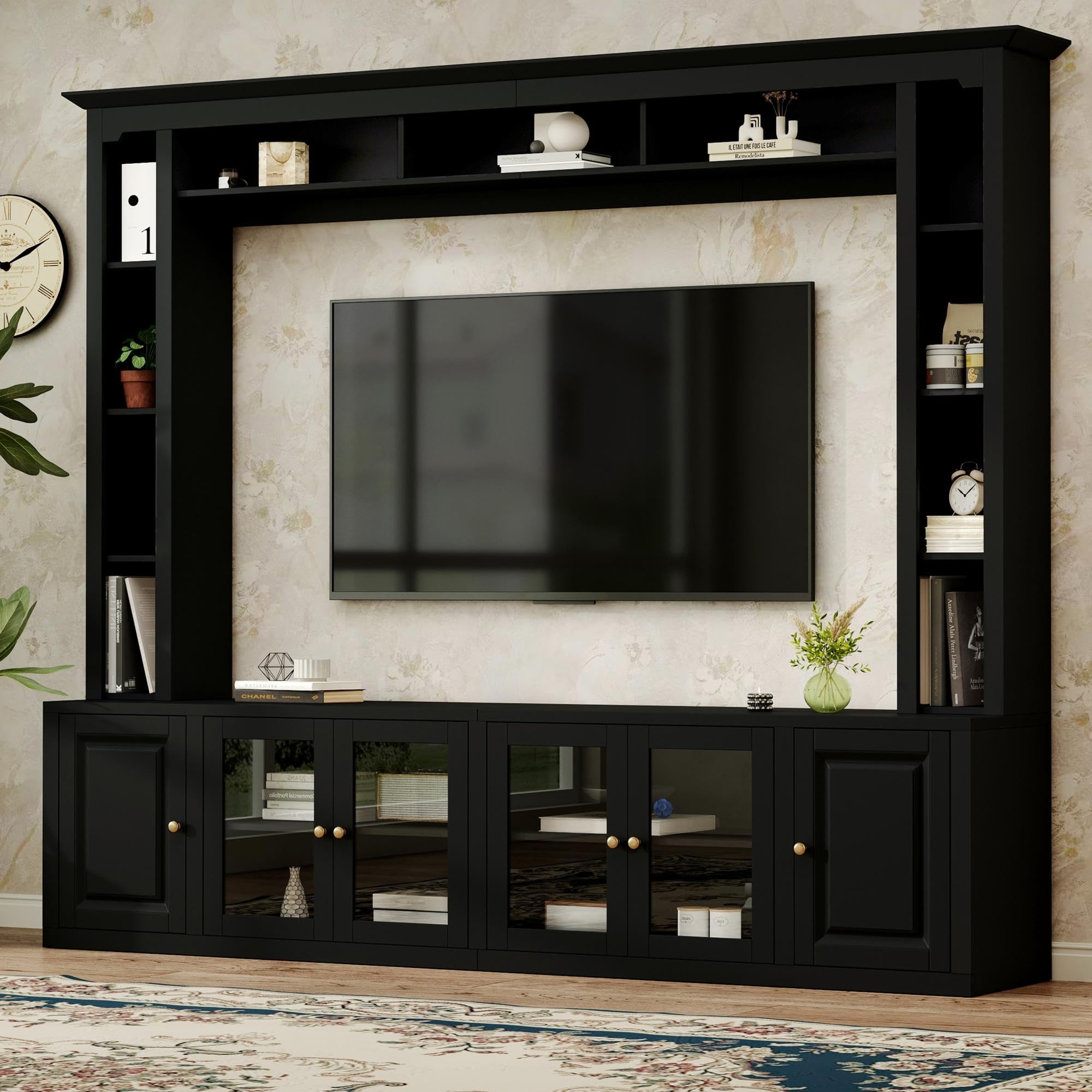
Image: Fully assembled roomfitters 4-Piece Entertainment Center, showcasing its design and storage capabilities.
Setup and Assembly
The roomfitters 4-Piece Entertainment Center is designed for straightforward assembly. All necessary parts, tools, and instructions are included in the packaging. Please follow the step-by-step guide provided with your product for detailed assembly instructions.
- Unpack and Verify: Carefully unpack all components and verify that all parts listed in the included parts list are present and undamaged.
- Prepare Workspace: Assemble the unit on a clean, flat, and soft surface to prevent scratches.
- Follow Instructions: Adhere strictly to the assembly instructions provided in the separate manual. Do not overtighten screws.
- Secure Anti-Tip Device: For safety, it is crucial to install the secure anti-tip device as instructed. This device helps prevent accidental tipping of the unit.

Image: Illustration of the sturdy particle board construction and the secure anti-tip device for enhanced stability.
Operating Instructions
Once assembled, your entertainment center is ready for use. Consider the following guidelines for optimal functionality:
- Television Placement: The central opening is designed to accommodate televisions up to 80 inches. Ensure the TV is centered and stable on the stand.
- Adjustable Shelves: The unit features adjustable shelves within the cabinets. To adjust, remove the shelf, reposition the shelf pins to the desired height, and reinsert the shelf.
- Cable Management: Utilize the built-in cable holes on the back panel to route and organize power cords and signal cables from your TV, sound system, game console, or other devices. This helps maintain a tidy appearance and prevents cable clutter.
- Storage Utilization: Use the various compartments, including the grooved side cabinets and tempered glass door cabinets, for storing media, books, decorative items, and other essentials.

Image: Detailed view of the convenient back-panel design, highlighting the cable management hole for various electronic devices.

Image: The entertainment center showcasing its optimized storage layout, functioning as a TV cabinet, bookshelf, display cabinet, and storage organizer.
Maintenance
Proper care will ensure the longevity and appearance of your entertainment center:
- Cleaning: Wipe surfaces with a soft, damp cloth. Avoid using abrasive cleaners, harsh chemicals, or polishes that may damage the finish.
- Dusting: Regularly dust the unit with a dry, soft cloth.
- Inspection: Periodically check all screws and fasteners to ensure they remain tight. Retighten if necessary to maintain stability.
- Avoid Direct Sunlight: Prolonged exposure to direct sunlight can cause fading or discoloration.
- Liquid Spills: Immediately wipe up any liquid spills to prevent damage to the wood finish.
Troubleshooting
If you encounter any issues with your entertainment center, refer to the following common solutions:
- Unit is Wobbly:
- Ensure the unit is placed on a level surface.
- Check that all assembly screws and fasteners are securely tightened. Do not overtighten. - Doors Do Not Align Properly:
- Inspect the hinges. Most hinges allow for minor adjustments to align the doors. Refer to the assembly manual for specific hinge adjustment instructions.
- Ensure the unit is level, as an uneven base can affect door alignment. - Missing or Damaged Parts:
- If you find any parts missing or damaged upon unpacking, do not proceed with assembly. Contact roomfitters customer support immediately for assistance.
Specifications
| Brand | roomfitters |
| Model Number | RF-N721S000052B |
| Color | Black |
| Product Dimensions (Overall) | L 92.5" x W 15.7" x H 78.7" |
| Product Dimensions (Packaged) | 49.05 x 20.07 x 10.82 inches |
| Item Weight | 220 Pounds |
| Material | Sturdy Particle Board and MDF |
| TV Size Compatibility | Up to 80 inches |
| Assembly Required | Yes |
| UPC / GTIN | 749510839136 |
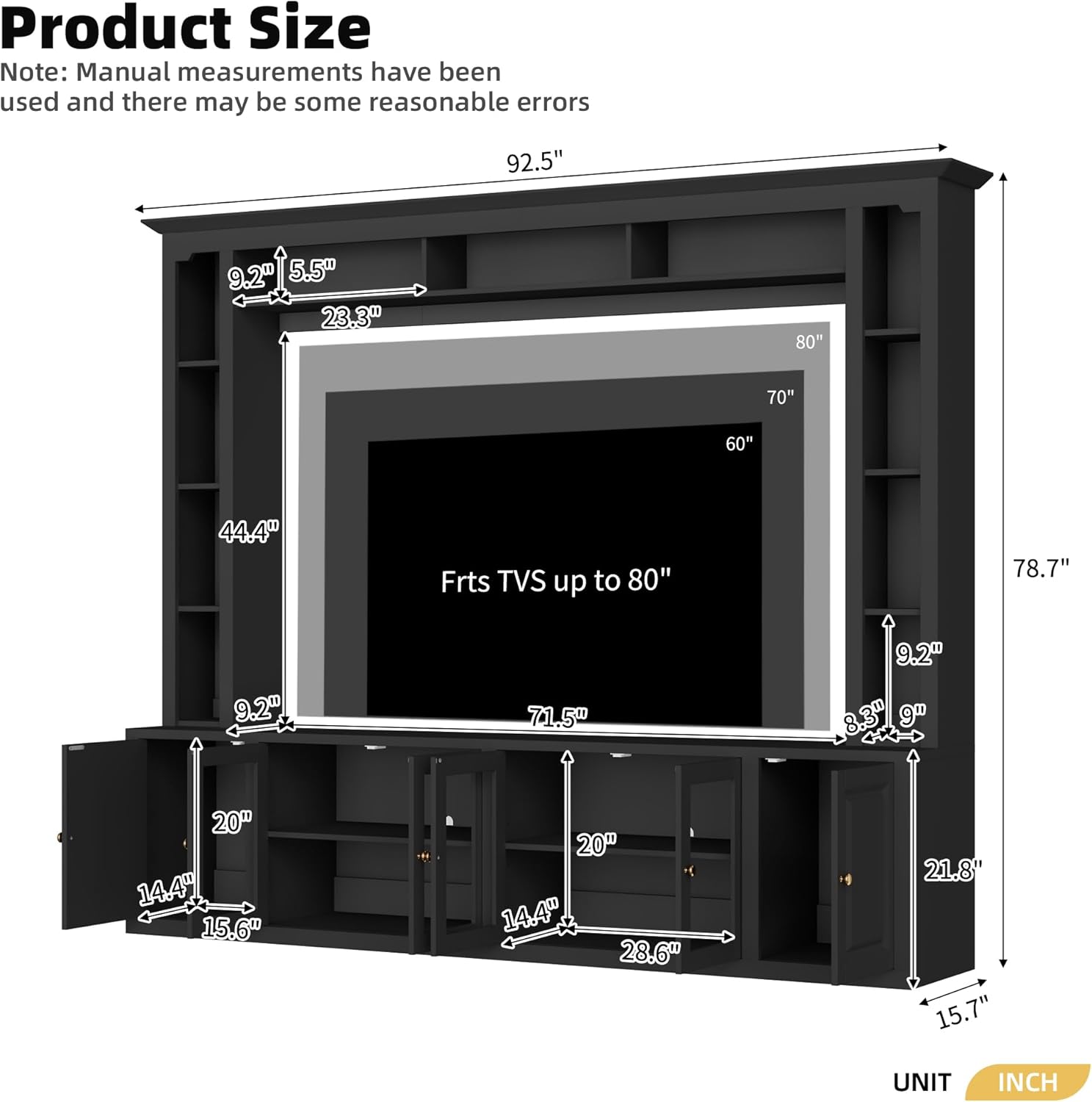
Image: Product size diagram illustrating overall dimensions and TV compatibility.
Warranty Information
For specific warranty details regarding your roomfitters 4-Piece Entertainment Center, please refer to the documentation included with your purchase or contact roomfitters customer support directly. Generally, products are covered against manufacturing defects for a specified period from the date of purchase.
Customer Support
If you have any questions, require assistance with assembly, or need to report missing/damaged parts, please contact roomfitters customer support. You can often find contact information on the manufacturer's website or through the retailer where the product was purchased.
For more information, you may visit the official roomfitters Store.