
Introduction
This manual provides instructions for the assembly, operation, and maintenance of your Patikuin 70-inch TV Stand Dresser. Please read this manual thoroughly before assembly and use to ensure safe and proper operation. This unit combines a spacious TV stand with a multi-drawer dresser, featuring integrated power outlets and LED lighting.
Safety Information
Anti-Tip Kit: Always install the included anti-tip kit to prevent accidental tipping, especially in households with children or pets. Secure the unit to a wall stud according to the instructions provided in the assembly manual.
Weight Capacity: Do not exceed the maximum weight capacity of the top surface (120 lbs) or individual drawers (18-22 lbs). Overloading can cause instability and damage to the unit.
Placement: Place the unit on a flat, level, and stable surface. Uneven surfaces can lead to instability and potential tipping hazards.
Electrical Safety: Ensure all electrical connections for the power outlets and LED lights are made correctly and safely. Do not overload the power outlets. Disconnect power before cleaning or maintenance.
Assembly: Follow all assembly instructions carefully. Do not use power tools unless specifically instructed, as this may damage components or strip screws.

Image: Key safety and stability features including the anti-tipping kit and adjustable feet.
Package Contents
Verify that all components are present before beginning assembly. If any parts are missing or damaged, contact customer support.
- 1 x Patikuin 70-Inch TV Stand Dresser (Disassembled Components)
- 1 x Accessory Kit (Hardware, Screws, Tools, etc.)
- 1 x Anti-Tip Kit
- 1 x Instructions Manual (Paper version for detailed assembly steps)
- 1 x Built-in Power Outlet Unit with USB Ports
- 1 x LED Light Strip with Controller
Setup and Assembly
Assembly is required for this product. Please refer to the detailed assembly instructions included in your package for step-by-step guidance. The following provides a general overview and important considerations:
Unpack Components: Carefully remove all parts from the packaging. Lay them out on a clean, soft surface (e.g., a blanket or carpet) to prevent scratches.
Identify Parts: Match all components with the parts list and diagrams in the included instruction manual to ensure everything is present and undamaged.
Frame Assembly: Begin by assembling the metal frame structure. Ensure all connections are secure and tightened appropriately, but do not overtighten until the unit is fully assembled.
Install Wood Top: Attach the wood top surface to the assembled frame. Ensure it is aligned correctly before securing.
Drawer Assembly: Assemble the fabric drawers according to the instructions. Ensure the drawer handles are securely attached to the front panels.
Install Drawers: Insert the assembled fabric drawers into their designated slots within the frame. The dresser features 13 drawers of varying sizes.
Power Outlet Installation: Install the built-in power outlet unit into the designated cutout on the top surface. Connect the power cord as instructed.
LED Light Installation: Install the LED light strip in the central open compartment. Ensure it is securely attached and the wiring is routed safely and discreetly.
Adjustable Feet: Adjust the leveling feet at the base of the unit to ensure stability and level positioning on your floor. This also helps protect your flooring from scratches.
Anti-Tip Kit Installation: Securely attach the anti-tip kit to the back of the dresser and to a wall stud using appropriate hardware. This is a critical safety step and should not be skipped.

Image: The Patikuin TV Stand Dresser fully assembled, ready for use.
Operating Instructions
Power Outlets and USB Ports
Your TV stand dresser is equipped with a built-in power outlet unit for convenient device charging and power supply.
Connection: Plug the dresser's main power cord into a standard 125V/12A wall outlet.
AC Outlets: Use the two 125V/12A AC outlets to power your television, gaming consoles, or other electronic devices.
USB Ports: Use the two 5V/2A USB ports to charge smartphones, tablets, or other USB-powered devices.
Safety: Do not exceed the maximum electrical load for the outlets. Avoid plugging in high-power appliances that may draw more current than specified.

Image: Detail of the integrated power outlets and USB ports for device connectivity.
LED Lights
The integrated LED lights in the central compartment provide ambient lighting and can be controlled for various effects.
Power On/Off: The LED lights are typically controlled via a switch on the power cord or an included remote control. Refer to the separate LED light controller instructions for detailed operation.
Color and Mode Selection: The LED lights often offer multiple colors (over 60,000 colors) and various modes (e.g., music sync, timing, microphone sync). Use the provided remote control or smartphone app (if applicable) to customize settings.
Brightness Adjustment: Adjust the brightness level to suit your preference using the controller.
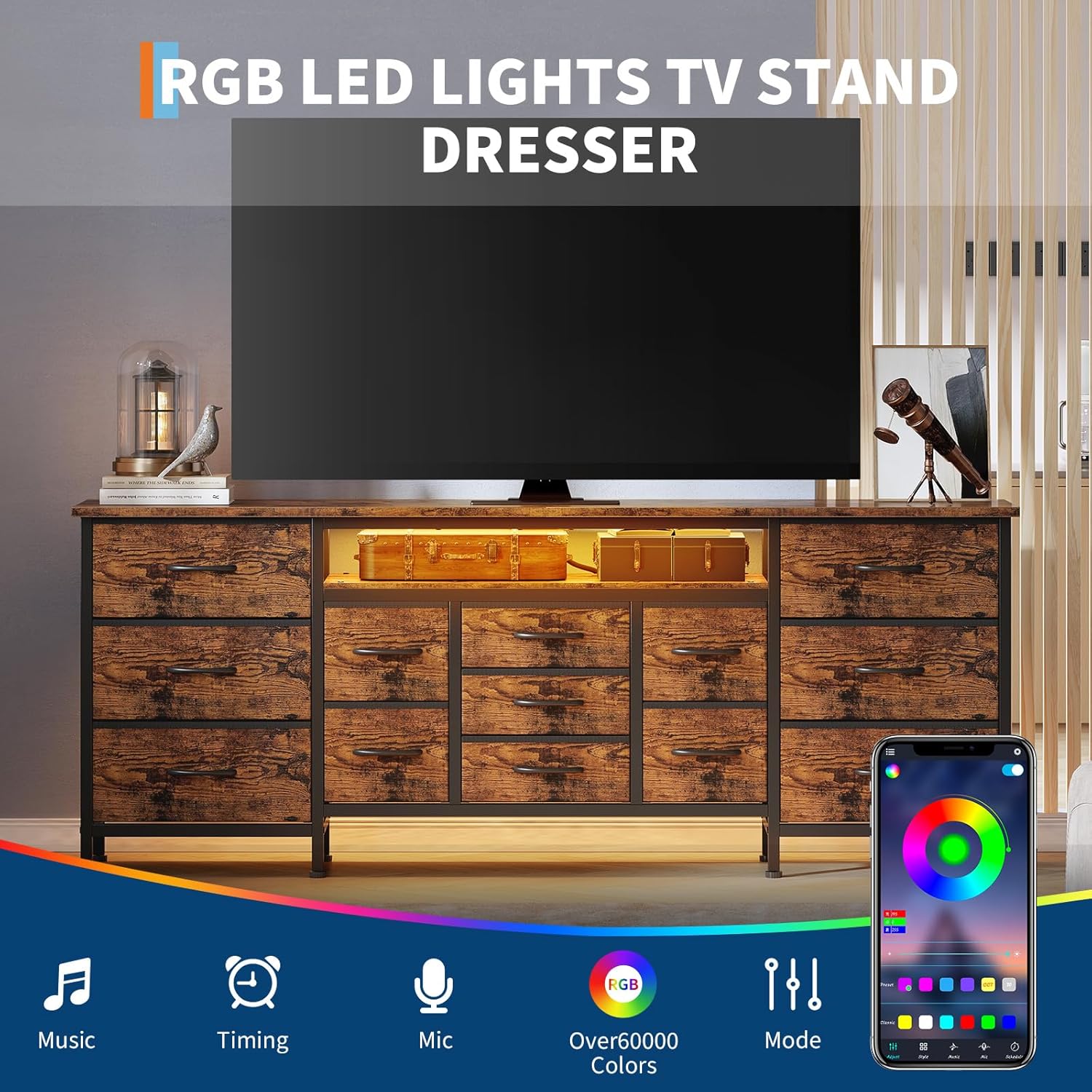
Image: The TV stand dresser with LED lights active, illustrating control options via a smartphone application.
Maintenance
Cleaning the Wood Top: Wipe the wood top surface with a soft, damp cloth. Avoid harsh chemicals, abrasive cleaners, or excessive moisture that could damage the finish. The tabletop is designed to be waterproof for easy cleaning.
Cleaning Fabric Drawers: For fabric drawers, spot clean with a mild detergent and a damp cloth. Allow to air dry completely. Do not machine wash or submerge in water.
Frame Cleaning: Wipe the metal frame with a soft, dry cloth to remove dust. Avoid using abrasive materials that could scratch the finish.
Regular Checks: Periodically check all screws and connections to ensure they remain tight. Re-tighten if necessary to maintain structural integrity.
Anti-Tip Kit: Verify the anti-tip kit remains securely attached to both the dresser and the wall. Re-secure if any looseness is detected.
Troubleshooting
Unit is Unstable:
- Ensure the unit is placed on a flat, level surface.
- Adjust the leveling feet at the bottom of the unit to compensate for uneven flooring.
- Verify all assembly screws are tightened securely.
- Confirm the anti-tip kit is properly installed and secured to a wall stud.
Power Outlets Not Working:
- Check if the dresser's main power cord is securely plugged into a functional wall outlet.
- Test the wall outlet with another device to ensure it has power.
- Ensure the power outlet unit is correctly installed within the dresser and its internal connections are secure.
- Do not overload the outlets; unplug some devices and try again.
LED Lights Not Functioning:
- Check if the LED light strip is properly connected to its power source and the dresser's main power cord is plugged in.
- Verify the LED controller (remote or app) has power and is functioning correctly. Replace batteries in the remote if applicable.
- Refer to the specific LED light instructions for troubleshooting common issues related to the lighting system.
Drawers Do Not Slide Smoothly:
- Ensure drawers are not overloaded beyond their weight capacity.
- Check for any obstructions or items caught in the drawer slots.
- Verify the drawer fabric is not snagged or misaligned within the frame.
Specifications
| Feature | Detail |
|---|---|
| Brand | Patikuin |
| Model Name | TVStand_PHK_35K6AG38VAlY9z |
| Color | Rustic Brown |
| Dimensions (L x W x H) | 70.87" x 13.8" x 25.2" |
| Item Weight | 46.3 pounds |
| Material | Wood top, Metal frame, Fabric drawers |
| Number of Drawers | 13 |
| TV Size Compatibility | Up to 80 inches (fits 55", 60", 65", 70", 75", 80" TVs) |
| Power Outlets | 2 x 125V/12A AC Outlets |
| USB Ports | 2 x 5V/2A USB Ports |
| Special Features | Built-in Power Outlet, LED Lights, Anti-Tip Kit, Smooth-Glide Mechanisms, Adjustable Feet, Waterproof Tabletop |
| Assembly Required | Yes |
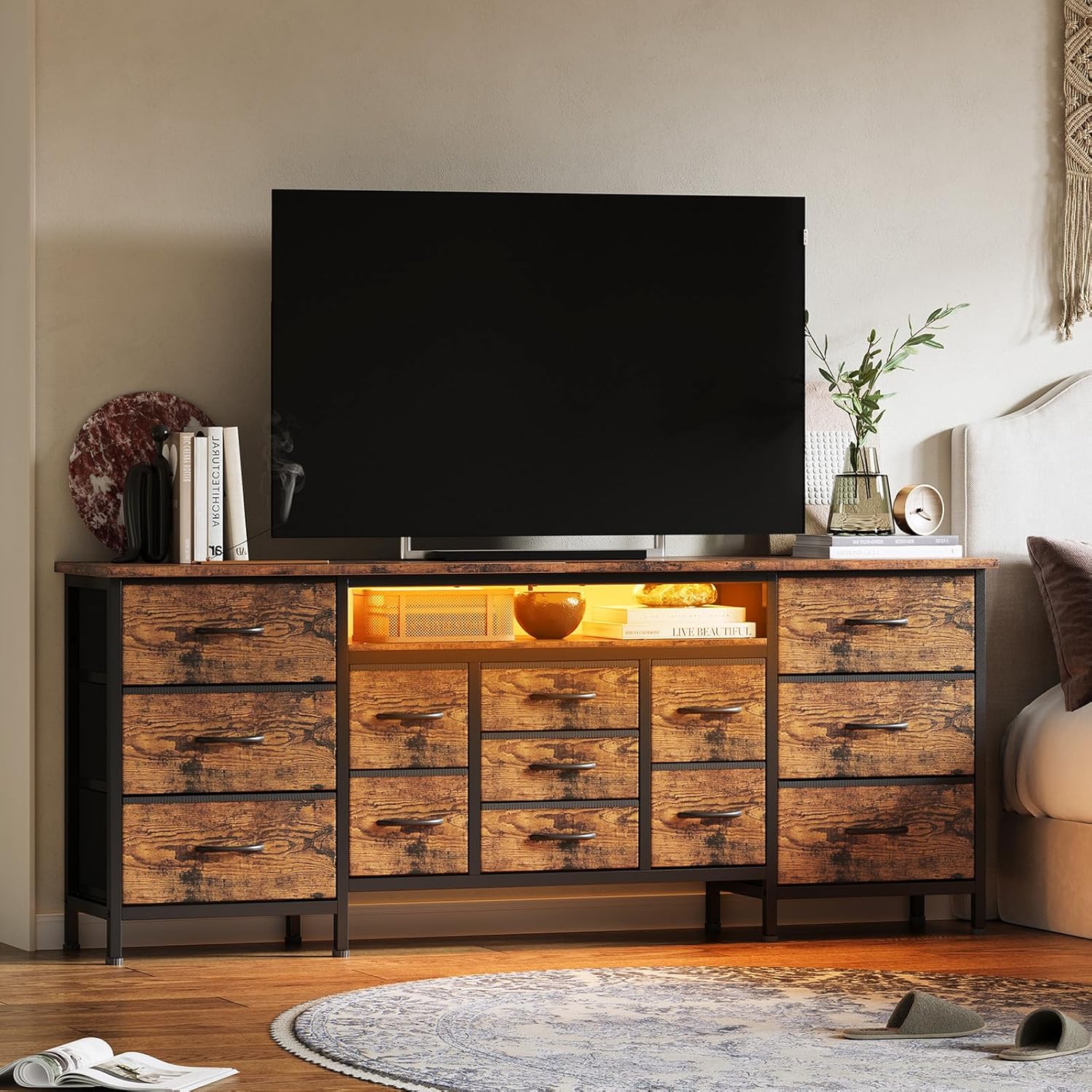
Image: Detailed product dimensions and weight capacities for the TV stand dresser.

Image: The 13 fabric drawers demonstrating their storage capacity.
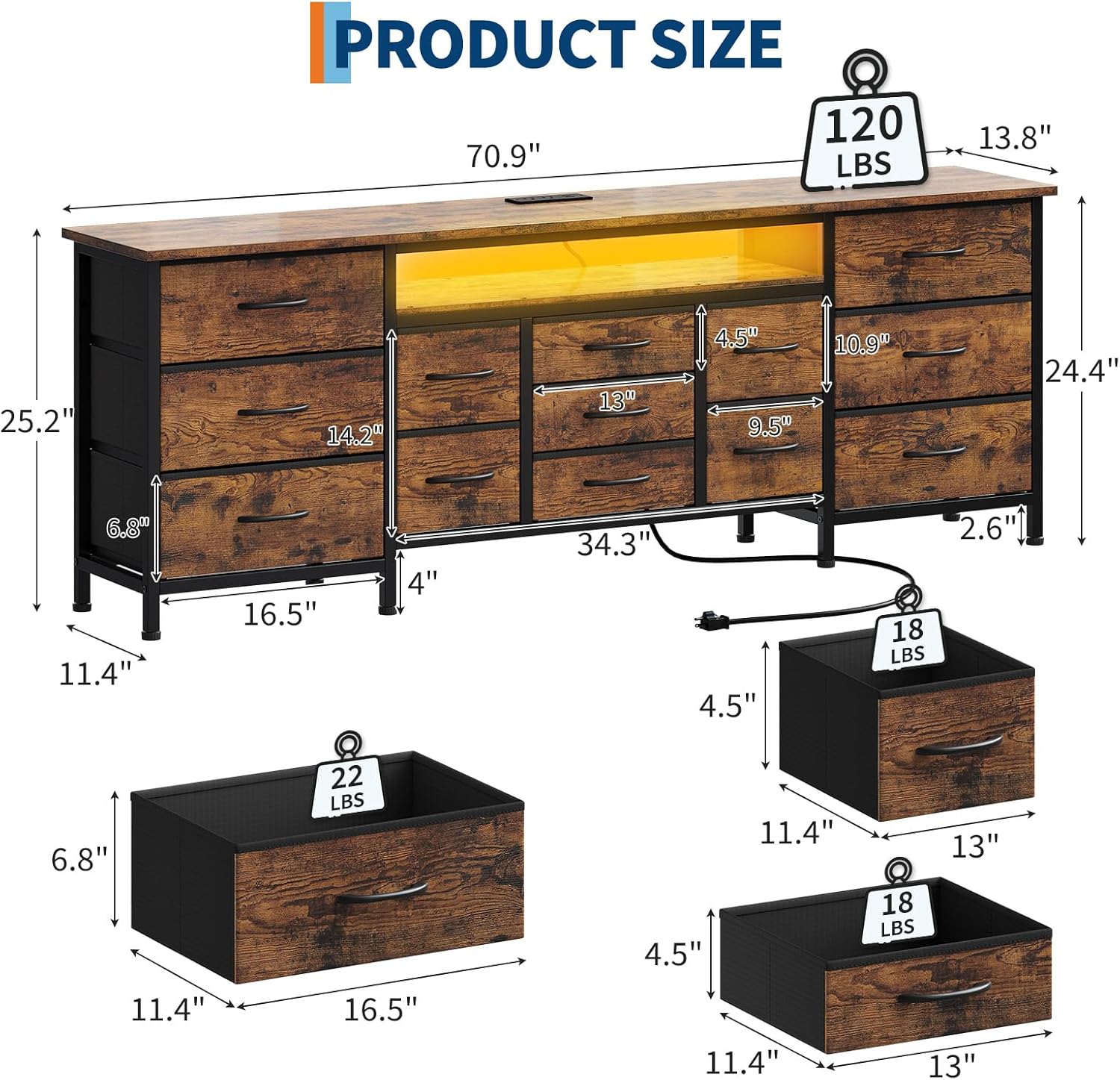
Image: Visual representation of TV size compatibility, showing the dresser accommodating up to an 80-inch television.
Warranty and Support
For warranty information and customer support, please refer to the documentation included with your purchase or contact Patikuin customer service directly. Keep your purchase receipt for warranty claims.
For further assistance, visit the Patikuin Store on Amazon.