
1. Introduction
The Y&H 7200W Solar Hybrid Inverter is a versatile power solution designed for various applications, including home backup, RVs, cabins, and off-grid systems. This inverter converts 48V DC power to AC120V/240V split-phase pure sine wave output, ensuring stable and clean power for sensitive electronics. It integrates a 150A MPPT (Maximum Power Point Tracking) charge controller for efficient solar energy harvesting and is UL1741 certified for safety and grid integration. The inverter supports battery-free operation, Wi-Fi remote monitoring, and is compatible with BMS-enabled lithium batteries.
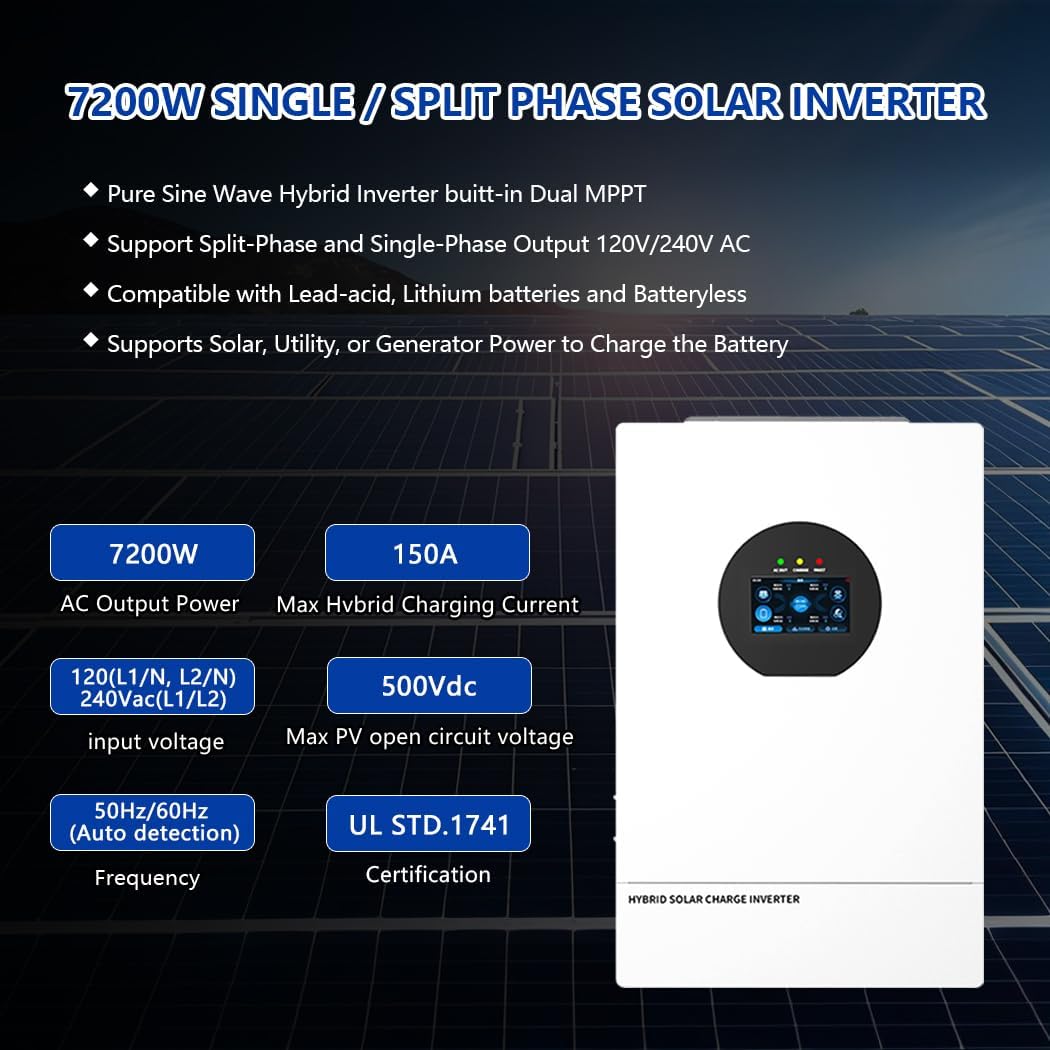
Figure 1: Front view of the Y&H 7200W Solar Hybrid Inverter.
2. Product Features
- 7200W Continuous AC Output: Provides reliable power for a wide range of appliances.
- 48V DC to AC120V/240V Split-Phase Pure Sine Wave: Ensures compatibility with standard household loads and protects sensitive electronics.
- Dual MPPT 150A Charge Controller: Maximizes solar power harvesting efficiency with a wide PV input range (90-450 Vdc, 500Voc).
- UL1741 Certified: Meets stringent safety and performance standards for grid-tied and off-grid applications.
- Battery-Free Operation: Can power loads directly from PV when solar input is sufficient.
- BMS Lithium Compatible: Supports 48V LiFePO4 batteries via RS485/CAN communication.
- Wi-Fi Remote Monitoring: Allows for remote monitoring and control via a dedicated app.
- Peak-Shift Functionality: Optimizes energy usage by charging batteries during low-tariff periods and discharging during high-tariff periods.

Figure 2: Key features and specifications of the inverter.
3. Setup and Installation
The Y&H 7200W Solar Hybrid Inverter is designed for straightforward installation. It comes with pre-wired terminals and a mounting kit. Ensure all connections are secure and follow local electrical codes.
3.1 Unboxing and Components
Upon unboxing, verify all components are present as listed in the 'What's in the Box' section. Inspect the inverter for any physical damage before proceeding with installation.
Video 1: An overview of the inverter's physical appearance and connection points, demonstrating the unboxing and initial inspection.
3.2 Wiring Diagrams
The inverter supports both split-phase and single-phase configurations. Refer to the diagrams below for correct wiring. Always ensure proper polarity and secure connections to prevent damage or hazards.

Figure 3: Split-Phase Mode Wiring Diagram.

Figure 4: Single-Phase Mode Wiring Diagram.
Important Caution: Ensure AC wires are connected with correct polarity. If L (Live) and N (Neutral) wires are reversed, it may cause utility short-circuit when inverters are operated in parallel. For appliances like air conditioners, allow 2-3 minutes for restart to balance refrigerant gas. A power shortage and quick recovery can damage connected appliances. Check for time-delay functions on appliances before installation.

Figure 5: Secure Wiring Connections.
4. Operating Instructions
The inverter features an LCD HD display screen for real-time monitoring and configuration. Use the control buttons (ESC, UP, DOWN, ENTER) to navigate through the menus and adjust settings.
4.1 LCD Display and Navigation
The LCD screen provides information on photovoltaic (PV) parameters, system information, AC input/output, battery parameters, and historical data. To enter the setting mode, long press the ENTER key for more than 10 seconds. Use the UP and DOWN keys to navigate options and ENTER to modify parameters.

Figure 6: LCD HD Display Screen Overview.
Video 2: Demonstration on how to enter the setting mode and navigate through options on the inverter's display.
4.2 Charging and Load Output Modes
The inverter offers flexible charging and load output modes to optimize energy usage and reduce electricity costs.
- Charging Modes: Solar Priority, Utility Priority, Solar and Utility, Only Solar.
- Load Output Working Modes: Solar Priority, Utility Priority, Solar and Utility, Inverter Priority Output.

Figure 7: Charging and Load Output Working Modes.
4.3 Time-Slot Charging/Discharging
The inverter includes a time-slot charging and discharging function, allowing users to set different charging and discharging periods based on local peak and valley electricity tariffs. This feature helps optimize utility and PV energy usage, reducing monthly bills.

Figure 8: Time-Slot Charging/Discharging Function.
4.4 Remote Monitoring
Monitor and control your hybrid inverter from anywhere via Wi-Fi using the SmartESS app. A Wi-Fi module may need to be purchased separately, and registration is required.

Figure 9: Monitor and Control via SmartESS App.
5. Safety Features
The Y&H 7200W Solar Hybrid Inverter incorporates multiple safety features to protect users, appliances, and the battery system, complying with UL1741 standards.
- Anti-Islanding Protection: Prevents the inverter from feeding power into the grid during an outage.
- Overload Protection: Shuts down the inverter if the load exceeds its capacity.
- Short-Circuit Protection: Protects against short circuits in the output.
- Over-Temperature Protection: Prevents damage from excessive heat.
- PV Battery Reverse Polarity Protection: Safeguards against incorrect PV or battery connections.
- Low-Voltage Recovery (51.2V) and Deep-Discharge Cutoff (42V): Protects batteries from over-discharge.
- Pure Sine Wave Output (<3% THD): Ensures clean power for sensitive electronics like medical equipment, refrigerators, TVs, and routers.

Figure 10: Comprehensive Protection Features.

Figure 11: Certifications for Safety and Grid Integration.
6. Technical Specifications
| Specification | Value |
|---|---|
| Product Dimensions | 22.8 x 14.13 x 5 inches |
| Item Weight | 33 pounds |
| Item Model Number | GES-7.2KW-U |
| Power Source | Solar and Battery Powered |
| Wattage | 7500 watts (Peak) |
| Color | White |
| Max Hybrid Charging Current | 150A |
| Max PV Open Circuit Voltage | 500Vdc |
| MPPT Voltage Range | 90-450 Vdc |
| Output Voltage | 120V/240V AC Split Phase |
7. Troubleshooting
If the inverter encounters an issue, a fault code will be displayed on the screen, accompanied by an audible buzzer and a lit fault indicator. Refer to the product manual for a comprehensive list of fault codes and their corresponding solutions.
Video 3: Explanation of how fault codes are displayed on the inverter screen and how to identify them.
Common Issues and Solutions:
- No Power Output: Check battery connections, PV input, and AC input. Ensure the inverter is turned on and not in a fault state.
- Overload Warning: Reduce the connected load. The inverter may automatically restart after a cool-down period.
- Battery Not Charging: Verify PV panel connections, MPPT settings, and battery health. Check for sufficient sunlight.
- Inverter Not Communicating: Check Wi-Fi module connection, network settings, and app configuration.
8. Maintenance
Regular maintenance ensures the longevity and optimal performance of your Y&H Solar Hybrid Inverter.
- Keep Clean: Periodically clean the inverter's exterior and ventilation openings to prevent dust buildup, which can hinder cooling.
- Check Connections: Regularly inspect all electrical connections (PV, battery, AC input/output) for tightness and corrosion.
- Monitor Performance: Use the LCD display or the SmartESS app to monitor system performance and identify any anomalies early.
- Battery Health: If using batteries, follow the manufacturer's guidelines for battery maintenance and replacement.
9. What's in the Box
The Y&H 7200W Solar Hybrid Inverter package includes:
- Solar Hybrid Inverter
- Instruction Manual
10. Warranty and Support
For warranty information, technical support, or service inquiries, please refer to the contact details provided in the included instruction manual or visit the official Y&H website. Keep your purchase receipt as proof of purchase for warranty claims.