
Introduction
This manual provides detailed instructions for the assembly, operation, and maintenance of your ONBRILL 72" L-Shaped Executive Desk with Hutch. Please read this manual thoroughly before beginning assembly or use to ensure proper setup and safe operation. Keep this manual for future reference.
Safety Information
Your safety is important. Please observe the following precautions:
- Important Note: The desk is shipped in three separate boxes. It is normal for them to arrive at different times. Do not begin assembly until all packages have been received.
- Always ensure all parts are present and undamaged before starting assembly.
- Use caution when handling heavy parts. It is recommended to have two people for assembly and moving the desk.
- Follow all assembly steps in the provided manual and video instructions carefully.
- Do not overtighten screws, as this may damage the material.
- Keep small parts away from children during assembly.
- Do not stand or sit on the desk during or after assembly.
- For any missing parts or assembly issues, contact ONBRILL customer support.
Package Contents
Your ONBRILL L-Shaped Executive Desk with Hutch is delivered in three separate packages. Please verify that all components listed in the packing list (included in one of the boxes) are present before starting assembly.

Figure 1: Product overview and packaging indication. The desk is shipped in three boxes.
The packages typically include:
- Desk components (panels, hardware)
- Hutch components (panels, hardware)
- Accessory kit (screws, dowels, cam locks, etc.)
- Power outlet unit
- Product Manual
Assembly Instructions
Assembly of the ONBRILL L-Shaped Executive Desk with Hutch requires careful attention to detail. All parts are numbered for easy identification. An electric screwdriver is recommended to save time and effort, but avoid overtightening.
Estimated Assembly Time: Approximately 8 hours for one person. Two people are recommended for easier and faster assembly.
Tools Required: Phillips head screwdriver (not included), Hammer (optional, for dowels), Electric screwdriver (recommended).
Follow the step-by-step instructions provided in the included product manual. For visual guidance, please refer to the official assembly videos below.
Assembly Video Guide
Video 1: Detailed assembly instructions for the L-Shaped Executive Desk with Hutch. This video provides visual steps to guide you through the construction process.
Product Overview Video
Video 2: An overview of the Onbrill L-Shaped Executive Desk with Hutch, highlighting its features and design.
Product Features
The ONBRILL L-Shaped Executive Desk with Hutch is designed for functionality and style, offering a comprehensive workstation solution.
Design and Aesthetics
This desk features a rustic farmhouse style with an off-white finish and black accents. The integrated hutch includes a glass door, adding an elegant touch to your home office or study room.

Figure 2: The desk's rustic farmhouse design with hutch and storage.
Spacious Working Area
The L-shaped desktop provides ample space for multiple monitors, files, printers, and other office equipment. The main desktop measures 56.69" x 19.53" and the return desktop measures 59.84" x 20.87".

Figure 3: Overview of the spacious L-shaped desktop for various office setups.
Integrated Storage Solutions
The desk and hutch combination offers diverse storage options:
- Desk Storage: Features four drawers and cabinets for secure storage of documents and supplies. One drawer is a file drawer designed for letter and legal-sized documents.
- Hutch Storage: Includes three open compartments for daily essentials and enclosed storage on both sides with adjustable shelves. Two private drawers are also integrated into the hutch.

Figure 4: Detailed view of the desk's storage features, including drawers and adjustable shelves.
Operating Instructions: Power Outlet
The ONBRILL Executive Desk includes an integrated power outlet for convenience. This unit features:
- 4 AC outlets (125V, 12A)
- 1 USB charging port (5V, 2.1A)
- 1 Type-C charging port (5V, 2.1A)
A master switch is included to control power to all outlets, allowing you to easily turn off power to connected devices when not in use.
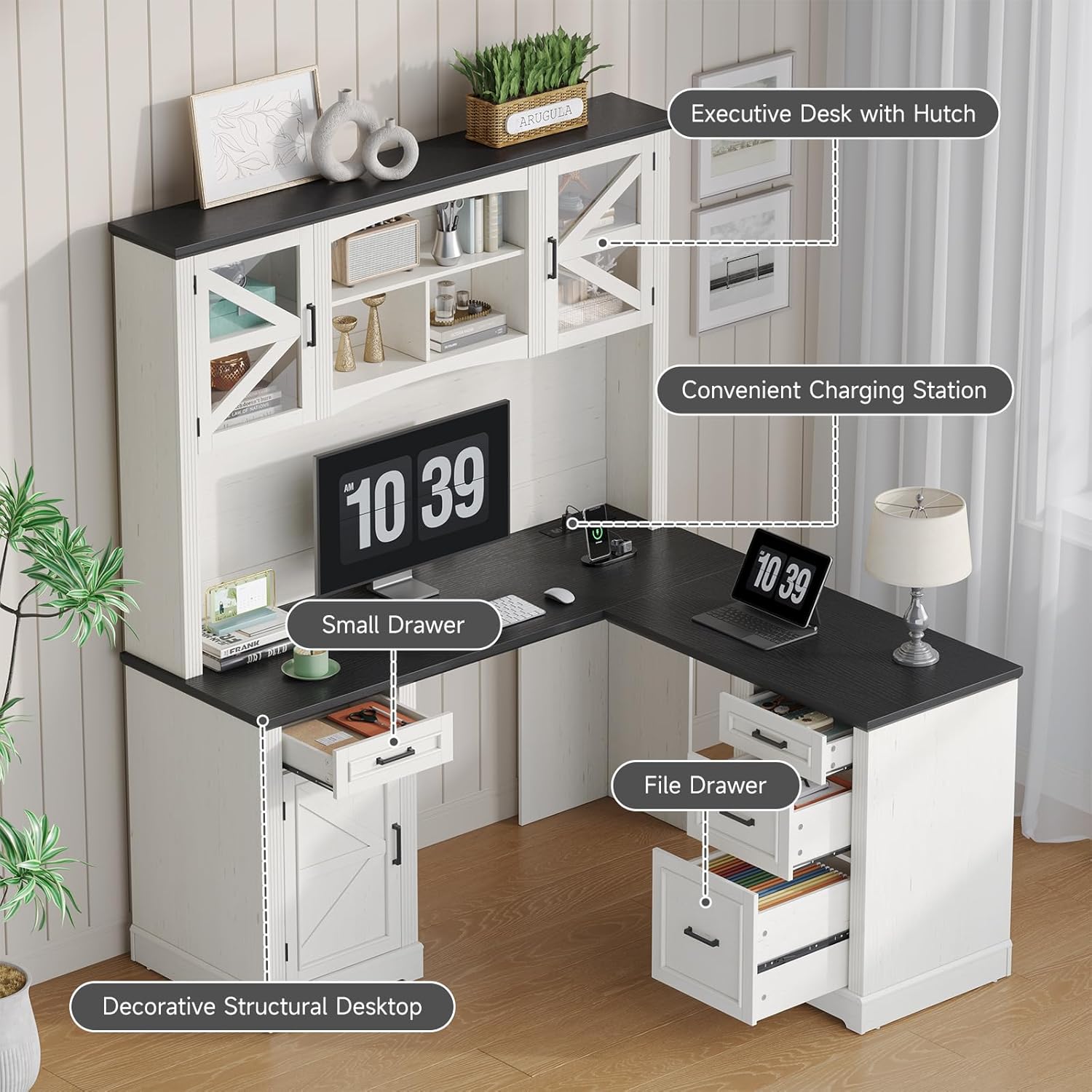
Figure 5: The built-in power outlet with multiple charging options.
Usage:
- Connect the desk's power cord to a wall outlet.
- Plug your devices (phone, tablet, laptop, etc.) into the appropriate AC, USB, or Type-C ports.
- Use the master switch to turn the power strip ON or OFF as needed.
Maintenance
To ensure the longevity and appearance of your ONBRILL Executive Desk, follow these maintenance guidelines:
- Cleaning: Wipe surfaces with a damp cloth. Avoid harsh chemical cleaners that may damage the finish.
- Spills: Clean up spills immediately to prevent staining or damage to the engineered wood.
- Protection: Consider using a clear desktop protector to guard against wear and tear, especially if using cleaning products frequently.
- Hardware: Periodically check and tighten all screws and fasteners to maintain stability.
- Weight Capacity: Do not exceed the maximum load capacity of 200 lbs on the desktop.
Troubleshooting
If you encounter issues with your ONBRILL L-Shaped Executive Desk, refer to the following common solutions:
Assembly Difficulties:
- Missing or Unlabeled Parts: Double-check the packing list and all packaging materials. If parts are genuinely missing or incorrectly labeled, contact customer support.
- Misaligned Holes: Ensure all panels are oriented correctly according to the manual. Do not force parts together. Loosen adjacent screws, adjust, and then retighten.
- Desk Wobbles: Verify that all fasteners are securely tightened. Ensure the desk is placed on a level surface.
Power Outlet Issues:
- No Power: Check if the desk's power cord is securely plugged into a working wall outlet. Ensure the master switch on the power strip is in the ON position. Test the wall outlet with another device.
- Charging Slow: Ensure your device's charging cable is compatible and undamaged. The USB and Type-C ports provide 5V, 2.1A; some devices may charge faster with higher amperage chargers.
For persistent issues or problems not covered here, please contact ONBRILL customer support.
Specifications
| Feature | Detail |
|---|---|
| Brand | ONBRILL |
| Model Number | HOD-114 |
| Desk Design | L-Shape Executive Desk with Hutch |
| Color | Off White & Black |
| Style | Farmhouse |
| Material | Engineered Wood |
| Product Dimensions (D x W x H) | 57"D x 60"W x 72.8"H |
| Desktop Dimensions (Main) | 56.69" x 19.53" |
| Desktop Dimensions (Return) | 59.84" x 20.87" |
| Item Weight | 200 Pounds |
| Maximum Load Capacity | 200 LBS |
| Number of Drawers | 4 (including 1 file drawer) |
| Number of Cabinets | 4 |
| Number of Shelves | 3 (open hutch compartments) + adjustable shelves in enclosed hutch storage |
| Power Outlets | 4 AC, 1 USB, 1 Type-C |
| Assembly Required | Yes |
| Recommended Assembly Persons | 2 |
Warranty and Support
The ONBRILL L-Shaped Executive Desk with Hutch comes with a limited warranty. Please refer to the warranty card included in your package for specific terms and conditions.
For any questions, missing parts, assembly assistance, or warranty claims, please contact ONBRILL customer support through the retailer where you purchased the product or visit the official ONBRILL website.
Contact Information: Refer to your purchase documentation or the ONBRILL brand store for the most current support details.


