
1. Introduction
This manual provides essential information for the safe and efficient use of your BMJX US Walking Pad Treadmill with Desk Workstation. Please read all instructions carefully before assembly and operation. Retain this manual for future reference.
2. What's in the Box
Upon opening the package, verify that all components are present and undamaged. The package includes:
- Walking Pad Treadmill
- Removable Desk Workstation
- Handlebar with Console
- Power Cord
- Safety Key
- Tool Kit (for assembly)
- Lubricating Oil
- User Manual (this document)

Figure 2.1: Package contents for the Walking Pad Treadmill.
3. Setup Instructions
The BMJX US Walking Pad Treadmill is designed for easy assembly. Follow these steps to set up your treadmill:
- Unpack Components: Carefully remove all items from the packaging. Place the treadmill base on a flat, stable surface.
- Attach Handlebar and Console: Secure the handlebar and console unit to the main treadmill frame using the provided tools and screws. Ensure all connections are tight.
- Install Removable Desk: If desired, attach the removable desk workstation to the handlebar frame. It is designed to securely hold laptops, tablets, and other items.
- Connect Power: Plug the power cord into a grounded electrical outlet.
- Insert Safety Key: Place the safety key into its designated slot on the console. The treadmill will not operate without the safety key in place.
Video 3.1: Demonstration of the unboxing and initial setup of the Walking Pad Treadmill with Desk.
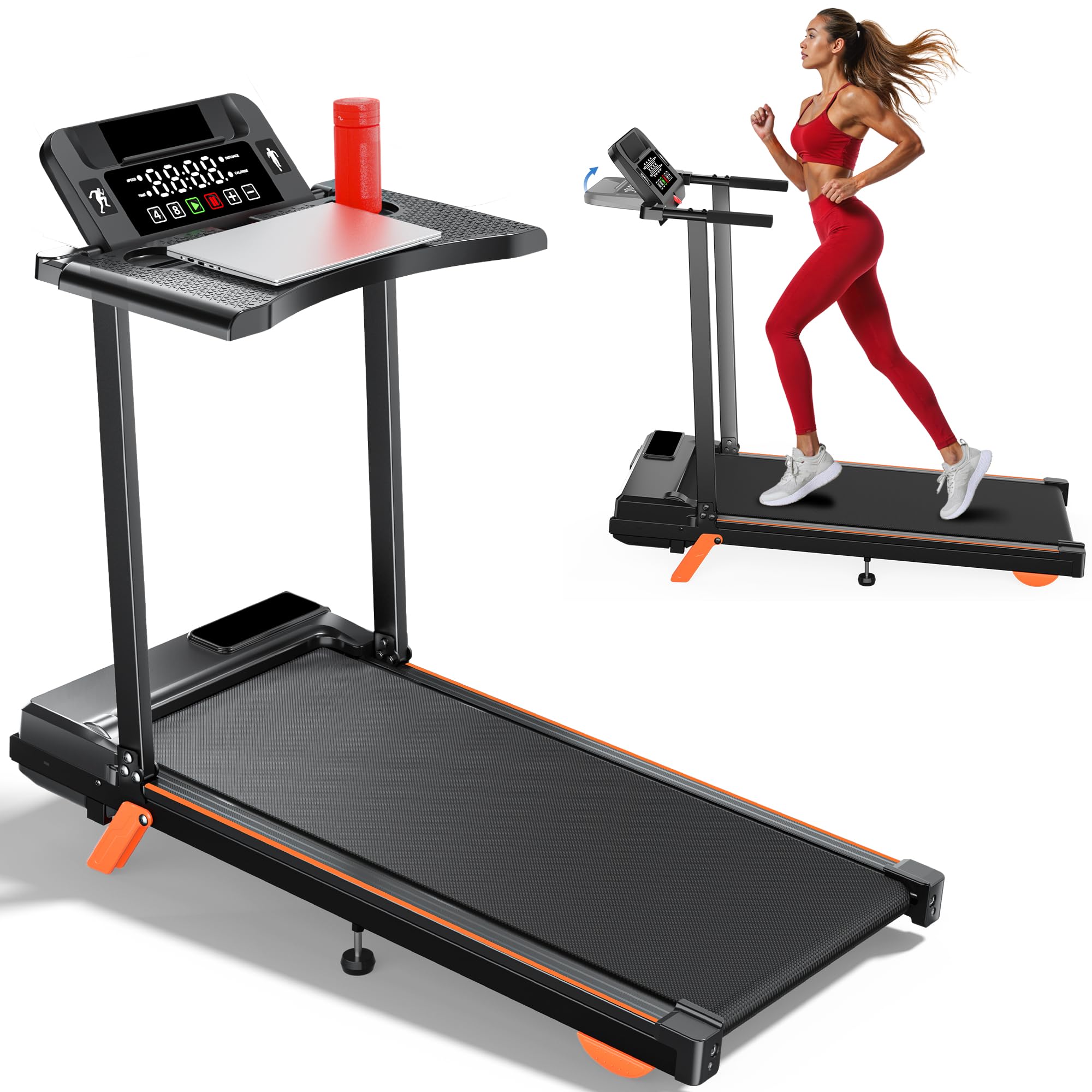
Figure 3.1: Fully assembled Walking Pad Treadmill with Desk Workstation.
4. Operating Instructions
Familiarize yourself with the console and controls for optimal use:
- Power On/Off: Use the main power switch located at the base of the treadmill. The console display will illuminate.
- Start/Stop: Press the green play button (►) to start the treadmill. Press the red stop button (■) to stop. The pause button (⏸⏸) allows for temporary halts.
- Speed Adjustment: Use the '+' and '-' buttons to increase or decrease speed. Quick-select buttons for speeds 4 MPH and 8 MPH are also available. The speed range is 0.6 to 8.0 MPH.
- Incline Adjustment: The treadmill features a 12% manual incline. To adjust, lift the rear of the treadmill and secure the orange support brackets into the desired position.
- Safety Key: Always attach the safety key clip to your clothing before starting. If the key detaches, the treadmill will immediately stop.

Figure 4.1: Multifunctional console with LED display and control buttons.
Video 4.1: Review and demonstration of the Walking Pad Treadmill's features and operation.
5. Key Features
- Removable Desk Workstation: Seamlessly integrate work and exercise. The detachable desk tray securely accommodates your laptop, tablet, phone, or water bottle.
- Powerful & Quiet 3.5HP Brushless DC Motor: Experience smoother, quieter operation and extended motor life. Brushless motors are more durable and energy-efficient, reducing electricity consumption.
- Versatile Speed Range (0.6 - 8.0 MPH):
- 0.6-2.5 MPH: Working mode (with desk)
- 2.5-4.0 MPH: Jogging mode (desk removed)
- 4.0-8.0 MPH: Running mode (desk removed)
- 12% Manual Incline: Elevate your workout intensity and increase calorie burn with the adjustable manual incline setting.
- Multifunctional LED Console: Track essential workout data including speed, time, distance, and calories burned on a clear, easy-to-read display.
- Advanced Shock Absorption System: Equipped with 4 shock absorbers and a 5-layer running belt, this system provides superior knee protection and a comfortable workout experience.
- High Weight Capacity: Supports users up to 350 pounds.
- Compact & Foldable Design: Ideal for home and small office spaces, easy to move and store.

Figure 5.1: Multifunctional LCD display and removable desktop.

Figure 5.2: Powerful and quiet 3.5HP motor with 350 lbs weight capacity.

Figure 5.3: 12% manual incline feature for increased workout intensity.

Figure 5.4: Non-slip and shock absorption system for comfort and safety.
6. Maintenance
Regular maintenance ensures the longevity and optimal performance of your treadmill:
- Lubrication: Apply lubricating oil to the running belt as instructed in the user manual (included in the tool kit) to reduce friction and wear.
- Cleaning: Regularly wipe down the treadmill with a damp cloth to remove dust and sweat. Avoid using abrasive cleaners.
- Belt Adjustment: Periodically check the tension and alignment of the running belt. Adjust as needed using the provided tools to ensure smooth operation.
- Storage: When not in use, the treadmill can be folded and stored in a compact space.
7. Troubleshooting
If you encounter any issues with your treadmill, refer to the following common troubleshooting tips:
- Treadmill Not Starting: Ensure the power cord is securely plugged in, the main power switch is ON, and the safety key is correctly inserted into the console.
- Belt Slipping: Check the running belt tension. If it's too loose, adjust it according to the maintenance instructions.
- Unusual Noises: Inspect the treadmill for any loose parts or foreign objects. Ensure the running belt is properly lubricated.
- Inaccurate Display Readings: Verify that all connections to the console are secure. If issues persist, contact customer support.
For persistent problems or issues not covered here, please contact BMJX US customer support.
8. Specifications
| Feature | Detail |
|---|---|
| Brand | BMJX US |
| Model Name | ZJ-X1 |
| Product Dimensions | 40.55"D x 19.5"W x 35.2"H |
| Material | Alloy Steel, Acrylonitrile Butadiene Styrene (ABS) |
| Maximum Speed | 8 Miles per Hour |
| Minimum Speed | 0.6 Miles per Hour |
| Maximum Horsepower | 3.5 Horsepower |
| Maximum Incline Percentage | 12% (Manual) |
| Maximum Weight Recommendation | 350 Pounds |
| Display Type | LED |
| Connectivity Technology | Bluetooth |
| Special Feature | Foldable, Removable Desk Workstation |
9. Warranty & Support
Your BMJX US Walking Pad Treadmill comes with a 365-day warranty from the date of purchase, covering manufacturing defects. Please retain your proof of purchase for warranty claims.
For technical support, troubleshooting assistance, or warranty inquiries, please visit the official BMJX US Store: BMJX US Store.