Introduction
This manual provides detailed instructions for the Generic Y36 In-Ear Bluetooth Headphones. Designed for comfort and high-quality audio, these headphones feature Bluetooth 5.3 connectivity, a semi-in-ear design, and a compact charging case. Please read this manual thoroughly to ensure proper use and maintenance of your device.
Setup
1. Charging the Headphones and Case
Before first use, fully charge the headphones and their charging case. The case features a digital display indicating battery percentage.
- Connect the provided Type-C charging cable to the charging port on the case.
- Plug the other end into a compatible USB power source.
- Charging typically takes approximately 1-2 hours for a full charge.
- The digital display on the case will show the charging status and battery level.

Image: The Y36 charging case with earbuds, displaying the current battery percentage on its digital screen.
2. Pairing with a Device
The headphones utilize Bluetooth 5.3 for a stable and efficient connection.
- Open the charging case. The headphones will automatically enter pairing mode.
- On your device (smartphone, tablet, etc.), navigate to the Bluetooth settings.
- Search for available devices and select "Y36" (or similar identifier) from the list.
- Once connected, a voice prompt will confirm successful pairing.
- The headphones support seamless switching between single and double ear use.

Image: The Y36 earbuds in their open charging case, indicating they are powered on and connected to a device.
Operating Instructions
1. Wearing the Headphones
The Y36 headphones feature a semi-in-ear design, making them comfortable for extended wear, including during sleep.
- Gently insert each earbud into your ear canal.
- Adjust for a secure and comfortable fit. The slim design (1cm thick, 3.2 grams) is intended to minimize discomfort, even when lying on your side.

Image: A person wearing one Y36 earbud, demonstrating its low-profile and ergonomic fit.
2. Basic Controls
The Y36 headphones utilize touch controls for various functions. Refer to the diagram below for specific actions:
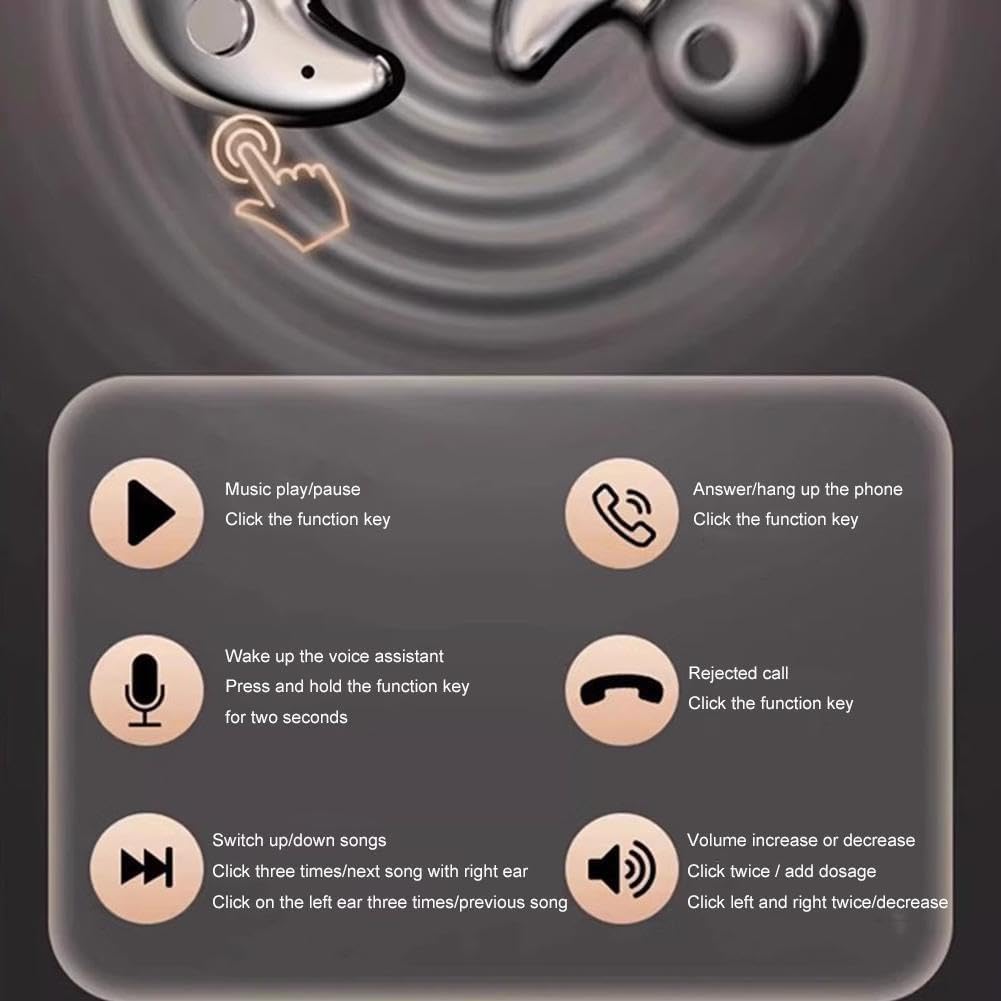
Image: A visual guide detailing the touch gestures for controlling music playback, phone calls, and activating the voice assistant on the Y36 earbuds.
- Music Play/Pause: Click the function key once.
- Answer/Hang up Phone: Click the function key once.
- Wake up Voice Assistant: Press and hold the function key for two seconds.
- Reject Call: Click the function key once.
- Switch Songs: Click three times on the right ear for the next song; click three times on the left ear for the previous song.
- Volume Increase/Decrease: Click twice on the right ear to increase volume; click twice on the left ear to decrease volume.
3. Call Management
The headphones feature ENC (Environmental Noise Cancellation) for clearer calls.
- To answer an incoming call, click the function key once.
- To end an active call, click the function key once.
- To reject an incoming call, click the function key once.

Image: A user engaged in a phone call with the Y36 earbuds, illustrating the benefit of ENC call noise reduction for clear communication.
Maintenance and Care
Proper care ensures the longevity and optimal performance of your Y36 headphones.
- Cleaning: Regularly wipe the earbuds and charging case with a soft, dry, lint-free cloth. Avoid using harsh chemicals or abrasive materials.
- Storage: Store the headphones in their charging case when not in use to protect them from dust and damage.
- Temperature: Avoid exposing the headphones to extreme temperatures (hot or cold) or high humidity.
- Water Exposure: While designed with a drop-resistant coating, avoid submerging the headphones in water.
- Charging: Use only the provided Type-C cable or a certified equivalent for charging.
Troubleshooting
If you encounter issues with your Y36 headphones, refer to the following common solutions:
- Headphones not pairing:
- Ensure the headphones are charged.
- Turn off and on your device's Bluetooth.
- Forget the device in your Bluetooth settings and attempt to re-pair.
- Ensure the headphones are within the 10-meter transmission distance.
- No sound:
- Check the volume level on both the headphones and your connected device.
- Ensure the headphones are properly paired and connected.
- Try playing audio from a different application or source.
- Charging issues:
- Verify the charging cable is securely connected to both the case and the power source.
- Try a different charging cable or power adapter.
- Ensure the charging port is clean and free of debris.
- Poor sound quality:
- Ensure the earbuds are properly seated in your ears for an optimal seal.
- Move closer to your connected device to avoid interference.
- Check if the audio source quality is high.
Specifications
| Feature | Specification |
|---|---|
| Transmission Distance | 10 meters (unobstructed) |
| Wearing Style | Semi-in-ear |
| Standby Time | Approximately 480 hours (with charging case) |
| Bluetooth Version | v5.3 |
| Charging Port | Type-C |
| Charging Time | Approximately 1-2 hours |
| Earbud Thickness | 1 cm |
| Earbud Weight | 3.2 grams (each) |
| Product Color Options | Black, White, Skin |
Warranty and Support
The Generic Y36 In-Ear Bluetooth Headphones come with a 1-year warranty from the date of purchase.
This warranty covers manufacturing defects and issues arising from normal use. It does not cover damage caused by misuse, accidents, unauthorized modifications, or improper maintenance.
For warranty claims or technical support, please refer to the contact information provided with your purchase or visit the Generic product support website.


