
1. Introduction
Thank you for choosing the GUANIEE 10x42 1042RF Laser Rangefinder Binoculars. This device combines high-quality optical viewing with precise laser ranging capabilities, making it an essential tool for various outdoor activities including hunting, shooting, and golf. Designed for speed, accuracy, and durability, these binoculars will enhance your ability to observe and measure distances with confidence. Please read this manual thoroughly before using your new device to ensure proper operation and maximize its lifespan.
2. Package Contents
Upon unpacking, please verify that all items listed below are included in your package:
- GUANIEE 10x42 1042RF Laser Rangefinder Binoculars
- Carrying Harness
- Cleaning Cloth
- Decal
- CR2 Battery (3V)
- Quick Start Guide

3. Product Overview
Familiarize yourself with the various parts of your GUANIEE 10x42 1042RF Laser Rangefinder Binoculars:
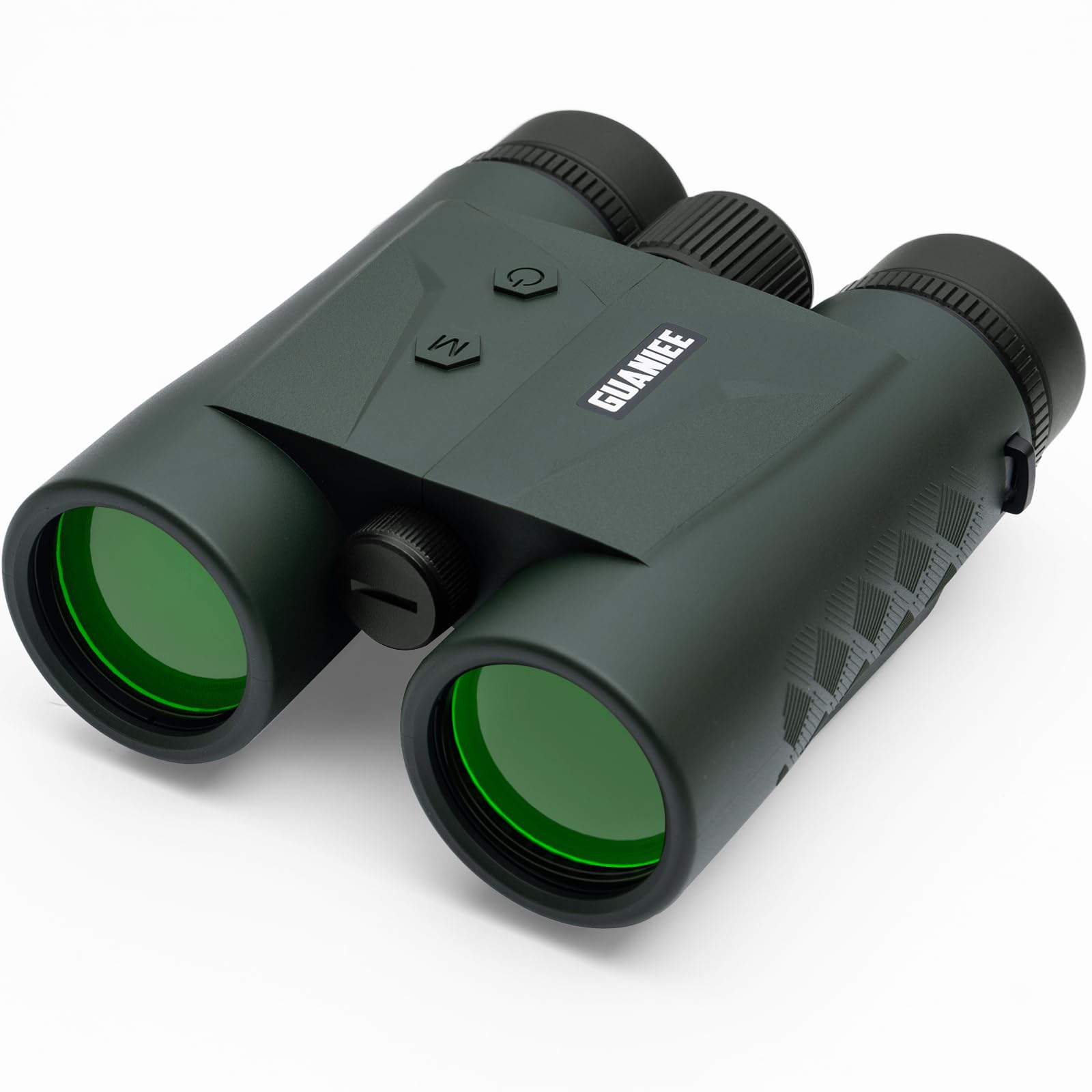
4. Setup
4.1 Battery Installation
Your binoculars require one CR2 (3V) battery. To install:
- Locate the Battery Cover on the underside of the binoculars.
- Unscrew the Battery Cover by turning it counter-clockwise.
- Insert the CR2 battery with the positive (+) terminal facing inwards.
- Replace the Battery Cover and turn clockwise until securely tightened.
4.2 Adjusting Eyecups and Diopter
Proper adjustment ensures a clear and comfortable viewing experience:
- Twist-up Eyecups: Rotate the eyecups up or down to achieve the optimal eye relief. If you wear eyeglasses, keep the eyecups fully down. If you do not wear eyeglasses, twist them up until you see a full field of view without shadows.
- Diopter Adjustment: Look through the binoculars at a distant object. Close your right eye and use the Center Focus wheel to bring the image in your left eye into sharp focus. Then, close your left eye and use the Diopter Focus ring (on the right ocular) to bring the image in your right eye into sharp focus. Once set, use only the Center Focus wheel for general focusing.
4.3 Focusing
After diopter adjustment, use the Center Focus wheel to focus on objects at varying distances.

5. Operating Modes
Your GUANIEE 10x42 1042RF Laser Rangefinder Binoculars offer multiple modes for various applications:
- Standard Ranging Mode: Provides ultra-fast and accurate distance measurements in approximately 0.15 seconds. Ideal for quick target acquisition.
- Scan Mode: For continuous distance readings as you pan across a landscape or track moving targets. Press and hold the Scan Button, then briefly press the On/Range Button.
- Angle Correction Mode: Calculates the horizontal component distance (HCD) to the target, compensating for uphill or downhill angles.
- Ballistics Mode: Provides ballistic data for shooting applications.
- Archery Mode: Optimized for archery, providing accurate distances for bow hunting.
- Gun Mode: Tailored for firearm users, offering precise ranging for shooting.
- Golf Mode: Features slope compensation and pin-lock technology to assist golfers in getting accurate distances to the flag.


5.1 Video Demonstrations
6. Specifications
| Feature | Detail |
|---|---|
| Brand | GUANIEE |
| Model Name | 1042RF |
| Magnification Maximum | 10 x |
| Measuring Range | 1640 yards |
| Color | Green |
| Material | Glass, Metal |
| Item Weight | 0.8 Kilograms |
| Are Batteries Included | Yes |
| Battery Description | Lithium Manganese Dioxide (CR2, 3V) |
| Item Package Dimensions L x W x H | 6.3 x 4.72 x 2.36 inches |
7. Maintenance
To ensure the longevity and optimal performance of your binoculars, follow these maintenance guidelines:
- Cleaning Lenses: Use the provided cleaning cloth or a soft, lint-free cloth specifically designed for optics. Gently wipe the lens surfaces to remove dust and smudges. For stubborn dirt, use a small amount of lens cleaning fluid. Avoid using abrasive materials or excessive force.
- Cleaning Body: Wipe the body of the binoculars with a soft, damp cloth. Do not use harsh chemicals or solvents.
- Storage: Store the binoculars in a cool, dry place away from direct sunlight and extreme temperatures. Use the carrying harness or a protective case to prevent scratches and impacts.
- Battery Care: Remove the battery if the device will not be used for an extended period to prevent leakage and damage.
8. Troubleshooting
If you encounter any issues with your binoculars, refer to the following common problems and solutions:
- No Display/Power:
- Check if the battery is installed correctly with the positive (+) terminal facing inwards.
- Replace the battery with a fresh CR2 (3V) battery.
- Ensure the battery cover is securely tightened.
- Unclear Image:
- Adjust the Center Focus wheel for overall sharpness.
- Adjust the Diopter Focus ring on the right ocular for individual eye clarity.
- Ensure the eyecups are properly adjusted for your eye relief.
- Clean the objective and ocular lenses with the provided cleaning cloth.
- Inaccurate Ranging:
- Ensure you are targeting a reflective surface. Non-reflective or very dark surfaces may reduce range accuracy.
- Verify that the correct operating mode (e.g., Angle Correction, Golf) is selected for your specific conditions.
- Environmental factors like heavy fog, rain, or very bright sunlight can affect ranging performance.
9. Warranty and Support
Your GUANIEE 10x42 1042RF Laser Rangefinder Binoculars are backed by a Lifetime Protection for worry-free ownership. This warranty covers defects in materials and workmanship under normal use. For warranty claims, technical support, or any questions regarding your product, please refer to the contact information provided in your Quick Start Guide or visit the official GUANIEE website.