
1. Introduction
The DigMaster DM150PRO Mini Excavator is a versatile and powerful machine designed for a variety of tasks including landscaping, trenching, and small construction projects. Featuring a 13.5HP gas engine, hydraulic thumb, and quick connect attachments, this compact excavator offers reliable performance and ease of operation in tight spaces.

Image: Overview of the DigMaster DM150PRO Mini Excavator highlighting its compact power, professional control, lower maintenance costs, and transparent shipping support.
2. Safety Information
Always prioritize safety when operating the mini excavator. Read and understand all safety decals on the machine and in this manual. Wear appropriate personal protective equipment (PPE) including hard hat, safety glasses, hearing protection, and steel-toed boots. Ensure the work area is clear of bystanders and obstacles. Never operate the machine under the influence of drugs or alcohol. Always engage safety locks when not operating the machine or when performing maintenance.
3. Unpacking and Assembly
Your DigMaster DM150PRO Mini Excavator comes with the following components:
- Mini Excavator unit
- Hydraulic Thumb
- Canopy
- Mud bucket
- Ripper
- Auger
- Rake
- Quick Connect System
- Tool Box
- Digital Manual
Upon delivery, inspect the crate for any damage. Note any damage on the Bill of Lading (BOL) and contact customer support immediately. Assembly of attachments is facilitated by the universal quick-attach system. Refer to the digital manual for detailed step-by-step instructions for attaching each accessory.
4. Components Overview
Familiarize yourself with the key components of your DM150PRO Mini Excavator.
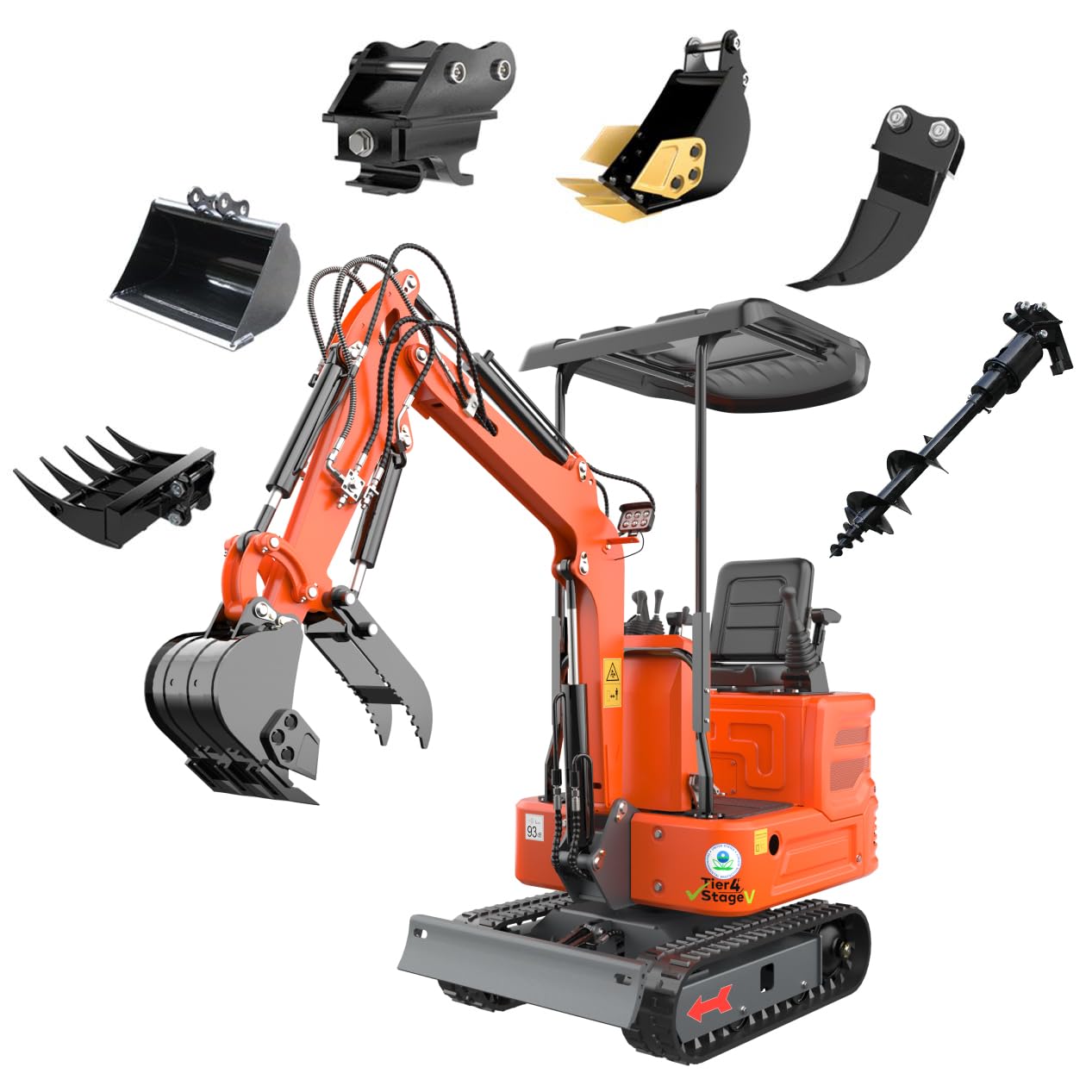
Image: The DigMaster DM150PRO Mini Excavator shown with its various attachments, including the bucket, hydraulic thumb, and canopy.

Image: Close-up of the excavator's control panel, highlighting the dual-joystick pilot control system for enhanced precision and reduced effort compared to mechanical linkage systems.

Image: Comparison showing the excavator's hidden hose design, which helps reduce wear and leaks from jobsite abrasion, contrasting with a design featuring longer, exposed hose lengths.

Image: The 13.5HP Briggs & Stratton XR2100 gasoline engine, emphasizing its air-cooled design for easy maintenance and 25.6 cubic inch displacement.

Image: Detail of the durable forged chassis and 7.1-inch wide rubber tracks, providing stability on uneven ground and better traction.

Image: Overview of operator-focused features such as an ergonomic seat, precise pilot control, anti-slip mat, and design for easy maintenance.
5. Setup
Before starting operation, ensure the mini excavator is on stable, level ground. Check all fluid levels, including engine oil and hydraulic fluid. Fill the fuel tank with appropriate gasoline. The air-cooled Briggs & Stratton engine does not require coolant.
To start the engine, insert the key into the ignition and turn it. If the engine is cold, use the choke. The visual dashboard provides clear feedback on operation.
6. Operating Instructions
The DM150PRO features a dual-joystick pilot control system for smooth and responsive handling. Familiarize yourself with the controls before beginning any work.
6.1. Basic Controls
The joysticks control the movement of the boom, stick, and bucket. The foot pedals control the tracks for forward and backward movement, and the boom swing for lateral arm movement. The blade is controlled by a separate lever for raising and lowering.
6.2. Hydraulic Thumb Operation
The hydraulic thumb clamp is operated via a foot pedal, allowing for easy gripping and manipulation of objects. This feature is essential for handling logs, rocks, and debris.
Video: Demonstration of the DigMaster DM150PRO Mini Excavator using the hydraulic grapple attachment to pick up and move logs. This video illustrates the precision and utility of the grapple for various tasks.
6.3. Boom Swing
The boom swing function allows the main arm to pivot left or right independently of the chassis, providing greater flexibility for working in confined spaces or alongside obstacles without repositioning the entire machine.
6.4. Blade Operation
The front blade can be raised or lowered to stabilize the excavator during digging operations or to push and level material. Use it to create a stable platform before heavy digging.
Video: This video showcases the DigMaster DM150PRO Mini Excavator in various working scenarios, demonstrating its versatility and performance in different operational environments.
7. Attachments
The DM150PRO features a universal quick-attach system, allowing for rapid and easy switching between various attachments. This enhances the machine's versatility for different tasks.
7.1. Quick Connect System
To change attachments, follow the instructions in the digital manual for engaging and disengaging the quick connect system. Ensure all pins are securely in place before operation.
Video: A demonstration of the quick-connect quick-change system on the DigMaster DM150PRO Mini Excavator, illustrating how easily attachments can be swapped for different tasks.
7.2. Available Attachments
- Bucket: Standard digging and loading.
- Mud Bucket: Wider for moving loose material.
- Ripper: For breaking up hard soil or roots.
- Auger: For drilling holes for posts or planting.
- Rake: For clearing debris and leveling.
- Grapple (Hydraulic Thumb): For gripping and moving irregular objects.
- Breaker: For breaking concrete or rock.
Video: This video demonstrates the DigMaster DM150PRO Mini Excavator in action using its standard bucket for digging and moving earth.
Video: The DigMaster DM150PRO Mini Excavator is shown utilizing a rake attachment to clear debris and level ground, highlighting its efficiency in landscaping tasks.
Video: This video illustrates the DigMaster DM150PRO Mini Excavator connecting and operating a rotary drilling rig (auger), demonstrating its capability for drilling tasks.
Video: The DigMaster DM150PRO Mini Excavator is shown using a breaker attachment to demolish hard surfaces, showcasing its power and effectiveness in breaking tasks.
8. Maintenance
Regular maintenance is crucial for the longevity and optimal performance of your DM150PRO Mini Excavator.
- Engine: The 13.5HP Briggs & Stratton engine is air-cooled, simplifying maintenance by eliminating the need for coolant. Perform quick daily checks as outlined in the digital manual.
- Hydraulic System: Regularly check hydraulic fluid levels and inspect hoses for any signs of wear or leaks. The hidden hose design helps reduce abrasion.
- Tracks: Inspect rubber tracks for damage and ensure proper tension.
- General: Keep the machine clean and free of debris. Lubricate all grease points as recommended in the digital manual.
9. Troubleshooting
For common operational issues, refer to the detailed troubleshooting guide in the digital manual. If you encounter problems that cannot be resolved, contact DigMaster customer support.
10. Specifications
| Feature | Specification |
|---|---|
| Manufacturer | DigMaster |
| Model | DM150PRO |
| Operating Weight | 2,000 lbs (up to 2,650 lbs with counterweight) |
| Engine | 13.5HP B & S Gasoline Engine |
| Product Dimensions | 109 x 37 x 86 inches |
| Transport Width | 36 inches (917mm) |
| Bucket Capacity | 0.014 m³ |
| Control System | Dual-Joystick Pilot Control |
| Tracks | Rubber Tracks |
11. Warranty and Support
Every DigMaster mini excavator includes a 30-Day Support Period for non-human damage due to product quality (repair or replacement). Lifetime online technical support is also provided.
How to Claim Support:
- Provide order information, photos, and/or videos.
- Retain your Amazon order invoice as proof of purchase.
Support excludes non-quality issues and in-transit damage (handled by the carrier).
Contact Us:
The best way to contact us is through Amazon's messaging system:
- Go to Your Orders.
- Find this order.
- Click "Problem with order" / "Contact seller" to send your message.
- Replies will arrive in your Message Center (Buyer-Seller Messages).
Alternatively, from the product page, click "Sold by: DigMaster Store" and then "Ask a question" to send a message via the Seller Messaging Assistant.

Image: Details on how to contact DigMaster customer support via Amazon's messaging system for product inquiries and support.