
Introduction
This manual provides detailed instructions for the safe and effective use of your Aomya Universal Dye Ink Refill Kit. This kit is designed for refilling ink cartridges compatible with HP, Canon, Epson, Brother, and Lexmark inkjet printers, as well as refillable ink cartridges and CISS/CIS systems. Please read all instructions carefully before proceeding with ink refilling.
Safety Information
- Keep ink bottles out of reach of children.
- Do not ingest ink. If swallowed, seek medical attention immediately.
- Avoid contact with eyes. In case of contact, flush thoroughly with water and seek medical advice if irritation persists.
- Store ink in a cool, dry place, away from direct sunlight and extreme temperatures (recommended storage temperature: 59-95°F / 15-35°C).
- Wear gloves to prevent skin contact and staining during the refilling process.
- Dispose of empty bottles and used syringes according to local regulations.
Package Contents
Verify that all items are present in your Aomya Universal Dye Ink Refill Kit:
- 2 x 100ml Black Dye Ink Bottles
- 1 x 100ml Cyan Dye Ink Bottle
- 1 x 100ml Magenta Dye Ink Bottle
- 1 x 100ml Yellow Dye Ink Bottle
- 4 x Syringes (for refilling)
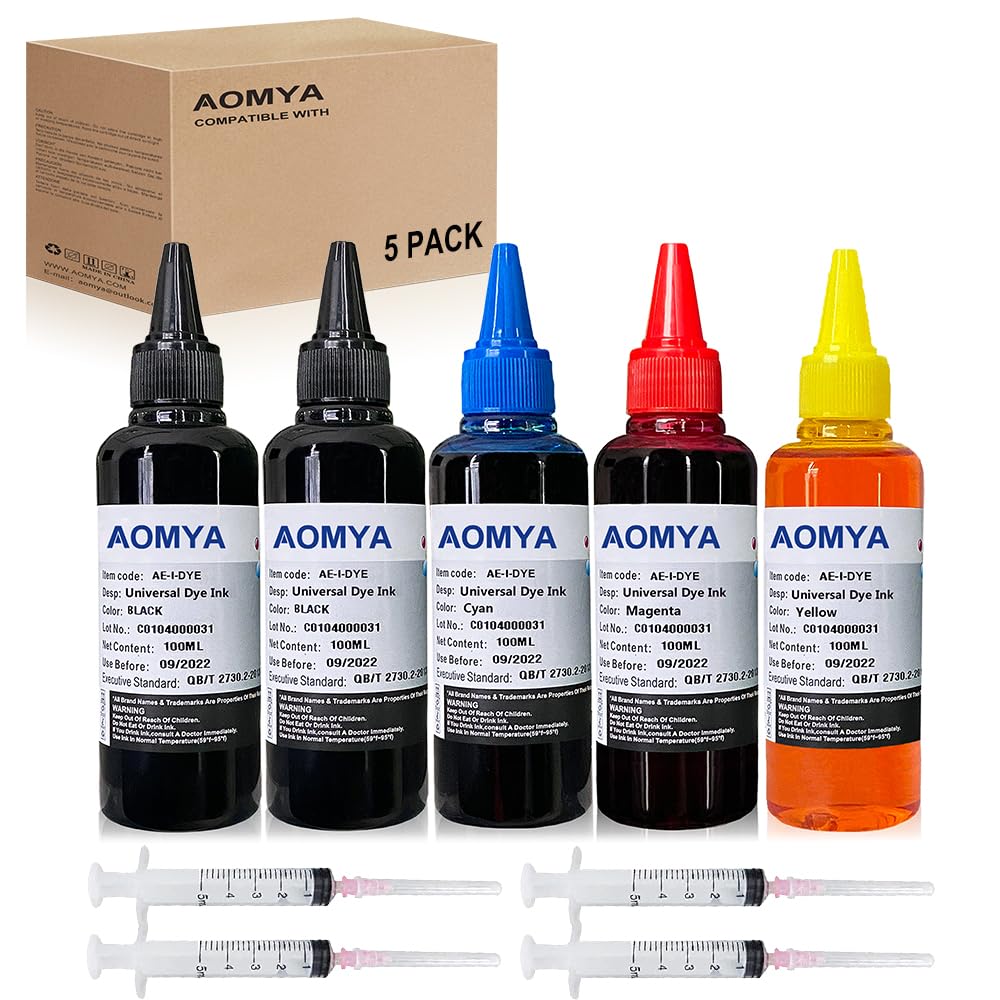
Image: Contents of the Aomya Universal Dye Ink Refill Kit, showing five 100ml ink bottles (two black, one cyan, one magenta, one yellow) and four syringes.
Setup
- Prepare your workspace: Choose a clean, flat surface. Cover the area with newspaper or a protective sheet to prevent ink stains.
- Gather supplies: Have your ink bottles, syringes, and the cartridges you intend to refill ready. You may also need paper towels or tissues.
- Identify cartridge type: Determine if your cartridge is a single-color (e.g., black) or tri-color (e.g., cyan, magenta, yellow in one unit). The refilling process may vary slightly.
- Remove cartridge: Carefully remove the ink cartridge from your printer according to your printer's specific instructions.
Operating Instructions: Ink Cartridge Refill
Follow these steps for refilling your ink cartridges. The images below illustrate the process for a tri-color cartridge, but the principles apply to single-color cartridges as well.
Step 1: Prepare the Cartridge

Carefully peel off the label on top of the ink cartridge to expose the refill holes. Be gentle to avoid damaging the cartridge.
Step 2: Identify Color Chambers (Tri-color only)

For tri-color cartridges, use a toothpick to gently probe each hole to determine which color chamber it corresponds to. This prevents mixing colors.
Step 3: Inject Ink

Draw the appropriate color ink into a syringe (maximum 3-5ml per chamber, depending on cartridge size). Slowly inject the ink into the correct refill hole. Do not overfill.
Step 4: Verify Ink Flow

After refilling, gently press the print head of the cartridge onto a clean paper towel. You should see a clear, distinct blot of each color. If not, repeat step 3 with a small amount of ink.
Important Note: Refill ink when the cartridge ink level is above 10%. Refilling an empty cartridge may damage the cartridge chip or print head.
Maintenance
- Print Head Cleaning: If print quality degrades after refilling (e.g., streaks, faded colors), perform a print head cleaning cycle through your printer's software utility. Refer to your printer's manual for specific instructions.
- Regular Printing: To prevent print head clogging, use your printer regularly. If you don't print often, print a test page at least once a week.
- Ink Storage: Keep ink bottles tightly capped when not in use. Store them upright in a cool, dark place to maintain ink quality and prevent evaporation.
- Syringe Cleaning: After each use, rinse syringes thoroughly with warm water to prevent ink residue from drying and clogging.
Troubleshooting
| Problem | Possible Cause | Solution |
|---|---|---|
| Poor Print Quality (Streaks, Fading) | Clogged print head, low ink level, air bubbles in cartridge. | Perform print head cleaning. Ensure sufficient ink. Gently tap cartridge to dislodge air bubbles. |
| Printer Not Recognizing Cartridge | Cartridge chip issue, improper installation. | Remove and reinsert the cartridge. Clean the cartridge contacts with a lint-free cloth. If the issue persists, the chip may be damaged. |
| Ink Leaking from Cartridge | Overfilling, damaged cartridge. | Ensure not to overfill. If the cartridge is damaged, it may need replacement. |
| Colors are Incorrect or Mixed | Ink injected into the wrong chamber (tri-color cartridges). | This usually indicates irreversible damage to the cartridge. Ensure careful identification of chambers during refilling. |

Image: Visual representation of ink levels, indicating when to refill for optimal performance.
Specifications
- Product Type: Universal Dye Ink Refill Kit
- Ink Colors: Black (x2), Cyan, Magenta, Yellow
- Ink Volume: 100ml per bottle (Total 500ml)
- Ink Base: Water-based Dye Ink
- Compatible Devices: HP, Epson, Canon, Brother, Lexmark Inkjet Printers (and compatible refillable cartridges/CISS systems)
- Package Dimensions: Approximately 6.06 x 5.83 x 3.82 inches
- Item Weight: Approximately 1.46 pounds
- Manufacturer: Aomya

Image: Close-up of an Aomya ink bottle label, detailing product specifications and safety information.
Warranty and Support
Aomya products are manufactured under ISO-9001 approved standards, ensuring quality. For any questions, concerns, or issues regarding your Aomya Universal Dye Ink Refill Kit, please contact Aomya customer service. Refer to the product packaging or the retailer's website for specific contact information.