
1. Introduction
This manual provides comprehensive instructions for the Re-Flix Superior Light 4-in-1 Remote Control, specifically designed for use with the Toshiba VT-858G VCR. Please read this manual carefully before using your new remote control to ensure proper operation and longevity.
2. Product Overview
The Re-Flix Superior Light remote control offers immediate usability with your Toshiba VT-858G VCR, requiring no complex programming. Its ergonomic design ensures comfortable handling for daily use.
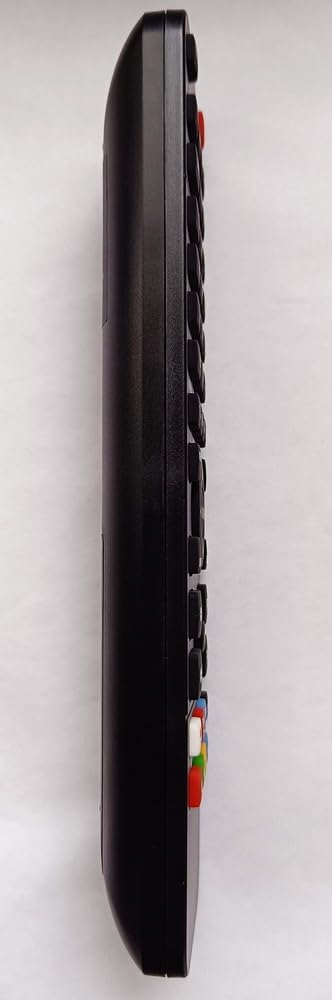
Figure 2.1: Side view of the Re-Flix Superior Light 4-in-1 Remote Control, showing its ergonomic profile and button layout.

Figure 2.2: Rear view of the Re-Flix Superior Light 4-in-1 Remote Control, highlighting the battery compartment and product label.
Key Features:
- Immediate Use (Plug & Play): No complex programming or code entry is required. Simply insert batteries to access all functions immediately. Specifically programmed for the Toshiba VT-858G VCR.
- Ergonomic Design: Engineered for comfortable grip and ease of use, making it an ideal replacement or secondary remote control.
- Smart TV Control Capability: This remote may include dedicated buttons for popular streaming services (e.g., Netflix, YouTube) for controlling compatible smart televisions. Functionality depends on the specific TV model and remote button availability.
3. Setup
3.1 Battery Installation
- Locate the battery compartment on the back of the remote control (refer to Figure 2.2).
- Slide the battery cover downwards to open it.
- Insert two AAA batteries (not included), ensuring correct polarity (+ and -) as indicated inside the compartment.
- Slide the battery cover back into place until it securely clicks shut.
3.2 First Use
The Re-Flix Superior Light remote control is pre-programmed for the Toshiba VT-858G VCR. No additional setup or code entry is required. Once batteries are installed, the remote is ready for immediate use with your VCR.
4. Operating Instructions
This remote control provides comprehensive functionality for your Toshiba VT-858G VCR. Familiarize yourself with the button layout for optimal use.
4.1 Basic VCR Functions
- POWER: Turns the VCR on or off.
- PLAY: Initiates tape playback.
- PAUSE: Pauses tape playback. Press again to resume.
- STOP: Halts tape playback.
- REW (Rewind): Rewinds the tape.
- FF (Fast Forward): Fast forwards the tape.
- REC (Record): Initiates recording. Ensure a blank tape is inserted and the VCR is in record-ready mode.
- CHANNEL +/-: Changes VCR channels.
- VOLUME +/-: Adjusts the audio volume (if your VCR supports this function directly).
4.2 Smart TV Control (Optional)
If your remote includes dedicated buttons for Smart TV functions (e.g., Netflix, YouTube), these buttons are designed to control compatible smart televisions. Their functionality depends on the specific TV model and may require direct line of sight to the TV. Refer to your TV's manual for compatibility details.
5. Maintenance
5.1 Cleaning
Wipe the remote control with a soft, dry cloth. Do not use abrasive cleaners, solvents, or chemical agents, as these can damage the remote's surface or internal components.
5.2 Battery Replacement
Replace batteries when the remote's response becomes sluggish or stops working entirely. Always replace both batteries simultaneously with new ones of the same type (AAA). Do not mix old and new batteries or different battery types.
5.3 Storage
Store the remote control in a dry place, away from direct sunlight, high humidity, and extreme temperatures. Remove batteries if the remote will not be used for an extended period to prevent leakage.
6. Troubleshooting
- Remote not responding:
- Check battery polarity and ensure batteries are fresh. Replace if necessary.
- Ensure there are no physical obstructions between the remote and the VCR's infrared sensor.
- Verify the VCR is powered on and functioning correctly.
- Limited range or intermittent response:
- Ensure batteries are not low. Replace them if performance is inconsistent.
- Point the remote directly at the VCR's infrared sensor.
- Avoid strong light sources (e.g., direct sunlight, fluorescent lights) that might interfere with the infrared signal.
7. Specifications
| Feature | Detail |
|---|---|
| Manufacturer | Re-Flix |
| Brand | Re-Flix |
| Model Number | 747516 |
| ASIN | B0FYZLD4X1 |
| Color | Black |
| Connectivity Technology | Infrared |
| Compatible Devices | VCR (Toshiba VT-858G) |
| Maximum Supported Devices | 1 (Primary VCR control) |
| Spare Parts Availability | Information unavailable |
| Guaranteed Software Updates Until | Information unavailable |
8. Warranty and Support
For warranty information, technical support, or inquiries regarding your Re-Flix Superior Light remote control, please refer to the contact details provided with your original purchase documentation. You may also visit the official Re-Flix website for further assistance. Specific information regarding spare parts availability and software updates is not provided at the time of this manual's publication.