
Introduction
This manual provides detailed instructions for the setup, operation, and maintenance of your SLIDE INNOVATIONS Pocket Shot Digital Camera and Video Recorder. Please read this manual thoroughly before using the device to ensure proper functionality and to maximize your user experience.
The Pocket Shot camera is designed for capturing high-definition photos and videos with ease. It features a dual-camera system, a 2.4-inch IPS display, and various creative effects to enhance your content. Its ultra-portable design makes it ideal for travel and documenting memories.
What's in the Box
Verify that all items are present in the package:
- SLIDE INNOVATIONS Pocket Shot Digital Camera
- USB Charging Cable
- Wristlet
- Instruction Manual (this document)
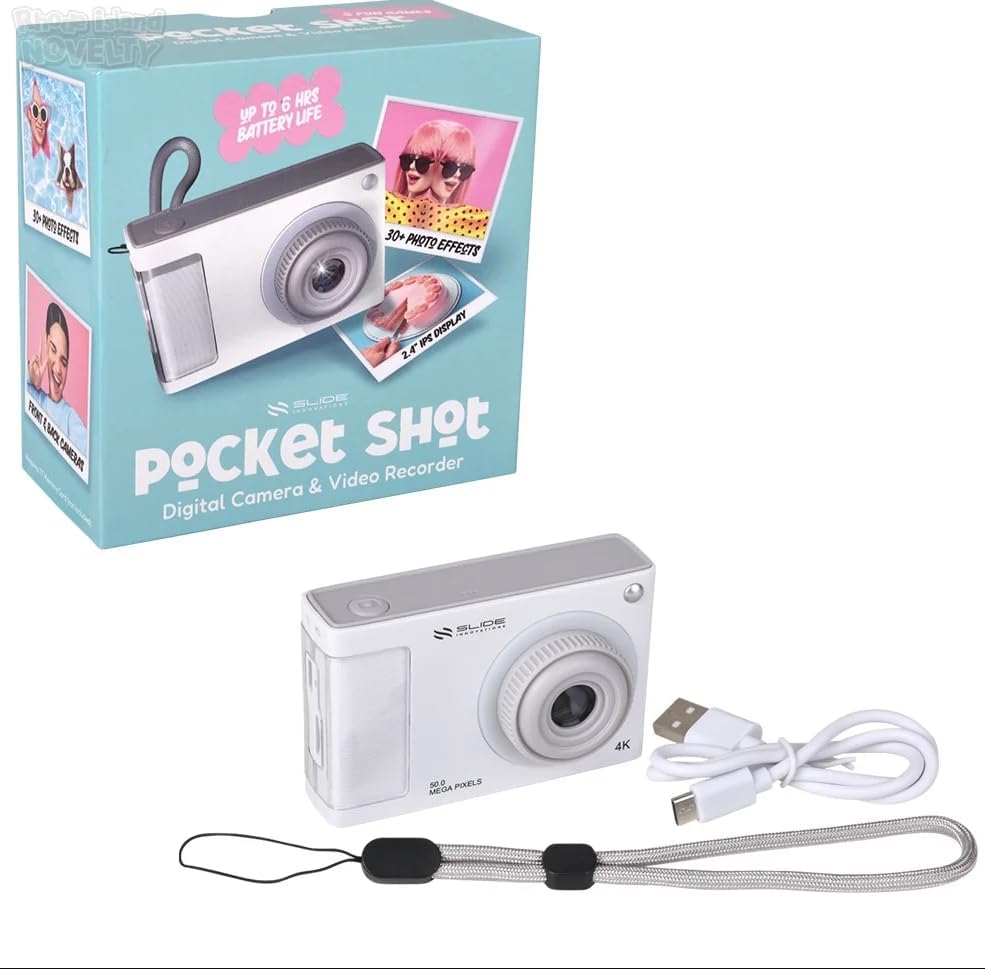
Image: Contents of the SLIDE INNOVATIONS Pocket Shot package, including the camera, USB cable, and wristlet.
Product Features
- 1080P HD Capture: Record high-definition photos and videos.
- Dual Cameras: Seamlessly switch between forward-facing and selfie cameras.
- 2.4" IPS Display: Vibrant viewfinder for framing shots.
- 8X Optical Zoom: Magnify distant subjects.
- LED Fill Light: Improve content quality in low-light conditions.
- Fun Effects & Frames: Customize photos with various effects and frames.
- 5 Built-in Mini Games: For entertainment.
- Audio Mode: Play music from an SD card through the built-in speaker.
- 6-Hour Battery Life: Extended usage time.
Setup
1. Charging the Battery
The camera is equipped with a built-in Lithium-Ion Polymer battery. Before first use, fully charge the camera.
- Connect the small end of the included USB cable to the camera's charging port.
- Connect the larger end of the USB cable to a standard USB power adapter (not included) or a computer's USB port.
- The charging indicator light will illuminate. Once fully charged, the light may change color or turn off.
- A full charge provides up to 6 hours of battery life.
2. Inserting a Memory Card (Not Included)
The camera requires a microSD card (up to 32GB recommended) to store photos and videos.
- Locate the memory card slot on the side of the camera.
- Gently insert the microSD card with the gold contacts facing down until it clicks into place.
- To remove, press the card gently inward until it springs out.
3. Attaching the Wristlet
Attach the included wristlet to prevent accidental drops.
- Thread the thin loop of the wristlet through the designated attachment point on the camera body.
- Pass the larger end of the wristlet through the loop and pull tight to secure.

Image: Front view of the camera, demonstrating the wristlet attachment point.
Operating Instructions
1. Powering On/Off
- To Power On: Press and hold the Power button (usually marked with a power symbol) until the screen illuminates.
- To Power Off: Press and hold the Power button again until the screen turns off.
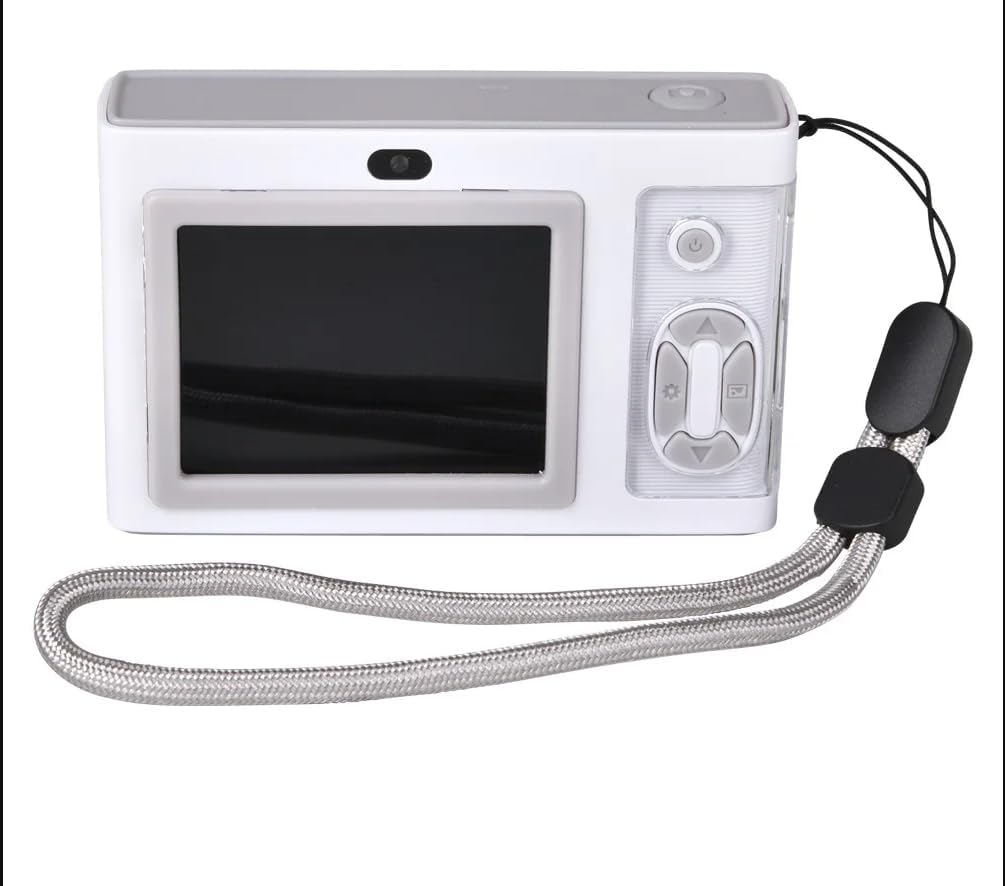
Image: Rear view of the camera, highlighting the 2.4-inch display and control buttons for operation.
2. Basic Camera Functions
- Taking Photos: In photo mode, press the Shutter button (typically on top or front) to capture an image.
- Recording Videos: Switch to video mode (if applicable, via menu or dedicated button), then press the Record button to start/stop recording.
- Switching Cameras: Use the dedicated dual-camera toggle button to switch between the front-facing and selfie cameras.
- Using Optical Zoom: Use the zoom buttons (often marked with '+' and '-') to adjust the 8x optical zoom.
- LED Fill Light: Activate the LED fill light in low-light conditions via the settings menu or a dedicated button.
- Self-Timer: Access the self-timer option in the settings to set a 10-second delay before a photo is taken.
3. Creative Features
- Fun Effects and Frames: Navigate through the camera's menu to find options for applying various photo effects and decorative frames to your images.
- Mini Games: Access the "Games" menu to play any of the 5 built-in mini games.
- Audio Mode: If an SD card with audio files is inserted, switch to Audio Mode to play music through the camera's built-in speaker.
4. Connecting to a Computer
To transfer photos and videos to your computer:
- Ensure the camera is powered on.
- Connect the camera to your computer using the provided USB cable.
- The camera should appear as a removable disk drive on your computer.
- Open the drive to access and transfer your files.
Maintenance
- Cleaning: Use a soft, dry cloth to clean the camera body. For the lens and screen, use a specialized lens cleaning cloth and solution. Avoid abrasive materials or harsh chemicals.
- Battery Care: To prolong battery life, avoid fully discharging the battery frequently. Store the camera with a partial charge if not used for extended periods.
- Storage: Store the camera in a cool, dry place away from direct sunlight, extreme temperatures, and high humidity.
- Memory Card: Periodically back up your data from the memory card to a computer or other storage device. Format the memory card in the camera periodically to maintain performance.
Troubleshooting
| Problem | Possible Cause / Solution |
|---|---|
| Camera does not power on. | Battery may be depleted. Charge the camera fully. Ensure the power button is pressed and held sufficiently. |
| Cannot take photos/videos. | Memory card may be full or not inserted correctly. Check card insertion or delete unnecessary files. Ensure sufficient battery charge. |
| Poor image/video quality. | Lens may be dirty. Clean the lens with a soft cloth. Ensure adequate lighting; use the LED fill light if necessary. Check camera settings for resolution. |
| Camera freezes or becomes unresponsive. | Try powering off and on again. If unresponsive, use a small pin to press the reset button (if available, check camera body for a small hole). |
| Computer does not recognize camera. | Ensure the USB cable is securely connected to both the camera and the computer. Try a different USB port or cable. Ensure the camera is powered on. |
Specifications
| Feature | Detail |
|---|---|
| Model Name | Slide Pocket Shot |
| Model Number | DC132W |
| Brand | SLIDE INNOVATIONS |
| Effective Still Resolution | 2.1 MP |
| Video Resolution | 1080p, 720p |
| Optical Zoom | 8x |
| Screen Size | 2.4 Inches (IPS Display) |
| Special Feature | Dual Camera, LED Fill Light, Mini Games |
| Photo Sensor Technology | CMOS |
| Supported File Format | JPEG (Photos), AVI (Video) |
| Memory Storage Capacity | Up to 32 GB (microSD card, not included) |
| Connectivity Technology | USB |
| Battery Type | Lithium-Ion Polymer |
| Battery Capacity | 600 Milliamp Hours |
| Self Timer | 10 Seconds |
| Item Weight | 3.36 ounces |
| Item Dimensions (D x W x H) | 1.39"D x 2.34"W x 3.61"H |
| Color | White, Silver |
| UPC | 643620041628 |
Warranty and Support
Manufacturer's Warranty: This product comes with a 30-day manufacturer's warranty from the date of purchase, covering defects in materials and workmanship under normal use.
Exclusions: The warranty does not cover damage caused by misuse, accident, unauthorized modification, or normal wear and tear.
Customer Support: For technical assistance, warranty claims, or further inquiries, please refer to the contact information provided with your purchase documentation or visit the official SLIDE INNOVATIONS website.