
Introduction
Thank you for choosing the DailyBody DAC-ZB2-B 3-in-1 Sound Machine and Alarm Clock. This device combines a digital alarm clock, a sound machine with a variety of soothing sounds, and a multi-color night light, designed to enhance sleep and create a relaxing environment for users of all ages. This manual provides detailed instructions to help you set up, operate, and maintain your device effectively.
Product Features
- 3-in-1 Functionality: Integrates an alarm clock, sound machine, and night light, which can be used independently.
- Extensive Sound Library: Features 30 high-fidelity, non-looping soothing sounds, including 7 brown noise, white noise, pink noise, 15 natural sounds (wind, cricket, fan, rain, brook), and 8 ambient sounds (subote lullabies, stars in the night).
- Dual Alarms with Wake-Up Sounds: Set two independent alarms with a choice of 15 wake-up sounds, including natural sounds and classic alarm tones.
- Adjustable Volume: Offers 32 volume levels for the sound machine and 10 volume levels for the alarm clock, with a gradual volume increase for alarms.
- Customizable Night Light: Provides 12 different light colors and 10 brightness levels to create various atmospheres.
- Large LED Display: Features a clear LED time display with 4 adjustable brightness levels, including an off option.
- Memory Function: Retains all settings after power off.
- Backup Battery: Includes a backup battery for clock function only, ensuring time is kept during power outages. Sound and light functions require USB power.
- Compact Design: Small and portable, measuring 3.5 x 2.7 x 2.3 inches.
Package Contents
- DailyBody DAC-ZB2-B 3-in-1 Sound Machine and Alarm Clock
- USB Power Cable
- Power Adapter
- User Manual (this document)
Product Overview
Familiarize yourself with the device's components and controls.
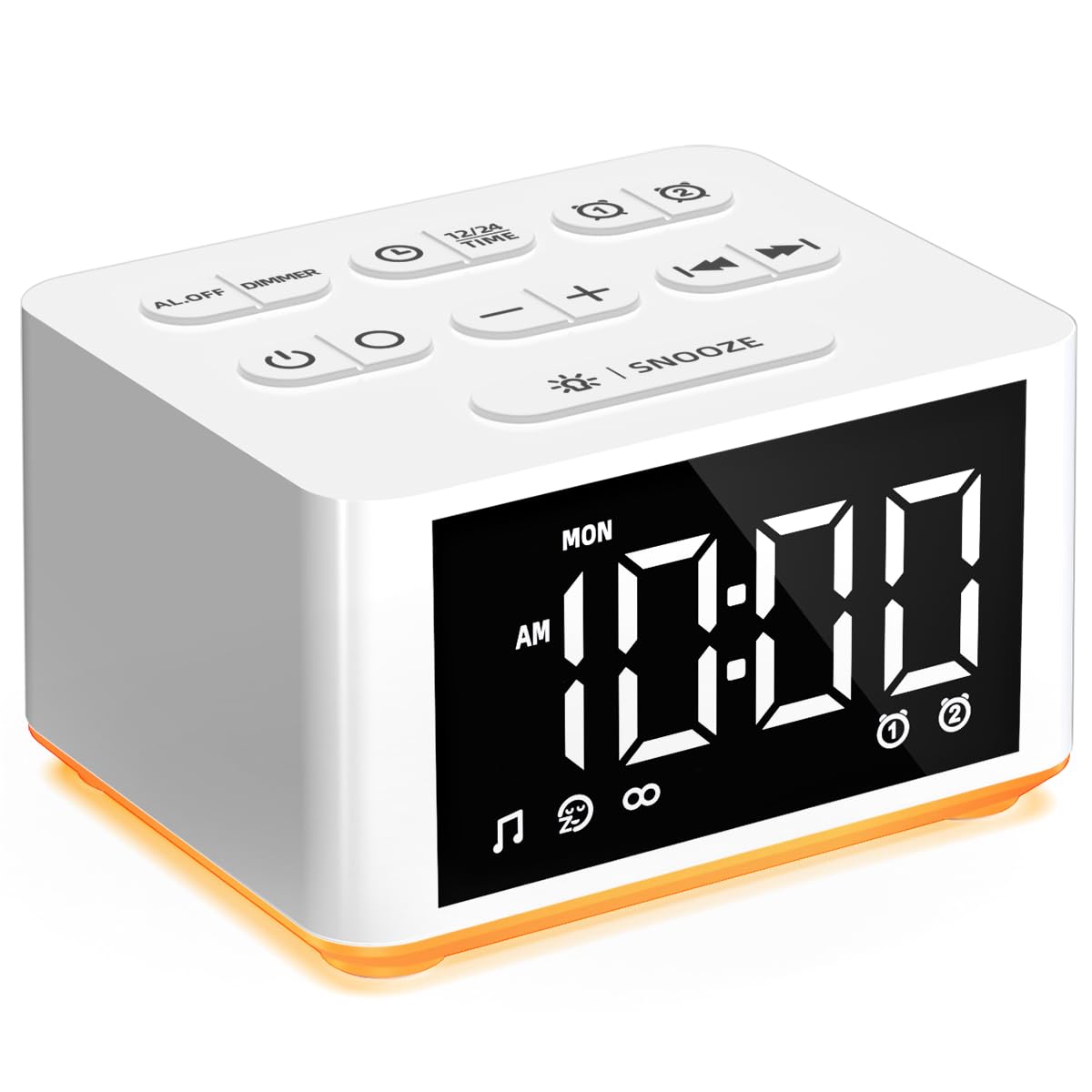
Figure 1: Front view of the DailyBody DAC-ZB2-B device.

Figure 2: The device showcasing its three primary functions: Night Lights, Alarm Clock, and Sound Machine.
Top Panel Controls
- Power Button (⏻): Turns the device on/off.
- RGB Button: Cycles through night light colors.
- Dimmer Button: Adjusts the brightness of the LED time display.
- Time Setting Button (⏱): Enters time setting mode.
- 12/24 Time Button: Toggles between 12-hour and 24-hour time formats.
- Alarm 1 Button (⏰1): Sets Alarm 1.
- Alarm 2 Button (⏰2): Sets Alarm 2.
- Minus (-) Button: Decreases values during setting or lowers volume.
- Plus (+) Button: Increases values during setting or raises volume.
- Previous Track Button (⏮): Skips to the previous sound.
- Next Track Button (⏭): Skips to the next sound.
- Snooze Button (💡 SNOOZE): Activates snooze during an alarm or controls night light on/off.
Setup
- Power Connection: Connect the provided USB power cable to the device and plug the adapter into a standard wall outlet. The device requires continuous USB power for sound and light functions.
- Initial Battery Charge: Before first use, ensure the internal backup battery is fully charged. This battery primarily maintains time settings during power interruptions; sound and light functions are disabled without USB power.
- Time Setting:
- Press the Time Setting (⏱) button. The hour display will flash.
- Use the Plus (+) or Minus (-) buttons to adjust the hour.
- Press the Time Setting (⏱) button again to confirm the hour and move to minutes. The minute display will flash.
- Use the Plus (+) or Minus (-) buttons to adjust the minutes.
- Press the Time Setting (⏱) button once more to confirm and exit time setting.
- 12/24 Hour Format: Press the 12/24 Time button to switch between 12-hour (AM/PM) and 24-hour (military) time formats.
Operating Instructions
Setting Alarms
The device supports two independent alarms (Alarm 1 and Alarm 2).
- Press the Alarm 1 (⏰1) or Alarm 2 (⏰2) button. The alarm hour will flash.
- Use the Plus (+) or Minus (-) buttons to set the desired alarm hour.
- Press the respective alarm button again. The alarm minutes will flash.
- Use the Plus (+) or Minus (-) buttons to set the desired alarm minutes.
- Press the alarm button again. The alarm sound selection will appear (e.g., "A-01"). Use the Previous Track (⏮) or Next Track (⏭) buttons to choose from 15 wake-up sounds.
- Press the alarm button again. The alarm volume level will appear. Use the Plus (+) or Minus (-) buttons to set the alarm volume (10 levels).
- Press the alarm button one last time to confirm and activate the alarm. An alarm icon will appear on the display.
- To turn off an active alarm, press the corresponding Alarm 1 (⏰1) or Alarm 2 (⏰2) button. The alarm icon will disappear.
Using the Sound Machine

Figure 3: The device offers a wide selection of soothing sounds.
- Press the Power (⏻) button to turn on the sound machine.
- Use the Previous Track (⏮) or Next Track (⏭) buttons to cycle through the 30 available soothing sounds.
- Adjust the volume using the Plus (+) or Minus (-) buttons (32 volume levels).
- To set a sleep timer for the sound machine, press the Time Setting (⏱) button while a sound is playing. Repeated presses will cycle through timer options (e.g., 30 min, 60 min, 90 min, continuous).
Controlling the Night Light

Figure 4: The device's night light feature with various color and brightness options.
- Press the RGB button to turn on the night light.
- Press the RGB button repeatedly to cycle through the 12 available colors.
- To adjust brightness, press the Snooze (💡 SNOOZE) button while the night light is on. Repeated presses will cycle through 10 brightness levels.
- To turn off the night light, press and hold the RGB button.
Display Brightness and Snooze
- Display Brightness: Press the Dimmer button to cycle through 4 levels of LED display brightness (High, Medium, Low, Off).
- Snooze Function: When an alarm sounds, press the Snooze (💡 SNOOZE) button to temporarily silence the alarm for 9 minutes. The alarm will sound again after the snooze period.
Maintenance
- Cleaning: Wipe the device with a soft, dry cloth. Do not use liquid cleaners or abrasive materials.
- Storage: Store the device in a cool, dry place when not in use for extended periods.
- Power: Always ensure the device is connected to a stable power source for optimal performance of sound and light features.
Troubleshooting
| Problem | Solution |
|---|---|
| Device does not power on or display is blank. | Ensure the USB power cable is securely connected to both the device and the power adapter, and the adapter is plugged into a working electrical outlet. The backup battery only supports timekeeping, not full operation. |
| Sound or light functions are not working. | Verify the device is connected to a USB power supply. Sound and light features are disabled when running solely on the backup battery. |
| Cannot change settings (time, alarm, etc.). | Settings can only be adjusted when the device is plugged into a power source via the USB cable. |
| Alarm is too loud or too quiet. | During alarm setting, adjust the volume using the Plus (+) or Minus (-) buttons. There are 10 alarm volume levels. |
| Night light is too bright or too dim. | While the night light is on, press the Snooze (💡 SNOOZE) button repeatedly to cycle through 10 brightness levels. |
| Display is too bright at night. | Press the Dimmer button to reduce the display brightness or turn it off completely. |
Specifications
| Feature | Detail |
|---|---|
| Model Name | DAC-ZB2-B |
| Brand | DailyBody |
| Product Dimensions | 2.7 x 2.3 x 3.5 inches |
| Item Weight | 0.4 Pounds (6.4 ounces) |
| Color | White |
| Material Type | Plastic |
| Batteries | 1 Lithium Ion battery (included, for backup clock function only) |
| Power Source | USB (for full functionality) |
Warranty and Support
For warranty information and customer support, please refer to the documentation provided with your purchase or contact the seller directly. Keep your purchase receipt for any warranty claims.