
1. Safety Information
Always follow the assembly instructions carefully. Use appropriate tools and ensure the work area is clear and well-lit. Keep children and pets away from the assembly area. If you are unsure about any part of the assembly process, consult a professional.
- Ensure all parts are present before beginning assembly.
- Do not overtighten screws, as this may damage the material.
- Place the desk on a level surface to prevent wobbling.
- Maximum load capacity for the desk is 200 lbs. Do not exceed this weight.
2. Product Overview
The ONBRILL 72" H Farmhouse Executive Desk with Hutch is designed to provide a functional and stylish workspace. It features a spacious 60" worksurface, integrated storage, and a built-in charging station.
Key Features:
- Farmhouse Aesthetic: Off-white finish with a walnut top.
- Integrated Charging Station: Includes 4 AC outlets, 1 USB Type-A port, and 1 USB Type-C port.
- Ample Storage: Features 5 smooth-gliding drawers, a spacious storage cabinet with adjustable shelves, and additional hutch shelving.
- Spacious Worksurface: 60" wide desktop accommodates multiple monitors and work materials.
- Keyboard Tray: A dedicated pull-out drawer for keyboard and mouse.

Image: Overview of the ONBRILL Executive Desk with Hutch, pointing out its main components such as the hutch, charging station, decorative desktop, small drawers, and middle storage drawer.
Video: A detailed look at the ONBRILL Executive Desk with Hutch and its integrated charging station, showcasing its design and functionality.
3. Setup and Assembly
The ONBRILL Executive Desk with Hutch is delivered in two separate packages. It is recommended to have two people for assembly. Ensure you have all parts and tools as listed in the included product manual before starting.
Before You Begin:
- Unpack all components and verify against the parts list.
- Clear a spacious, well-lit area for assembly.
- Keep small parts away from children.
Assembly Steps:
- Begin by assembling the main desk frame according to the detailed instructions provided in your physical manual.
- Install the drawer slides and assemble the five drawers.
- Attach the side cabinet and its adjustable shelves.
- Assemble the hutch section, including its doors and adjustable shelves.
- Carefully place and secure the hutch onto the main desk unit.
- Connect the charging station wiring as instructed.
- Insert the keyboard tray into its designated slot.
Video: A comprehensive assembly video for the ONBRILL 72" H Executive Desk with Hutch, demonstrating each step of the construction process.
4. Operating Instructions
Using the Charging Station:
The desk includes an integrated charging station. To use it, plug the desk's power cord into a standard wall outlet. The 4 AC outlets, 1 USB Type-A port, and 1 USB Type-C port will then be active for charging your devices.

Image: The integrated charging station on the desk, showing the placement of AC outlets and USB ports for convenient device charging.
Utilizing Storage Features:
- Drawers: The desk features five smooth-gliding drawers. The bottom drawer is designed to hold both letter and A4-sized documents.
- Adjustable Shelves: The shelves within the hutch and the storage cabinet are adjustable. To adjust, remove the shelf, reposition the shelf pins to the desired height, and reinsert the shelf.
- Keyboard Tray: Pull out the central drawer to access the keyboard tray. Push it back in when not in use to save space.

Image: The pull-out keyboard tray, providing a dedicated space for a keyboard and mouse.

Image: The hutch section of the desk, illustrating the adjustable shelves for customized storage and display.
5. Maintenance
Proper care will ensure the longevity and appearance of your ONBRILL Executive Desk.
- Cleaning: Wipe surfaces with a soft, damp cloth. Avoid harsh chemicals or abrasive cleaners, which can damage the finish.
- Spills: Clean spills immediately to prevent staining.
- Heat and Moisture: Avoid placing hot items directly on the surface. Use coasters for drinks. Keep the desk away from direct sunlight and excessive moisture.
- Hardware: Periodically check and tighten all screws and fasteners to ensure stability.

Image: Details of the desk's construction, including handles, stable base, smooth slide rails for drawers, and the easy-to-clean laminated finish.
6. Troubleshooting
If you encounter issues with your desk, refer to the following common solutions:
- Wobbling Desk: Ensure the desk is on a level surface. Check all assembly hardware and tighten any loose screws.
- Drawers Not Sliding Smoothly: Verify that the drawer slides are correctly installed and free of obstructions. Ensure the drawers are not overloaded.
- Charging Station Not Working: Confirm the desk's power cord is securely plugged into a functional wall outlet. Check for any tripped circuit breakers.
- Missing or Damaged Parts: If you received damaged or missing parts, contact ONBRILL customer support with your model number and a description of the issue.
7. Specifications
| Feature | Detail |
|---|---|
| Brand | ONBRILL |
| Model Number | HOD-112-W-B |
| Product Dimensions (D x W x H) | 21"D x 60"W x 72"H |
| Color | Off White & Walnut |
| Style | Farmhouse |
| Material Type | Engineered Wood |
| Finish Type | Laminated |
| Number of Drawers | 5 |
| Number of Cabinets | 1 |
| Number of Shelves | 3 (adjustable) |
| Item Weight | 200 Pounds |
| Maximum Weight Recommendation | 200 Pounds |
| Special Features | Adjustable Shelves, Built-In USB Outlet, Keyboard Tray Drawer |
| Charging Station | 4 AC outlets, 1 USB Type-A, 1 USB Type-C |
| Assembly Required | Yes |
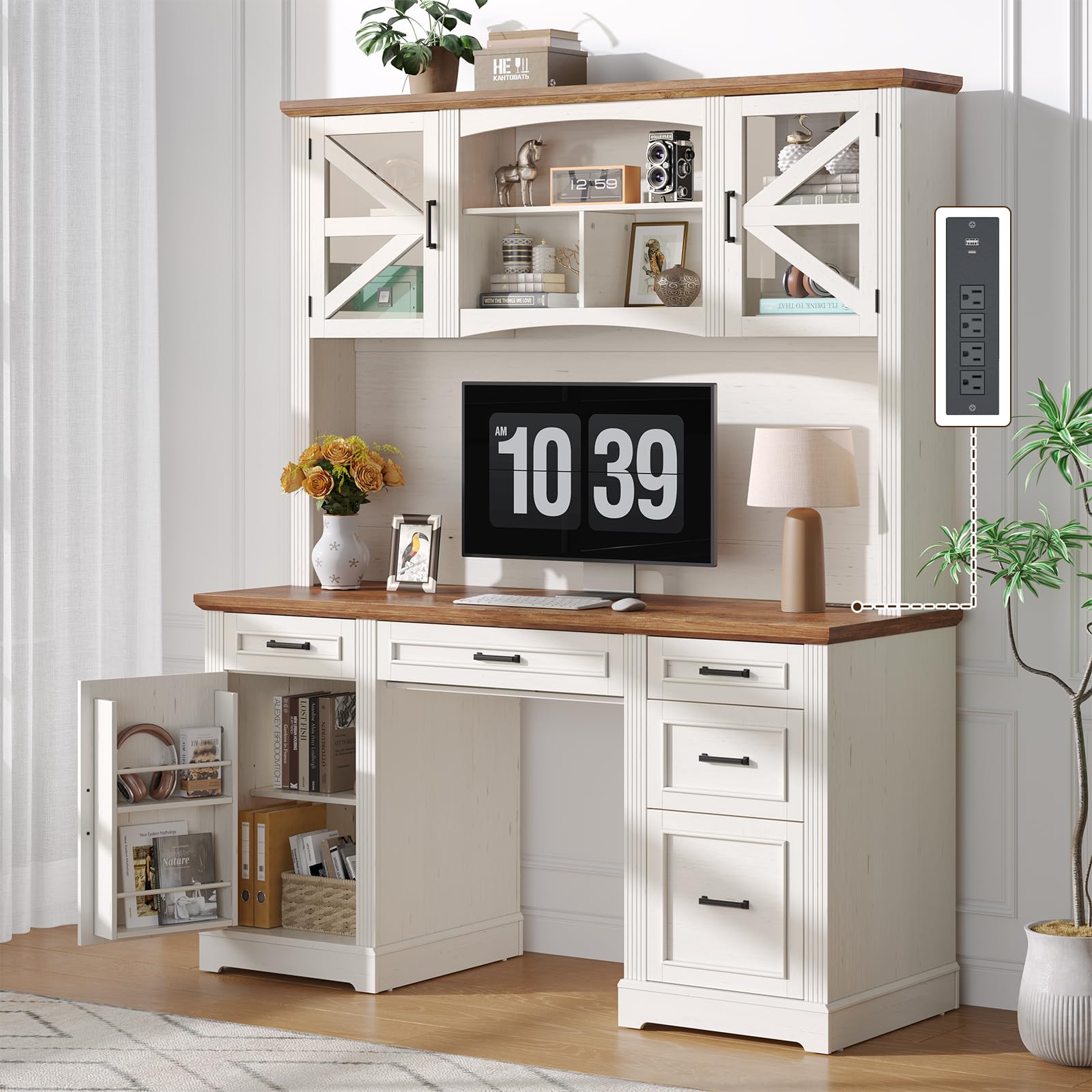
Image: Detailed product dimensions including height, width, depth, and maximum load capacity of 200 lbs. Also indicates two-box delivery.
8. Warranty and Support
ONBRILL provides a limited warranty for this product. For specific warranty details, please refer to the documentation included with your purchase or visit the official ONBRILL website.
For customer support, assistance with assembly, or to report missing/damaged parts, please contact ONBRILL customer service through the contact information provided in your product packaging or on the ONBRILL brand store page.
You can visit the ONBRILL Store for more information: ONBRILL Store


